
Employee onboarding BPMN example
Employee onboarding runs from the moment an offer is accepted to the new starter being fully productive. Teams map it because it is a coordination problem more than a sequence: HR, IT, and the line manager all have work to do before day one, and a single missed handoff means a new hire sitting at a desk with no laptop and no plan. The usual failure is treating it as one long checklist owned by nobody.
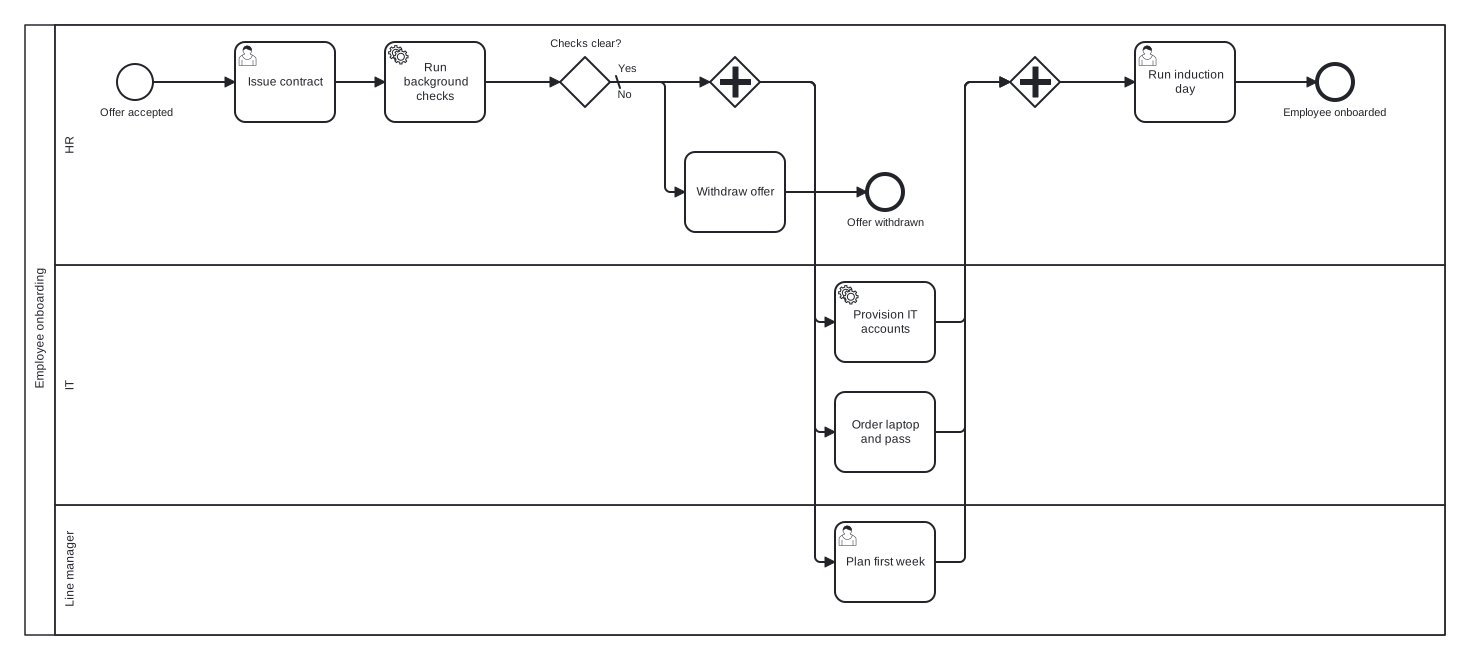
This model uses a single pool with three lanes: HR, IT, and Line manager. A background check gateway guards the front of the process, so a failed check exits cleanly through its own end event. The choice worth noticing is the parallel gateway pair: account provisioning, equipment ordering, and first week planning genuinely happen at the same time, so modelling them as a sequence would misstate how the process actually runs.
Standard BPMN 2.0 interchange XML: opens in Camunda Modeler, Signavio, Bizagi, and any other compliant tool.
The process at a glance
How to read this diagram
Everything begins at the "Offer accepted" start event in the HR lane. HR issues the contract and runs background checks, which feed the exclusive gateway "Checks clear?". The No branch, marked as the default flow, leads to withdrawing the offer and the "Offer withdrawn" end event. The Yes branch hits a parallel gateway that splits the token three ways: IT provisions accounts and orders the laptop and building pass, while the Line manager plans the first week.
A second parallel gateway joins the three branches, and the process only moves on once all of them have completed. That join is the whole point of the model: induction day cannot start until IT and the manager are both ready. HR then runs the induction and the process closes at the "Employee onboarded" end event, giving the flow one rejection outcome and one success outcome.
BPMN elements used
| Element | Count | In this diagram |
|---|---|---|
| Start event | 1 | Offer accepted |
| End event | 2 | Offer withdrawn, Employee onboarded |
| Task | 2 | Withdraw offer, Order laptop and pass |
| User task | 3 | Issue contract, Plan first week, Run induction day |
| Service task | 2 | Run background checks, Provision IT accounts |
| Exclusive gateway | 1 | Checks clear? |
| Parallel gateway | 2 |
View the BPMN 2.0 XML for this diagram
<?xml version="1.0" encoding="UTF-8"?>
<bpmn2:definitions xmlns:bpmn2="http://www.omg.org/spec/BPMN/20100524/MODEL" xmlns:bpmndi="http://www.omg.org/spec/BPMN/20100524/DI" xmlns:dc="http://www.omg.org/spec/DD/20100524/DC" xmlns:di="http://www.omg.org/spec/DD/20100524/DI" xmlns:xsi="http://www.w3.org/2001/XMLSchema-instance" id="Definitions_1" targetNamespace="http://bpmn.io/schema/bpmn" exporter="swimdraft" exporterVersion="1.0">
  <bpmn2:collaboration id="Collaboration_1">
    <bpmn2:participant id="pool_onb" name="Employee onboarding" processRef="Process_pool_onb" />
  </bpmn2:collaboration>
  <bpmn2:process id="Process_pool_onb" isExecutable="false">
    <bpmn2:laneSet id="LaneSet_pool_onb">
      <bpmn2:lane id="lane_onb_hr" name="HR">
        <bpmn2:flowNodeRef>start_onb</bpmn2:flowNodeRef>
        <bpmn2:flowNodeRef>t_onb_contract</bpmn2:flowNodeRef>
        <bpmn2:flowNodeRef>t_onb_checks</bpmn2:flowNodeRef>
        <bpmn2:flowNodeRef>g_onb_checks</bpmn2:flowNodeRef>
        <bpmn2:flowNodeRef>t_onb_withdraw</bpmn2:flowNodeRef>
        <bpmn2:flowNodeRef>end_onb_withdrawn</bpmn2:flowNodeRef>
        <bpmn2:flowNodeRef>g_onb_split</bpmn2:flowNodeRef>
        <bpmn2:flowNodeRef>g_onb_join</bpmn2:flowNodeRef>
        <bpmn2:flowNodeRef>t_onb_induct</bpmn2:flowNodeRef>
        <bpmn2:flowNodeRef>end_onb_done</bpmn2:flowNodeRef>
      </bpmn2:lane>
      <bpmn2:lane id="lane_onb_it" name="IT">
        <bpmn2:flowNodeRef>t_onb_accounts</bpmn2:flowNodeRef>
        <bpmn2:flowNodeRef>t_onb_kit</bpmn2:flowNodeRef>
      </bpmn2:lane>
      <bpmn2:lane id="lane_onb_mgr" name="Line manager">
        <bpmn2:flowNodeRef>t_onb_plan</bpmn2:flowNodeRef>
      </bpmn2:lane>
    </bpmn2:laneSet>
    <bpmn2:startEvent id="start_onb" name="Offer accepted">
      <bpmn2:outgoing>fonb1</bpmn2:outgoing>
    </bpmn2:startEvent>
    <bpmn2:userTask id="t_onb_contract" name="Issue contract">
      <bpmn2:incoming>fonb1</bpmn2:incoming>
      <bpmn2:outgoing>fonb2</bpmn2:outgoing>
    </bpmn2:userTask>
    <bpmn2:serviceTask id="t_onb_checks" name="Run background checks">
      <bpmn2:incoming>fonb2</bpmn2:incoming>
      <bpmn2:outgoing>fonb3</bpmn2:outgoing>
    </bpmn2:serviceTask>
    <bpmn2:exclusiveGateway id="g_onb_checks" name="Checks clear?" default="fonb5">
      <bpmn2:incoming>fonb3</bpmn2:incoming>
      <bpmn2:outgoing>fonb4</bpmn2:outgoing>
      <bpmn2:outgoing>fonb5</bpmn2:outgoing>
    </bpmn2:exclusiveGateway>
    <bpmn2:task id="t_onb_withdraw" name="Withdraw offer">
      <bpmn2:incoming>fonb5</bpmn2:incoming>
      <bpmn2:outgoing>fonb6</bpmn2:outgoing>
    </bpmn2:task>
    <bpmn2:endEvent id="end_onb_withdrawn" name="Offer withdrawn">
      <bpmn2:incoming>fonb6</bpmn2:incoming>
    </bpmn2:endEvent>
    <bpmn2:parallelGateway id="g_onb_split">
      <bpmn2:incoming>fonb4</bpmn2:incoming>
      <bpmn2:outgoing>fonb7</bpmn2:outgoing>
      <bpmn2:outgoing>fonb8</bpmn2:outgoing>
      <bpmn2:outgoing>fonb9</bpmn2:outgoing>
    </bpmn2:parallelGateway>
    <bpmn2:serviceTask id="t_onb_accounts" name="Provision IT accounts">
      <bpmn2:incoming>fonb7</bpmn2:incoming>
      <bpmn2:outgoing>fonb10</bpmn2:outgoing>
    </bpmn2:serviceTask>
    <bpmn2:task id="t_onb_kit" name="Order laptop and pass">
      <bpmn2:incoming>fonb8</bpmn2:incoming>
      <bpmn2:outgoing>fonb11</bpmn2:outgoing>
    </bpmn2:task>
    <bpmn2:userTask id="t_onb_plan" name="Plan first week">
      <bpmn2:incoming>fonb9</bpmn2:incoming>
      <bpmn2:outgoing>fonb12</bpmn2:outgoing>
    </bpmn2:userTask>
    <bpmn2:parallelGateway id="g_onb_join">
      <bpmn2:incoming>fonb10</bpmn2:incoming>
      <bpmn2:incoming>fonb11</bpmn2:incoming>
      <bpmn2:incoming>fonb12</bpmn2:incoming>
      <bpmn2:outgoing>fonb13</bpmn2:outgoing>
    </bpmn2:parallelGateway>
    <bpmn2:userTask id="t_onb_induct" name="Run induction day">
      <bpmn2:incoming>fonb13</bpmn2:incoming>
      <bpmn2:outgoing>fonb14</bpmn2:outgoing>
    </bpmn2:userTask>
    <bpmn2:endEvent id="end_onb_done" name="Employee onboarded">
      <bpmn2:incoming>fonb14</bpmn2:incoming>
    </bpmn2:endEvent>
    <bpmn2:sequenceFlow id="fonb1" sourceRef="start_onb" targetRef="t_onb_contract" />
    <bpmn2:sequenceFlow id="fonb2" sourceRef="t_onb_contract" targetRef="t_onb_checks" />
    <bpmn2:sequenceFlow id="fonb3" sourceRef="t_onb_checks" targetRef="g_onb_checks" />
    <bpmn2:sequenceFlow id="fonb4" name="Yes" sourceRef="g_onb_checks" targetRef="g_onb_split">
      <bpmn2:conditionExpression xsi:type="bpmn2:tFormalExpression">Yes</bpmn2:conditionExpression>
    </bpmn2:sequenceFlow>
    <bpmn2:sequenceFlow id="fonb5" name="No" sourceRef="g_onb_checks" targetRef="t_onb_withdraw" />
    <bpmn2:sequenceFlow id="fonb6" sourceRef="t_onb_withdraw" targetRef="end_onb_withdrawn" />
    <bpmn2:sequenceFlow id="fonb7" sourceRef="g_onb_split" targetRef="t_onb_accounts" />
    <bpmn2:sequenceFlow id="fonb8" sourceRef="g_onb_split" targetRef="t_onb_kit" />
    <bpmn2:sequenceFlow id="fonb9" sourceRef="g_onb_split" targetRef="t_onb_plan" />
    <bpmn2:sequenceFlow id="fonb10" sourceRef="t_onb_accounts" targetRef="g_onb_join" />
    <bpmn2:sequenceFlow id="fonb11" sourceRef="t_onb_kit" targetRef="g_onb_join" />
    <bpmn2:sequenceFlow id="fonb12" sourceRef="t_onb_plan" targetRef="g_onb_join" />
    <bpmn2:sequenceFlow id="fonb13" sourceRef="g_onb_join" targetRef="t_onb_induct" />
    <bpmn2:sequenceFlow id="fonb14" sourceRef="t_onb_induct" targetRef="end_onb_done" />
  </bpmn2:process>
  <bpmndi:BPMNDiagram id="BPMNDiagram_1">
    <bpmndi:BPMNPlane id="BPMNPlane_1" bpmnElement="Collaboration_1">
      <bpmndi:BPMNShape id="pool_onb_di" bpmnElement="pool_onb" isHorizontal="true">
        <dc:Bounds x="20" y="20" width="1420" height="610" />
      </bpmndi:BPMNShape>
      <bpmndi:BPMNShape id="lane_onb_hr_di" bpmnElement="lane_onb_hr" isHorizontal="true">
        <dc:Bounds x="50" y="20" width="1390" height="240" />
      </bpmndi:BPMNShape>
      <bpmndi:BPMNShape id="lane_onb_it_di" bpmnElement="lane_onb_it" isHorizontal="true">
        <dc:Bounds x="50" y="260" width="1390" height="240" />
      </bpmndi:BPMNShape>
      <bpmndi:BPMNShape id="lane_onb_mgr_di" bpmnElement="lane_onb_mgr" isHorizontal="true">
        <dc:Bounds x="50" y="500" width="1390" height="130" />
      </bpmndi:BPMNShape>
      <bpmndi:BPMNShape id="start_onb_di" bpmnElement="start_onb">
        <dc:Bounds x="112" y="59" width="36" height="36" />
        <bpmndi:BPMNLabel><dc:Bounds x="93" y="101" width="75" height="14" /></bpmndi:BPMNLabel>
      </bpmndi:BPMNShape>
      <bpmndi:BPMNShape id="t_onb_contract_di" bpmnElement="t_onb_contract">
        <dc:Bounds x="230" y="37" width="100" height="80" />
      </bpmndi:BPMNShape>
      <bpmndi:BPMNShape id="t_onb_checks_di" bpmnElement="t_onb_checks">
        <dc:Bounds x="380" y="37" width="100" height="80" />
      </bpmndi:BPMNShape>
      <bpmndi:BPMNShape id="g_onb_checks_di" bpmnElement="g_onb_checks">
        <dc:Bounds x="555" y="52" width="50" height="50" />
        <bpmndi:BPMNLabel><dc:Bounds x="544" y="32" width="72" height="14" /></bpmndi:BPMNLabel>
      </bpmndi:BPMNShape>
      <bpmndi:BPMNShape id="t_onb_withdraw_di" bpmnElement="t_onb_withdraw">
        <dc:Bounds x="680" y="147" width="100" height="80" />
      </bpmndi:BPMNShape>
      <bpmndi:BPMNShape id="end_onb_withdrawn_di" bpmnElement="end_onb_withdrawn">
        <dc:Bounds x="862" y="169" width="36" height="36" />
        <bpmndi:BPMNLabel><dc:Bounds x="840" y="211" width="80" height="14" /></bpmndi:BPMNLabel>
      </bpmndi:BPMNShape>
      <bpmndi:BPMNShape id="g_onb_split_di" bpmnElement="g_onb_split">
        <dc:Bounds x="705" y="52" width="50" height="50" />
      </bpmndi:BPMNShape>
      <bpmndi:BPMNShape id="t_onb_accounts_di" bpmnElement="t_onb_accounts">
        <dc:Bounds x="830" y="277" width="100" height="80" />
      </bpmndi:BPMNShape>
      <bpmndi:BPMNShape id="t_onb_kit_di" bpmnElement="t_onb_kit">
        <dc:Bounds x="830" y="387" width="100" height="80" />
      </bpmndi:BPMNShape>
      <bpmndi:BPMNShape id="t_onb_plan_di" bpmnElement="t_onb_plan">
        <dc:Bounds x="830" y="517" width="100" height="80" />
      </bpmndi:BPMNShape>
      <bpmndi:BPMNShape id="g_onb_join_di" bpmnElement="g_onb_join">
        <dc:Bounds x="1005" y="52" width="50" height="50" />
      </bpmndi:BPMNShape>
      <bpmndi:BPMNShape id="t_onb_induct_di" bpmnElement="t_onb_induct">
        <dc:Bounds x="1130" y="37" width="100" height="80" />
      </bpmndi:BPMNShape>
      <bpmndi:BPMNShape id="end_onb_done_di" bpmnElement="end_onb_done">
        <dc:Bounds x="1312" y="59" width="36" height="36" />
        <bpmndi:BPMNLabel><dc:Bounds x="1277" y="101" width="107" height="14" /></bpmndi:BPMNLabel>
      </bpmndi:BPMNShape>
      <bpmndi:BPMNEdge id="fonb1_di" bpmnElement="fonb1">
        <di:waypoint x="148" y="77" />
        <di:waypoint x="230" y="77" />
      </bpmndi:BPMNEdge>
      <bpmndi:BPMNEdge id="fonb2_di" bpmnElement="fonb2">
        <di:waypoint x="330" y="77" />
        <di:waypoint x="380" y="77" />
      </bpmndi:BPMNEdge>
      <bpmndi:BPMNEdge id="fonb3_di" bpmnElement="fonb3">
        <di:waypoint x="480" y="77" />
        <di:waypoint x="555" y="77" />
      </bpmndi:BPMNEdge>
      <bpmndi:BPMNEdge id="fonb4_di" bpmnElement="fonb4">
        <di:waypoint x="605" y="77" />
        <di:waypoint x="705" y="77" />
        <bpmndi:BPMNLabel><dc:Bounds x="611" y="57" width="21" height="14" /></bpmndi:BPMNLabel>
      </bpmndi:BPMNEdge>
      <bpmndi:BPMNEdge id="fonb5_di" bpmnElement="fonb5">
        <di:waypoint x="605" y="77" />
        <di:waypoint x="660" y="77" />
        <di:waypoint x="660" y="187" />
        <di:waypoint x="680" y="187" />
        <bpmndi:BPMNLabel><dc:Bounds x="611" y="83" width="17" height="14" /></bpmndi:BPMNLabel>
      </bpmndi:BPMNEdge>
      <bpmndi:BPMNEdge id="fonb6_di" bpmnElement="fonb6">
        <di:waypoint x="780" y="187" />
        <di:waypoint x="862" y="187" />
      </bpmndi:BPMNEdge>
      <bpmndi:BPMNEdge id="fonb7_di" bpmnElement="fonb7">
        <di:waypoint x="755" y="77" />
        <di:waypoint x="810" y="77" />
        <di:waypoint x="810" y="317" />
        <di:waypoint x="830" y="317" />
      </bpmndi:BPMNEdge>
      <bpmndi:BPMNEdge id="fonb8_di" bpmnElement="fonb8">
        <di:waypoint x="755" y="77" />
        <di:waypoint x="810" y="77" />
        <di:waypoint x="810" y="427" />
        <di:waypoint x="830" y="427" />
      </bpmndi:BPMNEdge>
      <bpmndi:BPMNEdge id="fonb9_di" bpmnElement="fonb9">
        <di:waypoint x="755" y="77" />
        <di:waypoint x="810" y="77" />
        <di:waypoint x="810" y="557" />
        <di:waypoint x="830" y="557" />
      </bpmndi:BPMNEdge>
      <bpmndi:BPMNEdge id="fonb10_di" bpmnElement="fonb10">
        <di:waypoint x="930" y="317" />
        <di:waypoint x="960" y="317" />
        <di:waypoint x="960" y="77" />
        <di:waypoint x="1005" y="77" />
      </bpmndi:BPMNEdge>
      <bpmndi:BPMNEdge id="fonb11_di" bpmnElement="fonb11">
        <di:waypoint x="930" y="427" />
        <di:waypoint x="960" y="427" />
        <di:waypoint x="960" y="77" />
        <di:waypoint x="1005" y="77" />
      </bpmndi:BPMNEdge>
      <bpmndi:BPMNEdge id="fonb12_di" bpmnElement="fonb12">
        <di:waypoint x="930" y="557" />
        <di:waypoint x="960" y="557" />
        <di:waypoint x="960" y="77" />
        <di:waypoint x="1005" y="77" />
      </bpmndi:BPMNEdge>
      <bpmndi:BPMNEdge id="fonb13_di" bpmnElement="fonb13">
        <di:waypoint x="1055" y="77" />
        <di:waypoint x="1130" y="77" />
      </bpmndi:BPMNEdge>
      <bpmndi:BPMNEdge id="fonb14_di" bpmnElement="fonb14">
        <di:waypoint x="1230" y="77" />
        <di:waypoint x="1312" y="77" />
      </bpmndi:BPMNEdge>
    </bpmndi:BPMNPlane>
  </bpmndi:BPMNDiagram>
</bpmn2:definitions>
Frequently asked questions
Why use a parallel gateway instead of drawing three separate arrows?
Multiple unlabelled flows out of a task are ambiguous in BPMN, and many tools read them as an implicit split with unclear semantics. A parallel gateway states explicitly that all three branches run, and the matching join guarantees induction waits for every branch. The BPMN 2.0 spec expects splits and joins to be paired this way.
Should the new starter get their own lane or pool?
Only if they perform activities in the process. In this model the new starter is passive until induction, so adding a lane would leave it nearly empty. If you extend the model with tasks like signing the contract or completing right to work forms, a black box pool for the candidate connected by message flows is the cleaner choice.
Can I open the downloaded file in my own modelling tool?
Yes. The download is standard BPMN 2.0 interchange XML, validated against 19 normative rules from the OMG 2.0.2 specification, so it opens directly in Camunda Modeler, Signavio, or Bizagi. You can also edit it in the Swimdraft browser editor first and export .bpmn, SVG, or PNG when you are done.
Related BPMN examples
Employee offboarding
Employee offboarding as a BPMN 2.0 diagram: handover planning, a last day timer, parallel access revocation, and final pay. Download the .bpmn file free.
Recruitment
A recruitment process in BPMN 2.0: screening, interviews, offer, and a candidate pool with message flows. View the diagram and download the .bpmn file free.
Leave request
A leave request process as a BPMN 2.0 diagram: balance check, manager approval, and booking confirmation. View the swimlanes and download the .bpmn file free.
Performance review
A performance review process in BPMN 2.0: parallel self and manager assessments, a review meeting, and an objectives rework loop. Download the .bpmn file free.
Generate your own version of this diagram
Describe how the process works in your organisation: plain English, meeting notes, a transcript, or a spreadsheet. Swimdraft turns it into a spec-validated BPMN 2.0 diagram you can edit in the browser and export as .bpmn, SVG, or PNG.
Start freeNo credit card required