
Turn transcripts into BPMN diagrams
Upload the recording transcript from your process discovery call: Teams, Zoom, or Meet. Swimdraft filters out the small talk and turns what people actually said into a spec-validated BPMN 2.0 diagram.
No credit card required · Export SVG, PNG, and .bpmn
The most accurate description of a process is the one people give out loud when you ask them how work actually happens. But an hour-long discovery call produces thirty pages of transcript, and somewhere in there (between the greetings, the tangents, and the “can everyone see my screen?”) are the participants, triggers, steps, and decisions your process map needs.
Swimdraft reads .vtt and .srt subtitle files and .docx transcript exports directly. It ignores timestamps and chit-chat, keeps who-said-what so roles land in the right lanes, and produces a diagram validated against the OMG BPMN 2.0.2 specification, ready to take back to the team for the “is this right?” review.
A real example
00:03:12 Priya: So when a ticket comes in, the service
desk categorises it first.
00:03:20 Marcus: Right, and the big question is whether
it's a major incident. If it is, it goes straight to an
engineer who digs into the root cause and applies the fix.
00:03:35 Priya: And if it's not major we just resolve it
at first line. Either way the ticket ends up resolved.
00:03:41 Marcus: Exactly. Anyway, how was the weekend?
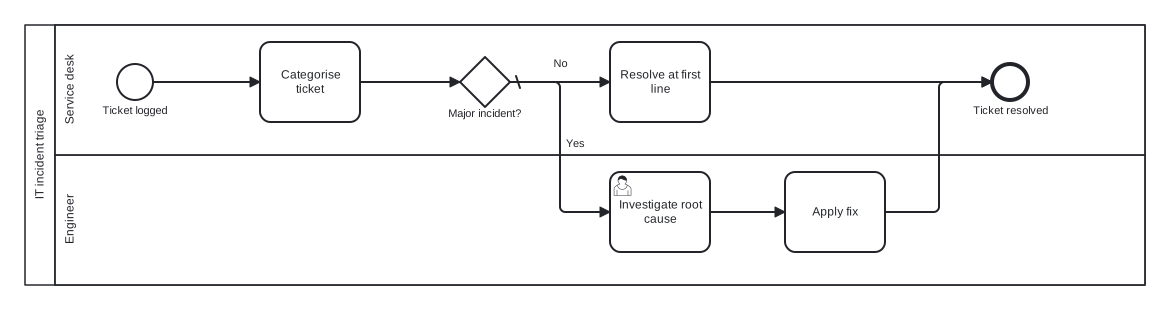
Generated from the transcript above. The weekend chat didn't make it in; the decision did.
How it works
- 1
Export the transcript
Download the .vtt or .docx transcript from Teams, Zoom, or Meet, whatever your meeting tool produces. Files are parsed in your browser; only text is sent.
- 2
Drop it into Swimdraft
The generator filters filler, identifies speakers and roles, and extracts the trigger, steps, decisions, and end states people described.
- 3
Review with the team
You get an editable diagram with every generation assumption listed. Fix anything in the built-in editor and export SVG, PNG, or .bpmn.
Frequently asked questions
Which transcript formats are supported?
Subtitle files (.vtt, .srt) from Teams, Zoom, and Meet, plus .docx transcript exports and plain .txt or .md. You can also paste transcript text directly.
How does it handle small talk and tangents?
The generator is instructed to extract process content (participants, triggers, activities, decisions, end states) and discard greetings, scheduling chatter, and off-topic discussion. Anything ambiguous is surfaced as an explicit assumption rather than silently guessed.
Does it know who does each step?
Yes, when the transcript keeps speaker names (as .vtt and Teams .docx exports do), statements like "we categorise it first" from the service-desk lead put that step in the service desk lane.
How long a transcript can I upload?
Up to roughly 600,000 characters of combined input, several hours of conversation. For best results, trim the transcript to the part of the call where the process was actually discussed.
Is the transcript stored or used for training?
Transcripts are parsed in your browser and the extracted text is used only to generate your diagram, not for AI training. Generated diagrams are saved to your account so you can keep editing them.
Upload your discovery-call transcript
Paste your notes, transcript, or spreadsheet and get a spec-validated BPMN 2.0 diagram in seconds. Your first 5 diagrams are free.
Start freeNo credit card required