
Turn text into BPMN diagrams
Describe the process in plain English: who does what, in what order, and where the decisions are. Swimdraft turns it into an editable, BPMN 2.0-compliant diagram with pools, lanes, and gateways in the right places.
No credit card required · Export SVG, PNG, and .bpmn
Most process knowledge starts as text: an email describing how orders get approved, a wiki page on the returns procedure, a paragraph you typed up after talking to the team. Turning that into proper BPMN by hand means an hour of dragging shapes, and the result usually breaks rules you did not know existed.
Swimdraft reads the description, identifies the participants, trigger, activities, decisions, and end states, and lays out a diagram that is checked against 19 normative rules from the OMG BPMN 2.0.2 specification before you ever see it. Decision gateways come out phrased as questions with labelled branches; every path reaches an end event; lanes match the roles in your text.
A real example
Process: New customer onboarding

After the contract is signed, the sales rep collects the
customer's details. Compliance runs KYC checks on the
paperwork. If anything is missing they go back to the
customer for documents and re-check. Once the checks
pass, IT provisions the accounts and the customer is live.
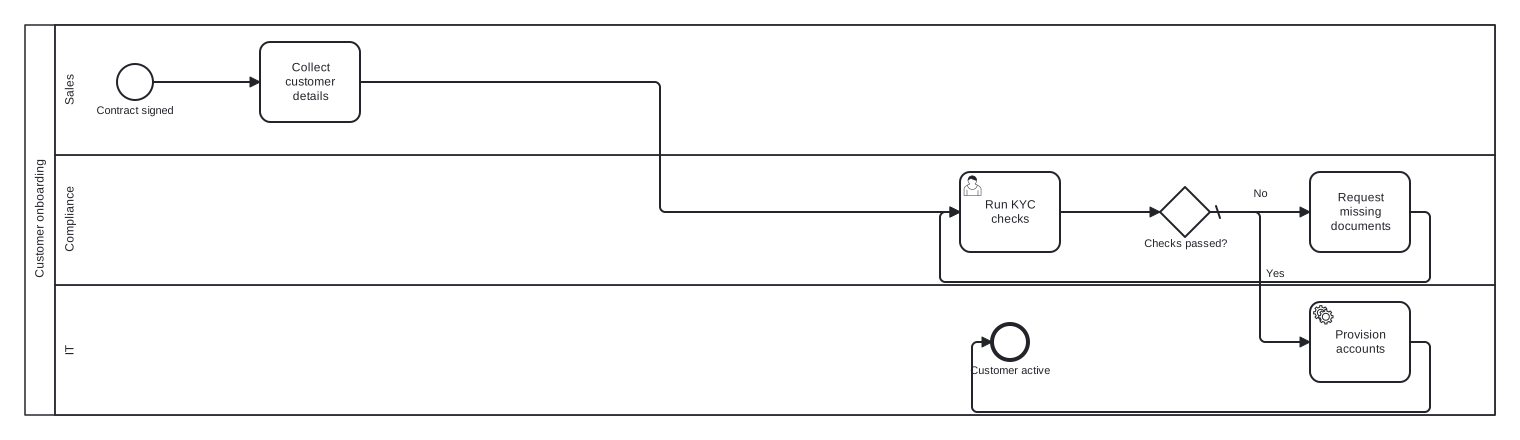
Generated from the text above: three lanes, an exclusive gateway with labelled branches, and a rework loop, all spec-valid.
How it works
- 1
Paste your description
Plain prose is fine. Mention who does each step and where the decisions are. No special syntax or keywords needed.
- 2
Review the diagram
Swimdraft generates the BPMN, validates it against the 2.0.2 spec, and auto-repairs violations. You see exactly which rules passed.
- 3
Edit and export
Move shapes, rename steps, reconnect flows in a real editor with live re-validation. Export SVG, PNG, or .bpmn for any other tool.
Frequently asked questions
How detailed does my text need to be?
A few sentences per stage works well. The generator does best when the text mentions who performs each step, what starts the process, and what the possible outcomes are. Gaps are filled with clearly flagged assumptions you can review and edit.
Does it produce real BPMN or just a picture of one?
Real BPMN 2.0 interchange XML, validated against 19 normative rules from the OMG 2.0.2 specification with clause citations. You can open the exported .bpmn file in Camunda Modeler, Signavio, Bizagi, or any other compliant tool.
Can I edit the result?
Yes. The studio includes a full editor built on the same engine as Camunda Modeler. Move elements, resize lanes, rename anything, and reconnect flows, with the diagram re-validated live after every change.
What if the diagram gets something wrong?
The generator lists every assumption it made, so mistakes are easy to spot. Fixing one is an edit in the browser, not a regeneration, and the live validator confirms your fix keeps the diagram spec-compliant.
Is my text used to train AI models?
No. Your text is processed to generate your diagram and is not used for model training. Files you attach are parsed in your browser; only the extracted text is sent for generation.
Paste your process description
Paste your notes, transcript, or spreadsheet and get a spec-validated BPMN 2.0 diagram in seconds. Your first 5 diagrams are free.
Start freeNo credit card required