
Turn CSV files into BPMN diagrams
Step lists exported from task trackers, ticketing tools, or onboarding checklists: if it is rows of steps and owners, Swimdraft turns it into an editable, spec-validated BPMN 2.0 diagram.
No credit card required · Export SVG, PNG, and .bpmn
CSV is the exchange format of operations data: checklist exports, workflow dumps from ticketing systems, dependency lists from project tools. The structure a diagram needs is already in the columns: step names, owners, dependencies. It has just never been drawn.
Swimdraft reads .csv and .tsv files in your browser and maps the columns to BPMN: owners become lanes, dependency columns become sequence flows, and steps that share the same predecessor become genuinely parallel branches with proper fork and join gateways, a structure that hand-drawn diagrams routinely get wrong and the BPMN 2.0.2 validator here enforces.
A real example
step,owner,depends_on
Offer accepted,HR,
Prepare contract,HR,Offer accepted
Set up accounts,IT,Prepare contract
Plan first week,Manager,Prepare contract
Run induction day,HR,"Set up accounts, Plan first week"
Employee onboarded,HR,Run induction day
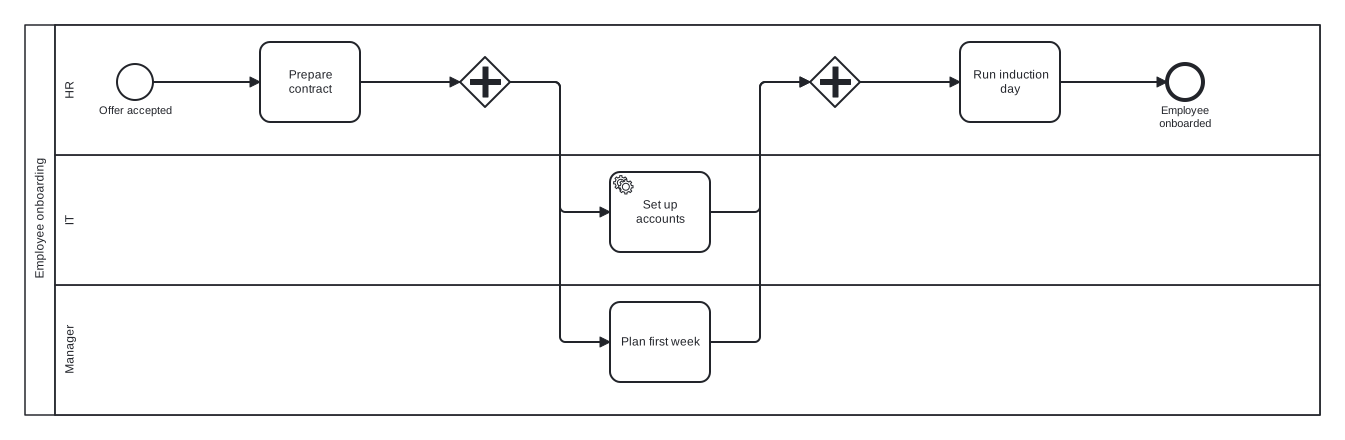
Generated from the CSV above: two steps share a dependency, so they fork through a parallel gateway and join before induction.
How it works
- 1
Export or write the CSV
Any delimited step list works: a column for the step, optionally columns for owner and dependencies. Headers help but are not required.
- 2
Drop it into Swimdraft
The file is parsed in your browser. Steps, owners, and dependencies are mapped to activities, lanes, and flows, with parallel work forked and joined correctly.
- 3
Edit and share
Fine-tune in the built-in editor with live spec validation, then export SVG, PNG, or .bpmn interchange XML.
Frequently asked questions
What columns does it expect?
At minimum, a column of step names in order. Owner/role and dependency columns unlock lanes and parallel structure. Extra columns are read as context, so notes and descriptions help rather than hurt.
How does it detect parallel steps?
When several steps depend on the same predecessor and nothing orders them against each other, they are modelled as parallel branches between fork and join gateways, with no conditions on the branches, exactly as BPMN 2.0.2 §8.4.13 requires.
Can I use exports from Jira, ServiceNow, or Asana?
Yes, if the export contains a recognisable sequence of steps or tasks. Trim the export to the workflow you care about for the cleanest result; the generator lists its assumptions so you can see how it interpreted the columns.
What is the difference between the CSV and Excel converters?
They share the same engine. Use whichever format you have: .csv/.tsv here, or .xlsx/.xls with multiple sheets and formatting on the Excel page. Both parse locally in your browser.
Is the generated diagram really BPMN-compliant?
Every diagram is checked against 19 normative rules of the OMG BPMN 2.0.2 specification (start/end pairing, gateway fan rules, token flow, branch conditions) and auto-repaired until it passes. You can see the rule-by-rule report in the studio.
Upload your CSV step list
Paste your notes, transcript, or spreadsheet and get a spec-validated BPMN 2.0 diagram in seconds. Your first 5 diagrams are free.
Start freeNo credit card required