
Patient admission BPMN example
Patient admission covers the journey from a patient arriving at hospital to occupying a ward bed, or being safely sent home. Hospitals map it because it crosses reception, nursing, bed management, and the ward team, and because the queue between triage and bed allocation is where waiting time accumulates. When the process lives in staff heads rather than on paper, every shift handover reinvents it.
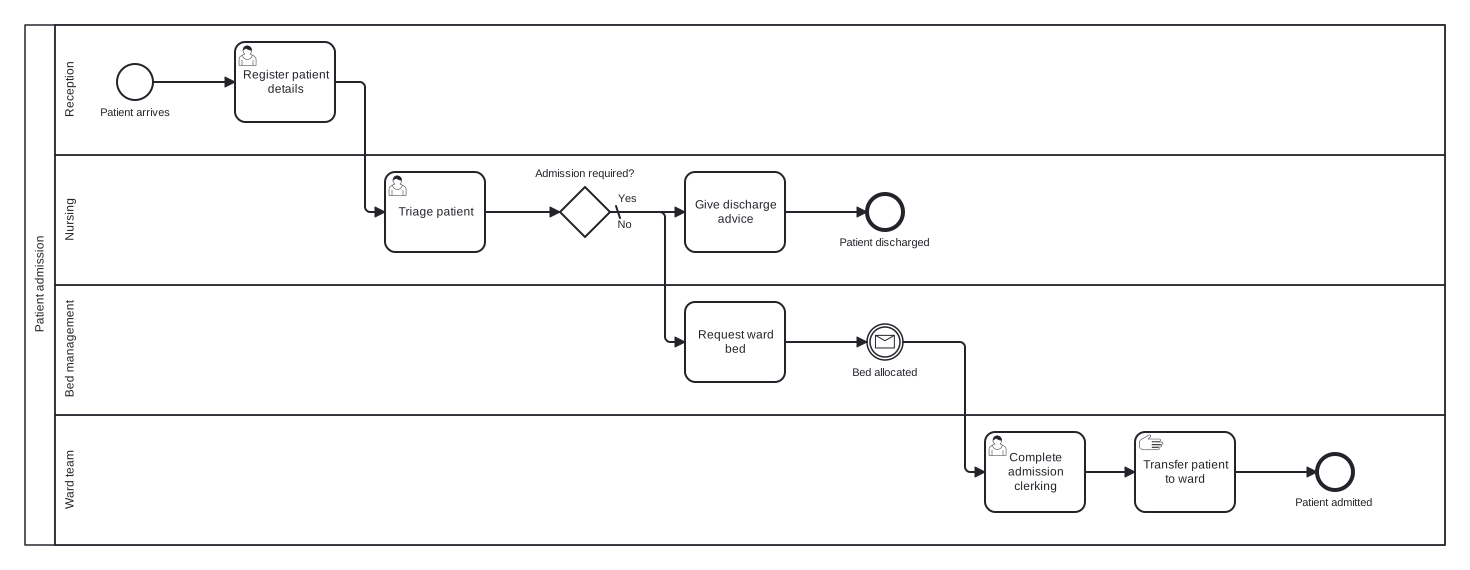
The model is a single pool with four lanes and one clinical decision gateway. A message catch event represents the wait for a bed, which is often the longest step in the whole process. The choice worth noticing is that the wait is modelled as an event rather than folded into the bed request task: making it visible is precisely what lets a process team measure it and argue for capacity.
Standard BPMN 2.0 interchange XML: opens in Camunda Modeler, Signavio, Bizagi, and any other compliant tool.
The process at a glance
How to read this diagram
Arrival at reception triggers the process at the "Patient arrives" start event. Reception registers the patient details, then the Nursing lane triages the patient. The gateway "Admission required?" carries the clinical decision: on the default No branch, nursing gives discharge advice and the process ends at "Patient discharged". On Yes, the Bed management lane requests a ward bed.
After the bed request, the token waits at the "Bed allocated" message event until bed management confirms a space. The Ward lane then completes the admission clerking and physically transfers the patient, and the process closes at the "Patient admitted" end event. Reading the lanes top to bottom shows the handoffs plainly: reception to nursing, nursing to bed management, bed management to ward, with exactly one decision along the way.
BPMN elements used
| Element | Count | In this diagram |
|---|---|---|
| Start event | 1 | Patient arrives |
| End event | 2 | Patient discharged, Patient admitted |
| Intermediate catch event | 1 | Bed allocated |
| Task | 2 | Give discharge advice, Request ward bed |
| User task | 3 | Register patient details, Triage patient, Complete admission clerking |
| Manual task | 1 | Transfer patient to ward |
| Exclusive gateway | 1 | Admission required? |
View the BPMN 2.0 XML for this diagram
<?xml version="1.0" encoding="UTF-8"?>
<bpmn2:definitions xmlns:bpmn2="http://www.omg.org/spec/BPMN/20100524/MODEL" xmlns:bpmndi="http://www.omg.org/spec/BPMN/20100524/DI" xmlns:dc="http://www.omg.org/spec/DD/20100524/DC" xmlns:di="http://www.omg.org/spec/DD/20100524/DI" xmlns:xsi="http://www.w3.org/2001/XMLSchema-instance" id="Definitions_1" targetNamespace="http://bpmn.io/schema/bpmn" exporter="swimdraft" exporterVersion="1.0">
  <bpmn2:collaboration id="Collaboration_1">
    <bpmn2:participant id="pool_pat" name="Patient admission" processRef="Process_pool_pat" />
  </bpmn2:collaboration>
  <bpmn2:process id="Process_pool_pat" isExecutable="false">
    <bpmn2:laneSet id="LaneSet_pool_pat">
      <bpmn2:lane id="lane_pat_reception" name="Reception">
        <bpmn2:flowNodeRef>start_pat</bpmn2:flowNodeRef>
        <bpmn2:flowNodeRef>t_pat_register</bpmn2:flowNodeRef>
      </bpmn2:lane>
      <bpmn2:lane id="lane_pat_nursing" name="Nursing">
        <bpmn2:flowNodeRef>t_pat_triage</bpmn2:flowNodeRef>
        <bpmn2:flowNodeRef>g_pat_admit</bpmn2:flowNodeRef>
        <bpmn2:flowNodeRef>t_pat_advice</bpmn2:flowNodeRef>
        <bpmn2:flowNodeRef>end_pat_home</bpmn2:flowNodeRef>
      </bpmn2:lane>
      <bpmn2:lane id="lane_pat_beds" name="Bed management">
        <bpmn2:flowNodeRef>t_pat_bed</bpmn2:flowNodeRef>
        <bpmn2:flowNodeRef>ev_pat_bed</bpmn2:flowNodeRef>
      </bpmn2:lane>
      <bpmn2:lane id="lane_pat_ward" name="Ward team">
        <bpmn2:flowNodeRef>t_pat_clerk</bpmn2:flowNodeRef>
        <bpmn2:flowNodeRef>t_pat_transfer</bpmn2:flowNodeRef>
        <bpmn2:flowNodeRef>end_pat_admitted</bpmn2:flowNodeRef>
      </bpmn2:lane>
    </bpmn2:laneSet>
    <bpmn2:startEvent id="start_pat" name="Patient arrives">
      <bpmn2:outgoing>fpat1</bpmn2:outgoing>
    </bpmn2:startEvent>
    <bpmn2:userTask id="t_pat_register" name="Register patient details">
      <bpmn2:incoming>fpat1</bpmn2:incoming>
      <bpmn2:outgoing>fpat2</bpmn2:outgoing>
    </bpmn2:userTask>
    <bpmn2:userTask id="t_pat_triage" name="Triage patient">
      <bpmn2:incoming>fpat2</bpmn2:incoming>
      <bpmn2:outgoing>fpat3</bpmn2:outgoing>
    </bpmn2:userTask>
    <bpmn2:exclusiveGateway id="g_pat_admit" name="Admission required?" default="fpat5">
      <bpmn2:incoming>fpat3</bpmn2:incoming>
      <bpmn2:outgoing>fpat4</bpmn2:outgoing>
      <bpmn2:outgoing>fpat5</bpmn2:outgoing>
    </bpmn2:exclusiveGateway>
    <bpmn2:task id="t_pat_advice" name="Give discharge advice">
      <bpmn2:incoming>fpat5</bpmn2:incoming>
      <bpmn2:outgoing>fpat6</bpmn2:outgoing>
    </bpmn2:task>
    <bpmn2:endEvent id="end_pat_home" name="Patient discharged">
      <bpmn2:incoming>fpat6</bpmn2:incoming>
    </bpmn2:endEvent>
    <bpmn2:task id="t_pat_bed" name="Request ward bed">
      <bpmn2:incoming>fpat4</bpmn2:incoming>
      <bpmn2:outgoing>fpat7</bpmn2:outgoing>
    </bpmn2:task>
    <bpmn2:intermediateCatchEvent id="ev_pat_bed" name="Bed allocated">
      <bpmn2:incoming>fpat7</bpmn2:incoming>
      <bpmn2:outgoing>fpat8</bpmn2:outgoing>
      <bpmn2:messageEventDefinition id="ev_pat_bed_def" />
    </bpmn2:intermediateCatchEvent>
    <bpmn2:userTask id="t_pat_clerk" name="Complete admission clerking">
      <bpmn2:incoming>fpat8</bpmn2:incoming>
      <bpmn2:outgoing>fpat9</bpmn2:outgoing>
    </bpmn2:userTask>
    <bpmn2:manualTask id="t_pat_transfer" name="Transfer patient to ward">
      <bpmn2:incoming>fpat9</bpmn2:incoming>
      <bpmn2:outgoing>fpat10</bpmn2:outgoing>
    </bpmn2:manualTask>
    <bpmn2:endEvent id="end_pat_admitted" name="Patient admitted">
      <bpmn2:incoming>fpat10</bpmn2:incoming>
    </bpmn2:endEvent>
    <bpmn2:sequenceFlow id="fpat1" sourceRef="start_pat" targetRef="t_pat_register" />
    <bpmn2:sequenceFlow id="fpat2" sourceRef="t_pat_register" targetRef="t_pat_triage" />
    <bpmn2:sequenceFlow id="fpat3" sourceRef="t_pat_triage" targetRef="g_pat_admit" />
    <bpmn2:sequenceFlow id="fpat4" name="Yes" sourceRef="g_pat_admit" targetRef="t_pat_bed">
      <bpmn2:conditionExpression xsi:type="bpmn2:tFormalExpression">Yes</bpmn2:conditionExpression>
    </bpmn2:sequenceFlow>
    <bpmn2:sequenceFlow id="fpat5" name="No" sourceRef="g_pat_admit" targetRef="t_pat_advice" />
    <bpmn2:sequenceFlow id="fpat6" sourceRef="t_pat_advice" targetRef="end_pat_home" />
    <bpmn2:sequenceFlow id="fpat7" sourceRef="t_pat_bed" targetRef="ev_pat_bed" />
    <bpmn2:sequenceFlow id="fpat8" sourceRef="ev_pat_bed" targetRef="t_pat_clerk" />
    <bpmn2:sequenceFlow id="fpat9" sourceRef="t_pat_clerk" targetRef="t_pat_transfer" />
    <bpmn2:sequenceFlow id="fpat10" sourceRef="t_pat_transfer" targetRef="end_pat_admitted" />
  </bpmn2:process>
  <bpmndi:BPMNDiagram id="BPMNDiagram_1">
    <bpmndi:BPMNPlane id="BPMNPlane_1" bpmnElement="Collaboration_1">
      <bpmndi:BPMNShape id="pool_pat_di" bpmnElement="pool_pat" isHorizontal="true">
        <dc:Bounds x="20" y="20" width="1420" height="520" />
      </bpmndi:BPMNShape>
      <bpmndi:BPMNShape id="lane_pat_reception_di" bpmnElement="lane_pat_reception" isHorizontal="true">
        <dc:Bounds x="50" y="20" width="1390" height="130" />
      </bpmndi:BPMNShape>
      <bpmndi:BPMNShape id="lane_pat_nursing_di" bpmnElement="lane_pat_nursing" isHorizontal="true">
        <dc:Bounds x="50" y="150" width="1390" height="130" />
      </bpmndi:BPMNShape>
      <bpmndi:BPMNShape id="lane_pat_beds_di" bpmnElement="lane_pat_beds" isHorizontal="true">
        <dc:Bounds x="50" y="280" width="1390" height="130" />
      </bpmndi:BPMNShape>
      <bpmndi:BPMNShape id="lane_pat_ward_di" bpmnElement="lane_pat_ward" isHorizontal="true">
        <dc:Bounds x="50" y="410" width="1390" height="130" />
      </bpmndi:BPMNShape>
      <bpmndi:BPMNShape id="start_pat_di" bpmnElement="start_pat">
        <dc:Bounds x="112" y="59" width="36" height="36" />
        <bpmndi:BPMNLabel><dc:Bounds x="94" y="101" width="73" height="14" /></bpmndi:BPMNLabel>
      </bpmndi:BPMNShape>
      <bpmndi:BPMNShape id="t_pat_register_di" bpmnElement="t_pat_register">
        <dc:Bounds x="230" y="37" width="100" height="80" />
      </bpmndi:BPMNShape>
      <bpmndi:BPMNShape id="t_pat_triage_di" bpmnElement="t_pat_triage">
        <dc:Bounds x="380" y="167" width="100" height="80" />
      </bpmndi:BPMNShape>
      <bpmndi:BPMNShape id="g_pat_admit_di" bpmnElement="g_pat_admit">
        <dc:Bounds x="555" y="182" width="50" height="50" />
        <bpmndi:BPMNLabel><dc:Bounds x="529" y="162" width="103" height="14" /></bpmndi:BPMNLabel>
      </bpmndi:BPMNShape>
      <bpmndi:BPMNShape id="t_pat_advice_di" bpmnElement="t_pat_advice">
        <dc:Bounds x="680" y="167" width="100" height="80" />
      </bpmndi:BPMNShape>
      <bpmndi:BPMNShape id="end_pat_home_di" bpmnElement="end_pat_home">
        <dc:Bounds x="862" y="189" width="36" height="36" />
        <bpmndi:BPMNLabel><dc:Bounds x="833" y="231" width="94" height="14" /></bpmndi:BPMNLabel>
      </bpmndi:BPMNShape>
      <bpmndi:BPMNShape id="t_pat_bed_di" bpmnElement="t_pat_bed">
        <dc:Bounds x="680" y="297" width="100" height="80" />
      </bpmndi:BPMNShape>
      <bpmndi:BPMNShape id="ev_pat_bed_di" bpmnElement="ev_pat_bed">
        <dc:Bounds x="862" y="319" width="36" height="36" />
        <bpmndi:BPMNLabel><dc:Bounds x="846" y="361" width="69" height="14" /></bpmndi:BPMNLabel>
      </bpmndi:BPMNShape>
      <bpmndi:BPMNShape id="t_pat_clerk_di" bpmnElement="t_pat_clerk">
        <dc:Bounds x="980" y="427" width="100" height="80" />
      </bpmndi:BPMNShape>
      <bpmndi:BPMNShape id="t_pat_transfer_di" bpmnElement="t_pat_transfer">
        <dc:Bounds x="1130" y="427" width="100" height="80" />
      </bpmndi:BPMNShape>
      <bpmndi:BPMNShape id="end_pat_admitted_di" bpmnElement="end_pat_admitted">
        <dc:Bounds x="1312" y="449" width="36" height="36" />
        <bpmndi:BPMNLabel><dc:Bounds x="1289" y="491" width="82" height="14" /></bpmndi:BPMNLabel>
      </bpmndi:BPMNShape>
      <bpmndi:BPMNEdge id="fpat1_di" bpmnElement="fpat1">
        <di:waypoint x="148" y="77" />
        <di:waypoint x="230" y="77" />
      </bpmndi:BPMNEdge>
      <bpmndi:BPMNEdge id="fpat2_di" bpmnElement="fpat2">
        <di:waypoint x="330" y="77" />
        <di:waypoint x="360" y="77" />
        <di:waypoint x="360" y="207" />
        <di:waypoint x="380" y="207" />
      </bpmndi:BPMNEdge>
      <bpmndi:BPMNEdge id="fpat3_di" bpmnElement="fpat3">
        <di:waypoint x="480" y="207" />
        <di:waypoint x="555" y="207" />
      </bpmndi:BPMNEdge>
      <bpmndi:BPMNEdge id="fpat4_di" bpmnElement="fpat4">
        <di:waypoint x="605" y="207" />
        <di:waypoint x="660" y="207" />
        <di:waypoint x="660" y="337" />
        <di:waypoint x="680" y="337" />
        <bpmndi:BPMNLabel><dc:Bounds x="611" y="187" width="21" height="14" /></bpmndi:BPMNLabel>
      </bpmndi:BPMNEdge>
      <bpmndi:BPMNEdge id="fpat5_di" bpmnElement="fpat5">
        <di:waypoint x="605" y="207" />
        <di:waypoint x="680" y="207" />
        <bpmndi:BPMNLabel><dc:Bounds x="611" y="213" width="17" height="14" /></bpmndi:BPMNLabel>
      </bpmndi:BPMNEdge>
      <bpmndi:BPMNEdge id="fpat6_di" bpmnElement="fpat6">
        <di:waypoint x="780" y="207" />
        <di:waypoint x="862" y="207" />
      </bpmndi:BPMNEdge>
      <bpmndi:BPMNEdge id="fpat7_di" bpmnElement="fpat7">
        <di:waypoint x="780" y="337" />
        <di:waypoint x="862" y="337" />
      </bpmndi:BPMNEdge>
      <bpmndi:BPMNEdge id="fpat8_di" bpmnElement="fpat8">
        <di:waypoint x="898" y="337" />
        <di:waypoint x="960" y="337" />
        <di:waypoint x="960" y="467" />
        <di:waypoint x="980" y="467" />
      </bpmndi:BPMNEdge>
      <bpmndi:BPMNEdge id="fpat9_di" bpmnElement="fpat9">
        <di:waypoint x="1080" y="467" />
        <di:waypoint x="1130" y="467" />
      </bpmndi:BPMNEdge>
      <bpmndi:BPMNEdge id="fpat10_di" bpmnElement="fpat10">
        <di:waypoint x="1230" y="467" />
        <di:waypoint x="1312" y="467" />
      </bpmndi:BPMNEdge>
    </bpmndi:BPMNPlane>
  </bpmndi:BPMNDiagram>
</bpmn2:definitions>
Frequently asked questions
Should the patient be a separate pool in this model?
Not here. The patient is the subject the process acts on, not an independent participant exchanging messages with it, so a lane or pool for them would add clutter without meaning. A patient pool earns its place in flows where the patient genuinely acts, for example booking an outpatient appointment or responding to a letter.
Why is "Transfer patient to ward" a manual task?
A manual task is work performed physically, without any system involvement, and moving a patient to a ward is exactly that. Registration and clerking touch hospital systems, so they are typed differently. Distinguishing manual work matters in healthcare models because those steps cannot be automated away and constrain staffing.
How could this model show a four hour admission target?
Attach a timer to the waiting stage, typically as a boundary event on the bed wait or a parallel timer path started at triage, that escalates to the site manager when the target is at risk. Modelling the escalation explicitly turns the diagram from a description into something you can hold the process to.
Related BPMN examples
Loan approval
A bank loan approval process as a BPMN 2.0 diagram: completeness check, credit scoring, offer, and payout, with a document rework loop. Download the .bpmn file free.
Mortgage application
A mortgage application mapped in BPMN 2.0: parallel valuation and underwriting, lending decision, offer, and completion. View the swimlanes and download the .bpmn free.
Insurance claim processing
An end to end insurance claim process in BPMN 2.0: registration, cover check, loss assessment, and settlement or decline. Free .bpmn download included.
Student enrolment
University student enrolment modelled in BPMN 2.0: condition checks, an evidence loop, parallel fees and records, and IT setup. Free .bpmn download.
Generate your own version of this diagram
Describe how the process works in your organisation: plain English, meeting notes, a transcript, or a spreadsheet. Swimdraft turns it into a spec-validated BPMN 2.0 diagram you can edit in the browser and export as .bpmn, SVG, or PNG.
Start freeNo credit card required