
GDPR data request BPMN example
A GDPR subject access request (SAR) obliges an organisation to hand an individual a copy of their personal data, normally within one calendar month. Privacy teams map the process because the deadline is statutory, the work is scattered across every team that holds data, and regulators ask to see the procedure. The common failure is the middle of the process: requests get logged and acknowledged, then stall while data owners are chased informally.
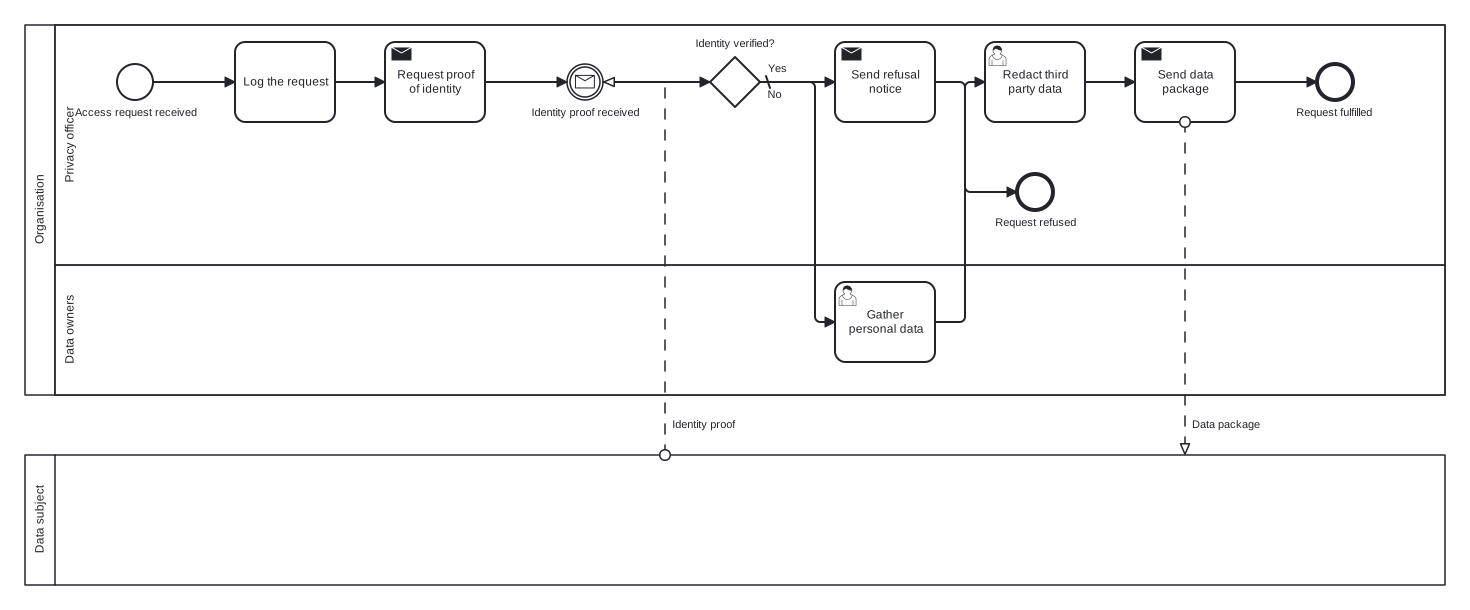
This example uses two pools: the organisation, with Privacy officer and Data owners lanes, and the data subject as a black box pool connected by message flows. That is the modelling choice to notice. The requester is a genuinely external participant whose internal behaviour you cannot see, so BPMN gives them an empty pool, and the two message flows mark exactly where information crosses the organisational boundary.
Standard BPMN 2.0 interchange XML: opens in Camunda Modeler, Signavio, Bizagi, and any other compliant tool.
The process at a glance
How to read this diagram
The Privacy officer lane opens the flow at the "Access request received" start event, logs the request, and sends the requester a proof of identity request. The process then waits at the "Identity proof received" message event, fed by a message flow from the Data subject pool. The gateway "Identity verified?" protects the whole process: its default No branch sends a refusal notice and ends at "Request refused", because releasing data to the wrong person is itself a breach.
On the Yes branch, the Data owners lane gathers the personal data from their systems, then the privacy officer redacts third party data before sending the data package, shown as a message flow back to the Data subject pool. The process completes at the "Request fulfilled" end event. Every exchange with the requester is a message flow crossing the pool boundary, while everything inside the organisation stays on sequence flows.
BPMN elements used
| Element | Count | In this diagram |
|---|---|---|
| Start event | 1 | Access request received |
| End event | 2 | Request fulfilled, Request refused |
| Intermediate catch event | 1 | Identity proof received |
| Task | 1 | Log the request |
| User task | 2 | Gather personal data, Redact third party data |
| Send task | 3 | Request proof of identity, Send data package, Send refusal notice |
| Exclusive gateway | 1 | Identity verified? |
View the BPMN 2.0 XML for this diagram
<?xml version="1.0" encoding="UTF-8"?>
<bpmn2:definitions xmlns:bpmn2="http://www.omg.org/spec/BPMN/20100524/MODEL" xmlns:bpmndi="http://www.omg.org/spec/BPMN/20100524/DI" xmlns:dc="http://www.omg.org/spec/DD/20100524/DC" xmlns:di="http://www.omg.org/spec/DD/20100524/DI" xmlns:xsi="http://www.w3.org/2001/XMLSchema-instance" id="Definitions_1" targetNamespace="http://bpmn.io/schema/bpmn" exporter="swimdraft" exporterVersion="1.0">
  <bpmn2:collaboration id="Collaboration_1">
    <bpmn2:participant id="pool_dsar" name="Organisation" processRef="Process_pool_dsar" />
    <bpmn2:participant id="pool_dsar_subject" name="Data subject" processRef="Process_pool_dsar_subject" />
    <bpmn2:messageFlow id="mfdsar1" name="Identity proof" sourceRef="pool_dsar_subject" targetRef="ev_dsar_id" />
    <bpmn2:messageFlow id="mfdsar2" name="Data package" sourceRef="t_dsar_send" targetRef="pool_dsar_subject" />
  </bpmn2:collaboration>
  <bpmn2:process id="Process_pool_dsar" isExecutable="false">
    <bpmn2:laneSet id="LaneSet_pool_dsar">
      <bpmn2:lane id="lane_dsar_privacy" name="Privacy officer">
        <bpmn2:flowNodeRef>start_dsar</bpmn2:flowNodeRef>
        <bpmn2:flowNodeRef>t_dsar_log</bpmn2:flowNodeRef>
        <bpmn2:flowNodeRef>t_dsar_id</bpmn2:flowNodeRef>
        <bpmn2:flowNodeRef>ev_dsar_id</bpmn2:flowNodeRef>
        <bpmn2:flowNodeRef>g_dsar_verify</bpmn2:flowNodeRef>
        <bpmn2:flowNodeRef>t_dsar_redact</bpmn2:flowNodeRef>
        <bpmn2:flowNodeRef>t_dsar_send</bpmn2:flowNodeRef>
        <bpmn2:flowNodeRef>end_dsar_done</bpmn2:flowNodeRef>
        <bpmn2:flowNodeRef>t_dsar_refuse</bpmn2:flowNodeRef>
        <bpmn2:flowNodeRef>end_dsar_refused</bpmn2:flowNodeRef>
      </bpmn2:lane>
      <bpmn2:lane id="lane_dsar_owners" name="Data owners">
        <bpmn2:flowNodeRef>t_dsar_gather</bpmn2:flowNodeRef>
      </bpmn2:lane>
    </bpmn2:laneSet>
    <bpmn2:startEvent id="start_dsar" name="Access request received">
      <bpmn2:outgoing>fdsar1</bpmn2:outgoing>
    </bpmn2:startEvent>
    <bpmn2:task id="t_dsar_log" name="Log the request">
      <bpmn2:incoming>fdsar1</bpmn2:incoming>
      <bpmn2:outgoing>fdsar2</bpmn2:outgoing>
    </bpmn2:task>
    <bpmn2:sendTask id="t_dsar_id" name="Request proof of identity">
      <bpmn2:incoming>fdsar2</bpmn2:incoming>
      <bpmn2:outgoing>fdsar3</bpmn2:outgoing>
    </bpmn2:sendTask>
    <bpmn2:intermediateCatchEvent id="ev_dsar_id" name="Identity proof received">
      <bpmn2:incoming>fdsar3</bpmn2:incoming>
      <bpmn2:outgoing>fdsar4</bpmn2:outgoing>
      <bpmn2:messageEventDefinition id="ev_dsar_id_def" />
    </bpmn2:intermediateCatchEvent>
    <bpmn2:exclusiveGateway id="g_dsar_verify" name="Identity verified?" default="fdsar6">
      <bpmn2:incoming>fdsar4</bpmn2:incoming>
      <bpmn2:outgoing>fdsar5</bpmn2:outgoing>
      <bpmn2:outgoing>fdsar6</bpmn2:outgoing>
    </bpmn2:exclusiveGateway>
    <bpmn2:userTask id="t_dsar_gather" name="Gather personal data">
      <bpmn2:incoming>fdsar5</bpmn2:incoming>
      <bpmn2:outgoing>fdsar7</bpmn2:outgoing>
    </bpmn2:userTask>
    <bpmn2:userTask id="t_dsar_redact" name="Redact third party data">
      <bpmn2:incoming>fdsar7</bpmn2:incoming>
      <bpmn2:outgoing>fdsar8</bpmn2:outgoing>
    </bpmn2:userTask>
    <bpmn2:sendTask id="t_dsar_send" name="Send data package">
      <bpmn2:incoming>fdsar8</bpmn2:incoming>
      <bpmn2:outgoing>fdsar9</bpmn2:outgoing>
    </bpmn2:sendTask>
    <bpmn2:endEvent id="end_dsar_done" name="Request fulfilled">
      <bpmn2:incoming>fdsar9</bpmn2:incoming>
    </bpmn2:endEvent>
    <bpmn2:sendTask id="t_dsar_refuse" name="Send refusal notice">
      <bpmn2:incoming>fdsar6</bpmn2:incoming>
      <bpmn2:outgoing>fdsar10</bpmn2:outgoing>
    </bpmn2:sendTask>
    <bpmn2:endEvent id="end_dsar_refused" name="Request refused">
      <bpmn2:incoming>fdsar10</bpmn2:incoming>
    </bpmn2:endEvent>
    <bpmn2:sequenceFlow id="fdsar1" sourceRef="start_dsar" targetRef="t_dsar_log" />
    <bpmn2:sequenceFlow id="fdsar2" sourceRef="t_dsar_log" targetRef="t_dsar_id" />
    <bpmn2:sequenceFlow id="fdsar3" sourceRef="t_dsar_id" targetRef="ev_dsar_id" />
    <bpmn2:sequenceFlow id="fdsar4" sourceRef="ev_dsar_id" targetRef="g_dsar_verify" />
    <bpmn2:sequenceFlow id="fdsar5" name="Yes" sourceRef="g_dsar_verify" targetRef="t_dsar_gather">
      <bpmn2:conditionExpression xsi:type="bpmn2:tFormalExpression">Yes</bpmn2:conditionExpression>
    </bpmn2:sequenceFlow>
    <bpmn2:sequenceFlow id="fdsar6" name="No" sourceRef="g_dsar_verify" targetRef="t_dsar_refuse" />
    <bpmn2:sequenceFlow id="fdsar7" sourceRef="t_dsar_gather" targetRef="t_dsar_redact" />
    <bpmn2:sequenceFlow id="fdsar8" sourceRef="t_dsar_redact" targetRef="t_dsar_send" />
    <bpmn2:sequenceFlow id="fdsar9" sourceRef="t_dsar_send" targetRef="end_dsar_done" />
    <bpmn2:sequenceFlow id="fdsar10" sourceRef="t_dsar_refuse" targetRef="end_dsar_refused" />
  </bpmn2:process>
  <bpmn2:process id="Process_pool_dsar_subject" isExecutable="false">
  </bpmn2:process>
  <bpmndi:BPMNDiagram id="BPMNDiagram_1">
    <bpmndi:BPMNPlane id="BPMNPlane_1" bpmnElement="Collaboration_1">
      <bpmndi:BPMNShape id="pool_dsar_di" bpmnElement="pool_dsar" isHorizontal="true">
        <dc:Bounds x="20" y="20" width="1420" height="370" />
      </bpmndi:BPMNShape>
      <bpmndi:BPMNShape id="lane_dsar_privacy_di" bpmnElement="lane_dsar_privacy" isHorizontal="true">
        <dc:Bounds x="50" y="20" width="1390" height="240" />
      </bpmndi:BPMNShape>
      <bpmndi:BPMNShape id="lane_dsar_owners_di" bpmnElement="lane_dsar_owners" isHorizontal="true">
        <dc:Bounds x="50" y="260" width="1390" height="130" />
      </bpmndi:BPMNShape>
      <bpmndi:BPMNShape id="pool_dsar_subject_di" bpmnElement="pool_dsar_subject" isHorizontal="true">
        <dc:Bounds x="20" y="450" width="1420" height="130" />
      </bpmndi:BPMNShape>
      <bpmndi:BPMNShape id="start_dsar_di" bpmnElement="start_dsar">
        <dc:Bounds x="112" y="59" width="36" height="36" />
        <bpmndi:BPMNLabel><dc:Bounds x="69" y="101" width="122" height="14" /></bpmndi:BPMNLabel>
      </bpmndi:BPMNShape>
      <bpmndi:BPMNShape id="t_dsar_log_di" bpmnElement="t_dsar_log">
        <dc:Bounds x="230" y="37" width="100" height="80" />
      </bpmndi:BPMNShape>
      <bpmndi:BPMNShape id="t_dsar_id_di" bpmnElement="t_dsar_id">
        <dc:Bounds x="380" y="37" width="100" height="80" />
      </bpmndi:BPMNShape>
      <bpmndi:BPMNShape id="ev_dsar_id_di" bpmnElement="ev_dsar_id">
        <dc:Bounds x="562" y="59" width="36" height="36" />
        <bpmndi:BPMNLabel><dc:Bounds x="525" y="101" width="111" height="14" /></bpmndi:BPMNLabel>
      </bpmndi:BPMNShape>
      <bpmndi:BPMNShape id="g_dsar_verify_di" bpmnElement="g_dsar_verify">
        <dc:Bounds x="705" y="52" width="50" height="50" />
        <bpmndi:BPMNLabel><dc:Bounds x="689" y="32" width="83" height="14" /></bpmndi:BPMNLabel>
      </bpmndi:BPMNShape>
      <bpmndi:BPMNShape id="t_dsar_gather_di" bpmnElement="t_dsar_gather">
        <dc:Bounds x="830" y="277" width="100" height="80" />
      </bpmndi:BPMNShape>
      <bpmndi:BPMNShape id="t_dsar_redact_di" bpmnElement="t_dsar_redact">
        <dc:Bounds x="980" y="37" width="100" height="80" />
      </bpmndi:BPMNShape>
      <bpmndi:BPMNShape id="t_dsar_send_di" bpmnElement="t_dsar_send">
        <dc:Bounds x="1130" y="37" width="100" height="80" />
      </bpmndi:BPMNShape>
      <bpmndi:BPMNShape id="end_dsar_done_di" bpmnElement="end_dsar_done">
        <dc:Bounds x="1312" y="59" width="36" height="36" />
        <bpmndi:BPMNLabel><dc:Bounds x="1290" y="101" width="81" height="14" /></bpmndi:BPMNLabel>
      </bpmndi:BPMNShape>
      <bpmndi:BPMNShape id="t_dsar_refuse_di" bpmnElement="t_dsar_refuse">
        <dc:Bounds x="830" y="37" width="100" height="80" />
      </bpmndi:BPMNShape>
      <bpmndi:BPMNShape id="end_dsar_refused_di" bpmnElement="end_dsar_refused">
        <dc:Bounds x="1012" y="169" width="36" height="36" />
        <bpmndi:BPMNLabel><dc:Bounds x="989" y="211" width="83" height="14" /></bpmndi:BPMNLabel>
      </bpmndi:BPMNShape>
      <bpmndi:BPMNEdge id="fdsar1_di" bpmnElement="fdsar1">
        <di:waypoint x="148" y="77" />
        <di:waypoint x="230" y="77" />
      </bpmndi:BPMNEdge>
      <bpmndi:BPMNEdge id="fdsar2_di" bpmnElement="fdsar2">
        <di:waypoint x="330" y="77" />
        <di:waypoint x="380" y="77" />
      </bpmndi:BPMNEdge>
      <bpmndi:BPMNEdge id="fdsar3_di" bpmnElement="fdsar3">
        <di:waypoint x="480" y="77" />
        <di:waypoint x="562" y="77" />
      </bpmndi:BPMNEdge>
      <bpmndi:BPMNEdge id="fdsar4_di" bpmnElement="fdsar4">
        <di:waypoint x="598" y="77" />
        <di:waypoint x="705" y="77" />
      </bpmndi:BPMNEdge>
      <bpmndi:BPMNEdge id="fdsar5_di" bpmnElement="fdsar5">
        <di:waypoint x="755" y="77" />
        <di:waypoint x="810" y="77" />
        <di:waypoint x="810" y="317" />
        <di:waypoint x="830" y="317" />
        <bpmndi:BPMNLabel><dc:Bounds x="761" y="57" width="21" height="14" /></bpmndi:BPMNLabel>
      </bpmndi:BPMNEdge>
      <bpmndi:BPMNEdge id="fdsar6_di" bpmnElement="fdsar6">
        <di:waypoint x="755" y="77" />
        <di:waypoint x="830" y="77" />
        <bpmndi:BPMNLabel><dc:Bounds x="761" y="83" width="17" height="14" /></bpmndi:BPMNLabel>
      </bpmndi:BPMNEdge>
      <bpmndi:BPMNEdge id="fdsar7_di" bpmnElement="fdsar7">
        <di:waypoint x="930" y="317" />
        <di:waypoint x="960" y="317" />
        <di:waypoint x="960" y="77" />
        <di:waypoint x="980" y="77" />
      </bpmndi:BPMNEdge>
      <bpmndi:BPMNEdge id="fdsar8_di" bpmnElement="fdsar8">
        <di:waypoint x="1080" y="77" />
        <di:waypoint x="1130" y="77" />
      </bpmndi:BPMNEdge>
      <bpmndi:BPMNEdge id="fdsar9_di" bpmnElement="fdsar9">
        <di:waypoint x="1230" y="77" />
        <di:waypoint x="1312" y="77" />
      </bpmndi:BPMNEdge>
      <bpmndi:BPMNEdge id="fdsar10_di" bpmnElement="fdsar10">
        <di:waypoint x="930" y="77" />
        <di:waypoint x="960" y="77" />
        <di:waypoint x="960" y="187" />
        <di:waypoint x="1012" y="187" />
      </bpmndi:BPMNEdge>
      <bpmndi:BPMNEdge id="mfdsar1_di" bpmnElement="mfdsar1">
        <di:waypoint x="660" y="450" />
        <di:waypoint x="660" y="420" />
        <di:waypoint x="660" y="77" />
        <di:waypoint x="598" y="77" />
        <bpmndi:BPMNLabel><dc:Bounds x="666" y="413" width="66" height="14" /></bpmndi:BPMNLabel>
      </bpmndi:BPMNEdge>
      <bpmndi:BPMNEdge id="mfdsar2_di" bpmnElement="mfdsar2">
        <di:waypoint x="1180" y="117" />
        <di:waypoint x="1180" y="420" />
        <di:waypoint x="1180" y="450" />
        <bpmndi:BPMNLabel><dc:Bounds x="1186" y="413" width="70" height="14" /></bpmndi:BPMNLabel>
      </bpmndi:BPMNEdge>
    </bpmndi:BPMNPlane>
  </bpmndi:BPMNDiagram>
</bpmn2:definitions>
Frequently asked questions
Why is the data subject a black box pool rather than a lane?
Lanes share one process instance and one organisation; the requester belongs to neither. A black box pool shows a participant whose internal steps you do not control or know, connected only by message flows. Modelling them as a lane would wrongly imply your process engine drives their behaviour, and would make the identity wait meaningless.
Where does the one month statutory deadline belong in this model?
Attach a timer to the overall case, most cleanly as a timer boundary event on the gathering task or a parallel timer path from the start, escalating to the data protection officer as the deadline nears. Because the clock starts at receipt, anchoring the timer to the start event matches how the regulation actually counts the month.
Does this diagram stay valid BPMN with two pools?
Yes, provided message flows only ever cross pools and sequence flows never do. Swimdraft checks exactly that, validating the model against 19 normative rules from the OMG BPMN 2.0.2 specification with clause citations, and the exported .bpmn file opens cleanly in Camunda Modeler, Signavio, or Bizagi.
Related BPMN examples
Loan approval
A bank loan approval process as a BPMN 2.0 diagram: completeness check, credit scoring, offer, and payout, with a document rework loop. Download the .bpmn file free.
Mortgage application
A mortgage application mapped in BPMN 2.0: parallel valuation and underwriting, lending decision, offer, and completion. View the swimlanes and download the .bpmn free.
Insurance claim processing
An end to end insurance claim process in BPMN 2.0: registration, cover check, loss assessment, and settlement or decline. Free .bpmn download included.
Patient admission
A hospital patient admission flow as a BPMN 2.0 swimlane diagram: registration, triage, bed request, and ward transfer. Download the .bpmn file free.
Generate your own version of this diagram
Describe how the process works in your organisation: plain English, meeting notes, a transcript, or a spreadsheet. Swimdraft turns it into a spec-validated BPMN 2.0 diagram you can edit in the browser and export as .bpmn, SVG, or PNG.
Start freeNo credit card required