
KYC verification BPMN example
Know your customer (KYC) verification is the gate every regulated firm puts between a prospective customer and an active account: identity documents are collected, the name is screened against sanctions and PEP lists, and higher risk cases get a deeper look. Firms map it because the regulator expects a defined, repeatable procedure, and because the escalation path for screening hits is exactly the part that varies between analysts when left undocumented.
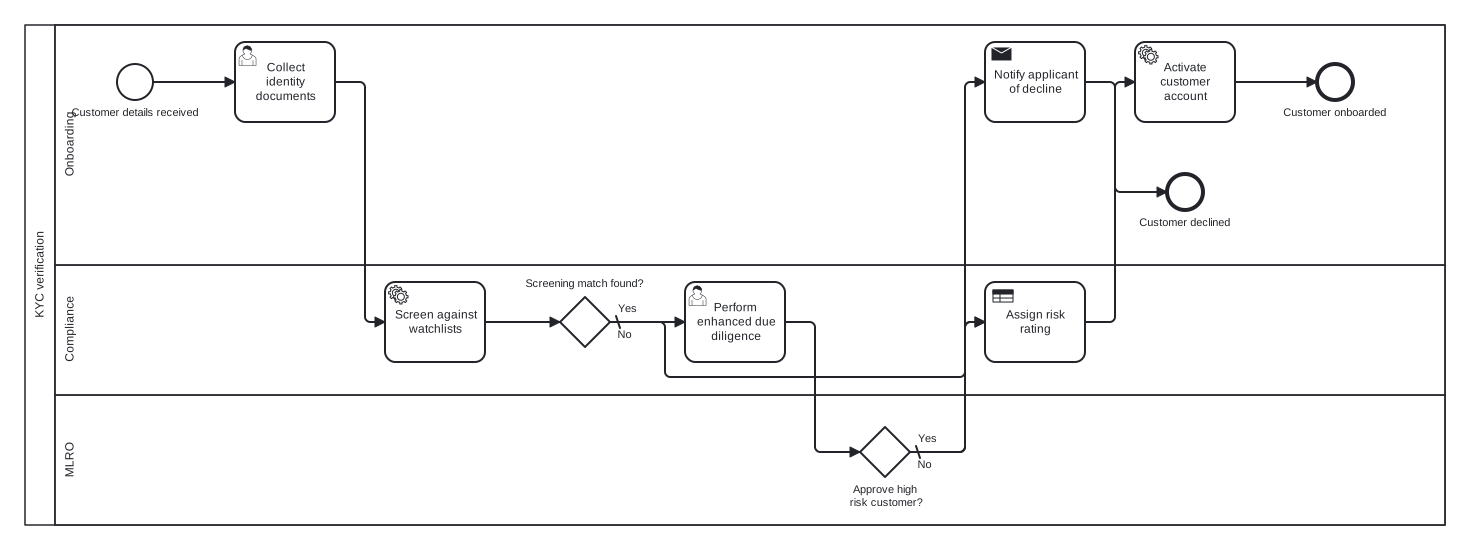
This example models the flow as one pool with Onboarding, Compliance, and MLRO lanes and two exclusive gateways. The choice worth noticing is the escalation structure: a screening match does not decide the outcome by itself, it routes the case through enhanced due diligence and a named MLRO approval gateway. Clean cases and approved high risk cases then converge on the same risk rating task, so both paths finish through identical controls.
Standard BPMN 2.0 interchange XML: opens in Camunda Modeler, Signavio, Bizagi, and any other compliant tool.
The process at a glance
How to read this diagram
Onboarding starts the flow when customer details are received, collecting the identity documents before the Compliance lane screens the name against watchlists through a service task. At the gateway "Screening match found?", the default No branch goes directly to the risk rating step. The Yes branch escalates: compliance performs enhanced due diligence, and the case rises to the MLRO lane for the gateway "Approve high risk customer?".
From the MLRO decision, the Yes branch rejoins the main path at the "Assign risk rating" business rule task, while the default No branch has onboarding notify the applicant and the process ends at "Customer declined". Approved customers, whether routine or escalated, flow from risk rating into account activation, finishing at the "Customer onboarded" end event. The two end events give compliance a clean measure of decline rates against completions.
BPMN elements used
| Element | Count | In this diagram |
|---|---|---|
| Start event | 1 | Customer details received |
| End event | 2 | Customer onboarded, Customer declined |
| User task | 2 | Collect identity documents, Perform enhanced due diligence |
| Service task | 2 | Screen against watchlists, Activate customer account |
| Send task | 1 | Notify applicant of decline |
| Business rule task | 1 | Assign risk rating |
| Exclusive gateway | 2 | Screening match found?, Approve high risk customer? |
View the BPMN 2.0 XML for this diagram
<?xml version="1.0" encoding="UTF-8"?>
<bpmn2:definitions xmlns:bpmn2="http://www.omg.org/spec/BPMN/20100524/MODEL" xmlns:bpmndi="http://www.omg.org/spec/BPMN/20100524/DI" xmlns:dc="http://www.omg.org/spec/DD/20100524/DC" xmlns:di="http://www.omg.org/spec/DD/20100524/DI" xmlns:xsi="http://www.w3.org/2001/XMLSchema-instance" id="Definitions_1" targetNamespace="http://bpmn.io/schema/bpmn" exporter="swimdraft" exporterVersion="1.0">
  <bpmn2:collaboration id="Collaboration_1">
    <bpmn2:participant id="pool_kyc" name="KYC verification" processRef="Process_pool_kyc" />
  </bpmn2:collaboration>
  <bpmn2:process id="Process_pool_kyc" isExecutable="false">
    <bpmn2:laneSet id="LaneSet_pool_kyc">
      <bpmn2:lane id="lane_kyc_onb" name="Onboarding">
        <bpmn2:flowNodeRef>start_kyc</bpmn2:flowNodeRef>
        <bpmn2:flowNodeRef>t_kyc_docs</bpmn2:flowNodeRef>
        <bpmn2:flowNodeRef>t_kyc_activate</bpmn2:flowNodeRef>
        <bpmn2:flowNodeRef>end_kyc_ok</bpmn2:flowNodeRef>
        <bpmn2:flowNodeRef>t_kyc_notify</bpmn2:flowNodeRef>
        <bpmn2:flowNodeRef>end_kyc_declined</bpmn2:flowNodeRef>
      </bpmn2:lane>
      <bpmn2:lane id="lane_kyc_comp" name="Compliance">
        <bpmn2:flowNodeRef>t_kyc_screen</bpmn2:flowNodeRef>
        <bpmn2:flowNodeRef>g_kyc_hit</bpmn2:flowNodeRef>
        <bpmn2:flowNodeRef>t_kyc_edd</bpmn2:flowNodeRef>
        <bpmn2:flowNodeRef>t_kyc_rate</bpmn2:flowNodeRef>
      </bpmn2:lane>
      <bpmn2:lane id="lane_kyc_mlro" name="MLRO">
        <bpmn2:flowNodeRef>g_kyc_mlro</bpmn2:flowNodeRef>
      </bpmn2:lane>
    </bpmn2:laneSet>
    <bpmn2:startEvent id="start_kyc" name="Customer details received">
      <bpmn2:outgoing>fkyc1</bpmn2:outgoing>
    </bpmn2:startEvent>
    <bpmn2:userTask id="t_kyc_docs" name="Collect identity documents">
      <bpmn2:incoming>fkyc1</bpmn2:incoming>
      <bpmn2:outgoing>fkyc2</bpmn2:outgoing>
    </bpmn2:userTask>
    <bpmn2:serviceTask id="t_kyc_screen" name="Screen against watchlists">
      <bpmn2:incoming>fkyc2</bpmn2:incoming>
      <bpmn2:outgoing>fkyc3</bpmn2:outgoing>
    </bpmn2:serviceTask>
    <bpmn2:exclusiveGateway id="g_kyc_hit" name="Screening match found?" default="fkyc5">
      <bpmn2:incoming>fkyc3</bpmn2:incoming>
      <bpmn2:outgoing>fkyc4</bpmn2:outgoing>
      <bpmn2:outgoing>fkyc5</bpmn2:outgoing>
    </bpmn2:exclusiveGateway>
    <bpmn2:userTask id="t_kyc_edd" name="Perform enhanced due diligence">
      <bpmn2:incoming>fkyc4</bpmn2:incoming>
      <bpmn2:outgoing>fkyc6</bpmn2:outgoing>
    </bpmn2:userTask>
    <bpmn2:exclusiveGateway id="g_kyc_mlro" name="Approve high risk customer?" default="fkyc8">
      <bpmn2:incoming>fkyc6</bpmn2:incoming>
      <bpmn2:outgoing>fkyc7</bpmn2:outgoing>
      <bpmn2:outgoing>fkyc8</bpmn2:outgoing>
    </bpmn2:exclusiveGateway>
    <bpmn2:businessRuleTask id="t_kyc_rate" name="Assign risk rating">
      <bpmn2:incoming>fkyc5</bpmn2:incoming>
      <bpmn2:incoming>fkyc7</bpmn2:incoming>
      <bpmn2:outgoing>fkyc9</bpmn2:outgoing>
    </bpmn2:businessRuleTask>
    <bpmn2:serviceTask id="t_kyc_activate" name="Activate customer account">
      <bpmn2:incoming>fkyc9</bpmn2:incoming>
      <bpmn2:outgoing>fkyc10</bpmn2:outgoing>
    </bpmn2:serviceTask>
    <bpmn2:endEvent id="end_kyc_ok" name="Customer onboarded">
      <bpmn2:incoming>fkyc10</bpmn2:incoming>
    </bpmn2:endEvent>
    <bpmn2:sendTask id="t_kyc_notify" name="Notify applicant of decline">
      <bpmn2:incoming>fkyc8</bpmn2:incoming>
      <bpmn2:outgoing>fkyc11</bpmn2:outgoing>
    </bpmn2:sendTask>
    <bpmn2:endEvent id="end_kyc_declined" name="Customer declined">
      <bpmn2:incoming>fkyc11</bpmn2:incoming>
    </bpmn2:endEvent>
    <bpmn2:sequenceFlow id="fkyc1" sourceRef="start_kyc" targetRef="t_kyc_docs" />
    <bpmn2:sequenceFlow id="fkyc2" sourceRef="t_kyc_docs" targetRef="t_kyc_screen" />
    <bpmn2:sequenceFlow id="fkyc3" sourceRef="t_kyc_screen" targetRef="g_kyc_hit" />
    <bpmn2:sequenceFlow id="fkyc4" name="Yes" sourceRef="g_kyc_hit" targetRef="t_kyc_edd">
      <bpmn2:conditionExpression xsi:type="bpmn2:tFormalExpression">Yes</bpmn2:conditionExpression>
    </bpmn2:sequenceFlow>
    <bpmn2:sequenceFlow id="fkyc5" name="No" sourceRef="g_kyc_hit" targetRef="t_kyc_rate" />
    <bpmn2:sequenceFlow id="fkyc6" sourceRef="t_kyc_edd" targetRef="g_kyc_mlro" />
    <bpmn2:sequenceFlow id="fkyc7" name="Yes" sourceRef="g_kyc_mlro" targetRef="t_kyc_rate">
      <bpmn2:conditionExpression xsi:type="bpmn2:tFormalExpression">Yes</bpmn2:conditionExpression>
    </bpmn2:sequenceFlow>
    <bpmn2:sequenceFlow id="fkyc8" name="No" sourceRef="g_kyc_mlro" targetRef="t_kyc_notify" />
    <bpmn2:sequenceFlow id="fkyc9" sourceRef="t_kyc_rate" targetRef="t_kyc_activate" />
    <bpmn2:sequenceFlow id="fkyc10" sourceRef="t_kyc_activate" targetRef="end_kyc_ok" />
    <bpmn2:sequenceFlow id="fkyc11" sourceRef="t_kyc_notify" targetRef="end_kyc_declined" />
  </bpmn2:process>
  <bpmndi:BPMNDiagram id="BPMNDiagram_1">
    <bpmndi:BPMNPlane id="BPMNPlane_1" bpmnElement="Collaboration_1">
      <bpmndi:BPMNShape id="pool_kyc_di" bpmnElement="pool_kyc" isHorizontal="true">
        <dc:Bounds x="20" y="20" width="1420" height="500" />
      </bpmndi:BPMNShape>
      <bpmndi:BPMNShape id="lane_kyc_onb_di" bpmnElement="lane_kyc_onb" isHorizontal="true">
        <dc:Bounds x="50" y="20" width="1390" height="240" />
      </bpmndi:BPMNShape>
      <bpmndi:BPMNShape id="lane_kyc_comp_di" bpmnElement="lane_kyc_comp" isHorizontal="true">
        <dc:Bounds x="50" y="260" width="1390" height="130" />
      </bpmndi:BPMNShape>
      <bpmndi:BPMNShape id="lane_kyc_mlro_di" bpmnElement="lane_kyc_mlro" isHorizontal="true">
        <dc:Bounds x="50" y="390" width="1390" height="130" />
      </bpmndi:BPMNShape>
      <bpmndi:BPMNShape id="start_kyc_di" bpmnElement="start_kyc">
        <dc:Bounds x="112" y="59" width="36" height="36" />
        <bpmndi:BPMNLabel><dc:Bounds x="65" y="101" width="130" height="14" /></bpmndi:BPMNLabel>
      </bpmndi:BPMNShape>
      <bpmndi:BPMNShape id="t_kyc_docs_di" bpmnElement="t_kyc_docs">
        <dc:Bounds x="230" y="37" width="100" height="80" />
      </bpmndi:BPMNShape>
      <bpmndi:BPMNShape id="t_kyc_screen_di" bpmnElement="t_kyc_screen">
        <dc:Bounds x="380" y="277" width="100" height="80" />
      </bpmndi:BPMNShape>
      <bpmndi:BPMNShape id="g_kyc_hit_di" bpmnElement="g_kyc_hit">
        <dc:Bounds x="555" y="292" width="50" height="50" />
        <bpmndi:BPMNLabel><dc:Bounds x="519" y="272" width="122" height="14" /></bpmndi:BPMNLabel>
      </bpmndi:BPMNShape>
      <bpmndi:BPMNShape id="t_kyc_edd_di" bpmnElement="t_kyc_edd">
        <dc:Bounds x="680" y="277" width="100" height="80" />
      </bpmndi:BPMNShape>
      <bpmndi:BPMNShape id="g_kyc_mlro_di" bpmnElement="g_kyc_mlro">
        <dc:Bounds x="855" y="422" width="50" height="50" />
        <bpmndi:BPMNLabel><dc:Bounds x="837" y="478" width="87" height="28" /></bpmndi:BPMNLabel>
      </bpmndi:BPMNShape>
      <bpmndi:BPMNShape id="t_kyc_rate_di" bpmnElement="t_kyc_rate">
        <dc:Bounds x="980" y="277" width="100" height="80" />
      </bpmndi:BPMNShape>
      <bpmndi:BPMNShape id="t_kyc_activate_di" bpmnElement="t_kyc_activate">
        <dc:Bounds x="1130" y="37" width="100" height="80" />
      </bpmndi:BPMNShape>
      <bpmndi:BPMNShape id="end_kyc_ok_di" bpmnElement="end_kyc_ok">
        <dc:Bounds x="1312" y="59" width="36" height="36" />
        <bpmndi:BPMNLabel><dc:Bounds x="1277" y="101" width="106" height="14" /></bpmndi:BPMNLabel>
      </bpmndi:BPMNShape>
      <bpmndi:BPMNShape id="t_kyc_notify_di" bpmnElement="t_kyc_notify">
        <dc:Bounds x="980" y="37" width="100" height="80" />
      </bpmndi:BPMNShape>
      <bpmndi:BPMNShape id="end_kyc_declined_di" bpmnElement="end_kyc_declined">
        <dc:Bounds x="1162" y="169" width="36" height="36" />
        <bpmndi:BPMNLabel><dc:Bounds x="1133" y="211" width="94" height="14" /></bpmndi:BPMNLabel>
      </bpmndi:BPMNShape>
      <bpmndi:BPMNEdge id="fkyc1_di" bpmnElement="fkyc1">
        <di:waypoint x="148" y="77" />
        <di:waypoint x="230" y="77" />
      </bpmndi:BPMNEdge>
      <bpmndi:BPMNEdge id="fkyc2_di" bpmnElement="fkyc2">
        <di:waypoint x="330" y="77" />
        <di:waypoint x="360" y="77" />
        <di:waypoint x="360" y="317" />
        <di:waypoint x="380" y="317" />
      </bpmndi:BPMNEdge>
      <bpmndi:BPMNEdge id="fkyc3_di" bpmnElement="fkyc3">
        <di:waypoint x="480" y="317" />
        <di:waypoint x="555" y="317" />
      </bpmndi:BPMNEdge>
      <bpmndi:BPMNEdge id="fkyc4_di" bpmnElement="fkyc4">
        <di:waypoint x="605" y="317" />
        <di:waypoint x="680" y="317" />
        <bpmndi:BPMNLabel><dc:Bounds x="611" y="297" width="21" height="14" /></bpmndi:BPMNLabel>
      </bpmndi:BPMNEdge>
      <bpmndi:BPMNEdge id="fkyc5_di" bpmnElement="fkyc5">
        <di:waypoint x="605" y="317" />
        <di:waypoint x="660" y="317" />
        <di:waypoint x="660" y="372" />
        <di:waypoint x="960" y="372" />
        <di:waypoint x="960" y="317" />
        <di:waypoint x="980" y="317" />
        <bpmndi:BPMNLabel><dc:Bounds x="611" y="323" width="17" height="14" /></bpmndi:BPMNLabel>
      </bpmndi:BPMNEdge>
      <bpmndi:BPMNEdge id="fkyc6_di" bpmnElement="fkyc6">
        <di:waypoint x="780" y="317" />
        <di:waypoint x="810" y="317" />
        <di:waypoint x="810" y="447" />
        <di:waypoint x="855" y="447" />
      </bpmndi:BPMNEdge>
      <bpmndi:BPMNEdge id="fkyc7_di" bpmnElement="fkyc7">
        <di:waypoint x="905" y="447" />
        <di:waypoint x="960" y="447" />
        <di:waypoint x="960" y="317" />
        <di:waypoint x="980" y="317" />
        <bpmndi:BPMNLabel><dc:Bounds x="911" y="427" width="21" height="14" /></bpmndi:BPMNLabel>
      </bpmndi:BPMNEdge>
      <bpmndi:BPMNEdge id="fkyc8_di" bpmnElement="fkyc8">
        <di:waypoint x="905" y="447" />
        <di:waypoint x="960" y="447" />
        <di:waypoint x="960" y="77" />
        <di:waypoint x="980" y="77" />
        <bpmndi:BPMNLabel><dc:Bounds x="911" y="453" width="17" height="14" /></bpmndi:BPMNLabel>
      </bpmndi:BPMNEdge>
      <bpmndi:BPMNEdge id="fkyc9_di" bpmnElement="fkyc9">
        <di:waypoint x="1080" y="317" />
        <di:waypoint x="1110" y="317" />
        <di:waypoint x="1110" y="77" />
        <di:waypoint x="1130" y="77" />
      </bpmndi:BPMNEdge>
      <bpmndi:BPMNEdge id="fkyc10_di" bpmnElement="fkyc10">
        <di:waypoint x="1230" y="77" />
        <di:waypoint x="1312" y="77" />
      </bpmndi:BPMNEdge>
      <bpmndi:BPMNEdge id="fkyc11_di" bpmnElement="fkyc11">
        <di:waypoint x="1080" y="77" />
        <di:waypoint x="1110" y="77" />
        <di:waypoint x="1110" y="187" />
        <di:waypoint x="1162" y="187" />
      </bpmndi:BPMNEdge>
    </bpmndi:BPMNPlane>
  </bpmndi:BPMNDiagram>
</bpmn2:definitions>
Frequently asked questions
Why does the MLRO get a lane instead of just an approval task in Compliance?
The money laundering reporting officer is a named individual role with personal regulatory accountability, distinct from the compliance team that prepares the case. Giving the role its own lane makes the accountability visible in the diagram: any flow entering that lane is a decision only the MLRO can take, which mirrors how audits examine the process.
Why is risk rating a business rule task rather than a user task?
Risk ratings in KYC are normally produced by a scoring matrix: jurisdiction, product, entity type, and screening results feed a defined table. A business rule task declares that the step applies codified rules rather than free judgement, which is precisely the property regulators want, and it marks the natural integration point for a rules engine.
How would periodic KYC review fit into this model?
Ongoing due diligence is best modelled as a separate process with a timer start event firing on the review cycle (annually for high risk, less often for low), rather than a loop bolted onto onboarding. The onboarding model hands over when the account activates; the review process picks up the customer record from there.
Related BPMN examples
Loan approval
A bank loan approval process as a BPMN 2.0 diagram: completeness check, credit scoring, offer, and payout, with a document rework loop. Download the .bpmn file free.
Mortgage application
A mortgage application mapped in BPMN 2.0: parallel valuation and underwriting, lending decision, offer, and completion. View the swimlanes and download the .bpmn free.
Insurance claim processing
An end to end insurance claim process in BPMN 2.0: registration, cover check, loss assessment, and settlement or decline. Free .bpmn download included.
Patient admission
A hospital patient admission flow as a BPMN 2.0 swimlane diagram: registration, triage, bed request, and ward transfer. Download the .bpmn file free.
Generate your own version of this diagram
Describe how the process works in your organisation: plain English, meeting notes, a transcript, or a spreadsheet. Swimdraft turns it into a spec-validated BPMN 2.0 diagram you can edit in the browser and export as .bpmn, SVG, or PNG.
Start freeNo credit card required