
Order fulfilment BPMN example
Order fulfilment is the stretch of work between a confirmed customer order and the parcel leaving the building. Teams map it because it is where sales promises meet warehouse reality: a stock shortage, a mislabelled parcel, or a missed courier slot all surface here. The most common failure is an undocumented backorder path, where out of stock orders vanish into a spreadsheet and nobody owns the customer update.
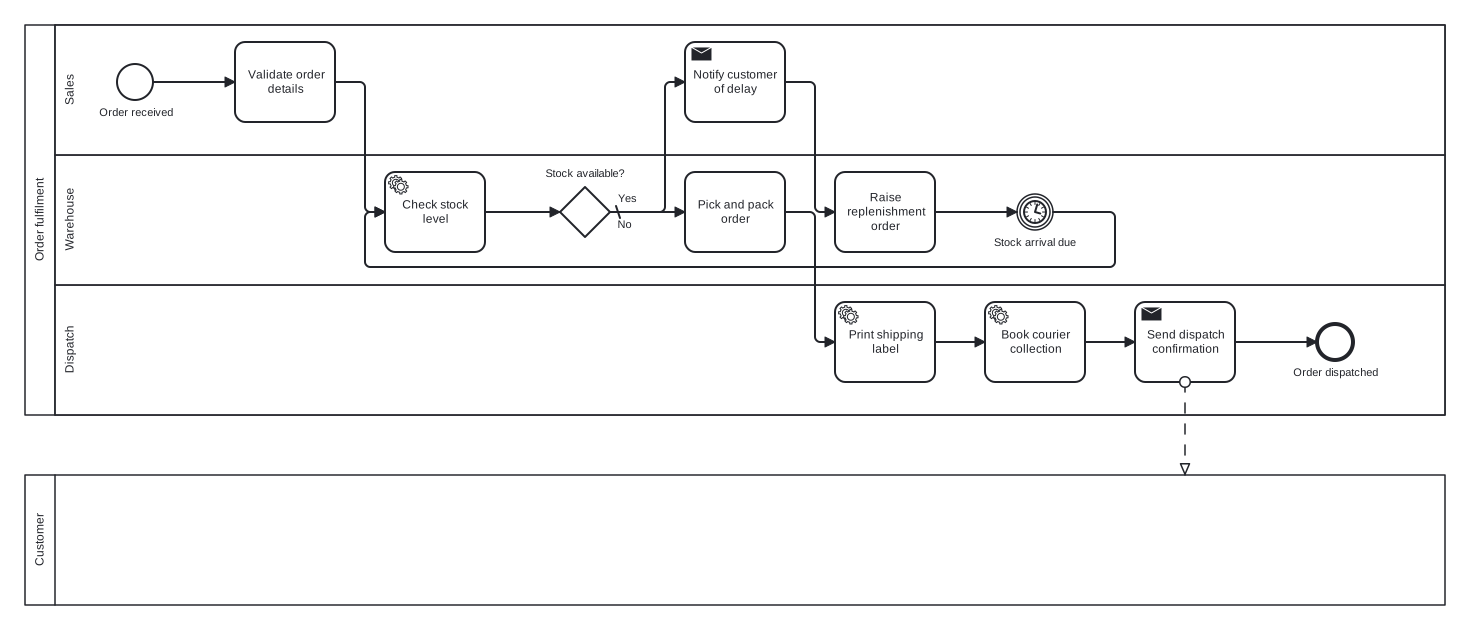
This example uses two pools: the fulfilment process itself, with Sales, Warehouse, and Dispatch lanes, and a collapsed Customer pool connected by a message flow. A stock gateway sends short orders around a replenishment loop with a timer event, so the wait for incoming stock is modelled explicitly rather than buried in a task. Notice that the customer is a black box: their internal steps are not this organisation's business to model.
Standard BPMN 2.0 interchange XML: opens in Camunda Modeler, Signavio, Bizagi, and any other compliant tool.
The process at a glance
How to read this diagram
A customer order enters the Sales lane at the "Order received" start event, where Sales validates the order details before the Warehouse checks the stock level. The exclusive gateway "Stock available?" is the pivot of the model. On the No branch, which is the default, Sales notifies the customer of the delay, the Warehouse raises a replenishment order, and the process waits at a timer event until stock arrives, then loops back to the stock check.
On the Yes branch the Warehouse picks and packs the order and hands it to the Dispatch lane, which prints the shipping label and books the courier collection. A send task then pushes the dispatch confirmation across the pool boundary to the Customer as a message flow, and the process closes at the "Order dispatched" end event. Every order therefore either ships or circles the replenishment loop until it can.
BPMN elements used
| Element | Count | In this diagram |
|---|---|---|
| Start event | 1 | Order received |
| End event | 1 | Order dispatched |
| Intermediate catch event | 1 | Stock arrival due |
| Task | 3 | Validate order details, Raise replenishment order, Pick and pack order |
| Service task | 3 | Check stock level, Print shipping label, Book courier collection |
| Send task | 2 | Notify customer of delay, Send dispatch confirmation |
| Exclusive gateway | 1 | Stock available? |
View the BPMN 2.0 XML for this diagram
<?xml version="1.0" encoding="UTF-8"?>
<bpmn2:definitions xmlns:bpmn2="http://www.omg.org/spec/BPMN/20100524/MODEL" xmlns:bpmndi="http://www.omg.org/spec/BPMN/20100524/DI" xmlns:dc="http://www.omg.org/spec/DD/20100524/DC" xmlns:di="http://www.omg.org/spec/DD/20100524/DI" xmlns:xsi="http://www.w3.org/2001/XMLSchema-instance" id="Definitions_1" targetNamespace="http://bpmn.io/schema/bpmn" exporter="swimdraft" exporterVersion="1.0">
  <bpmn2:collaboration id="Collaboration_1">
    <bpmn2:participant id="pool_ofl" name="Order fulfilment" processRef="Process_pool_ofl" />
    <bpmn2:participant id="pool_ofl_cust" name="Customer" processRef="Process_pool_ofl_cust" />
    <bpmn2:messageFlow id="mfofl1" sourceRef="t_ofl_confirm" targetRef="pool_ofl_cust" />
  </bpmn2:collaboration>
  <bpmn2:process id="Process_pool_ofl" isExecutable="false">
    <bpmn2:laneSet id="LaneSet_pool_ofl">
      <bpmn2:lane id="lane_ofl_sales" name="Sales">
        <bpmn2:flowNodeRef>start_ofl</bpmn2:flowNodeRef>
        <bpmn2:flowNodeRef>t_ofl_validate</bpmn2:flowNodeRef>
        <bpmn2:flowNodeRef>t_ofl_delay</bpmn2:flowNodeRef>
      </bpmn2:lane>
      <bpmn2:lane id="lane_ofl_wh" name="Warehouse">
        <bpmn2:flowNodeRef>t_ofl_stock</bpmn2:flowNodeRef>
        <bpmn2:flowNodeRef>g_ofl_stock</bpmn2:flowNodeRef>
        <bpmn2:flowNodeRef>t_ofl_replen</bpmn2:flowNodeRef>
        <bpmn2:flowNodeRef>ev_ofl_wait</bpmn2:flowNodeRef>
        <bpmn2:flowNodeRef>t_ofl_pick</bpmn2:flowNodeRef>
      </bpmn2:lane>
      <bpmn2:lane id="lane_ofl_disp" name="Dispatch">
        <bpmn2:flowNodeRef>t_ofl_label</bpmn2:flowNodeRef>
        <bpmn2:flowNodeRef>t_ofl_courier</bpmn2:flowNodeRef>
        <bpmn2:flowNodeRef>t_ofl_confirm</bpmn2:flowNodeRef>
        <bpmn2:flowNodeRef>end_ofl</bpmn2:flowNodeRef>
      </bpmn2:lane>
    </bpmn2:laneSet>
    <bpmn2:startEvent id="start_ofl" name="Order received">
      <bpmn2:outgoing>fofl1</bpmn2:outgoing>
    </bpmn2:startEvent>
    <bpmn2:task id="t_ofl_validate" name="Validate order details">
      <bpmn2:incoming>fofl1</bpmn2:incoming>
      <bpmn2:outgoing>fofl2</bpmn2:outgoing>
    </bpmn2:task>
    <bpmn2:serviceTask id="t_ofl_stock" name="Check stock level">
      <bpmn2:incoming>fofl2</bpmn2:incoming>
      <bpmn2:incoming>fofl8</bpmn2:incoming>
      <bpmn2:outgoing>fofl3</bpmn2:outgoing>
    </bpmn2:serviceTask>
    <bpmn2:exclusiveGateway id="g_ofl_stock" name="Stock available?" default="fofl5">
      <bpmn2:incoming>fofl3</bpmn2:incoming>
      <bpmn2:outgoing>fofl4</bpmn2:outgoing>
      <bpmn2:outgoing>fofl5</bpmn2:outgoing>
    </bpmn2:exclusiveGateway>
    <bpmn2:sendTask id="t_ofl_delay" name="Notify customer of delay">
      <bpmn2:incoming>fofl5</bpmn2:incoming>
      <bpmn2:outgoing>fofl6</bpmn2:outgoing>
    </bpmn2:sendTask>
    <bpmn2:task id="t_ofl_replen" name="Raise replenishment order">
      <bpmn2:incoming>fofl6</bpmn2:incoming>
      <bpmn2:outgoing>fofl7</bpmn2:outgoing>
    </bpmn2:task>
    <bpmn2:intermediateCatchEvent id="ev_ofl_wait" name="Stock arrival due">
      <bpmn2:incoming>fofl7</bpmn2:incoming>
      <bpmn2:outgoing>fofl8</bpmn2:outgoing>
      <bpmn2:timerEventDefinition id="ev_ofl_wait_def" />
    </bpmn2:intermediateCatchEvent>
    <bpmn2:task id="t_ofl_pick" name="Pick and pack order">
      <bpmn2:incoming>fofl4</bpmn2:incoming>
      <bpmn2:outgoing>fofl9</bpmn2:outgoing>
    </bpmn2:task>
    <bpmn2:serviceTask id="t_ofl_label" name="Print shipping label">
      <bpmn2:incoming>fofl9</bpmn2:incoming>
      <bpmn2:outgoing>fofl10</bpmn2:outgoing>
    </bpmn2:serviceTask>
    <bpmn2:serviceTask id="t_ofl_courier" name="Book courier collection">
      <bpmn2:incoming>fofl10</bpmn2:incoming>
      <bpmn2:outgoing>fofl11</bpmn2:outgoing>
    </bpmn2:serviceTask>
    <bpmn2:sendTask id="t_ofl_confirm" name="Send dispatch confirmation">
      <bpmn2:incoming>fofl11</bpmn2:incoming>
      <bpmn2:outgoing>fofl12</bpmn2:outgoing>
    </bpmn2:sendTask>
    <bpmn2:endEvent id="end_ofl" name="Order dispatched">
      <bpmn2:incoming>fofl12</bpmn2:incoming>
    </bpmn2:endEvent>
    <bpmn2:sequenceFlow id="fofl1" sourceRef="start_ofl" targetRef="t_ofl_validate" />
    <bpmn2:sequenceFlow id="fofl2" sourceRef="t_ofl_validate" targetRef="t_ofl_stock" />
    <bpmn2:sequenceFlow id="fofl3" sourceRef="t_ofl_stock" targetRef="g_ofl_stock" />
    <bpmn2:sequenceFlow id="fofl4" name="Yes" sourceRef="g_ofl_stock" targetRef="t_ofl_pick">
      <bpmn2:conditionExpression xsi:type="bpmn2:tFormalExpression">Yes</bpmn2:conditionExpression>
    </bpmn2:sequenceFlow>
    <bpmn2:sequenceFlow id="fofl5" name="No" sourceRef="g_ofl_stock" targetRef="t_ofl_delay" />
    <bpmn2:sequenceFlow id="fofl6" sourceRef="t_ofl_delay" targetRef="t_ofl_replen" />
    <bpmn2:sequenceFlow id="fofl7" sourceRef="t_ofl_replen" targetRef="ev_ofl_wait" />
    <bpmn2:sequenceFlow id="fofl8" sourceRef="ev_ofl_wait" targetRef="t_ofl_stock" />
    <bpmn2:sequenceFlow id="fofl9" sourceRef="t_ofl_pick" targetRef="t_ofl_label" />
    <bpmn2:sequenceFlow id="fofl10" sourceRef="t_ofl_label" targetRef="t_ofl_courier" />
    <bpmn2:sequenceFlow id="fofl11" sourceRef="t_ofl_courier" targetRef="t_ofl_confirm" />
    <bpmn2:sequenceFlow id="fofl12" sourceRef="t_ofl_confirm" targetRef="end_ofl" />
  </bpmn2:process>
  <bpmn2:process id="Process_pool_ofl_cust" isExecutable="false">
  </bpmn2:process>
  <bpmndi:BPMNDiagram id="BPMNDiagram_1">
    <bpmndi:BPMNPlane id="BPMNPlane_1" bpmnElement="Collaboration_1">
      <bpmndi:BPMNShape id="pool_ofl_di" bpmnElement="pool_ofl" isHorizontal="true">
        <dc:Bounds x="20" y="20" width="1420" height="390" />
      </bpmndi:BPMNShape>
      <bpmndi:BPMNShape id="lane_ofl_sales_di" bpmnElement="lane_ofl_sales" isHorizontal="true">
        <dc:Bounds x="50" y="20" width="1390" height="130" />
      </bpmndi:BPMNShape>
      <bpmndi:BPMNShape id="lane_ofl_wh_di" bpmnElement="lane_ofl_wh" isHorizontal="true">
        <dc:Bounds x="50" y="150" width="1390" height="130" />
      </bpmndi:BPMNShape>
      <bpmndi:BPMNShape id="lane_ofl_disp_di" bpmnElement="lane_ofl_disp" isHorizontal="true">
        <dc:Bounds x="50" y="280" width="1390" height="130" />
      </bpmndi:BPMNShape>
      <bpmndi:BPMNShape id="pool_ofl_cust_di" bpmnElement="pool_ofl_cust" isHorizontal="true">
        <dc:Bounds x="20" y="470" width="1420" height="130" />
      </bpmndi:BPMNShape>
      <bpmndi:BPMNShape id="start_ofl_di" bpmnElement="start_ofl">
        <dc:Bounds x="112" y="59" width="36" height="36" />
        <bpmndi:BPMNLabel><dc:Bounds x="93" y="101" width="75" height="14" /></bpmndi:BPMNLabel>
      </bpmndi:BPMNShape>
      <bpmndi:BPMNShape id="t_ofl_validate_di" bpmnElement="t_ofl_validate">
        <dc:Bounds x="230" y="37" width="100" height="80" />
      </bpmndi:BPMNShape>
      <bpmndi:BPMNShape id="t_ofl_stock_di" bpmnElement="t_ofl_stock">
        <dc:Bounds x="380" y="167" width="100" height="80" />
      </bpmndi:BPMNShape>
      <bpmndi:BPMNShape id="g_ofl_stock_di" bpmnElement="g_ofl_stock">
        <dc:Bounds x="555" y="182" width="50" height="50" />
        <bpmndi:BPMNLabel><dc:Bounds x="539" y="162" width="83" height="14" /></bpmndi:BPMNLabel>
      </bpmndi:BPMNShape>
      <bpmndi:BPMNShape id="t_ofl_delay_di" bpmnElement="t_ofl_delay">
        <dc:Bounds x="680" y="37" width="100" height="80" />
      </bpmndi:BPMNShape>
      <bpmndi:BPMNShape id="t_ofl_replen_di" bpmnElement="t_ofl_replen">
        <dc:Bounds x="830" y="167" width="100" height="80" />
      </bpmndi:BPMNShape>
      <bpmndi:BPMNShape id="ev_ofl_wait_di" bpmnElement="ev_ofl_wait">
        <dc:Bounds x="1012" y="189" width="36" height="36" />
        <bpmndi:BPMNLabel><dc:Bounds x="988" y="231" width="84" height="14" /></bpmndi:BPMNLabel>
      </bpmndi:BPMNShape>
      <bpmndi:BPMNShape id="t_ofl_pick_di" bpmnElement="t_ofl_pick">
        <dc:Bounds x="680" y="167" width="100" height="80" />
      </bpmndi:BPMNShape>
      <bpmndi:BPMNShape id="t_ofl_label_di" bpmnElement="t_ofl_label">
        <dc:Bounds x="830" y="297" width="100" height="80" />
      </bpmndi:BPMNShape>
      <bpmndi:BPMNShape id="t_ofl_courier_di" bpmnElement="t_ofl_courier">
        <dc:Bounds x="980" y="297" width="100" height="80" />
      </bpmndi:BPMNShape>
      <bpmndi:BPMNShape id="t_ofl_confirm_di" bpmnElement="t_ofl_confirm">
        <dc:Bounds x="1130" y="297" width="100" height="80" />
      </bpmndi:BPMNShape>
      <bpmndi:BPMNShape id="end_ofl_di" bpmnElement="end_ofl">
        <dc:Bounds x="1312" y="319" width="36" height="36" />
        <bpmndi:BPMNLabel><dc:Bounds x="1287" y="361" width="87" height="14" /></bpmndi:BPMNLabel>
      </bpmndi:BPMNShape>
      <bpmndi:BPMNEdge id="fofl1_di" bpmnElement="fofl1">
        <di:waypoint x="148" y="77" />
        <di:waypoint x="230" y="77" />
      </bpmndi:BPMNEdge>
      <bpmndi:BPMNEdge id="fofl2_di" bpmnElement="fofl2">
        <di:waypoint x="330" y="77" />
        <di:waypoint x="360" y="77" />
        <di:waypoint x="360" y="207" />
        <di:waypoint x="380" y="207" />
      </bpmndi:BPMNEdge>
      <bpmndi:BPMNEdge id="fofl3_di" bpmnElement="fofl3">
        <di:waypoint x="480" y="207" />
        <di:waypoint x="555" y="207" />
      </bpmndi:BPMNEdge>
      <bpmndi:BPMNEdge id="fofl4_di" bpmnElement="fofl4">
        <di:waypoint x="605" y="207" />
        <di:waypoint x="680" y="207" />
        <bpmndi:BPMNLabel><dc:Bounds x="611" y="187" width="21" height="14" /></bpmndi:BPMNLabel>
      </bpmndi:BPMNEdge>
      <bpmndi:BPMNEdge id="fofl5_di" bpmnElement="fofl5">
        <di:waypoint x="605" y="207" />
        <di:waypoint x="660" y="207" />
        <di:waypoint x="660" y="77" />
        <di:waypoint x="680" y="77" />
        <bpmndi:BPMNLabel><dc:Bounds x="611" y="213" width="17" height="14" /></bpmndi:BPMNLabel>
      </bpmndi:BPMNEdge>
      <bpmndi:BPMNEdge id="fofl6_di" bpmnElement="fofl6">
        <di:waypoint x="780" y="77" />
        <di:waypoint x="810" y="77" />
        <di:waypoint x="810" y="207" />
        <di:waypoint x="830" y="207" />
      </bpmndi:BPMNEdge>
      <bpmndi:BPMNEdge id="fofl7_di" bpmnElement="fofl7">
        <di:waypoint x="930" y="207" />
        <di:waypoint x="1012" y="207" />
      </bpmndi:BPMNEdge>
      <bpmndi:BPMNEdge id="fofl8_di" bpmnElement="fofl8">
        <di:waypoint x="1048" y="207" />
        <di:waypoint x="1110" y="207" />
        <di:waypoint x="1110" y="262" />
        <di:waypoint x="360" y="262" />
        <di:waypoint x="360" y="207" />
        <di:waypoint x="380" y="207" />
      </bpmndi:BPMNEdge>
      <bpmndi:BPMNEdge id="fofl9_di" bpmnElement="fofl9">
        <di:waypoint x="780" y="207" />
        <di:waypoint x="810" y="207" />
        <di:waypoint x="810" y="337" />
        <di:waypoint x="830" y="337" />
      </bpmndi:BPMNEdge>
      <bpmndi:BPMNEdge id="fofl10_di" bpmnElement="fofl10">
        <di:waypoint x="930" y="337" />
        <di:waypoint x="980" y="337" />
      </bpmndi:BPMNEdge>
      <bpmndi:BPMNEdge id="fofl11_di" bpmnElement="fofl11">
        <di:waypoint x="1080" y="337" />
        <di:waypoint x="1130" y="337" />
      </bpmndi:BPMNEdge>
      <bpmndi:BPMNEdge id="fofl12_di" bpmnElement="fofl12">
        <di:waypoint x="1230" y="337" />
        <di:waypoint x="1312" y="337" />
      </bpmndi:BPMNEdge>
      <bpmndi:BPMNEdge id="mfofl1_di" bpmnElement="mfofl1">
        <di:waypoint x="1180" y="377" />
        <di:waypoint x="1180" y="440" />
        <di:waypoint x="1180" y="470" />
      </bpmndi:BPMNEdge>
    </bpmndi:BPMNPlane>
  </bpmndi:BPMNDiagram>
</bpmn2:definitions>
Frequently asked questions
Why is the customer a separate empty pool rather than a lane?
Lanes share one process instance and one controller, but the customer runs their own process you cannot see or control. BPMN represents that as a separate pool, and since their internals are unknown the pool stays collapsed as a black box. The message flow to it shows the one interaction that matters: the dispatch confirmation.
Why use a timer event in the backorder loop instead of a task?
Waiting is not work. A task implies someone is actively doing something, while an intermediate timer catch event states the process is paused until a deadline or duration elapses. Modelling the wait as an event keeps the diagram honest about where time goes, which is usually the first question anyone asks about fulfilment delays.
How would I extend this model for split shipments?
Replace the single "Stock available?" exclusive gateway with an inclusive gateway asking which lines can ship now. One branch picks and dispatches the available lines while another runs the replenishment loop for the rest, and an inclusive merge joins them. Keep the branch conditions labelled so the split logic stays readable.
Related BPMN examples
Goods receipt
A goods receipt process as a BPMN 2.0 diagram: PO matching, condition inspection, discrepancy handling, and GRN posting. See the swimlanes and download the free .bpmn file.
Shipping and dispatch
A shipping and dispatch process as a BPMN 2.0 diagram: parallel packing and paperwork, customs branch, and departure. View the swimlanes and download the .bpmn free.
Inventory replenishment
An inventory replenishment process as a BPMN 2.0 diagram: reorder trigger, policy rules, approval branch, and supplier confirmation. Free .bpmn file download included.
Quality inspection
A quality inspection process as a BPMN 2.0 diagram: sampling, testing, tolerance decision, and a rework loop back through inspection. Download the .bpmn file free.
Generate your own version of this diagram
Describe how the process works in your organisation: plain English, meeting notes, a transcript, or a spreadsheet. Swimdraft turns it into a spec-validated BPMN 2.0 diagram you can edit in the browser and export as .bpmn, SVG, or PNG.
Start freeNo credit card required