
Shipping and dispatch BPMN example
Shipping and dispatch turns a ready order into a moving consignment: route planning, packing, paperwork, loading, and the customs question for cross border freight. Logistics teams map it because packing and documentation run in parallel and the truck leaves on whichever finishes last. When the two strands are not modelled explicitly, delays get blamed on the warehouse when the real bottleneck is a missing commercial invoice.
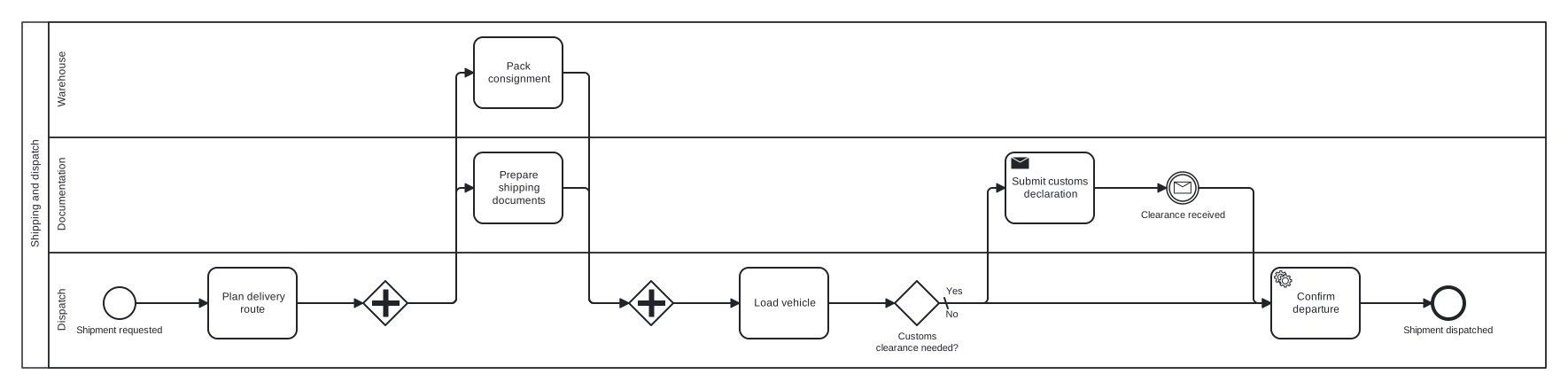
This model is a single pool with Warehouse, Documentation, and Dispatch lanes. A parallel gateway forks packing and paperwork so the diagram shows both happening at once, and a joining parallel gateway holds the flow until both are done. A second, exclusive gateway handles customs: only shipments that need clearance wait at a message event for the release, a good illustration of keeping the domestic happy path short.
Standard BPMN 2.0 interchange XML: opens in Camunda Modeler, Signavio, Bizagi, and any other compliant tool.
The process at a glance
How to read this diagram
From the moment a shipment is requested, the Dispatch lane plans the delivery route. An unlabelled parallel gateway then forks the flow: the Warehouse lane packs the consignment while the Documentation lane prepares the shipping documents, and neither branch carries a condition because both always run. The joining parallel gateway waits for both tokens before Dispatch loads the vehicle.
Loading complete, the exclusive gateway "Customs clearance needed?" asks the only conditional question in the process. On the Yes branch, Documentation submits the customs declaration and the flow pauses at a message catch event until clearance is received. The No branch, marked as the default, skips straight ahead. Both branches converge on confirming the departure in the Dispatch lane, and the process ends at "Shipment dispatched".
BPMN elements used
| Element | Count | In this diagram |
|---|---|---|
| Start event | 1 | Shipment requested |
| End event | 1 | Shipment dispatched |
| Intermediate catch event | 1 | Clearance received |
| Task | 4 | Plan delivery route, Pack consignment, Prepare shipping documents, Load vehicle |
| Service task | 1 | Confirm departure |
| Send task | 1 | Submit customs declaration |
| Exclusive gateway | 1 | Customs clearance needed? |
| Parallel gateway | 2 |
View the BPMN 2.0 XML for this diagram
<?xml version="1.0" encoding="UTF-8"?>
<bpmn2:definitions xmlns:bpmn2="http://www.omg.org/spec/BPMN/20100524/MODEL" xmlns:bpmndi="http://www.omg.org/spec/BPMN/20100524/DI" xmlns:dc="http://www.omg.org/spec/DD/20100524/DC" xmlns:di="http://www.omg.org/spec/DD/20100524/DI" xmlns:xsi="http://www.w3.org/2001/XMLSchema-instance" id="Definitions_1" targetNamespace="http://bpmn.io/schema/bpmn" exporter="swimdraft" exporterVersion="1.0">
  <bpmn2:collaboration id="Collaboration_1">
    <bpmn2:participant id="pool_shp" name="Shipping and dispatch" processRef="Process_pool_shp" />
  </bpmn2:collaboration>
  <bpmn2:process id="Process_pool_shp" isExecutable="false">
    <bpmn2:laneSet id="LaneSet_pool_shp">
      <bpmn2:lane id="lane_shp_wh" name="Warehouse">
        <bpmn2:flowNodeRef>t_shp_pack</bpmn2:flowNodeRef>
      </bpmn2:lane>
      <bpmn2:lane id="lane_shp_doc" name="Documentation">
        <bpmn2:flowNodeRef>t_shp_docs</bpmn2:flowNodeRef>
        <bpmn2:flowNodeRef>t_shp_decl</bpmn2:flowNodeRef>
        <bpmn2:flowNodeRef>ev_shp_clear</bpmn2:flowNodeRef>
      </bpmn2:lane>
      <bpmn2:lane id="lane_shp_disp" name="Dispatch">
        <bpmn2:flowNodeRef>start_shp</bpmn2:flowNodeRef>
        <bpmn2:flowNodeRef>t_shp_route</bpmn2:flowNodeRef>
        <bpmn2:flowNodeRef>g_shp_fork</bpmn2:flowNodeRef>
        <bpmn2:flowNodeRef>g_shp_join</bpmn2:flowNodeRef>
        <bpmn2:flowNodeRef>t_shp_load</bpmn2:flowNodeRef>
        <bpmn2:flowNodeRef>g_shp_cust</bpmn2:flowNodeRef>
        <bpmn2:flowNodeRef>t_shp_depart</bpmn2:flowNodeRef>
        <bpmn2:flowNodeRef>end_shp</bpmn2:flowNodeRef>
      </bpmn2:lane>
    </bpmn2:laneSet>
    <bpmn2:startEvent id="start_shp" name="Shipment requested">
      <bpmn2:outgoing>fshp1</bpmn2:outgoing>
    </bpmn2:startEvent>
    <bpmn2:task id="t_shp_route" name="Plan delivery route">
      <bpmn2:incoming>fshp1</bpmn2:incoming>
      <bpmn2:outgoing>fshp2</bpmn2:outgoing>
    </bpmn2:task>
    <bpmn2:parallelGateway id="g_shp_fork">
      <bpmn2:incoming>fshp2</bpmn2:incoming>
      <bpmn2:outgoing>fshp3</bpmn2:outgoing>
      <bpmn2:outgoing>fshp4</bpmn2:outgoing>
    </bpmn2:parallelGateway>
    <bpmn2:task id="t_shp_pack" name="Pack consignment">
      <bpmn2:incoming>fshp3</bpmn2:incoming>
      <bpmn2:outgoing>fshp5</bpmn2:outgoing>
    </bpmn2:task>
    <bpmn2:task id="t_shp_docs" name="Prepare shipping documents">
      <bpmn2:incoming>fshp4</bpmn2:incoming>
      <bpmn2:outgoing>fshp6</bpmn2:outgoing>
    </bpmn2:task>
    <bpmn2:parallelGateway id="g_shp_join">
      <bpmn2:incoming>fshp5</bpmn2:incoming>
      <bpmn2:incoming>fshp6</bpmn2:incoming>
      <bpmn2:outgoing>fshp7</bpmn2:outgoing>
    </bpmn2:parallelGateway>
    <bpmn2:task id="t_shp_load" name="Load vehicle">
      <bpmn2:incoming>fshp7</bpmn2:incoming>
      <bpmn2:outgoing>fshp8</bpmn2:outgoing>
    </bpmn2:task>
    <bpmn2:exclusiveGateway id="g_shp_cust" name="Customs clearance needed?" default="fshp10">
      <bpmn2:incoming>fshp8</bpmn2:incoming>
      <bpmn2:outgoing>fshp9</bpmn2:outgoing>
      <bpmn2:outgoing>fshp10</bpmn2:outgoing>
    </bpmn2:exclusiveGateway>
    <bpmn2:sendTask id="t_shp_decl" name="Submit customs declaration">
      <bpmn2:incoming>fshp9</bpmn2:incoming>
      <bpmn2:outgoing>fshp11</bpmn2:outgoing>
    </bpmn2:sendTask>
    <bpmn2:intermediateCatchEvent id="ev_shp_clear" name="Clearance received">
      <bpmn2:incoming>fshp11</bpmn2:incoming>
      <bpmn2:outgoing>fshp12</bpmn2:outgoing>
      <bpmn2:messageEventDefinition id="ev_shp_clear_def" />
    </bpmn2:intermediateCatchEvent>
    <bpmn2:serviceTask id="t_shp_depart" name="Confirm departure">
      <bpmn2:incoming>fshp10</bpmn2:incoming>
      <bpmn2:incoming>fshp12</bpmn2:incoming>
      <bpmn2:outgoing>fshp13</bpmn2:outgoing>
    </bpmn2:serviceTask>
    <bpmn2:endEvent id="end_shp" name="Shipment dispatched">
      <bpmn2:incoming>fshp13</bpmn2:incoming>
    </bpmn2:endEvent>
    <bpmn2:sequenceFlow id="fshp1" sourceRef="start_shp" targetRef="t_shp_route" />
    <bpmn2:sequenceFlow id="fshp2" sourceRef="t_shp_route" targetRef="g_shp_fork" />
    <bpmn2:sequenceFlow id="fshp3" sourceRef="g_shp_fork" targetRef="t_shp_pack" />
    <bpmn2:sequenceFlow id="fshp4" sourceRef="g_shp_fork" targetRef="t_shp_docs" />
    <bpmn2:sequenceFlow id="fshp5" sourceRef="t_shp_pack" targetRef="g_shp_join" />
    <bpmn2:sequenceFlow id="fshp6" sourceRef="t_shp_docs" targetRef="g_shp_join" />
    <bpmn2:sequenceFlow id="fshp7" sourceRef="g_shp_join" targetRef="t_shp_load" />
    <bpmn2:sequenceFlow id="fshp8" sourceRef="t_shp_load" targetRef="g_shp_cust" />
    <bpmn2:sequenceFlow id="fshp9" name="Yes" sourceRef="g_shp_cust" targetRef="t_shp_decl">
      <bpmn2:conditionExpression xsi:type="bpmn2:tFormalExpression">Yes</bpmn2:conditionExpression>
    </bpmn2:sequenceFlow>
    <bpmn2:sequenceFlow id="fshp10" name="No" sourceRef="g_shp_cust" targetRef="t_shp_depart" />
    <bpmn2:sequenceFlow id="fshp11" sourceRef="t_shp_decl" targetRef="ev_shp_clear" />
    <bpmn2:sequenceFlow id="fshp12" sourceRef="ev_shp_clear" targetRef="t_shp_depart" />
    <bpmn2:sequenceFlow id="fshp13" sourceRef="t_shp_depart" targetRef="end_shp" />
  </bpmn2:process>
  <bpmndi:BPMNDiagram id="BPMNDiagram_1">
    <bpmndi:BPMNPlane id="BPMNPlane_1" bpmnElement="Collaboration_1">
      <bpmndi:BPMNShape id="pool_shp_di" bpmnElement="pool_shp" isHorizontal="true">
        <dc:Bounds x="20" y="20" width="1720" height="390" />
      </bpmndi:BPMNShape>
      <bpmndi:BPMNShape id="lane_shp_wh_di" bpmnElement="lane_shp_wh" isHorizontal="true">
        <dc:Bounds x="50" y="20" width="1690" height="130" />
      </bpmndi:BPMNShape>
      <bpmndi:BPMNShape id="lane_shp_doc_di" bpmnElement="lane_shp_doc" isHorizontal="true">
        <dc:Bounds x="50" y="150" width="1690" height="130" />
      </bpmndi:BPMNShape>
      <bpmndi:BPMNShape id="lane_shp_disp_di" bpmnElement="lane_shp_disp" isHorizontal="true">
        <dc:Bounds x="50" y="280" width="1690" height="130" />
      </bpmndi:BPMNShape>
      <bpmndi:BPMNShape id="start_shp_di" bpmnElement="start_shp">
        <dc:Bounds x="112" y="319" width="36" height="36" />
        <bpmndi:BPMNLabel><dc:Bounds x="80" y="361" width="101" height="14" /></bpmndi:BPMNLabel>
      </bpmndi:BPMNShape>
      <bpmndi:BPMNShape id="t_shp_route_di" bpmnElement="t_shp_route">
        <dc:Bounds x="230" y="297" width="100" height="80" />
      </bpmndi:BPMNShape>
      <bpmndi:BPMNShape id="g_shp_fork_di" bpmnElement="g_shp_fork">
        <dc:Bounds x="405" y="312" width="50" height="50" />
      </bpmndi:BPMNShape>
      <bpmndi:BPMNShape id="t_shp_pack_di" bpmnElement="t_shp_pack">
        <dc:Bounds x="530" y="37" width="100" height="80" />
      </bpmndi:BPMNShape>
      <bpmndi:BPMNShape id="t_shp_docs_di" bpmnElement="t_shp_docs">
        <dc:Bounds x="530" y="167" width="100" height="80" />
      </bpmndi:BPMNShape>
      <bpmndi:BPMNShape id="g_shp_join_di" bpmnElement="g_shp_join">
        <dc:Bounds x="705" y="312" width="50" height="50" />
      </bpmndi:BPMNShape>
      <bpmndi:BPMNShape id="t_shp_load_di" bpmnElement="t_shp_load">
        <dc:Bounds x="830" y="297" width="100" height="80" />
      </bpmndi:BPMNShape>
      <bpmndi:BPMNShape id="g_shp_cust_di" bpmnElement="g_shp_cust">
        <dc:Bounds x="1005" y="312" width="50" height="50" />
        <bpmndi:BPMNLabel><dc:Bounds x="982" y="368" width="97" height="28" /></bpmndi:BPMNLabel>
      </bpmndi:BPMNShape>
      <bpmndi:BPMNShape id="t_shp_decl_di" bpmnElement="t_shp_decl">
        <dc:Bounds x="1130" y="167" width="100" height="80" />
      </bpmndi:BPMNShape>
      <bpmndi:BPMNShape id="ev_shp_clear_di" bpmnElement="ev_shp_clear">
        <dc:Bounds x="1312" y="189" width="36" height="36" />
        <bpmndi:BPMNLabel><dc:Bounds x="1282" y="231" width="97" height="14" /></bpmndi:BPMNLabel>
      </bpmndi:BPMNShape>
      <bpmndi:BPMNShape id="t_shp_depart_di" bpmnElement="t_shp_depart">
        <dc:Bounds x="1430" y="297" width="100" height="80" />
      </bpmndi:BPMNShape>
      <bpmndi:BPMNShape id="end_shp_di" bpmnElement="end_shp">
        <dc:Bounds x="1612" y="319" width="36" height="36" />
        <bpmndi:BPMNLabel><dc:Bounds x="1578" y="361" width="105" height="14" /></bpmndi:BPMNLabel>
      </bpmndi:BPMNShape>
      <bpmndi:BPMNEdge id="fshp1_di" bpmnElement="fshp1">
        <di:waypoint x="148" y="337" />
        <di:waypoint x="230" y="337" />
      </bpmndi:BPMNEdge>
      <bpmndi:BPMNEdge id="fshp2_di" bpmnElement="fshp2">
        <di:waypoint x="330" y="337" />
        <di:waypoint x="405" y="337" />
      </bpmndi:BPMNEdge>
      <bpmndi:BPMNEdge id="fshp3_di" bpmnElement="fshp3">
        <di:waypoint x="455" y="337" />
        <di:waypoint x="510" y="337" />
        <di:waypoint x="510" y="77" />
        <di:waypoint x="530" y="77" />
      </bpmndi:BPMNEdge>
      <bpmndi:BPMNEdge id="fshp4_di" bpmnElement="fshp4">
        <di:waypoint x="455" y="337" />
        <di:waypoint x="510" y="337" />
        <di:waypoint x="510" y="207" />
        <di:waypoint x="530" y="207" />
      </bpmndi:BPMNEdge>
      <bpmndi:BPMNEdge id="fshp5_di" bpmnElement="fshp5">
        <di:waypoint x="630" y="77" />
        <di:waypoint x="660" y="77" />
        <di:waypoint x="660" y="337" />
        <di:waypoint x="705" y="337" />
      </bpmndi:BPMNEdge>
      <bpmndi:BPMNEdge id="fshp6_di" bpmnElement="fshp6">
        <di:waypoint x="630" y="207" />
        <di:waypoint x="660" y="207" />
        <di:waypoint x="660" y="337" />
        <di:waypoint x="705" y="337" />
      </bpmndi:BPMNEdge>
      <bpmndi:BPMNEdge id="fshp7_di" bpmnElement="fshp7">
        <di:waypoint x="755" y="337" />
        <di:waypoint x="830" y="337" />
      </bpmndi:BPMNEdge>
      <bpmndi:BPMNEdge id="fshp8_di" bpmnElement="fshp8">
        <di:waypoint x="930" y="337" />
        <di:waypoint x="1005" y="337" />
      </bpmndi:BPMNEdge>
      <bpmndi:BPMNEdge id="fshp9_di" bpmnElement="fshp9">
        <di:waypoint x="1055" y="337" />
        <di:waypoint x="1110" y="337" />
        <di:waypoint x="1110" y="207" />
        <di:waypoint x="1130" y="207" />
        <bpmndi:BPMNLabel><dc:Bounds x="1061" y="317" width="21" height="14" /></bpmndi:BPMNLabel>
      </bpmndi:BPMNEdge>
      <bpmndi:BPMNEdge id="fshp10_di" bpmnElement="fshp10">
        <di:waypoint x="1055" y="337" />
        <di:waypoint x="1430" y="337" />
        <bpmndi:BPMNLabel><dc:Bounds x="1061" y="343" width="17" height="14" /></bpmndi:BPMNLabel>
      </bpmndi:BPMNEdge>
      <bpmndi:BPMNEdge id="fshp11_di" bpmnElement="fshp11">
        <di:waypoint x="1230" y="207" />
        <di:waypoint x="1312" y="207" />
      </bpmndi:BPMNEdge>
      <bpmndi:BPMNEdge id="fshp12_di" bpmnElement="fshp12">
        <di:waypoint x="1348" y="207" />
        <di:waypoint x="1410" y="207" />
        <di:waypoint x="1410" y="337" />
        <di:waypoint x="1430" y="337" />
      </bpmndi:BPMNEdge>
      <bpmndi:BPMNEdge id="fshp13_di" bpmnElement="fshp13">
        <di:waypoint x="1530" y="337" />
        <di:waypoint x="1612" y="337" />
      </bpmndi:BPMNEdge>
    </bpmndi:BPMNPlane>
  </bpmndi:BPMNDiagram>
</bpmn2:definitions>
Frequently asked questions
Why do the parallel gateway flows have no labels?
Labels on outgoing flows express conditions, and a parallel gateway is unconditional by definition: every outgoing branch always fires. The BPMN 2.0 spec therefore expects no conditions there, and adding labels would mislead readers into thinking a choice is being made. Only the exclusive customs gateway carries labelled branches in this model.
Should the carrier be its own pool with message flows?
If you need to show the interaction, yes: add a collapsed Carrier pool and a message flow from the booking task. This model keeps the carrier out of frame because the process being analysed is internal dispatch, and every extra pool costs reading effort. Add participants only when their messages change how your process behaves.
What happens if customs clearance never arrives?
As drawn, the token would wait at the message catch event indefinitely. To bound the wait, place an event based decision after the declaration: one path catches the clearance message, a parallel timer path escalates to a broker after a set period. Model the escalation explicitly so the diagram admits the failure mode exists.
Related BPMN examples
Order fulfilment
An order fulfilment process as a BPMN 2.0 diagram: stock check, backorder loop, picking, and dispatch confirmation. View the swimlanes and download the .bpmn file free.
Goods receipt
A goods receipt process as a BPMN 2.0 diagram: PO matching, condition inspection, discrepancy handling, and GRN posting. See the swimlanes and download the free .bpmn file.
Inventory replenishment
An inventory replenishment process as a BPMN 2.0 diagram: reorder trigger, policy rules, approval branch, and supplier confirmation. Free .bpmn file download included.
Quality inspection
A quality inspection process as a BPMN 2.0 diagram: sampling, testing, tolerance decision, and a rework loop back through inspection. Download the .bpmn file free.
Generate your own version of this diagram
Describe how the process works in your organisation: plain English, meeting notes, a transcript, or a spreadsheet. Swimdraft turns it into a spec-validated BPMN 2.0 diagram you can edit in the browser and export as .bpmn, SVG, or PNG.
Start freeNo credit card required