
Password reset BPMN example
Password reset is the highest volume request most service desks handle, and also a favourite social engineering target: an attacker who talks their way through a reset owns the account. Teams map the process to draw a hard line between the cheap self-service path and the careful manual path, and to prove to auditors that identity is verified before any credential changes hands. It goes wrong when the manual fallback is vaguer than the automated route it backs up.
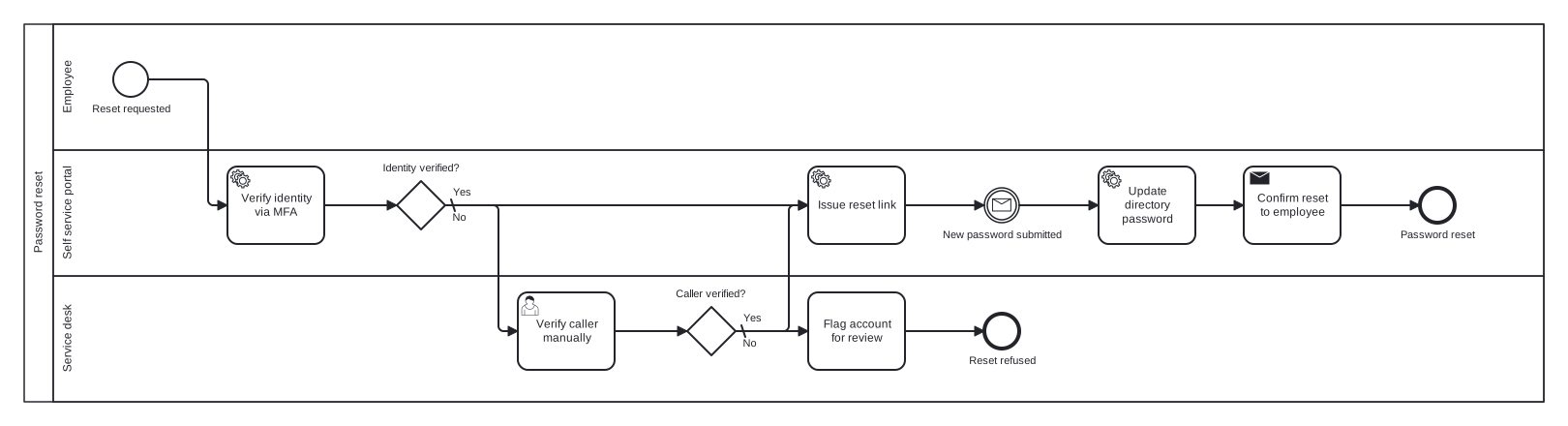
The model is one pool with three lanes: Employee, Self service portal, and Service desk. Two exclusive gateways cover automated and manual identity checks, and an intermediate message catch event models the wait for the employee to submit a new password. That event is the detail worth noticing: the process genuinely pauses for an external message, and modelling the pause as an event rather than a "wait for user" task keeps the BPMN semantics honest.
Standard BPMN 2.0 interchange XML: opens in Camunda Modeler, Signavio, Bizagi, and any other compliant tool.
The process at a glance
How to read this diagram
From the "Reset requested" start event in the Employee lane, the Self service portal verifies identity via MFA. The gateway "Identity verified?" issues a reset link on the Yes branch; its default No branch drops to the Service desk, where an agent verifies the caller manually against security questions. A second gateway, "Caller verified?", rejoins the happy path on Yes, while the default No branch flags the account for review and ends at "Reset refused".
Once the reset link is issued, the flow pauses at the message catch event "New password submitted" until the employee acts. The portal then updates the directory password, confirms the reset to the employee, and the process ends at "Password reset". Two end events split the outcomes cleanly: either the credential was changed for a verified person, or nobody was verified and the account is flagged, with no middle ground for a reader to misread.
BPMN elements used
| Element | Count | In this diagram |
|---|---|---|
| Start event | 1 | Reset requested |
| End event | 2 | Reset refused, Password reset |
| Intermediate catch event | 1 | New password submitted |
| Task | 1 | Flag account for review |
| User task | 1 | Verify caller manually |
| Service task | 3 | Verify identity via MFA, Issue reset link, Update directory password |
| Send task | 1 | Confirm reset to employee |
| Exclusive gateway | 2 | Identity verified?, Caller verified? |
View the BPMN 2.0 XML for this diagram
<?xml version="1.0" encoding="UTF-8"?>
<bpmn2:definitions xmlns:bpmn2="http://www.omg.org/spec/BPMN/20100524/MODEL" xmlns:bpmndi="http://www.omg.org/spec/BPMN/20100524/DI" xmlns:dc="http://www.omg.org/spec/DD/20100524/DC" xmlns:di="http://www.omg.org/spec/DD/20100524/DI" xmlns:xsi="http://www.w3.org/2001/XMLSchema-instance" id="Definitions_1" targetNamespace="http://bpmn.io/schema/bpmn" exporter="swimdraft" exporterVersion="1.0">
  <bpmn2:collaboration id="Collaboration_1">
    <bpmn2:participant id="pool_pr" name="Password reset" processRef="Process_pool_pr" />
  </bpmn2:collaboration>
  <bpmn2:process id="Process_pool_pr" isExecutable="false">
    <bpmn2:laneSet id="LaneSet_pool_pr">
      <bpmn2:lane id="lane_pr_emp" name="Employee">
        <bpmn2:flowNodeRef>start_pr</bpmn2:flowNodeRef>
      </bpmn2:lane>
      <bpmn2:lane id="lane_pr_portal" name="Self service portal">
        <bpmn2:flowNodeRef>t_pr_mfa</bpmn2:flowNodeRef>
        <bpmn2:flowNodeRef>g_pr_id</bpmn2:flowNodeRef>
        <bpmn2:flowNodeRef>t_pr_link</bpmn2:flowNodeRef>
        <bpmn2:flowNodeRef>ev_pr_new</bpmn2:flowNodeRef>
        <bpmn2:flowNodeRef>t_pr_update</bpmn2:flowNodeRef>
        <bpmn2:flowNodeRef>t_pr_confirm</bpmn2:flowNodeRef>
        <bpmn2:flowNodeRef>end_pr_done</bpmn2:flowNodeRef>
      </bpmn2:lane>
      <bpmn2:lane id="lane_pr_desk" name="Service desk">
        <bpmn2:flowNodeRef>t_pr_manual</bpmn2:flowNodeRef>
        <bpmn2:flowNodeRef>g_pr_caller</bpmn2:flowNodeRef>
        <bpmn2:flowNodeRef>t_pr_flag</bpmn2:flowNodeRef>
        <bpmn2:flowNodeRef>end_pr_ref</bpmn2:flowNodeRef>
      </bpmn2:lane>
    </bpmn2:laneSet>
    <bpmn2:startEvent id="start_pr" name="Reset requested">
      <bpmn2:outgoing>fpr1</bpmn2:outgoing>
    </bpmn2:startEvent>
    <bpmn2:serviceTask id="t_pr_mfa" name="Verify identity via MFA">
      <bpmn2:incoming>fpr1</bpmn2:incoming>
      <bpmn2:outgoing>fpr2</bpmn2:outgoing>
    </bpmn2:serviceTask>
    <bpmn2:exclusiveGateway id="g_pr_id" name="Identity verified?" default="fpr4">
      <bpmn2:incoming>fpr2</bpmn2:incoming>
      <bpmn2:outgoing>fpr3</bpmn2:outgoing>
      <bpmn2:outgoing>fpr4</bpmn2:outgoing>
    </bpmn2:exclusiveGateway>
    <bpmn2:userTask id="t_pr_manual" name="Verify caller manually">
      <bpmn2:incoming>fpr4</bpmn2:incoming>
      <bpmn2:outgoing>fpr5</bpmn2:outgoing>
    </bpmn2:userTask>
    <bpmn2:exclusiveGateway id="g_pr_caller" name="Caller verified?" default="fpr7">
      <bpmn2:incoming>fpr5</bpmn2:incoming>
      <bpmn2:outgoing>fpr6</bpmn2:outgoing>
      <bpmn2:outgoing>fpr7</bpmn2:outgoing>
    </bpmn2:exclusiveGateway>
    <bpmn2:task id="t_pr_flag" name="Flag account for review">
      <bpmn2:incoming>fpr7</bpmn2:incoming>
      <bpmn2:outgoing>fpr8</bpmn2:outgoing>
    </bpmn2:task>
    <bpmn2:endEvent id="end_pr_ref" name="Reset refused">
      <bpmn2:incoming>fpr8</bpmn2:incoming>
    </bpmn2:endEvent>
    <bpmn2:serviceTask id="t_pr_link" name="Issue reset link">
      <bpmn2:incoming>fpr3</bpmn2:incoming>
      <bpmn2:incoming>fpr6</bpmn2:incoming>
      <bpmn2:outgoing>fpr9</bpmn2:outgoing>
    </bpmn2:serviceTask>
    <bpmn2:intermediateCatchEvent id="ev_pr_new" name="New password submitted">
      <bpmn2:incoming>fpr9</bpmn2:incoming>
      <bpmn2:outgoing>fpr10</bpmn2:outgoing>
      <bpmn2:messageEventDefinition id="ev_pr_new_def" />
    </bpmn2:intermediateCatchEvent>
    <bpmn2:serviceTask id="t_pr_update" name="Update directory password">
      <bpmn2:incoming>fpr10</bpmn2:incoming>
      <bpmn2:outgoing>fpr11</bpmn2:outgoing>
    </bpmn2:serviceTask>
    <bpmn2:sendTask id="t_pr_confirm" name="Confirm reset to employee">
      <bpmn2:incoming>fpr11</bpmn2:incoming>
      <bpmn2:outgoing>fpr12</bpmn2:outgoing>
    </bpmn2:sendTask>
    <bpmn2:endEvent id="end_pr_done" name="Password reset">
      <bpmn2:incoming>fpr12</bpmn2:incoming>
    </bpmn2:endEvent>
    <bpmn2:sequenceFlow id="fpr1" sourceRef="start_pr" targetRef="t_pr_mfa" />
    <bpmn2:sequenceFlow id="fpr2" sourceRef="t_pr_mfa" targetRef="g_pr_id" />
    <bpmn2:sequenceFlow id="fpr3" name="Yes" sourceRef="g_pr_id" targetRef="t_pr_link">
      <bpmn2:conditionExpression xsi:type="bpmn2:tFormalExpression">Yes</bpmn2:conditionExpression>
    </bpmn2:sequenceFlow>
    <bpmn2:sequenceFlow id="fpr4" name="No" sourceRef="g_pr_id" targetRef="t_pr_manual" />
    <bpmn2:sequenceFlow id="fpr5" sourceRef="t_pr_manual" targetRef="g_pr_caller" />
    <bpmn2:sequenceFlow id="fpr6" name="Yes" sourceRef="g_pr_caller" targetRef="t_pr_link">
      <bpmn2:conditionExpression xsi:type="bpmn2:tFormalExpression">Yes</bpmn2:conditionExpression>
    </bpmn2:sequenceFlow>
    <bpmn2:sequenceFlow id="fpr7" name="No" sourceRef="g_pr_caller" targetRef="t_pr_flag" />
    <bpmn2:sequenceFlow id="fpr8" sourceRef="t_pr_flag" targetRef="end_pr_ref" />
    <bpmn2:sequenceFlow id="fpr9" sourceRef="t_pr_link" targetRef="ev_pr_new" />
    <bpmn2:sequenceFlow id="fpr10" sourceRef="ev_pr_new" targetRef="t_pr_update" />
    <bpmn2:sequenceFlow id="fpr11" sourceRef="t_pr_update" targetRef="t_pr_confirm" />
    <bpmn2:sequenceFlow id="fpr12" sourceRef="t_pr_confirm" targetRef="end_pr_done" />
  </bpmn2:process>
  <bpmndi:BPMNDiagram id="BPMNDiagram_1">
    <bpmndi:BPMNPlane id="BPMNPlane_1" bpmnElement="Collaboration_1">
      <bpmndi:BPMNShape id="pool_pr_di" bpmnElement="pool_pr" isHorizontal="true">
        <dc:Bounds x="20" y="20" width="1570" height="390" />
      </bpmndi:BPMNShape>
      <bpmndi:BPMNShape id="lane_pr_emp_di" bpmnElement="lane_pr_emp" isHorizontal="true">
        <dc:Bounds x="50" y="20" width="1540" height="130" />
      </bpmndi:BPMNShape>
      <bpmndi:BPMNShape id="lane_pr_portal_di" bpmnElement="lane_pr_portal" isHorizontal="true">
        <dc:Bounds x="50" y="150" width="1540" height="130" />
      </bpmndi:BPMNShape>
      <bpmndi:BPMNShape id="lane_pr_desk_di" bpmnElement="lane_pr_desk" isHorizontal="true">
        <dc:Bounds x="50" y="280" width="1540" height="130" />
      </bpmndi:BPMNShape>
      <bpmndi:BPMNShape id="start_pr_di" bpmnElement="start_pr">
        <dc:Bounds x="112" y="59" width="36" height="36" />
        <bpmndi:BPMNLabel><dc:Bounds x="89" y="101" width="83" height="14" /></bpmndi:BPMNLabel>
      </bpmndi:BPMNShape>
      <bpmndi:BPMNShape id="t_pr_mfa_di" bpmnElement="t_pr_mfa">
        <dc:Bounds x="230" y="167" width="100" height="80" />
      </bpmndi:BPMNShape>
      <bpmndi:BPMNShape id="g_pr_id_di" bpmnElement="g_pr_id">
        <dc:Bounds x="405" y="182" width="50" height="50" />
        <bpmndi:BPMNLabel><dc:Bounds x="389" y="162" width="83" height="14" /></bpmndi:BPMNLabel>
      </bpmndi:BPMNShape>
      <bpmndi:BPMNShape id="t_pr_manual_di" bpmnElement="t_pr_manual">
        <dc:Bounds x="530" y="297" width="100" height="80" />
      </bpmndi:BPMNShape>
      <bpmndi:BPMNShape id="g_pr_caller_di" bpmnElement="g_pr_caller">
        <dc:Bounds x="705" y="312" width="50" height="50" />
        <bpmndi:BPMNLabel><dc:Bounds x="692" y="292" width="76" height="14" /></bpmndi:BPMNLabel>
      </bpmndi:BPMNShape>
      <bpmndi:BPMNShape id="t_pr_flag_di" bpmnElement="t_pr_flag">
        <dc:Bounds x="830" y="297" width="100" height="80" />
      </bpmndi:BPMNShape>
      <bpmndi:BPMNShape id="end_pr_ref_di" bpmnElement="end_pr_ref">
        <dc:Bounds x="1012" y="319" width="36" height="36" />
        <bpmndi:BPMNLabel><dc:Bounds x="995" y="361" width="71" height="14" /></bpmndi:BPMNLabel>
      </bpmndi:BPMNShape>
      <bpmndi:BPMNShape id="t_pr_link_di" bpmnElement="t_pr_link">
        <dc:Bounds x="830" y="167" width="100" height="80" />
      </bpmndi:BPMNShape>
      <bpmndi:BPMNShape id="ev_pr_new_di" bpmnElement="ev_pr_new">
        <dc:Bounds x="1012" y="189" width="36" height="36" />
        <bpmndi:BPMNLabel><dc:Bounds x="968" y="231" width="125" height="14" /></bpmndi:BPMNLabel>
      </bpmndi:BPMNShape>
      <bpmndi:BPMNShape id="t_pr_update_di" bpmnElement="t_pr_update">
        <dc:Bounds x="1130" y="167" width="100" height="80" />
      </bpmndi:BPMNShape>
      <bpmndi:BPMNShape id="t_pr_confirm_di" bpmnElement="t_pr_confirm">
        <dc:Bounds x="1280" y="167" width="100" height="80" />
      </bpmndi:BPMNShape>
      <bpmndi:BPMNShape id="end_pr_done_di" bpmnElement="end_pr_done">
        <dc:Bounds x="1462" y="189" width="36" height="36" />
        <bpmndi:BPMNLabel><dc:Bounds x="1441" y="231" width="78" height="14" /></bpmndi:BPMNLabel>
      </bpmndi:BPMNShape>
      <bpmndi:BPMNEdge id="fpr1_di" bpmnElement="fpr1">
        <di:waypoint x="148" y="77" />
        <di:waypoint x="210" y="77" />
        <di:waypoint x="210" y="207" />
        <di:waypoint x="230" y="207" />
      </bpmndi:BPMNEdge>
      <bpmndi:BPMNEdge id="fpr2_di" bpmnElement="fpr2">
        <di:waypoint x="330" y="207" />
        <di:waypoint x="405" y="207" />
      </bpmndi:BPMNEdge>
      <bpmndi:BPMNEdge id="fpr3_di" bpmnElement="fpr3">
        <di:waypoint x="455" y="207" />
        <di:waypoint x="830" y="207" />
        <bpmndi:BPMNLabel><dc:Bounds x="461" y="187" width="21" height="14" /></bpmndi:BPMNLabel>
      </bpmndi:BPMNEdge>
      <bpmndi:BPMNEdge id="fpr4_di" bpmnElement="fpr4">
        <di:waypoint x="455" y="207" />
        <di:waypoint x="510" y="207" />
        <di:waypoint x="510" y="337" />
        <di:waypoint x="530" y="337" />
        <bpmndi:BPMNLabel><dc:Bounds x="461" y="213" width="17" height="14" /></bpmndi:BPMNLabel>
      </bpmndi:BPMNEdge>
      <bpmndi:BPMNEdge id="fpr5_di" bpmnElement="fpr5">
        <di:waypoint x="630" y="337" />
        <di:waypoint x="705" y="337" />
      </bpmndi:BPMNEdge>
      <bpmndi:BPMNEdge id="fpr6_di" bpmnElement="fpr6">
        <di:waypoint x="755" y="337" />
        <di:waypoint x="810" y="337" />
        <di:waypoint x="810" y="207" />
        <di:waypoint x="830" y="207" />
        <bpmndi:BPMNLabel><dc:Bounds x="761" y="317" width="21" height="14" /></bpmndi:BPMNLabel>
      </bpmndi:BPMNEdge>
      <bpmndi:BPMNEdge id="fpr7_di" bpmnElement="fpr7">
        <di:waypoint x="755" y="337" />
        <di:waypoint x="830" y="337" />
        <bpmndi:BPMNLabel><dc:Bounds x="761" y="343" width="17" height="14" /></bpmndi:BPMNLabel>
      </bpmndi:BPMNEdge>
      <bpmndi:BPMNEdge id="fpr8_di" bpmnElement="fpr8">
        <di:waypoint x="930" y="337" />
        <di:waypoint x="1012" y="337" />
      </bpmndi:BPMNEdge>
      <bpmndi:BPMNEdge id="fpr9_di" bpmnElement="fpr9">
        <di:waypoint x="930" y="207" />
        <di:waypoint x="1012" y="207" />
      </bpmndi:BPMNEdge>
      <bpmndi:BPMNEdge id="fpr10_di" bpmnElement="fpr10">
        <di:waypoint x="1048" y="207" />
        <di:waypoint x="1130" y="207" />
      </bpmndi:BPMNEdge>
      <bpmndi:BPMNEdge id="fpr11_di" bpmnElement="fpr11">
        <di:waypoint x="1230" y="207" />
        <di:waypoint x="1280" y="207" />
      </bpmndi:BPMNEdge>
      <bpmndi:BPMNEdge id="fpr12_di" bpmnElement="fpr12">
        <di:waypoint x="1380" y="207" />
        <di:waypoint x="1462" y="207" />
      </bpmndi:BPMNEdge>
    </bpmndi:BPMNPlane>
  </bpmndi:BPMNDiagram>
</bpmn2:definitions>
Frequently asked questions
Why is the wait for the new password an event rather than a task?
Nothing is being performed while the process waits, so a task would be semantically wrong. An intermediate message catch event states that the token halts until an external message arrives, in this case the submitted password. Tools that execute BPMN also treat events and tasks differently, so the distinction matters beyond style.
Where would a timeout belong if the reset link expires?
Attach a timer boundary event to the waiting state, or model a timer intermediate event racing the message. When the timer fires first, route the flow to an "Expire reset link" task and a separate end event such as "Link expired". This keeps abandoned resets from leaving tokens waiting forever in the diagram.
Does this diagram pass formal BPMN validation?
Yes. Swimdraft checks every example against 19 normative rules from the OMG BPMN 2.0.2 specification, with clause citations for each rule, before publishing. The exported .bpmn file is standard interchange XML, so you can confirm the result yourself by opening it in Camunda Modeler, Signavio, or Bizagi.
Related BPMN examples
Incident management
An ITIL-style incident management process as a BPMN 2.0 diagram: triage, major incident handling, escalation, and review. Download the .bpmn file free.
Change management
An IT change management process as a BPMN 2.0 swimlane diagram: risk assessment, CAB approval, implementation, and rollback. Free .bpmn download included.
User access request
A user access request process as a BPMN 2.0 diagram: manager approval, parallel provisioning, and an access register update. Download the .bpmn file free.
Software release
A software release process as a BPMN 2.0 diagram: build, regression testing, approval, parallel deployment, and rollback. Download the free .bpmn file.
Generate your own version of this diagram
Describe how the process works in your organisation: plain English, meeting notes, a transcript, or a spreadsheet. Swimdraft turns it into a spec-validated BPMN 2.0 diagram you can edit in the browser and export as .bpmn, SVG, or PNG.
Start freeNo credit card required