
Sales order processing BPMN example
Sales order processing takes a confirmed order and turns it into a dispatched parcel and an invoice. It is mapped so often because it crosses the boundary between commercial and operational teams: sales admin owns the order record, the warehouse owns the stock, and billing owns the money. The classic failure is an out of stock item that nobody communicates, leaving the customer to discover the delay themselves.
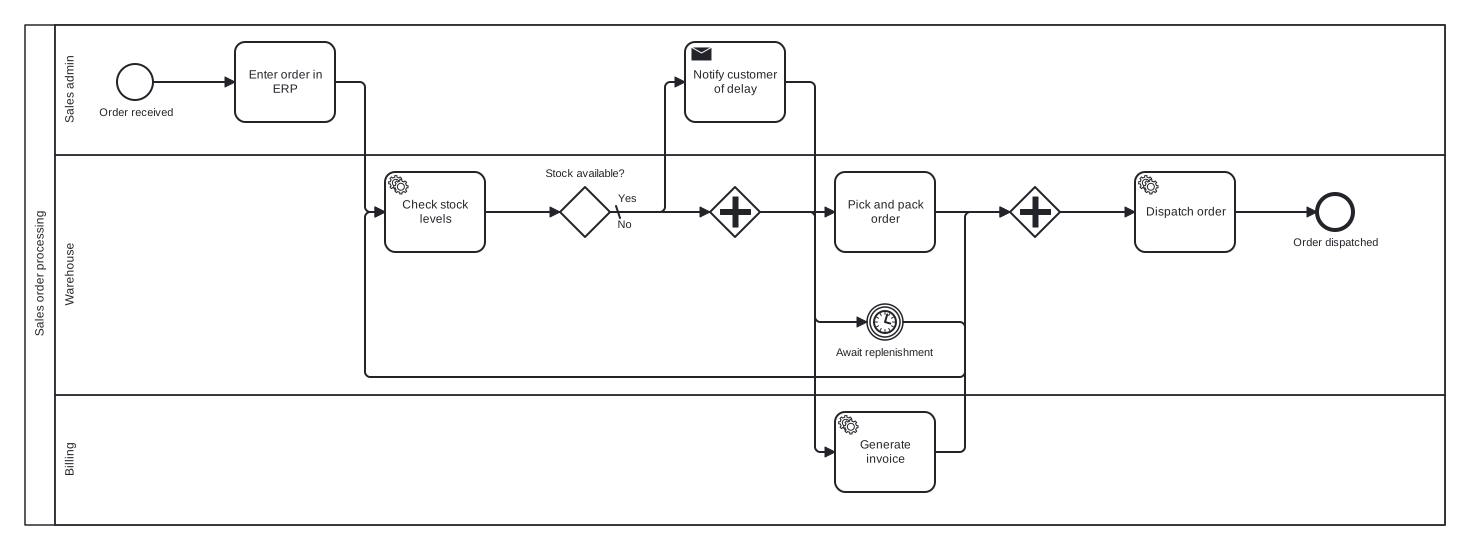
The model is a single pool with Sales admin, Warehouse, and Billing lanes. Its two structural features are worth a look: a timer event inside the back order loop makes the wait for replenishment explicit, and a parallel gateway lets picking and invoicing run at the same time, because neither depends on the other once stock is confirmed.
Standard BPMN 2.0 interchange XML: opens in Camunda Modeler, Signavio, Bizagi, and any other compliant tool.
The process at a glance
How to read this diagram
From the moment an order is received in the Sales admin lane, the flow is straightforward until stock is questioned. The order is entered into the ERP, then a service task in the Warehouse lane checks stock levels. The gateway "Stock available?" splits the flow: on the default No branch, Sales admin notifies the customer of the delay, an intermediate timer event waits out the replenishment period, and the flow loops back to the stock check.
When stock is available, the Yes branch reaches a parallel gateway that opens two concurrent paths: the Warehouse picks and packs the order while Billing generates the invoice. A joining parallel gateway waits for both to finish before the order is dispatched, and the process ends at "Order dispatched" in the Warehouse lane. The join matters: dispatching before the invoice exists would let a token race ahead of the paperwork.
BPMN elements used
| Element | Count | In this diagram |
|---|---|---|
| Start event | 1 | Order received |
| End event | 1 | Order dispatched |
| Intermediate catch event | 1 | Await replenishment |
| Task | 2 | Enter order in ERP, Pick and pack order |
| Service task | 3 | Check stock levels, Generate invoice, Dispatch order |
| Send task | 1 | Notify customer of delay |
| Exclusive gateway | 1 | Stock available? |
| Parallel gateway | 2 |
View the BPMN 2.0 XML for this diagram
<?xml version="1.0" encoding="UTF-8"?>
<bpmn2:definitions xmlns:bpmn2="http://www.omg.org/spec/BPMN/20100524/MODEL" xmlns:bpmndi="http://www.omg.org/spec/BPMN/20100524/DI" xmlns:dc="http://www.omg.org/spec/DD/20100524/DC" xmlns:di="http://www.omg.org/spec/DD/20100524/DI" xmlns:xsi="http://www.w3.org/2001/XMLSchema-instance" id="Definitions_1" targetNamespace="http://bpmn.io/schema/bpmn" exporter="swimdraft" exporterVersion="1.0">
  <bpmn2:collaboration id="Collaboration_1">
    <bpmn2:participant id="pool_sop" name="Sales order processing" processRef="Process_pool_sop" />
  </bpmn2:collaboration>
  <bpmn2:process id="Process_pool_sop" isExecutable="false">
    <bpmn2:laneSet id="LaneSet_pool_sop">
      <bpmn2:lane id="lane_sop_admin" name="Sales admin">
        <bpmn2:flowNodeRef>start_sop</bpmn2:flowNodeRef>
        <bpmn2:flowNodeRef>t_sop_enter</bpmn2:flowNodeRef>
        <bpmn2:flowNodeRef>t_sop_notify</bpmn2:flowNodeRef>
      </bpmn2:lane>
      <bpmn2:lane id="lane_sop_wh" name="Warehouse">
        <bpmn2:flowNodeRef>t_sop_check</bpmn2:flowNodeRef>
        <bpmn2:flowNodeRef>g_sop_stock</bpmn2:flowNodeRef>
        <bpmn2:flowNodeRef>ev_sop_wait</bpmn2:flowNodeRef>
        <bpmn2:flowNodeRef>g_sop_split</bpmn2:flowNodeRef>
        <bpmn2:flowNodeRef>t_sop_pick</bpmn2:flowNodeRef>
        <bpmn2:flowNodeRef>g_sop_join</bpmn2:flowNodeRef>
        <bpmn2:flowNodeRef>t_sop_dispatch</bpmn2:flowNodeRef>
        <bpmn2:flowNodeRef>end_sop_done</bpmn2:flowNodeRef>
      </bpmn2:lane>
      <bpmn2:lane id="lane_sop_bill" name="Billing">
        <bpmn2:flowNodeRef>t_sop_invoice</bpmn2:flowNodeRef>
      </bpmn2:lane>
    </bpmn2:laneSet>
    <bpmn2:startEvent id="start_sop" name="Order received">
      <bpmn2:outgoing>fsop1</bpmn2:outgoing>
    </bpmn2:startEvent>
    <bpmn2:task id="t_sop_enter" name="Enter order in ERP">
      <bpmn2:incoming>fsop1</bpmn2:incoming>
      <bpmn2:outgoing>fsop2</bpmn2:outgoing>
    </bpmn2:task>
    <bpmn2:serviceTask id="t_sop_check" name="Check stock levels">
      <bpmn2:incoming>fsop2</bpmn2:incoming>
      <bpmn2:incoming>fsop7</bpmn2:incoming>
      <bpmn2:outgoing>fsop3</bpmn2:outgoing>
    </bpmn2:serviceTask>
    <bpmn2:exclusiveGateway id="g_sop_stock" name="Stock available?" default="fsop5">
      <bpmn2:incoming>fsop3</bpmn2:incoming>
      <bpmn2:outgoing>fsop4</bpmn2:outgoing>
      <bpmn2:outgoing>fsop5</bpmn2:outgoing>
    </bpmn2:exclusiveGateway>
    <bpmn2:sendTask id="t_sop_notify" name="Notify customer of delay">
      <bpmn2:incoming>fsop5</bpmn2:incoming>
      <bpmn2:outgoing>fsop6</bpmn2:outgoing>
    </bpmn2:sendTask>
    <bpmn2:intermediateCatchEvent id="ev_sop_wait" name="Await replenishment">
      <bpmn2:incoming>fsop6</bpmn2:incoming>
      <bpmn2:outgoing>fsop7</bpmn2:outgoing>
      <bpmn2:timerEventDefinition id="ev_sop_wait_def" />
    </bpmn2:intermediateCatchEvent>
    <bpmn2:parallelGateway id="g_sop_split">
      <bpmn2:incoming>fsop4</bpmn2:incoming>
      <bpmn2:outgoing>fsop8</bpmn2:outgoing>
      <bpmn2:outgoing>fsop9</bpmn2:outgoing>
    </bpmn2:parallelGateway>
    <bpmn2:task id="t_sop_pick" name="Pick and pack order">
      <bpmn2:incoming>fsop8</bpmn2:incoming>
      <bpmn2:outgoing>fsop10</bpmn2:outgoing>
    </bpmn2:task>
    <bpmn2:serviceTask id="t_sop_invoice" name="Generate invoice">
      <bpmn2:incoming>fsop9</bpmn2:incoming>
      <bpmn2:outgoing>fsop11</bpmn2:outgoing>
    </bpmn2:serviceTask>
    <bpmn2:parallelGateway id="g_sop_join">
      <bpmn2:incoming>fsop10</bpmn2:incoming>
      <bpmn2:incoming>fsop11</bpmn2:incoming>
      <bpmn2:outgoing>fsop12</bpmn2:outgoing>
    </bpmn2:parallelGateway>
    <bpmn2:serviceTask id="t_sop_dispatch" name="Dispatch order">
      <bpmn2:incoming>fsop12</bpmn2:incoming>
      <bpmn2:outgoing>fsop13</bpmn2:outgoing>
    </bpmn2:serviceTask>
    <bpmn2:endEvent id="end_sop_done" name="Order dispatched">
      <bpmn2:incoming>fsop13</bpmn2:incoming>
    </bpmn2:endEvent>
    <bpmn2:sequenceFlow id="fsop1" sourceRef="start_sop" targetRef="t_sop_enter" />
    <bpmn2:sequenceFlow id="fsop2" sourceRef="t_sop_enter" targetRef="t_sop_check" />
    <bpmn2:sequenceFlow id="fsop3" sourceRef="t_sop_check" targetRef="g_sop_stock" />
    <bpmn2:sequenceFlow id="fsop4" name="Yes" sourceRef="g_sop_stock" targetRef="g_sop_split">
      <bpmn2:conditionExpression xsi:type="bpmn2:tFormalExpression">Yes</bpmn2:conditionExpression>
    </bpmn2:sequenceFlow>
    <bpmn2:sequenceFlow id="fsop5" name="No" sourceRef="g_sop_stock" targetRef="t_sop_notify" />
    <bpmn2:sequenceFlow id="fsop6" sourceRef="t_sop_notify" targetRef="ev_sop_wait" />
    <bpmn2:sequenceFlow id="fsop7" sourceRef="ev_sop_wait" targetRef="t_sop_check" />
    <bpmn2:sequenceFlow id="fsop8" sourceRef="g_sop_split" targetRef="t_sop_pick" />
    <bpmn2:sequenceFlow id="fsop9" sourceRef="g_sop_split" targetRef="t_sop_invoice" />
    <bpmn2:sequenceFlow id="fsop10" sourceRef="t_sop_pick" targetRef="g_sop_join" />
    <bpmn2:sequenceFlow id="fsop11" sourceRef="t_sop_invoice" targetRef="g_sop_join" />
    <bpmn2:sequenceFlow id="fsop12" sourceRef="g_sop_join" targetRef="t_sop_dispatch" />
    <bpmn2:sequenceFlow id="fsop13" sourceRef="t_sop_dispatch" targetRef="end_sop_done" />
  </bpmn2:process>
  <bpmndi:BPMNDiagram id="BPMNDiagram_1">
    <bpmndi:BPMNPlane id="BPMNPlane_1" bpmnElement="Collaboration_1">
      <bpmndi:BPMNShape id="pool_sop_di" bpmnElement="pool_sop" isHorizontal="true">
        <dc:Bounds x="20" y="20" width="1420" height="500" />
      </bpmndi:BPMNShape>
      <bpmndi:BPMNShape id="lane_sop_admin_di" bpmnElement="lane_sop_admin" isHorizontal="true">
        <dc:Bounds x="50" y="20" width="1390" height="130" />
      </bpmndi:BPMNShape>
      <bpmndi:BPMNShape id="lane_sop_wh_di" bpmnElement="lane_sop_wh" isHorizontal="true">
        <dc:Bounds x="50" y="150" width="1390" height="240" />
      </bpmndi:BPMNShape>
      <bpmndi:BPMNShape id="lane_sop_bill_di" bpmnElement="lane_sop_bill" isHorizontal="true">
        <dc:Bounds x="50" y="390" width="1390" height="130" />
      </bpmndi:BPMNShape>
      <bpmndi:BPMNShape id="start_sop_di" bpmnElement="start_sop">
        <dc:Bounds x="112" y="59" width="36" height="36" />
        <bpmndi:BPMNLabel><dc:Bounds x="93" y="101" width="75" height="14" /></bpmndi:BPMNLabel>
      </bpmndi:BPMNShape>
      <bpmndi:BPMNShape id="t_sop_enter_di" bpmnElement="t_sop_enter">
        <dc:Bounds x="230" y="37" width="100" height="80" />
      </bpmndi:BPMNShape>
      <bpmndi:BPMNShape id="t_sop_check_di" bpmnElement="t_sop_check">
        <dc:Bounds x="380" y="167" width="100" height="80" />
      </bpmndi:BPMNShape>
      <bpmndi:BPMNShape id="g_sop_stock_di" bpmnElement="g_sop_stock">
        <dc:Bounds x="555" y="182" width="50" height="50" />
        <bpmndi:BPMNLabel><dc:Bounds x="539" y="162" width="83" height="14" /></bpmndi:BPMNLabel>
      </bpmndi:BPMNShape>
      <bpmndi:BPMNShape id="t_sop_notify_di" bpmnElement="t_sop_notify">
        <dc:Bounds x="680" y="37" width="100" height="80" />
      </bpmndi:BPMNShape>
      <bpmndi:BPMNShape id="ev_sop_wait_di" bpmnElement="ev_sop_wait">
        <dc:Bounds x="862" y="299" width="36" height="36" />
        <bpmndi:BPMNLabel><dc:Bounds x="829" y="341" width="102" height="14" /></bpmndi:BPMNLabel>
      </bpmndi:BPMNShape>
      <bpmndi:BPMNShape id="g_sop_split_di" bpmnElement="g_sop_split">
        <dc:Bounds x="705" y="182" width="50" height="50" />
      </bpmndi:BPMNShape>
      <bpmndi:BPMNShape id="t_sop_pick_di" bpmnElement="t_sop_pick">
        <dc:Bounds x="830" y="167" width="100" height="80" />
      </bpmndi:BPMNShape>
      <bpmndi:BPMNShape id="t_sop_invoice_di" bpmnElement="t_sop_invoice">
        <dc:Bounds x="830" y="407" width="100" height="80" />
      </bpmndi:BPMNShape>
      <bpmndi:BPMNShape id="g_sop_join_di" bpmnElement="g_sop_join">
        <dc:Bounds x="1005" y="182" width="50" height="50" />
      </bpmndi:BPMNShape>
      <bpmndi:BPMNShape id="t_sop_dispatch_di" bpmnElement="t_sop_dispatch">
        <dc:Bounds x="1130" y="167" width="100" height="80" />
      </bpmndi:BPMNShape>
      <bpmndi:BPMNShape id="end_sop_done_di" bpmnElement="end_sop_done">
        <dc:Bounds x="1312" y="189" width="36" height="36" />
        <bpmndi:BPMNLabel><dc:Bounds x="1287" y="231" width="87" height="14" /></bpmndi:BPMNLabel>
      </bpmndi:BPMNShape>
      <bpmndi:BPMNEdge id="fsop1_di" bpmnElement="fsop1">
        <di:waypoint x="148" y="77" />
        <di:waypoint x="230" y="77" />
      </bpmndi:BPMNEdge>
      <bpmndi:BPMNEdge id="fsop2_di" bpmnElement="fsop2">
        <di:waypoint x="330" y="77" />
        <di:waypoint x="360" y="77" />
        <di:waypoint x="360" y="207" />
        <di:waypoint x="380" y="207" />
      </bpmndi:BPMNEdge>
      <bpmndi:BPMNEdge id="fsop3_di" bpmnElement="fsop3">
        <di:waypoint x="480" y="207" />
        <di:waypoint x="555" y="207" />
      </bpmndi:BPMNEdge>
      <bpmndi:BPMNEdge id="fsop4_di" bpmnElement="fsop4">
        <di:waypoint x="605" y="207" />
        <di:waypoint x="705" y="207" />
        <bpmndi:BPMNLabel><dc:Bounds x="611" y="187" width="21" height="14" /></bpmndi:BPMNLabel>
      </bpmndi:BPMNEdge>
      <bpmndi:BPMNEdge id="fsop5_di" bpmnElement="fsop5">
        <di:waypoint x="605" y="207" />
        <di:waypoint x="660" y="207" />
        <di:waypoint x="660" y="77" />
        <di:waypoint x="680" y="77" />
        <bpmndi:BPMNLabel><dc:Bounds x="611" y="213" width="17" height="14" /></bpmndi:BPMNLabel>
      </bpmndi:BPMNEdge>
      <bpmndi:BPMNEdge id="fsop6_di" bpmnElement="fsop6">
        <di:waypoint x="780" y="77" />
        <di:waypoint x="810" y="77" />
        <di:waypoint x="810" y="317" />
        <di:waypoint x="862" y="317" />
      </bpmndi:BPMNEdge>
      <bpmndi:BPMNEdge id="fsop7_di" bpmnElement="fsop7">
        <di:waypoint x="898" y="317" />
        <di:waypoint x="960" y="317" />
        <di:waypoint x="960" y="372" />
        <di:waypoint x="360" y="372" />
        <di:waypoint x="360" y="207" />
        <di:waypoint x="380" y="207" />
      </bpmndi:BPMNEdge>
      <bpmndi:BPMNEdge id="fsop8_di" bpmnElement="fsop8">
        <di:waypoint x="755" y="207" />
        <di:waypoint x="830" y="207" />
      </bpmndi:BPMNEdge>
      <bpmndi:BPMNEdge id="fsop9_di" bpmnElement="fsop9">
        <di:waypoint x="755" y="207" />
        <di:waypoint x="810" y="207" />
        <di:waypoint x="810" y="447" />
        <di:waypoint x="830" y="447" />
      </bpmndi:BPMNEdge>
      <bpmndi:BPMNEdge id="fsop10_di" bpmnElement="fsop10">
        <di:waypoint x="930" y="207" />
        <di:waypoint x="1005" y="207" />
      </bpmndi:BPMNEdge>
      <bpmndi:BPMNEdge id="fsop11_di" bpmnElement="fsop11">
        <di:waypoint x="930" y="447" />
        <di:waypoint x="960" y="447" />
        <di:waypoint x="960" y="207" />
        <di:waypoint x="1005" y="207" />
      </bpmndi:BPMNEdge>
      <bpmndi:BPMNEdge id="fsop12_di" bpmnElement="fsop12">
        <di:waypoint x="1055" y="207" />
        <di:waypoint x="1130" y="207" />
      </bpmndi:BPMNEdge>
      <bpmndi:BPMNEdge id="fsop13_di" bpmnElement="fsop13">
        <di:waypoint x="1230" y="207" />
        <di:waypoint x="1312" y="207" />
      </bpmndi:BPMNEdge>
    </bpmndi:BPMNPlane>
  </bpmndi:BPMNDiagram>
</bpmn2:definitions>
Frequently asked questions
Why a parallel gateway instead of doing picking and invoicing in sequence?
Neither activity needs the other's output, so forcing an order between them just adds elapsed time. A parallel gateway states that both must happen and both must complete before dispatch. If your invoice depends on final picked quantities, sequence them instead, because a parallel split would then be wrong.
What does the clock symbol in the back order loop mean?
It is an intermediate timer catch event. The token pauses there for the replenishment period before looping back to the stock check, which models the wait honestly instead of burying it inside a task called "wait". In an executable engine the timer would carry a duration expression such as three working days.
Can I open this diagram in other BPMN tools?
Yes. Swimdraft exports standard BPMN 2.0 interchange XML, validated against 19 normative rules from the OMG 2.0.2 specification, so the downloaded .bpmn file opens in Camunda Modeler, Signavio, or Bizagi with lanes, gateways, and the timer event intact. SVG and PNG exports are available for documents.
Related BPMN examples
Lead qualification
A lead qualification process as a BPMN 2.0 diagram: scoring, discovery, and handover to sales. View the swimlane diagram and download the .bpmn file free.
Quote approval
A quote approval workflow as a BPMN 2.0 diagram: pricing rules, discount escalation to finance, and a rework loop. See the diagram and download the .bpmn file free.
Customer onboarding
A customer onboarding process as a BPMN 2.0 diagram: kickoff, parallel provisioning and billing setup, go live checklist. Download the .bpmn file free.
Contract approval
A contract approval workflow as a BPMN 2.0 diagram: legal review, redline loop, finance sign off, and customer signature. Download the .bpmn file free.
Generate your own version of this diagram
Describe how the process works in your organisation: plain English, meeting notes, a transcript, or a spreadsheet. Swimdraft turns it into a spec-validated BPMN 2.0 diagram you can edit in the browser and export as .bpmn, SVG, or PNG.
Start freeNo credit card required