
Customer onboarding BPMN example
Customer onboarding is the stretch between a signed contract and a customer who is actually using what they bought. It is where churn is won or lost, and it is notoriously easy to fumble: sales moves on to the next deal, IT provisions accounts late, and the customer's first impression is a queue. Teams map onboarding to pin down who owns each step in the first weeks of the relationship.
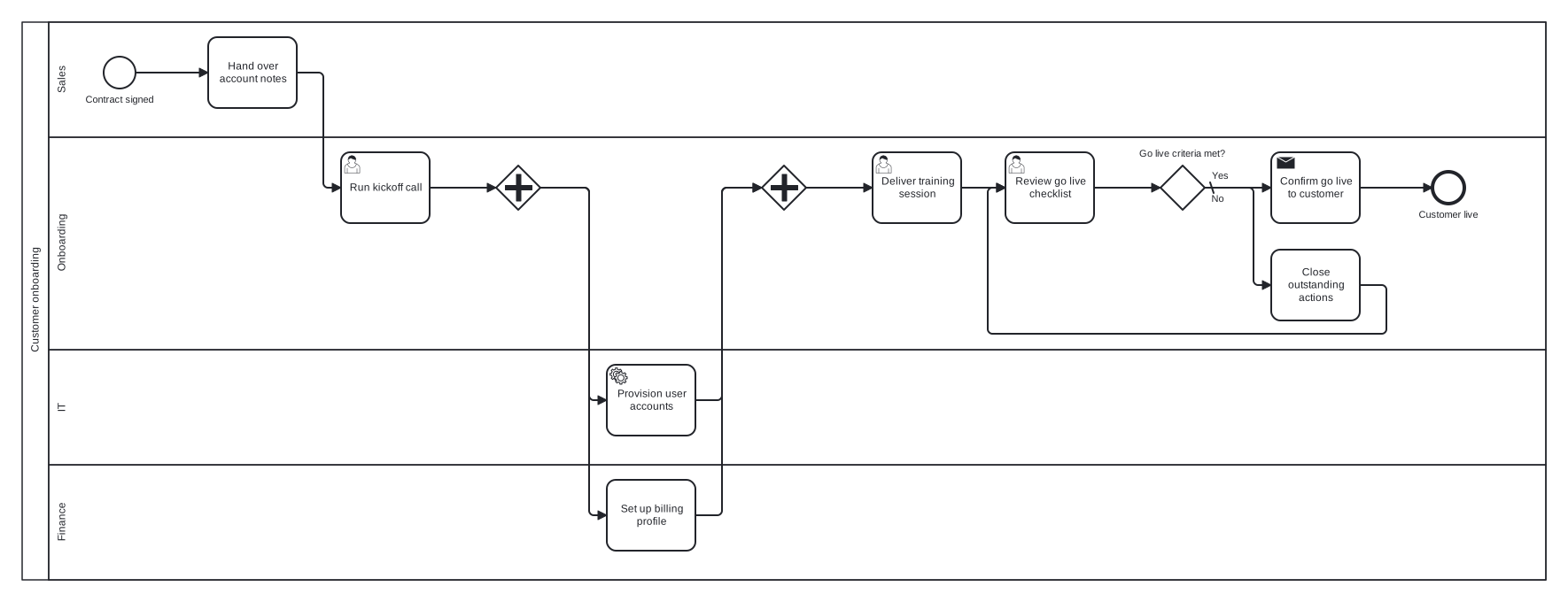
This model spans four lanes in one pool: Sales, Onboarding, IT, and Finance. A parallel gateway is the key structural choice, splitting account provisioning and billing setup to run concurrently after the kickoff call, since neither blocks the other. A go live checklist gateway with a rework loop then holds the gate: the customer is not declared live until every item is closed.
Standard BPMN 2.0 interchange XML: opens in Camunda Modeler, Signavio, Bizagi, and any other compliant tool.
The process at a glance
How to read this diagram
Signature in hand, the Sales lane opens the process at "Contract signed" by handing over account notes to the Onboarding lane, which runs the kickoff call with the customer. After kickoff, a parallel gateway starts two branches at once: IT provisions the user accounts while Finance sets up the billing profile. The joining gateway releases the flow only when both branches are done, and Onboarding then delivers the training session.
Before anything goes live, Onboarding reviews the go live checklist. At the gateway "Go live criteria met?", the default No branch loops through a task that closes outstanding actions and returns to the review, repeating until the checklist is clean. The Yes branch sends a go live confirmation to the customer and the process finishes at the "Customer live" end event. One end state, deliberately: onboarding either completes or keeps iterating.
BPMN elements used
| Element | Count | In this diagram |
|---|---|---|
| Start event | 1 | Contract signed |
| End event | 1 | Customer live |
| Task | 3 | Hand over account notes, Set up billing profile, Close outstanding actions |
| User task | 3 | Run kickoff call, Deliver training session, Review go live checklist |
| Service task | 1 | Provision user accounts |
| Send task | 1 | Confirm go live to customer |
| Exclusive gateway | 1 | Go live criteria met? |
| Parallel gateway | 2 |
View the BPMN 2.0 XML for this diagram
<?xml version="1.0" encoding="UTF-8"?>
<bpmn2:definitions xmlns:bpmn2="http://www.omg.org/spec/BPMN/20100524/MODEL" xmlns:bpmndi="http://www.omg.org/spec/BPMN/20100524/DI" xmlns:dc="http://www.omg.org/spec/DD/20100524/DC" xmlns:di="http://www.omg.org/spec/DD/20100524/DI" xmlns:xsi="http://www.w3.org/2001/XMLSchema-instance" id="Definitions_1" targetNamespace="http://bpmn.io/schema/bpmn" exporter="swimdraft" exporterVersion="1.0">
  <bpmn2:collaboration id="Collaboration_1">
    <bpmn2:participant id="pool_cob" name="Customer onboarding" processRef="Process_pool_cob" />
  </bpmn2:collaboration>
  <bpmn2:process id="Process_pool_cob" isExecutable="false">
    <bpmn2:laneSet id="LaneSet_pool_cob">
      <bpmn2:lane id="lane_cob_sales" name="Sales">
        <bpmn2:flowNodeRef>start_cob</bpmn2:flowNodeRef>
        <bpmn2:flowNodeRef>t_cob_handover</bpmn2:flowNodeRef>
      </bpmn2:lane>
      <bpmn2:lane id="lane_cob_onb" name="Onboarding">
        <bpmn2:flowNodeRef>t_cob_kickoff</bpmn2:flowNodeRef>
        <bpmn2:flowNodeRef>g_cob_split</bpmn2:flowNodeRef>
        <bpmn2:flowNodeRef>g_cob_join</bpmn2:flowNodeRef>
        <bpmn2:flowNodeRef>t_cob_training</bpmn2:flowNodeRef>
        <bpmn2:flowNodeRef>t_cob_review</bpmn2:flowNodeRef>
        <bpmn2:flowNodeRef>g_cob_live</bpmn2:flowNodeRef>
        <bpmn2:flowNodeRef>t_cob_actions</bpmn2:flowNodeRef>
        <bpmn2:flowNodeRef>t_cob_confirm</bpmn2:flowNodeRef>
        <bpmn2:flowNodeRef>end_cob_live</bpmn2:flowNodeRef>
      </bpmn2:lane>
      <bpmn2:lane id="lane_cob_it" name="IT">
        <bpmn2:flowNodeRef>t_cob_provision</bpmn2:flowNodeRef>
      </bpmn2:lane>
      <bpmn2:lane id="lane_cob_fin" name="Finance">
        <bpmn2:flowNodeRef>t_cob_billing</bpmn2:flowNodeRef>
      </bpmn2:lane>
    </bpmn2:laneSet>
    <bpmn2:startEvent id="start_cob" name="Contract signed">
      <bpmn2:outgoing>fcob1</bpmn2:outgoing>
    </bpmn2:startEvent>
    <bpmn2:task id="t_cob_handover" name="Hand over account notes">
      <bpmn2:incoming>fcob1</bpmn2:incoming>
      <bpmn2:outgoing>fcob2</bpmn2:outgoing>
    </bpmn2:task>
    <bpmn2:userTask id="t_cob_kickoff" name="Run kickoff call">
      <bpmn2:incoming>fcob2</bpmn2:incoming>
      <bpmn2:outgoing>fcob3</bpmn2:outgoing>
    </bpmn2:userTask>
    <bpmn2:parallelGateway id="g_cob_split">
      <bpmn2:incoming>fcob3</bpmn2:incoming>
      <bpmn2:outgoing>fcob4</bpmn2:outgoing>
      <bpmn2:outgoing>fcob5</bpmn2:outgoing>
    </bpmn2:parallelGateway>
    <bpmn2:serviceTask id="t_cob_provision" name="Provision user accounts">
      <bpmn2:incoming>fcob4</bpmn2:incoming>
      <bpmn2:outgoing>fcob6</bpmn2:outgoing>
    </bpmn2:serviceTask>
    <bpmn2:task id="t_cob_billing" name="Set up billing profile">
      <bpmn2:incoming>fcob5</bpmn2:incoming>
      <bpmn2:outgoing>fcob7</bpmn2:outgoing>
    </bpmn2:task>
    <bpmn2:parallelGateway id="g_cob_join">
      <bpmn2:incoming>fcob6</bpmn2:incoming>
      <bpmn2:incoming>fcob7</bpmn2:incoming>
      <bpmn2:outgoing>fcob8</bpmn2:outgoing>
    </bpmn2:parallelGateway>
    <bpmn2:userTask id="t_cob_training" name="Deliver training session">
      <bpmn2:incoming>fcob8</bpmn2:incoming>
      <bpmn2:outgoing>fcob9</bpmn2:outgoing>
    </bpmn2:userTask>
    <bpmn2:userTask id="t_cob_review" name="Review go live checklist">
      <bpmn2:incoming>fcob9</bpmn2:incoming>
      <bpmn2:incoming>fcob13</bpmn2:incoming>
      <bpmn2:outgoing>fcob10</bpmn2:outgoing>
    </bpmn2:userTask>
    <bpmn2:exclusiveGateway id="g_cob_live" name="Go live criteria met?" default="fcob12">
      <bpmn2:incoming>fcob10</bpmn2:incoming>
      <bpmn2:outgoing>fcob11</bpmn2:outgoing>
      <bpmn2:outgoing>fcob12</bpmn2:outgoing>
    </bpmn2:exclusiveGateway>
    <bpmn2:task id="t_cob_actions" name="Close outstanding actions">
      <bpmn2:incoming>fcob12</bpmn2:incoming>
      <bpmn2:outgoing>fcob13</bpmn2:outgoing>
    </bpmn2:task>
    <bpmn2:sendTask id="t_cob_confirm" name="Confirm go live to customer">
      <bpmn2:incoming>fcob11</bpmn2:incoming>
      <bpmn2:outgoing>fcob14</bpmn2:outgoing>
    </bpmn2:sendTask>
    <bpmn2:endEvent id="end_cob_live" name="Customer live">
      <bpmn2:incoming>fcob14</bpmn2:incoming>
    </bpmn2:endEvent>
    <bpmn2:sequenceFlow id="fcob1" sourceRef="start_cob" targetRef="t_cob_handover" />
    <bpmn2:sequenceFlow id="fcob2" sourceRef="t_cob_handover" targetRef="t_cob_kickoff" />
    <bpmn2:sequenceFlow id="fcob3" sourceRef="t_cob_kickoff" targetRef="g_cob_split" />
    <bpmn2:sequenceFlow id="fcob4" sourceRef="g_cob_split" targetRef="t_cob_provision" />
    <bpmn2:sequenceFlow id="fcob5" sourceRef="g_cob_split" targetRef="t_cob_billing" />
    <bpmn2:sequenceFlow id="fcob6" sourceRef="t_cob_provision" targetRef="g_cob_join" />
    <bpmn2:sequenceFlow id="fcob7" sourceRef="t_cob_billing" targetRef="g_cob_join" />
    <bpmn2:sequenceFlow id="fcob8" sourceRef="g_cob_join" targetRef="t_cob_training" />
    <bpmn2:sequenceFlow id="fcob9" sourceRef="t_cob_training" targetRef="t_cob_review" />
    <bpmn2:sequenceFlow id="fcob10" sourceRef="t_cob_review" targetRef="g_cob_live" />
    <bpmn2:sequenceFlow id="fcob11" name="Yes" sourceRef="g_cob_live" targetRef="t_cob_confirm">
      <bpmn2:conditionExpression xsi:type="bpmn2:tFormalExpression">Yes</bpmn2:conditionExpression>
    </bpmn2:sequenceFlow>
    <bpmn2:sequenceFlow id="fcob12" name="No" sourceRef="g_cob_live" targetRef="t_cob_actions" />
    <bpmn2:sequenceFlow id="fcob13" sourceRef="t_cob_actions" targetRef="t_cob_review" />
    <bpmn2:sequenceFlow id="fcob14" sourceRef="t_cob_confirm" targetRef="end_cob_live" />
  </bpmn2:process>
  <bpmndi:BPMNDiagram id="BPMNDiagram_1">
    <bpmndi:BPMNPlane id="BPMNPlane_1" bpmnElement="Collaboration_1">
      <bpmndi:BPMNShape id="pool_cob_di" bpmnElement="pool_cob" isHorizontal="true">
        <dc:Bounds x="20" y="20" width="1720" height="630" />
      </bpmndi:BPMNShape>
      <bpmndi:BPMNShape id="lane_cob_sales_di" bpmnElement="lane_cob_sales" isHorizontal="true">
        <dc:Bounds x="50" y="20" width="1690" height="130" />
      </bpmndi:BPMNShape>
      <bpmndi:BPMNShape id="lane_cob_onb_di" bpmnElement="lane_cob_onb" isHorizontal="true">
        <dc:Bounds x="50" y="150" width="1690" height="240" />
      </bpmndi:BPMNShape>
      <bpmndi:BPMNShape id="lane_cob_it_di" bpmnElement="lane_cob_it" isHorizontal="true">
        <dc:Bounds x="50" y="390" width="1690" height="130" />
      </bpmndi:BPMNShape>
      <bpmndi:BPMNShape id="lane_cob_fin_di" bpmnElement="lane_cob_fin" isHorizontal="true">
        <dc:Bounds x="50" y="520" width="1690" height="130" />
      </bpmndi:BPMNShape>
      <bpmndi:BPMNShape id="start_cob_di" bpmnElement="start_cob">
        <dc:Bounds x="112" y="59" width="36" height="36" />
        <bpmndi:BPMNLabel><dc:Bounds x="90" y="101" width="80" height="14" /></bpmndi:BPMNLabel>
      </bpmndi:BPMNShape>
      <bpmndi:BPMNShape id="t_cob_handover_di" bpmnElement="t_cob_handover">
        <dc:Bounds x="230" y="37" width="100" height="80" />
      </bpmndi:BPMNShape>
      <bpmndi:BPMNShape id="t_cob_kickoff_di" bpmnElement="t_cob_kickoff">
        <dc:Bounds x="380" y="167" width="100" height="80" />
      </bpmndi:BPMNShape>
      <bpmndi:BPMNShape id="g_cob_split_di" bpmnElement="g_cob_split">
        <dc:Bounds x="555" y="182" width="50" height="50" />
      </bpmndi:BPMNShape>
      <bpmndi:BPMNShape id="t_cob_provision_di" bpmnElement="t_cob_provision">
        <dc:Bounds x="680" y="407" width="100" height="80" />
      </bpmndi:BPMNShape>
      <bpmndi:BPMNShape id="t_cob_billing_di" bpmnElement="t_cob_billing">
        <dc:Bounds x="680" y="537" width="100" height="80" />
      </bpmndi:BPMNShape>
      <bpmndi:BPMNShape id="g_cob_join_di" bpmnElement="g_cob_join">
        <dc:Bounds x="855" y="182" width="50" height="50" />
      </bpmndi:BPMNShape>
      <bpmndi:BPMNShape id="t_cob_training_di" bpmnElement="t_cob_training">
        <dc:Bounds x="980" y="167" width="100" height="80" />
      </bpmndi:BPMNShape>
      <bpmndi:BPMNShape id="t_cob_review_di" bpmnElement="t_cob_review">
        <dc:Bounds x="1130" y="167" width="100" height="80" />
      </bpmndi:BPMNShape>
      <bpmndi:BPMNShape id="g_cob_live_di" bpmnElement="g_cob_live">
        <dc:Bounds x="1305" y="182" width="50" height="50" />
        <bpmndi:BPMNLabel><dc:Bounds x="1280" y="162" width="100" height="14" /></bpmndi:BPMNLabel>
      </bpmndi:BPMNShape>
      <bpmndi:BPMNShape id="t_cob_actions_di" bpmnElement="t_cob_actions">
        <dc:Bounds x="1430" y="277" width="100" height="80" />
      </bpmndi:BPMNShape>
      <bpmndi:BPMNShape id="t_cob_confirm_di" bpmnElement="t_cob_confirm">
        <dc:Bounds x="1430" y="167" width="100" height="80" />
      </bpmndi:BPMNShape>
      <bpmndi:BPMNShape id="end_cob_live_di" bpmnElement="end_cob_live">
        <dc:Bounds x="1612" y="189" width="36" height="36" />
        <bpmndi:BPMNLabel><dc:Bounds x="1595" y="231" width="70" height="14" /></bpmndi:BPMNLabel>
      </bpmndi:BPMNShape>
      <bpmndi:BPMNEdge id="fcob1_di" bpmnElement="fcob1">
        <di:waypoint x="148" y="77" />
        <di:waypoint x="230" y="77" />
      </bpmndi:BPMNEdge>
      <bpmndi:BPMNEdge id="fcob2_di" bpmnElement="fcob2">
        <di:waypoint x="330" y="77" />
        <di:waypoint x="360" y="77" />
        <di:waypoint x="360" y="207" />
        <di:waypoint x="380" y="207" />
      </bpmndi:BPMNEdge>
      <bpmndi:BPMNEdge id="fcob3_di" bpmnElement="fcob3">
        <di:waypoint x="480" y="207" />
        <di:waypoint x="555" y="207" />
      </bpmndi:BPMNEdge>
      <bpmndi:BPMNEdge id="fcob4_di" bpmnElement="fcob4">
        <di:waypoint x="605" y="207" />
        <di:waypoint x="660" y="207" />
        <di:waypoint x="660" y="447" />
        <di:waypoint x="680" y="447" />
      </bpmndi:BPMNEdge>
      <bpmndi:BPMNEdge id="fcob5_di" bpmnElement="fcob5">
        <di:waypoint x="605" y="207" />
        <di:waypoint x="660" y="207" />
        <di:waypoint x="660" y="577" />
        <di:waypoint x="680" y="577" />
      </bpmndi:BPMNEdge>
      <bpmndi:BPMNEdge id="fcob6_di" bpmnElement="fcob6">
        <di:waypoint x="780" y="447" />
        <di:waypoint x="810" y="447" />
        <di:waypoint x="810" y="207" />
        <di:waypoint x="855" y="207" />
      </bpmndi:BPMNEdge>
      <bpmndi:BPMNEdge id="fcob7_di" bpmnElement="fcob7">
        <di:waypoint x="780" y="577" />
        <di:waypoint x="810" y="577" />
        <di:waypoint x="810" y="207" />
        <di:waypoint x="855" y="207" />
      </bpmndi:BPMNEdge>
      <bpmndi:BPMNEdge id="fcob8_di" bpmnElement="fcob8">
        <di:waypoint x="905" y="207" />
        <di:waypoint x="980" y="207" />
      </bpmndi:BPMNEdge>
      <bpmndi:BPMNEdge id="fcob9_di" bpmnElement="fcob9">
        <di:waypoint x="1080" y="207" />
        <di:waypoint x="1130" y="207" />
      </bpmndi:BPMNEdge>
      <bpmndi:BPMNEdge id="fcob10_di" bpmnElement="fcob10">
        <di:waypoint x="1230" y="207" />
        <di:waypoint x="1305" y="207" />
      </bpmndi:BPMNEdge>
      <bpmndi:BPMNEdge id="fcob11_di" bpmnElement="fcob11">
        <di:waypoint x="1355" y="207" />
        <di:waypoint x="1430" y="207" />
        <bpmndi:BPMNLabel><dc:Bounds x="1361" y="187" width="21" height="14" /></bpmndi:BPMNLabel>
      </bpmndi:BPMNEdge>
      <bpmndi:BPMNEdge id="fcob12_di" bpmnElement="fcob12">
        <di:waypoint x="1355" y="207" />
        <di:waypoint x="1410" y="207" />
        <di:waypoint x="1410" y="317" />
        <di:waypoint x="1430" y="317" />
        <bpmndi:BPMNLabel><dc:Bounds x="1361" y="213" width="17" height="14" /></bpmndi:BPMNLabel>
      </bpmndi:BPMNEdge>
      <bpmndi:BPMNEdge id="fcob13_di" bpmnElement="fcob13">
        <di:waypoint x="1530" y="317" />
        <di:waypoint x="1560" y="317" />
        <di:waypoint x="1560" y="372" />
        <di:waypoint x="1110" y="372" />
        <di:waypoint x="1110" y="207" />
        <di:waypoint x="1130" y="207" />
      </bpmndi:BPMNEdge>
      <bpmndi:BPMNEdge id="fcob14_di" bpmnElement="fcob14">
        <di:waypoint x="1530" y="207" />
        <di:waypoint x="1612" y="207" />
      </bpmndi:BPMNEdge>
    </bpmndi:BPMNPlane>
  </bpmndi:BPMNDiagram>
</bpmn2:definitions>
Frequently asked questions
Why keep the customer out of the diagram rather than adding a customer pool?
This model documents internal accountability, so the customer appears only as the counterparty of the kickoff and confirmation tasks. Adding a black box customer pool with message flows is a reasonable extension once you want to show what you send and receive, but it doubles the visual weight for little internal insight.
Why does the checklist loop return to the review task instead of the gateway?
A gateway routes tokens, it does not do work, so the loop must re-enter through the activity that produces the decision data. Looping back to "Review go live checklist" means the criteria are checked again after actions are closed, and the gateway simply reads the fresh result. Flows into a gateway from a loop also blur its split semantics.
Where would an escalation fit if onboarding stalls?
Attach a timer to the rework loop, for example a boundary timer on "Close outstanding actions" set to a week. When it fires, route to an escalation task in the Sales lane so the account owner re-engages the customer. This keeps the happy path clean while making chronic stalls visible to someone with authority to fix them.
Related BPMN examples
Lead qualification
A lead qualification process as a BPMN 2.0 diagram: scoring, discovery, and handover to sales. View the swimlane diagram and download the .bpmn file free.
Quote approval
A quote approval workflow as a BPMN 2.0 diagram: pricing rules, discount escalation to finance, and a rework loop. See the diagram and download the .bpmn file free.
Sales order processing
Sales order processing as a BPMN 2.0 diagram: stock check, back order timer loop, parallel picking and invoicing. View it and download the .bpmn file free.
Contract approval
A contract approval workflow as a BPMN 2.0 diagram: legal review, redline loop, finance sign off, and customer signature. Download the .bpmn file free.
Generate your own version of this diagram
Describe how the process works in your organisation: plain English, meeting notes, a transcript, or a spreadsheet. Swimdraft turns it into a spec-validated BPMN 2.0 diagram you can edit in the browser and export as .bpmn, SVG, or PNG.
Start freeNo credit card required