
Timesheet approval BPMN example
Timesheet approval is a weekly drumbeat process: hours in, review, correction, pay run. It gets mapped because errors are cheap to fix before the pay run and expensive after it, so the design question is always where to put the checks. The classic failure is a manager rubber stamping hours that then bounce at payroll for an invalid project code, a week too late to fix quietly.
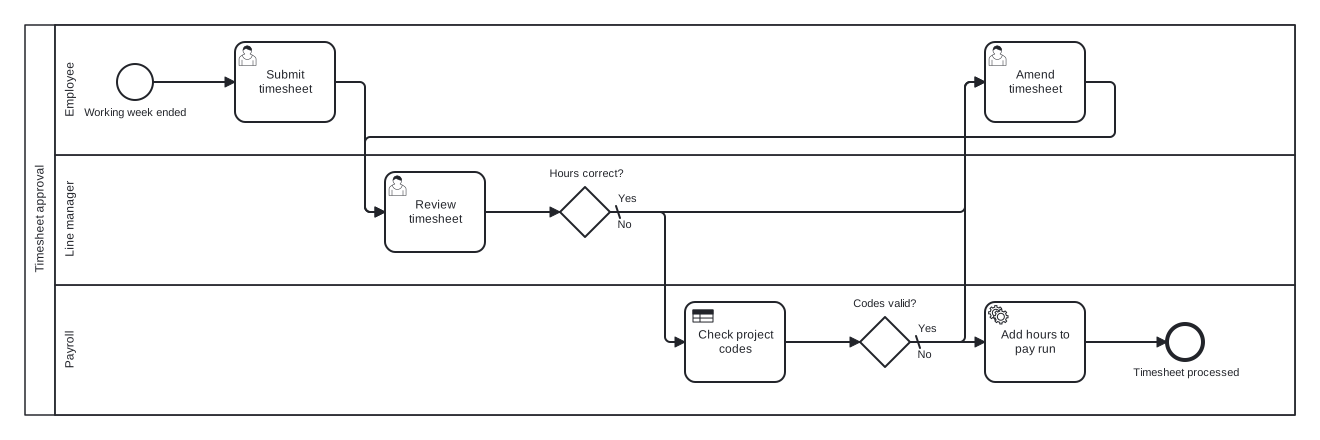
The model is one pool with Employee, Line manager, and Payroll lanes. It contains two checks with different owners: the manager confirms the hours are true, and payroll confirms the codes are valid, each with its own exclusive gateway. Both failure branches feed the same amendment task, giving the model a single correction loop no matter which check catches the problem.
Standard BPMN 2.0 interchange XML: opens in Camunda Modeler, Signavio, Bizagi, and any other compliant tool.
The process at a glance
How to read this diagram
Each cycle starts at the "Working week ended" event in the Employee lane, after which the employee submits their timesheet. The Line manager reviews it against the gateway "Hours correct?". If the answer is No (the default branch) the flow moves to "Amend timesheet" in the Employee lane and loops back to the review, repeating until the manager is satisfied.
Approved hours pass to Payroll, where a business rule task checks the project codes and the gateway "Codes valid?" asks its own question. Invalid codes send the token back through the same amendment task, so corrections always follow one route. Valid ones continue to "Add hours to pay run", and the process closes at the "Timesheet processed" end event once the hours are safely in the run.
BPMN elements used
| Element | Count | In this diagram |
|---|---|---|
| Start event | 1 | Working week ended |
| End event | 1 | Timesheet processed |
| User task | 3 | Submit timesheet, Review timesheet, Amend timesheet |
| Service task | 1 | Add hours to pay run |
| Business rule task | 1 | Check project codes |
| Exclusive gateway | 2 | Hours correct?, Codes valid? |
View the BPMN 2.0 XML for this diagram
<?xml version="1.0" encoding="UTF-8"?>
<bpmn2:definitions xmlns:bpmn2="http://www.omg.org/spec/BPMN/20100524/MODEL" xmlns:bpmndi="http://www.omg.org/spec/BPMN/20100524/DI" xmlns:dc="http://www.omg.org/spec/DD/20100524/DC" xmlns:di="http://www.omg.org/spec/DD/20100524/DI" xmlns:xsi="http://www.w3.org/2001/XMLSchema-instance" id="Definitions_1" targetNamespace="http://bpmn.io/schema/bpmn" exporter="swimdraft" exporterVersion="1.0">
  <bpmn2:collaboration id="Collaboration_1">
    <bpmn2:participant id="pool_ts" name="Timesheet approval" processRef="Process_pool_ts" />
  </bpmn2:collaboration>
  <bpmn2:process id="Process_pool_ts" isExecutable="false">
    <bpmn2:laneSet id="LaneSet_pool_ts">
      <bpmn2:lane id="lane_ts_emp" name="Employee">
        <bpmn2:flowNodeRef>start_ts</bpmn2:flowNodeRef>
        <bpmn2:flowNodeRef>t_ts_submit</bpmn2:flowNodeRef>
        <bpmn2:flowNodeRef>t_ts_amend</bpmn2:flowNodeRef>
      </bpmn2:lane>
      <bpmn2:lane id="lane_ts_mgr" name="Line manager">
        <bpmn2:flowNodeRef>t_ts_review</bpmn2:flowNodeRef>
        <bpmn2:flowNodeRef>g_ts_hours</bpmn2:flowNodeRef>
      </bpmn2:lane>
      <bpmn2:lane id="lane_ts_pay" name="Payroll">
        <bpmn2:flowNodeRef>t_ts_codes</bpmn2:flowNodeRef>
        <bpmn2:flowNodeRef>g_ts_codes</bpmn2:flowNodeRef>
        <bpmn2:flowNodeRef>t_ts_payrun</bpmn2:flowNodeRef>
        <bpmn2:flowNodeRef>end_ts</bpmn2:flowNodeRef>
      </bpmn2:lane>
    </bpmn2:laneSet>
    <bpmn2:startEvent id="start_ts" name="Working week ended">
      <bpmn2:outgoing>fts1</bpmn2:outgoing>
    </bpmn2:startEvent>
    <bpmn2:userTask id="t_ts_submit" name="Submit timesheet">
      <bpmn2:incoming>fts1</bpmn2:incoming>
      <bpmn2:outgoing>fts2</bpmn2:outgoing>
    </bpmn2:userTask>
    <bpmn2:userTask id="t_ts_review" name="Review timesheet">
      <bpmn2:incoming>fts2</bpmn2:incoming>
      <bpmn2:incoming>fts6</bpmn2:incoming>
      <bpmn2:outgoing>fts3</bpmn2:outgoing>
    </bpmn2:userTask>
    <bpmn2:exclusiveGateway id="g_ts_hours" name="Hours correct?" default="fts5">
      <bpmn2:incoming>fts3</bpmn2:incoming>
      <bpmn2:outgoing>fts4</bpmn2:outgoing>
      <bpmn2:outgoing>fts5</bpmn2:outgoing>
    </bpmn2:exclusiveGateway>
    <bpmn2:userTask id="t_ts_amend" name="Amend timesheet">
      <bpmn2:incoming>fts5</bpmn2:incoming>
      <bpmn2:incoming>fts9</bpmn2:incoming>
      <bpmn2:outgoing>fts6</bpmn2:outgoing>
    </bpmn2:userTask>
    <bpmn2:businessRuleTask id="t_ts_codes" name="Check project codes">
      <bpmn2:incoming>fts4</bpmn2:incoming>
      <bpmn2:outgoing>fts7</bpmn2:outgoing>
    </bpmn2:businessRuleTask>
    <bpmn2:exclusiveGateway id="g_ts_codes" name="Codes valid?" default="fts9">
      <bpmn2:incoming>fts7</bpmn2:incoming>
      <bpmn2:outgoing>fts8</bpmn2:outgoing>
      <bpmn2:outgoing>fts9</bpmn2:outgoing>
    </bpmn2:exclusiveGateway>
    <bpmn2:serviceTask id="t_ts_payrun" name="Add hours to pay run">
      <bpmn2:incoming>fts8</bpmn2:incoming>
      <bpmn2:outgoing>fts10</bpmn2:outgoing>
    </bpmn2:serviceTask>
    <bpmn2:endEvent id="end_ts" name="Timesheet processed">
      <bpmn2:incoming>fts10</bpmn2:incoming>
    </bpmn2:endEvent>
    <bpmn2:sequenceFlow id="fts1" sourceRef="start_ts" targetRef="t_ts_submit" />
    <bpmn2:sequenceFlow id="fts2" sourceRef="t_ts_submit" targetRef="t_ts_review" />
    <bpmn2:sequenceFlow id="fts3" sourceRef="t_ts_review" targetRef="g_ts_hours" />
    <bpmn2:sequenceFlow id="fts4" name="Yes" sourceRef="g_ts_hours" targetRef="t_ts_codes">
      <bpmn2:conditionExpression xsi:type="bpmn2:tFormalExpression">Yes</bpmn2:conditionExpression>
    </bpmn2:sequenceFlow>
    <bpmn2:sequenceFlow id="fts5" name="No" sourceRef="g_ts_hours" targetRef="t_ts_amend" />
    <bpmn2:sequenceFlow id="fts6" sourceRef="t_ts_amend" targetRef="t_ts_review" />
    <bpmn2:sequenceFlow id="fts7" sourceRef="t_ts_codes" targetRef="g_ts_codes" />
    <bpmn2:sequenceFlow id="fts8" name="Yes" sourceRef="g_ts_codes" targetRef="t_ts_payrun">
      <bpmn2:conditionExpression xsi:type="bpmn2:tFormalExpression">Yes</bpmn2:conditionExpression>
    </bpmn2:sequenceFlow>
    <bpmn2:sequenceFlow id="fts9" name="No" sourceRef="g_ts_codes" targetRef="t_ts_amend" />
    <bpmn2:sequenceFlow id="fts10" sourceRef="t_ts_payrun" targetRef="end_ts" />
  </bpmn2:process>
  <bpmndi:BPMNDiagram id="BPMNDiagram_1">
    <bpmndi:BPMNPlane id="BPMNPlane_1" bpmnElement="Collaboration_1">
      <bpmndi:BPMNShape id="pool_ts_di" bpmnElement="pool_ts" isHorizontal="true">
        <dc:Bounds x="20" y="20" width="1270" height="390" />
      </bpmndi:BPMNShape>
      <bpmndi:BPMNShape id="lane_ts_emp_di" bpmnElement="lane_ts_emp" isHorizontal="true">
        <dc:Bounds x="50" y="20" width="1240" height="130" />
      </bpmndi:BPMNShape>
      <bpmndi:BPMNShape id="lane_ts_mgr_di" bpmnElement="lane_ts_mgr" isHorizontal="true">
        <dc:Bounds x="50" y="150" width="1240" height="130" />
      </bpmndi:BPMNShape>
      <bpmndi:BPMNShape id="lane_ts_pay_di" bpmnElement="lane_ts_pay" isHorizontal="true">
        <dc:Bounds x="50" y="280" width="1240" height="130" />
      </bpmndi:BPMNShape>
      <bpmndi:BPMNShape id="start_ts_di" bpmnElement="start_ts">
        <dc:Bounds x="112" y="59" width="36" height="36" />
        <bpmndi:BPMNLabel><dc:Bounds x="78" y="101" width="105" height="14" /></bpmndi:BPMNLabel>
      </bpmndi:BPMNShape>
      <bpmndi:BPMNShape id="t_ts_submit_di" bpmnElement="t_ts_submit">
        <dc:Bounds x="230" y="37" width="100" height="80" />
      </bpmndi:BPMNShape>
      <bpmndi:BPMNShape id="t_ts_review_di" bpmnElement="t_ts_review">
        <dc:Bounds x="380" y="167" width="100" height="80" />
      </bpmndi:BPMNShape>
      <bpmndi:BPMNShape id="g_ts_hours_di" bpmnElement="g_ts_hours">
        <dc:Bounds x="555" y="182" width="50" height="50" />
        <bpmndi:BPMNLabel><dc:Bounds x="543" y="162" width="75" height="14" /></bpmndi:BPMNLabel>
      </bpmndi:BPMNShape>
      <bpmndi:BPMNShape id="t_ts_amend_di" bpmnElement="t_ts_amend">
        <dc:Bounds x="980" y="37" width="100" height="80" />
      </bpmndi:BPMNShape>
      <bpmndi:BPMNShape id="t_ts_codes_di" bpmnElement="t_ts_codes">
        <dc:Bounds x="680" y="297" width="100" height="80" />
      </bpmndi:BPMNShape>
      <bpmndi:BPMNShape id="g_ts_codes_di" bpmnElement="g_ts_codes">
        <dc:Bounds x="855" y="312" width="50" height="50" />
        <bpmndi:BPMNLabel><dc:Bounds x="847" y="292" width="66" height="14" /></bpmndi:BPMNLabel>
      </bpmndi:BPMNShape>
      <bpmndi:BPMNShape id="t_ts_payrun_di" bpmnElement="t_ts_payrun">
        <dc:Bounds x="980" y="297" width="100" height="80" />
      </bpmndi:BPMNShape>
      <bpmndi:BPMNShape id="end_ts_di" bpmnElement="end_ts">
        <dc:Bounds x="1162" y="319" width="36" height="36" />
        <bpmndi:BPMNLabel><dc:Bounds x="1126" y="361" width="108" height="14" /></bpmndi:BPMNLabel>
      </bpmndi:BPMNShape>
      <bpmndi:BPMNEdge id="fts1_di" bpmnElement="fts1">
        <di:waypoint x="148" y="77" />
        <di:waypoint x="230" y="77" />
      </bpmndi:BPMNEdge>
      <bpmndi:BPMNEdge id="fts2_di" bpmnElement="fts2">
        <di:waypoint x="330" y="77" />
        <di:waypoint x="360" y="77" />
        <di:waypoint x="360" y="207" />
        <di:waypoint x="380" y="207" />
      </bpmndi:BPMNEdge>
      <bpmndi:BPMNEdge id="fts3_di" bpmnElement="fts3">
        <di:waypoint x="480" y="207" />
        <di:waypoint x="555" y="207" />
      </bpmndi:BPMNEdge>
      <bpmndi:BPMNEdge id="fts4_di" bpmnElement="fts4">
        <di:waypoint x="605" y="207" />
        <di:waypoint x="660" y="207" />
        <di:waypoint x="660" y="337" />
        <di:waypoint x="680" y="337" />
        <bpmndi:BPMNLabel><dc:Bounds x="611" y="187" width="21" height="14" /></bpmndi:BPMNLabel>
      </bpmndi:BPMNEdge>
      <bpmndi:BPMNEdge id="fts5_di" bpmnElement="fts5">
        <di:waypoint x="605" y="207" />
        <di:waypoint x="960" y="207" />
        <di:waypoint x="960" y="77" />
        <di:waypoint x="980" y="77" />
        <bpmndi:BPMNLabel><dc:Bounds x="611" y="213" width="17" height="14" /></bpmndi:BPMNLabel>
      </bpmndi:BPMNEdge>
      <bpmndi:BPMNEdge id="fts6_di" bpmnElement="fts6">
        <di:waypoint x="1080" y="77" />
        <di:waypoint x="1110" y="77" />
        <di:waypoint x="1110" y="132" />
        <di:waypoint x="360" y="132" />
        <di:waypoint x="360" y="207" />
        <di:waypoint x="380" y="207" />
      </bpmndi:BPMNEdge>
      <bpmndi:BPMNEdge id="fts7_di" bpmnElement="fts7">
        <di:waypoint x="780" y="337" />
        <di:waypoint x="855" y="337" />
      </bpmndi:BPMNEdge>
      <bpmndi:BPMNEdge id="fts8_di" bpmnElement="fts8">
        <di:waypoint x="905" y="337" />
        <di:waypoint x="980" y="337" />
        <bpmndi:BPMNLabel><dc:Bounds x="911" y="317" width="21" height="14" /></bpmndi:BPMNLabel>
      </bpmndi:BPMNEdge>
      <bpmndi:BPMNEdge id="fts9_di" bpmnElement="fts9">
        <di:waypoint x="905" y="337" />
        <di:waypoint x="960" y="337" />
        <di:waypoint x="960" y="77" />
        <di:waypoint x="980" y="77" />
        <bpmndi:BPMNLabel><dc:Bounds x="911" y="343" width="17" height="14" /></bpmndi:BPMNLabel>
      </bpmndi:BPMNEdge>
      <bpmndi:BPMNEdge id="fts10_di" bpmnElement="fts10">
        <di:waypoint x="1080" y="337" />
        <di:waypoint x="1162" y="337" />
      </bpmndi:BPMNEdge>
    </bpmndi:BPMNPlane>
  </bpmndi:BPMNDiagram>
</bpmn2:definitions>
Frequently asked questions
Why route both failures through one amendment task?
Because the correction procedure is identical regardless of who caught the error: the employee edits the timesheet and it goes back through review. Pointing both No branches at one task keeps the diagram honest about that, and BPMN explicitly allows multiple incoming sequence flows on an activity as an implicit merge.
Should the weekly trigger be a timer start event instead?
A timer start event fires the process on a schedule, which suits an automated flow that opens timesheets every Friday. Here the plain start event named "Working week ended" keeps the trigger neutral: some organisations open timesheets on a timer, others when the employee first logs hours. Swap it for a timer start if your rollout is schedule driven.
What happens if a manager never reviews the timesheet?
As drawn, the token waits at "Review timesheet" indefinitely, which is exactly the risk worth modelling. Attach a boundary timer to that task that fires after a deadline, then either escalate to a second approver or auto approve per policy. Deadline behaviour belongs in the diagram, not in tribal knowledge.
Related BPMN examples
Employee onboarding
An employee onboarding process diagram in BPMN 2.0: background checks, parallel IT setup, and induction. View the swimlane diagram and download the .bpmn file free.
Employee offboarding
Employee offboarding as a BPMN 2.0 diagram: handover planning, a last day timer, parallel access revocation, and final pay. Download the .bpmn file free.
Recruitment
A recruitment process in BPMN 2.0: screening, interviews, offer, and a candidate pool with message flows. View the diagram and download the .bpmn file free.
Leave request
A leave request process as a BPMN 2.0 diagram: balance check, manager approval, and booking confirmation. View the swimlanes and download the .bpmn file free.
Generate your own version of this diagram
Describe how the process works in your organisation: plain English, meeting notes, a transcript, or a spreadsheet. Swimdraft turns it into a spec-validated BPMN 2.0 diagram you can edit in the browser and export as .bpmn, SVG, or PNG.
Start freeNo credit card required