
Training request BPMN example
Training requests sit at the junction of three interests: the employee wants the course, the manager wants the business case, and learning and development guards a finite budget. Teams map the process because informal versions produce two bad outcomes, courses booked with no budget cover, and requests that quietly die because nobody owned the next step.
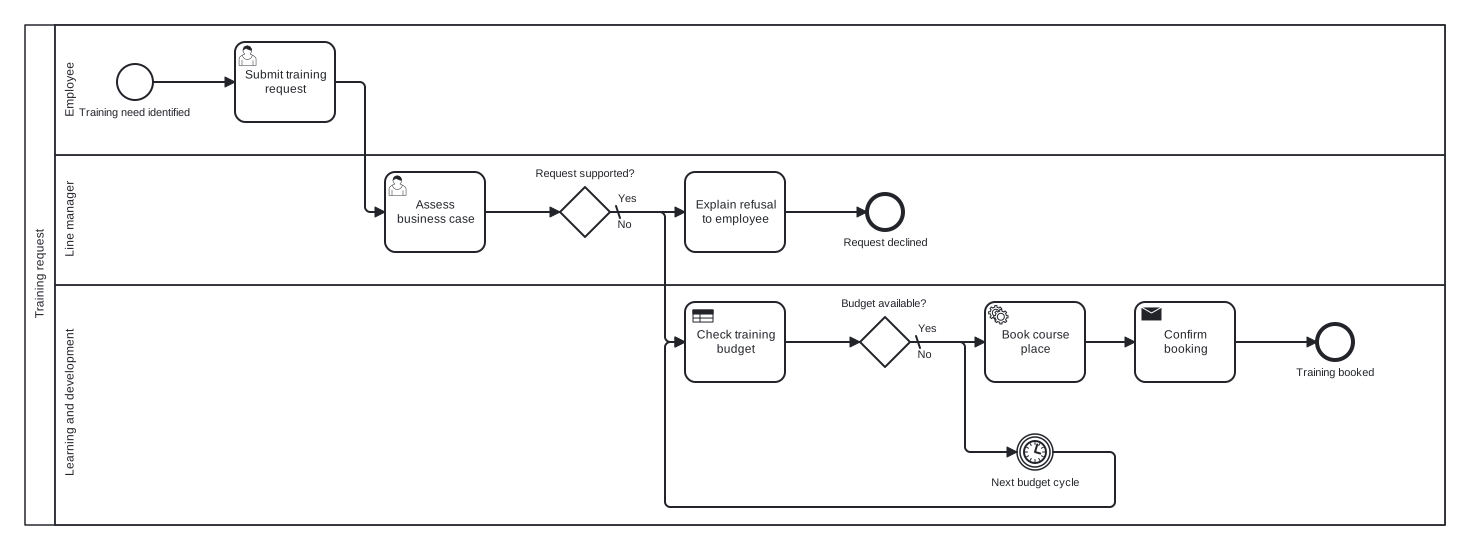
The model is a single pool with Employee, Line manager, and Learning and development lanes, and it separates the two refusable decisions: managerial support and budget availability. The detail worth noticing is what happens when the budget is exhausted: instead of a flat rejection, an intermediate timer event parks the request until the next budget cycle and then rechecks, modelling deferral as a first class outcome.
Standard BPMN 2.0 interchange XML: opens in Camunda Modeler, Signavio, Bizagi, and any other compliant tool.
The process at a glance
How to read this diagram
The trigger is an employee identifying a training need and submitting a request. Their Line manager assesses the business case at the gateway "Request supported?": the No branch, the default flow, leads to "Explain refusal to employee" and the "Request declined" end event, so unsupported requests end with a conversation rather than silence.
Supported requests move to Learning and development, where a business rule task checks the training budget and the gateway "Budget available?" makes the call. When funds are exhausted, the default No branch waits at the "Next budget cycle" timer event and then loops back to recheck the budget, so deferred requests are parked, not lost. Once budget exists, the course place is booked, the booking confirmed to the employee, and the flow ends at "Training booked".
BPMN elements used
| Element | Count | In this diagram |
|---|---|---|
| Start event | 1 | Training need identified |
| End event | 2 | Request declined, Training booked |
| Intermediate catch event | 1 | Next budget cycle |
| Task | 1 | Explain refusal to employee |
| User task | 2 | Submit training request, Assess business case |
| Service task | 1 | Book course place |
| Send task | 1 | Confirm booking |
| Business rule task | 1 | Check training budget |
| Exclusive gateway | 2 | Request supported?, Budget available? |
View the BPMN 2.0 XML for this diagram
<?xml version="1.0" encoding="UTF-8"?>
<bpmn2:definitions xmlns:bpmn2="http://www.omg.org/spec/BPMN/20100524/MODEL" xmlns:bpmndi="http://www.omg.org/spec/BPMN/20100524/DI" xmlns:dc="http://www.omg.org/spec/DD/20100524/DC" xmlns:di="http://www.omg.org/spec/DD/20100524/DI" xmlns:xsi="http://www.w3.org/2001/XMLSchema-instance" id="Definitions_1" targetNamespace="http://bpmn.io/schema/bpmn" exporter="swimdraft" exporterVersion="1.0">
  <bpmn2:collaboration id="Collaboration_1">
    <bpmn2:participant id="pool_tr" name="Training request" processRef="Process_pool_tr" />
  </bpmn2:collaboration>
  <bpmn2:process id="Process_pool_tr" isExecutable="false">
    <bpmn2:laneSet id="LaneSet_pool_tr">
      <bpmn2:lane id="lane_tr_emp" name="Employee">
        <bpmn2:flowNodeRef>start_tr</bpmn2:flowNodeRef>
        <bpmn2:flowNodeRef>t_tr_submit</bpmn2:flowNodeRef>
      </bpmn2:lane>
      <bpmn2:lane id="lane_tr_mgr" name="Line manager">
        <bpmn2:flowNodeRef>t_tr_case</bpmn2:flowNodeRef>
        <bpmn2:flowNodeRef>g_tr_support</bpmn2:flowNodeRef>
        <bpmn2:flowNodeRef>t_tr_refuse</bpmn2:flowNodeRef>
        <bpmn2:flowNodeRef>end_tr_declined</bpmn2:flowNodeRef>
      </bpmn2:lane>
      <bpmn2:lane id="lane_tr_ld" name="Learning and development">
        <bpmn2:flowNodeRef>t_tr_budget</bpmn2:flowNodeRef>
        <bpmn2:flowNodeRef>g_tr_budget</bpmn2:flowNodeRef>
        <bpmn2:flowNodeRef>ev_tr_cycle</bpmn2:flowNodeRef>
        <bpmn2:flowNodeRef>t_tr_book</bpmn2:flowNodeRef>
        <bpmn2:flowNodeRef>t_tr_confirm</bpmn2:flowNodeRef>
        <bpmn2:flowNodeRef>end_tr_booked</bpmn2:flowNodeRef>
      </bpmn2:lane>
    </bpmn2:laneSet>
    <bpmn2:startEvent id="start_tr" name="Training need identified">
      <bpmn2:outgoing>ftr1</bpmn2:outgoing>
    </bpmn2:startEvent>
    <bpmn2:userTask id="t_tr_submit" name="Submit training request">
      <bpmn2:incoming>ftr1</bpmn2:incoming>
      <bpmn2:outgoing>ftr2</bpmn2:outgoing>
    </bpmn2:userTask>
    <bpmn2:userTask id="t_tr_case" name="Assess business case">
      <bpmn2:incoming>ftr2</bpmn2:incoming>
      <bpmn2:outgoing>ftr3</bpmn2:outgoing>
    </bpmn2:userTask>
    <bpmn2:exclusiveGateway id="g_tr_support" name="Request supported?" default="ftr5">
      <bpmn2:incoming>ftr3</bpmn2:incoming>
      <bpmn2:outgoing>ftr4</bpmn2:outgoing>
      <bpmn2:outgoing>ftr5</bpmn2:outgoing>
    </bpmn2:exclusiveGateway>
    <bpmn2:task id="t_tr_refuse" name="Explain refusal to employee">
      <bpmn2:incoming>ftr5</bpmn2:incoming>
      <bpmn2:outgoing>ftr6</bpmn2:outgoing>
    </bpmn2:task>
    <bpmn2:endEvent id="end_tr_declined" name="Request declined">
      <bpmn2:incoming>ftr6</bpmn2:incoming>
    </bpmn2:endEvent>
    <bpmn2:businessRuleTask id="t_tr_budget" name="Check training budget">
      <bpmn2:incoming>ftr4</bpmn2:incoming>
      <bpmn2:incoming>ftr10</bpmn2:incoming>
      <bpmn2:outgoing>ftr7</bpmn2:outgoing>
    </bpmn2:businessRuleTask>
    <bpmn2:exclusiveGateway id="g_tr_budget" name="Budget available?" default="ftr9">
      <bpmn2:incoming>ftr7</bpmn2:incoming>
      <bpmn2:outgoing>ftr8</bpmn2:outgoing>
      <bpmn2:outgoing>ftr9</bpmn2:outgoing>
    </bpmn2:exclusiveGateway>
    <bpmn2:intermediateCatchEvent id="ev_tr_cycle" name="Next budget cycle">
      <bpmn2:incoming>ftr9</bpmn2:incoming>
      <bpmn2:outgoing>ftr10</bpmn2:outgoing>
      <bpmn2:timerEventDefinition id="ev_tr_cycle_def" />
    </bpmn2:intermediateCatchEvent>
    <bpmn2:serviceTask id="t_tr_book" name="Book course place">
      <bpmn2:incoming>ftr8</bpmn2:incoming>
      <bpmn2:outgoing>ftr11</bpmn2:outgoing>
    </bpmn2:serviceTask>
    <bpmn2:sendTask id="t_tr_confirm" name="Confirm booking">
      <bpmn2:incoming>ftr11</bpmn2:incoming>
      <bpmn2:outgoing>ftr12</bpmn2:outgoing>
    </bpmn2:sendTask>
    <bpmn2:endEvent id="end_tr_booked" name="Training booked">
      <bpmn2:incoming>ftr12</bpmn2:incoming>
    </bpmn2:endEvent>
    <bpmn2:sequenceFlow id="ftr1" sourceRef="start_tr" targetRef="t_tr_submit" />
    <bpmn2:sequenceFlow id="ftr2" sourceRef="t_tr_submit" targetRef="t_tr_case" />
    <bpmn2:sequenceFlow id="ftr3" sourceRef="t_tr_case" targetRef="g_tr_support" />
    <bpmn2:sequenceFlow id="ftr4" name="Yes" sourceRef="g_tr_support" targetRef="t_tr_budget">
      <bpmn2:conditionExpression xsi:type="bpmn2:tFormalExpression">Yes</bpmn2:conditionExpression>
    </bpmn2:sequenceFlow>
    <bpmn2:sequenceFlow id="ftr5" name="No" sourceRef="g_tr_support" targetRef="t_tr_refuse" />
    <bpmn2:sequenceFlow id="ftr6" sourceRef="t_tr_refuse" targetRef="end_tr_declined" />
    <bpmn2:sequenceFlow id="ftr7" sourceRef="t_tr_budget" targetRef="g_tr_budget" />
    <bpmn2:sequenceFlow id="ftr8" name="Yes" sourceRef="g_tr_budget" targetRef="t_tr_book">
      <bpmn2:conditionExpression xsi:type="bpmn2:tFormalExpression">Yes</bpmn2:conditionExpression>
    </bpmn2:sequenceFlow>
    <bpmn2:sequenceFlow id="ftr9" name="No" sourceRef="g_tr_budget" targetRef="ev_tr_cycle" />
    <bpmn2:sequenceFlow id="ftr10" sourceRef="ev_tr_cycle" targetRef="t_tr_budget" />
    <bpmn2:sequenceFlow id="ftr11" sourceRef="t_tr_book" targetRef="t_tr_confirm" />
    <bpmn2:sequenceFlow id="ftr12" sourceRef="t_tr_confirm" targetRef="end_tr_booked" />
  </bpmn2:process>
  <bpmndi:BPMNDiagram id="BPMNDiagram_1">
    <bpmndi:BPMNPlane id="BPMNPlane_1" bpmnElement="Collaboration_1">
      <bpmndi:BPMNShape id="pool_tr_di" bpmnElement="pool_tr" isHorizontal="true">
        <dc:Bounds x="20" y="20" width="1420" height="500" />
      </bpmndi:BPMNShape>
      <bpmndi:BPMNShape id="lane_tr_emp_di" bpmnElement="lane_tr_emp" isHorizontal="true">
        <dc:Bounds x="50" y="20" width="1390" height="130" />
      </bpmndi:BPMNShape>
      <bpmndi:BPMNShape id="lane_tr_mgr_di" bpmnElement="lane_tr_mgr" isHorizontal="true">
        <dc:Bounds x="50" y="150" width="1390" height="130" />
      </bpmndi:BPMNShape>
      <bpmndi:BPMNShape id="lane_tr_ld_di" bpmnElement="lane_tr_ld" isHorizontal="true">
        <dc:Bounds x="50" y="280" width="1390" height="240" />
      </bpmndi:BPMNShape>
      <bpmndi:BPMNShape id="start_tr_di" bpmnElement="start_tr">
        <dc:Bounds x="112" y="59" width="36" height="36" />
        <bpmndi:BPMNLabel><dc:Bounds x="72" y="101" width="117" height="14" /></bpmndi:BPMNLabel>
      </bpmndi:BPMNShape>
      <bpmndi:BPMNShape id="t_tr_submit_di" bpmnElement="t_tr_submit">
        <dc:Bounds x="230" y="37" width="100" height="80" />
      </bpmndi:BPMNShape>
      <bpmndi:BPMNShape id="t_tr_case_di" bpmnElement="t_tr_case">
        <dc:Bounds x="380" y="167" width="100" height="80" />
      </bpmndi:BPMNShape>
      <bpmndi:BPMNShape id="g_tr_support_di" bpmnElement="g_tr_support">
        <dc:Bounds x="555" y="182" width="50" height="50" />
        <bpmndi:BPMNLabel><dc:Bounds x="529" y="162" width="102" height="14" /></bpmndi:BPMNLabel>
      </bpmndi:BPMNShape>
      <bpmndi:BPMNShape id="t_tr_refuse_di" bpmnElement="t_tr_refuse">
        <dc:Bounds x="680" y="167" width="100" height="80" />
      </bpmndi:BPMNShape>
      <bpmndi:BPMNShape id="end_tr_declined_di" bpmnElement="end_tr_declined">
        <dc:Bounds x="862" y="189" width="36" height="36" />
        <bpmndi:BPMNLabel><dc:Bounds x="837" y="231" width="87" height="14" /></bpmndi:BPMNLabel>
      </bpmndi:BPMNShape>
      <bpmndi:BPMNShape id="t_tr_budget_di" bpmnElement="t_tr_budget">
        <dc:Bounds x="680" y="297" width="100" height="80" />
      </bpmndi:BPMNShape>
      <bpmndi:BPMNShape id="g_tr_budget_di" bpmnElement="g_tr_budget">
        <dc:Bounds x="855" y="312" width="50" height="50" />
        <bpmndi:BPMNLabel><dc:Bounds x="835" y="292" width="90" height="14" /></bpmndi:BPMNLabel>
      </bpmndi:BPMNShape>
      <bpmndi:BPMNShape id="ev_tr_cycle_di" bpmnElement="ev_tr_cycle">
        <dc:Bounds x="1012" y="429" width="36" height="36" />
        <bpmndi:BPMNLabel><dc:Bounds x="985" y="471" width="90" height="14" /></bpmndi:BPMNLabel>
      </bpmndi:BPMNShape>
      <bpmndi:BPMNShape id="t_tr_book_di" bpmnElement="t_tr_book">
        <dc:Bounds x="980" y="297" width="100" height="80" />
      </bpmndi:BPMNShape>
      <bpmndi:BPMNShape id="t_tr_confirm_di" bpmnElement="t_tr_confirm">
        <dc:Bounds x="1130" y="297" width="100" height="80" />
      </bpmndi:BPMNShape>
      <bpmndi:BPMNShape id="end_tr_booked_di" bpmnElement="end_tr_booked">
        <dc:Bounds x="1312" y="319" width="36" height="36" />
        <bpmndi:BPMNLabel><dc:Bounds x="1290" y="361" width="81" height="14" /></bpmndi:BPMNLabel>
      </bpmndi:BPMNShape>
      <bpmndi:BPMNEdge id="ftr1_di" bpmnElement="ftr1">
        <di:waypoint x="148" y="77" />
        <di:waypoint x="230" y="77" />
      </bpmndi:BPMNEdge>
      <bpmndi:BPMNEdge id="ftr2_di" bpmnElement="ftr2">
        <di:waypoint x="330" y="77" />
        <di:waypoint x="360" y="77" />
        <di:waypoint x="360" y="207" />
        <di:waypoint x="380" y="207" />
      </bpmndi:BPMNEdge>
      <bpmndi:BPMNEdge id="ftr3_di" bpmnElement="ftr3">
        <di:waypoint x="480" y="207" />
        <di:waypoint x="555" y="207" />
      </bpmndi:BPMNEdge>
      <bpmndi:BPMNEdge id="ftr4_di" bpmnElement="ftr4">
        <di:waypoint x="605" y="207" />
        <di:waypoint x="660" y="207" />
        <di:waypoint x="660" y="337" />
        <di:waypoint x="680" y="337" />
        <bpmndi:BPMNLabel><dc:Bounds x="611" y="187" width="21" height="14" /></bpmndi:BPMNLabel>
      </bpmndi:BPMNEdge>
      <bpmndi:BPMNEdge id="ftr5_di" bpmnElement="ftr5">
        <di:waypoint x="605" y="207" />
        <di:waypoint x="680" y="207" />
        <bpmndi:BPMNLabel><dc:Bounds x="611" y="213" width="17" height="14" /></bpmndi:BPMNLabel>
      </bpmndi:BPMNEdge>
      <bpmndi:BPMNEdge id="ftr6_di" bpmnElement="ftr6">
        <di:waypoint x="780" y="207" />
        <di:waypoint x="862" y="207" />
      </bpmndi:BPMNEdge>
      <bpmndi:BPMNEdge id="ftr7_di" bpmnElement="ftr7">
        <di:waypoint x="780" y="337" />
        <di:waypoint x="855" y="337" />
      </bpmndi:BPMNEdge>
      <bpmndi:BPMNEdge id="ftr8_di" bpmnElement="ftr8">
        <di:waypoint x="905" y="337" />
        <di:waypoint x="980" y="337" />
        <bpmndi:BPMNLabel><dc:Bounds x="911" y="317" width="21" height="14" /></bpmndi:BPMNLabel>
      </bpmndi:BPMNEdge>
      <bpmndi:BPMNEdge id="ftr9_di" bpmnElement="ftr9">
        <di:waypoint x="905" y="337" />
        <di:waypoint x="960" y="337" />
        <di:waypoint x="960" y="447" />
        <di:waypoint x="1012" y="447" />
        <bpmndi:BPMNLabel><dc:Bounds x="911" y="343" width="17" height="14" /></bpmndi:BPMNLabel>
      </bpmndi:BPMNEdge>
      <bpmndi:BPMNEdge id="ftr10_di" bpmnElement="ftr10">
        <di:waypoint x="1048" y="447" />
        <di:waypoint x="1110" y="447" />
        <di:waypoint x="1110" y="502" />
        <di:waypoint x="660" y="502" />
        <di:waypoint x="660" y="337" />
        <di:waypoint x="680" y="337" />
      </bpmndi:BPMNEdge>
      <bpmndi:BPMNEdge id="ftr11_di" bpmnElement="ftr11">
        <di:waypoint x="1080" y="337" />
        <di:waypoint x="1130" y="337" />
      </bpmndi:BPMNEdge>
      <bpmndi:BPMNEdge id="ftr12_di" bpmnElement="ftr12">
        <di:waypoint x="1230" y="337" />
        <di:waypoint x="1312" y="337" />
      </bpmndi:BPMNEdge>
    </bpmndi:BPMNPlane>
  </bpmndi:BPMNDiagram>
</bpmn2:definitions>
Frequently asked questions
Why defer on budget with a timer instead of just declining?
Declining tells the employee to start again next quarter, which most never do, and the organisation loses the signal about unmet demand. The timer loop keeps the request alive in the process itself: it waits, rechecks, and books when funds arrive. If your policy genuinely rejects on budget, replace the timer branch with an end event.
Could the two decisions be combined into one gateway?
They have different owners and different consequences, so no. Manager support is a judgement about relevance; budget is a fact about money, checked by a business rule task. Combining them into one "Approved?" gateway would hide who said no and why, which is precisely the ambiguity a process map exists to remove.
How do I extend this for courses above a spending threshold?
Add an exclusive gateway after the budget check, for example "Cost over 1,000?", routing expensive requests through an extra approval task in a senior lane before booking. Threshold gateways like this are the standard BPMN pattern for tiered authorisation and slot in without disturbing the rest of the flow.
Related BPMN examples
Employee onboarding
An employee onboarding process diagram in BPMN 2.0: background checks, parallel IT setup, and induction. View the swimlane diagram and download the .bpmn file free.
Employee offboarding
Employee offboarding as a BPMN 2.0 diagram: handover planning, a last day timer, parallel access revocation, and final pay. Download the .bpmn file free.
Recruitment
A recruitment process in BPMN 2.0: screening, interviews, offer, and a candidate pool with message flows. View the diagram and download the .bpmn file free.
Leave request
A leave request process as a BPMN 2.0 diagram: balance check, manager approval, and booking confirmation. View the swimlanes and download the .bpmn file free.
Generate your own version of this diagram
Describe how the process works in your organisation: plain English, meeting notes, a transcript, or a spreadsheet. Swimdraft turns it into a spec-validated BPMN 2.0 diagram you can edit in the browser and export as .bpmn, SVG, or PNG.
Start freeNo credit card required