
Travel request BPMN example
Travel request approval is one of the small workflows every organisation runs and almost none writes down: an employee wants to travel, a manager decides, and someone books it. It gets mapped because it is a favourite first candidate for workflow automation, and because the informal version leaks money through bookings made before approval. The usual gap is the middle outcome: requests that are neither approved nor refused, just sent back with comments, and no one models where they go.
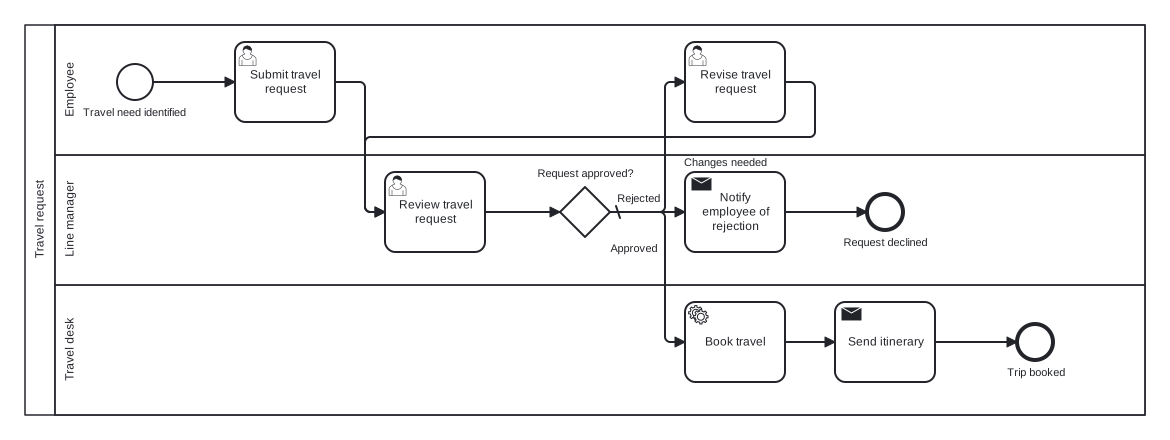
The model is a single pool with three lanes (Employee, Line manager, Travel desk) and one exclusive gateway with three outgoing branches. That three way split is the choice to notice: rather than forcing the manager into a yes or no, the gateway has Approved, Changes needed, and a default Rejected branch, and the Changes needed branch loops back through a revision task so returned requests have a defined route.
Standard BPMN 2.0 interchange XML: opens in Camunda Modeler, Signavio, Bizagi, and any other compliant tool.
The process at a glance
How to read this diagram
An employee kicks things off at the "Travel need identified" start event and submits the travel request. The Line manager lane reviews it, leading to the gateway "Request approved?" with three labelled outcomes. "Approved" moves the request to the Travel desk; "Changes needed" returns it to the Employee lane, where a revision task feeds straight back into the manager review, forming the rework loop; the default "Rejected" branch has the manager notify the employee, ending at "Request declined".
Approved requests land with the Travel desk, which books the travel through a service task and sends the itinerary back to the traveller with a send task. The process finishes at the "Trip booked" end event. Two end states, one loop, and every request provably reaches "Trip booked" or "Request declined": exactly the property you want before wiring the process into a workflow engine.
BPMN elements used
| Element | Count | In this diagram |
|---|---|---|
| Start event | 1 | Travel need identified |
| End event | 2 | Trip booked, Request declined |
| User task | 3 | Submit travel request, Review travel request, Revise travel request |
| Service task | 1 | Book travel |
| Send task | 2 | Send itinerary, Notify employee of rejection |
| Exclusive gateway | 1 | Request approved? |
View the BPMN 2.0 XML for this diagram
<?xml version="1.0" encoding="UTF-8"?>
<bpmn2:definitions xmlns:bpmn2="http://www.omg.org/spec/BPMN/20100524/MODEL" xmlns:bpmndi="http://www.omg.org/spec/BPMN/20100524/DI" xmlns:dc="http://www.omg.org/spec/DD/20100524/DC" xmlns:di="http://www.omg.org/spec/DD/20100524/DI" xmlns:xsi="http://www.w3.org/2001/XMLSchema-instance" id="Definitions_1" targetNamespace="http://bpmn.io/schema/bpmn" exporter="swimdraft" exporterVersion="1.0">
  <bpmn2:collaboration id="Collaboration_1">
    <bpmn2:participant id="pool_trv" name="Travel request" processRef="Process_pool_trv" />
  </bpmn2:collaboration>
  <bpmn2:process id="Process_pool_trv" isExecutable="false">
    <bpmn2:laneSet id="LaneSet_pool_trv">
      <bpmn2:lane id="lane_trv_emp" name="Employee">
        <bpmn2:flowNodeRef>start_trv</bpmn2:flowNodeRef>
        <bpmn2:flowNodeRef>t_trv_submit</bpmn2:flowNodeRef>
        <bpmn2:flowNodeRef>t_trv_revise</bpmn2:flowNodeRef>
      </bpmn2:lane>
      <bpmn2:lane id="lane_trv_mgr" name="Line manager">
        <bpmn2:flowNodeRef>t_trv_review</bpmn2:flowNodeRef>
        <bpmn2:flowNodeRef>g_trv_approve</bpmn2:flowNodeRef>
        <bpmn2:flowNodeRef>t_trv_notify</bpmn2:flowNodeRef>
        <bpmn2:flowNodeRef>end_trv_declined</bpmn2:flowNodeRef>
      </bpmn2:lane>
      <bpmn2:lane id="lane_trv_desk" name="Travel desk">
        <bpmn2:flowNodeRef>t_trv_book</bpmn2:flowNodeRef>
        <bpmn2:flowNodeRef>t_trv_itinerary</bpmn2:flowNodeRef>
        <bpmn2:flowNodeRef>end_trv_booked</bpmn2:flowNodeRef>
      </bpmn2:lane>
    </bpmn2:laneSet>
    <bpmn2:startEvent id="start_trv" name="Travel need identified">
      <bpmn2:outgoing>ftrv1</bpmn2:outgoing>
    </bpmn2:startEvent>
    <bpmn2:userTask id="t_trv_submit" name="Submit travel request">
      <bpmn2:incoming>ftrv1</bpmn2:incoming>
      <bpmn2:outgoing>ftrv2</bpmn2:outgoing>
    </bpmn2:userTask>
    <bpmn2:userTask id="t_trv_review" name="Review travel request">
      <bpmn2:incoming>ftrv2</bpmn2:incoming>
      <bpmn2:incoming>ftrv7</bpmn2:incoming>
      <bpmn2:outgoing>ftrv3</bpmn2:outgoing>
    </bpmn2:userTask>
    <bpmn2:exclusiveGateway id="g_trv_approve" name="Request approved?" default="ftrv6">
      <bpmn2:incoming>ftrv3</bpmn2:incoming>
      <bpmn2:outgoing>ftrv4</bpmn2:outgoing>
      <bpmn2:outgoing>ftrv5</bpmn2:outgoing>
      <bpmn2:outgoing>ftrv6</bpmn2:outgoing>
    </bpmn2:exclusiveGateway>
    <bpmn2:userTask id="t_trv_revise" name="Revise travel request">
      <bpmn2:incoming>ftrv5</bpmn2:incoming>
      <bpmn2:outgoing>ftrv7</bpmn2:outgoing>
    </bpmn2:userTask>
    <bpmn2:serviceTask id="t_trv_book" name="Book travel">
      <bpmn2:incoming>ftrv4</bpmn2:incoming>
      <bpmn2:outgoing>ftrv8</bpmn2:outgoing>
    </bpmn2:serviceTask>
    <bpmn2:sendTask id="t_trv_itinerary" name="Send itinerary">
      <bpmn2:incoming>ftrv8</bpmn2:incoming>
      <bpmn2:outgoing>ftrv9</bpmn2:outgoing>
    </bpmn2:sendTask>
    <bpmn2:endEvent id="end_trv_booked" name="Trip booked">
      <bpmn2:incoming>ftrv9</bpmn2:incoming>
    </bpmn2:endEvent>
    <bpmn2:sendTask id="t_trv_notify" name="Notify employee of rejection">
      <bpmn2:incoming>ftrv6</bpmn2:incoming>
      <bpmn2:outgoing>ftrv10</bpmn2:outgoing>
    </bpmn2:sendTask>
    <bpmn2:endEvent id="end_trv_declined" name="Request declined">
      <bpmn2:incoming>ftrv10</bpmn2:incoming>
    </bpmn2:endEvent>
    <bpmn2:sequenceFlow id="ftrv1" sourceRef="start_trv" targetRef="t_trv_submit" />
    <bpmn2:sequenceFlow id="ftrv2" sourceRef="t_trv_submit" targetRef="t_trv_review" />
    <bpmn2:sequenceFlow id="ftrv3" sourceRef="t_trv_review" targetRef="g_trv_approve" />
    <bpmn2:sequenceFlow id="ftrv4" name="Approved" sourceRef="g_trv_approve" targetRef="t_trv_book">
      <bpmn2:conditionExpression xsi:type="bpmn2:tFormalExpression">Approved</bpmn2:conditionExpression>
    </bpmn2:sequenceFlow>
    <bpmn2:sequenceFlow id="ftrv5" name="Changes needed" sourceRef="g_trv_approve" targetRef="t_trv_revise">
      <bpmn2:conditionExpression xsi:type="bpmn2:tFormalExpression">Changes needed</bpmn2:conditionExpression>
    </bpmn2:sequenceFlow>
    <bpmn2:sequenceFlow id="ftrv6" name="Rejected" sourceRef="g_trv_approve" targetRef="t_trv_notify" />
    <bpmn2:sequenceFlow id="ftrv7" sourceRef="t_trv_revise" targetRef="t_trv_review" />
    <bpmn2:sequenceFlow id="ftrv8" sourceRef="t_trv_book" targetRef="t_trv_itinerary" />
    <bpmn2:sequenceFlow id="ftrv9" sourceRef="t_trv_itinerary" targetRef="end_trv_booked" />
    <bpmn2:sequenceFlow id="ftrv10" sourceRef="t_trv_notify" targetRef="end_trv_declined" />
  </bpmn2:process>
  <bpmndi:BPMNDiagram id="BPMNDiagram_1">
    <bpmndi:BPMNPlane id="BPMNPlane_1" bpmnElement="Collaboration_1">
      <bpmndi:BPMNShape id="pool_trv_di" bpmnElement="pool_trv" isHorizontal="true">
        <dc:Bounds x="20" y="20" width="1120" height="390" />
      </bpmndi:BPMNShape>
      <bpmndi:BPMNShape id="lane_trv_emp_di" bpmnElement="lane_trv_emp" isHorizontal="true">
        <dc:Bounds x="50" y="20" width="1090" height="130" />
      </bpmndi:BPMNShape>
      <bpmndi:BPMNShape id="lane_trv_mgr_di" bpmnElement="lane_trv_mgr" isHorizontal="true">
        <dc:Bounds x="50" y="150" width="1090" height="130" />
      </bpmndi:BPMNShape>
      <bpmndi:BPMNShape id="lane_trv_desk_di" bpmnElement="lane_trv_desk" isHorizontal="true">
        <dc:Bounds x="50" y="280" width="1090" height="130" />
      </bpmndi:BPMNShape>
      <bpmndi:BPMNShape id="start_trv_di" bpmnElement="start_trv">
        <dc:Bounds x="112" y="59" width="36" height="36" />
        <bpmndi:BPMNLabel><dc:Bounds x="76" y="101" width="108" height="14" /></bpmndi:BPMNLabel>
      </bpmndi:BPMNShape>
      <bpmndi:BPMNShape id="t_trv_submit_di" bpmnElement="t_trv_submit">
        <dc:Bounds x="230" y="37" width="100" height="80" />
      </bpmndi:BPMNShape>
      <bpmndi:BPMNShape id="t_trv_review_di" bpmnElement="t_trv_review">
        <dc:Bounds x="380" y="167" width="100" height="80" />
      </bpmndi:BPMNShape>
      <bpmndi:BPMNShape id="g_trv_approve_di" bpmnElement="g_trv_approve">
        <dc:Bounds x="555" y="182" width="50" height="50" />
        <bpmndi:BPMNLabel><dc:Bounds x="531" y="162" width="98" height="14" /></bpmndi:BPMNLabel>
      </bpmndi:BPMNShape>
      <bpmndi:BPMNShape id="t_trv_revise_di" bpmnElement="t_trv_revise">
        <dc:Bounds x="680" y="37" width="100" height="80" />
      </bpmndi:BPMNShape>
      <bpmndi:BPMNShape id="t_trv_book_di" bpmnElement="t_trv_book">
        <dc:Bounds x="680" y="297" width="100" height="80" />
      </bpmndi:BPMNShape>
      <bpmndi:BPMNShape id="t_trv_itinerary_di" bpmnElement="t_trv_itinerary">
        <dc:Bounds x="830" y="297" width="100" height="80" />
      </bpmndi:BPMNShape>
      <bpmndi:BPMNShape id="end_trv_booked_di" bpmnElement="end_trv_booked">
        <dc:Bounds x="1012" y="319" width="36" height="36" />
        <bpmndi:BPMNLabel><dc:Bounds x="1000" y="361" width="61" height="14" /></bpmndi:BPMNLabel>
      </bpmndi:BPMNShape>
      <bpmndi:BPMNShape id="t_trv_notify_di" bpmnElement="t_trv_notify">
        <dc:Bounds x="680" y="167" width="100" height="80" />
      </bpmndi:BPMNShape>
      <bpmndi:BPMNShape id="end_trv_declined_di" bpmnElement="end_trv_declined">
        <dc:Bounds x="862" y="189" width="36" height="36" />
        <bpmndi:BPMNLabel><dc:Bounds x="837" y="231" width="87" height="14" /></bpmndi:BPMNLabel>
      </bpmndi:BPMNShape>
      <bpmndi:BPMNEdge id="ftrv1_di" bpmnElement="ftrv1">
        <di:waypoint x="148" y="77" />
        <di:waypoint x="230" y="77" />
      </bpmndi:BPMNEdge>
      <bpmndi:BPMNEdge id="ftrv2_di" bpmnElement="ftrv2">
        <di:waypoint x="330" y="77" />
        <di:waypoint x="360" y="77" />
        <di:waypoint x="360" y="207" />
        <di:waypoint x="380" y="207" />
      </bpmndi:BPMNEdge>
      <bpmndi:BPMNEdge id="ftrv3_di" bpmnElement="ftrv3">
        <di:waypoint x="480" y="207" />
        <di:waypoint x="555" y="207" />
      </bpmndi:BPMNEdge>
      <bpmndi:BPMNEdge id="ftrv4_di" bpmnElement="ftrv4">
        <di:waypoint x="605" y="207" />
        <di:waypoint x="660" y="207" />
        <di:waypoint x="660" y="337" />
        <di:waypoint x="680" y="337" />
        <bpmndi:BPMNLabel><dc:Bounds x="604" y="237" width="50" height="14" /></bpmndi:BPMNLabel>
      </bpmndi:BPMNEdge>
      <bpmndi:BPMNEdge id="ftrv5_di" bpmnElement="ftrv5">
        <di:waypoint x="605" y="207" />
        <di:waypoint x="660" y="207" />
        <di:waypoint x="660" y="77" />
        <di:waypoint x="680" y="77" />
        <bpmndi:BPMNLabel><dc:Bounds x="678" y="151" width="86" height="14" /></bpmndi:BPMNLabel>
      </bpmndi:BPMNEdge>
      <bpmndi:BPMNEdge id="ftrv6_di" bpmnElement="ftrv6">
        <di:waypoint x="605" y="207" />
        <di:waypoint x="680" y="207" />
        <bpmndi:BPMNLabel><dc:Bounds x="611" y="187" width="46" height="14" /></bpmndi:BPMNLabel>
      </bpmndi:BPMNEdge>
      <bpmndi:BPMNEdge id="ftrv7_di" bpmnElement="ftrv7">
        <di:waypoint x="780" y="77" />
        <di:waypoint x="810" y="77" />
        <di:waypoint x="810" y="132" />
        <di:waypoint x="360" y="132" />
        <di:waypoint x="360" y="207" />
        <di:waypoint x="380" y="207" />
      </bpmndi:BPMNEdge>
      <bpmndi:BPMNEdge id="ftrv8_di" bpmnElement="ftrv8">
        <di:waypoint x="780" y="337" />
        <di:waypoint x="830" y="337" />
      </bpmndi:BPMNEdge>
      <bpmndi:BPMNEdge id="ftrv9_di" bpmnElement="ftrv9">
        <di:waypoint x="930" y="337" />
        <di:waypoint x="1012" y="337" />
      </bpmndi:BPMNEdge>
      <bpmndi:BPMNEdge id="ftrv10_di" bpmnElement="ftrv10">
        <di:waypoint x="780" y="207" />
        <di:waypoint x="862" y="207" />
      </bpmndi:BPMNEdge>
    </bpmndi:BPMNPlane>
  </bpmndi:BPMNDiagram>
</bpmn2:definitions>
Frequently asked questions
Is a three way exclusive gateway better than two nested yes or no gateways?
Usually, yes. One gateway with Approved, Changes needed, and Rejected branches reflects a single decision made once, which is what actually happens in the review. Nesting two binary gateways models the same logic but adds a node, an extra flow, and the false suggestion that rejection is considered only after revision is ruled out.
Why is Rejected the default flow rather than Approved?
The default flow is the safety net taken when no condition evaluates true, so it should be the least damaging outcome. Defaulting to rejection means an unexpected review result stops the spend and prompts a human to look again. Defaulting to approval would let malformed requests through to booking, which is the costly direction to fail in.
How would I add a second approval for expensive trips?
After the manager approves, add a gateway asking "Over budget threshold?" with the Yes branch routing through a director approval task before the Travel desk, and the default No branch going straight to booking. Keep the threshold in the label ("Over 1,500?") so readers see the policy without opening any documentation.
Related BPMN examples
Loan approval
A bank loan approval process as a BPMN 2.0 diagram: completeness check, credit scoring, offer, and payout, with a document rework loop. Download the .bpmn file free.
Mortgage application
A mortgage application mapped in BPMN 2.0: parallel valuation and underwriting, lending decision, offer, and completion. View the swimlanes and download the .bpmn free.
Insurance claim processing
An end to end insurance claim process in BPMN 2.0: registration, cover check, loss assessment, and settlement or decline. Free .bpmn download included.
Patient admission
A hospital patient admission flow as a BPMN 2.0 swimlane diagram: registration, triage, bed request, and ward transfer. Download the .bpmn file free.
Generate your own version of this diagram
Describe how the process works in your organisation: plain English, meeting notes, a transcript, or a spreadsheet. Swimdraft turns it into a spec-validated BPMN 2.0 diagram you can edit in the browser and export as .bpmn, SVG, or PNG.
Start freeNo credit card required