
Accounts payable BPMN example
Accounts payable is the discipline of paying suppliers the right amount at the right time and not a day earlier. Teams map the AP process because it sits at the junction of cash management and supplier relationships: pay too eagerly and working capital suffers, pay late and the phone starts ringing. The classic failure is an invoice query that disappears into email while the due date passes.
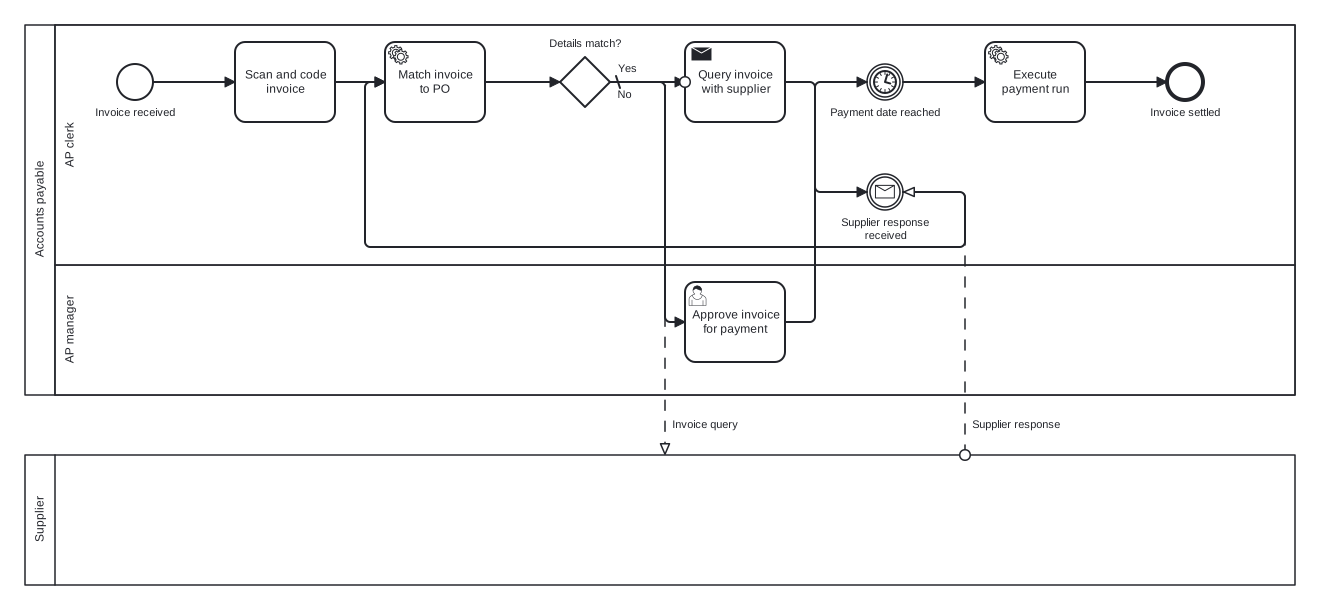
This is the one two-pool model in the finance set. The main pool holds AP clerk and AP manager lanes; the supplier is a black box pool connected by two message flows, one carrying the query out and one carrying the reply back. Inside, a rework loop around the match and a timer event for the payment date do the interesting work.
Standard BPMN 2.0 interchange XML: opens in Camunda Modeler, Signavio, Bizagi, and any other compliant tool.
The process at a glance
How to read this diagram
Two participants appear on this diagram, but only one has internal detail. In the AP clerk lane, a received invoice is scanned, coded, and matched against its purchase order. When "Details match?" takes the default No branch, a send task queries the invoice with the supplier: that is the first message flow crossing to the Supplier pool. The process then waits at a message catch event until the supplier responds, the second message flow, and loops back to the match task.
A clean match takes the Yes branch to the AP manager lane, where the invoice is approved for payment. Rather than paying immediately, the token holds at the "Payment date reached" timer event, honouring the agreed terms, and only then does the payment run execute and the process end at "Invoice settled". Note that both message flows attach to the pool itself, since the supplier's internal behaviour is deliberately unmodelled.
BPMN elements used
| Element | Count | In this diagram |
|---|---|---|
| Start event | 1 | Invoice received |
| End event | 1 | Invoice settled |
| Intermediate catch event | 2 | Supplier response received, Payment date reached |
| Task | 1 | Scan and code invoice |
| User task | 1 | Approve invoice for payment |
| Service task | 2 | Match invoice to PO, Execute payment run |
| Send task | 1 | Query invoice with supplier |
| Exclusive gateway | 1 | Details match? |
View the BPMN 2.0 XML for this diagram
<?xml version="1.0" encoding="UTF-8"?>
<bpmn2:definitions xmlns:bpmn2="http://www.omg.org/spec/BPMN/20100524/MODEL" xmlns:bpmndi="http://www.omg.org/spec/BPMN/20100524/DI" xmlns:dc="http://www.omg.org/spec/DD/20100524/DC" xmlns:di="http://www.omg.org/spec/DD/20100524/DI" xmlns:xsi="http://www.w3.org/2001/XMLSchema-instance" id="Definitions_1" targetNamespace="http://bpmn.io/schema/bpmn" exporter="swimdraft" exporterVersion="1.0">
  <bpmn2:collaboration id="Collaboration_1">
    <bpmn2:participant id="pool_ap" name="Accounts payable" processRef="Process_pool_ap" />
    <bpmn2:participant id="pool_ap_supplier" name="Supplier" processRef="Process_pool_ap_supplier" />
    <bpmn2:messageFlow id="mf_ap1" name="Invoice query" sourceRef="t_ap_query" targetRef="pool_ap_supplier" />
    <bpmn2:messageFlow id="mf_ap2" name="Supplier response" sourceRef="pool_ap_supplier" targetRef="ev_ap_reply" />
  </bpmn2:collaboration>
  <bpmn2:process id="Process_pool_ap" isExecutable="false">
    <bpmn2:laneSet id="LaneSet_pool_ap">
      <bpmn2:lane id="lane_ap_clerk" name="AP clerk">
        <bpmn2:flowNodeRef>start_ap</bpmn2:flowNodeRef>
        <bpmn2:flowNodeRef>t_ap_scan</bpmn2:flowNodeRef>
        <bpmn2:flowNodeRef>t_ap_match</bpmn2:flowNodeRef>
        <bpmn2:flowNodeRef>g_ap_match</bpmn2:flowNodeRef>
        <bpmn2:flowNodeRef>t_ap_query</bpmn2:flowNodeRef>
        <bpmn2:flowNodeRef>ev_ap_reply</bpmn2:flowNodeRef>
        <bpmn2:flowNodeRef>ev_ap_due</bpmn2:flowNodeRef>
        <bpmn2:flowNodeRef>t_ap_run</bpmn2:flowNodeRef>
        <bpmn2:flowNodeRef>end_ap_settled</bpmn2:flowNodeRef>
      </bpmn2:lane>
      <bpmn2:lane id="lane_ap_mgr" name="AP manager">
        <bpmn2:flowNodeRef>t_ap_approve</bpmn2:flowNodeRef>
      </bpmn2:lane>
    </bpmn2:laneSet>
    <bpmn2:startEvent id="start_ap" name="Invoice received">
      <bpmn2:outgoing>fap1</bpmn2:outgoing>
    </bpmn2:startEvent>
    <bpmn2:task id="t_ap_scan" name="Scan and code invoice">
      <bpmn2:incoming>fap1</bpmn2:incoming>
      <bpmn2:outgoing>fap2</bpmn2:outgoing>
    </bpmn2:task>
    <bpmn2:serviceTask id="t_ap_match" name="Match invoice to PO">
      <bpmn2:incoming>fap2</bpmn2:incoming>
      <bpmn2:incoming>fap7</bpmn2:incoming>
      <bpmn2:outgoing>fap3</bpmn2:outgoing>
    </bpmn2:serviceTask>
    <bpmn2:exclusiveGateway id="g_ap_match" name="Details match?" default="fap5">
      <bpmn2:incoming>fap3</bpmn2:incoming>
      <bpmn2:outgoing>fap4</bpmn2:outgoing>
      <bpmn2:outgoing>fap5</bpmn2:outgoing>
    </bpmn2:exclusiveGateway>
    <bpmn2:sendTask id="t_ap_query" name="Query invoice with supplier">
      <bpmn2:incoming>fap5</bpmn2:incoming>
      <bpmn2:outgoing>fap6</bpmn2:outgoing>
    </bpmn2:sendTask>
    <bpmn2:intermediateCatchEvent id="ev_ap_reply" name="Supplier response received">
      <bpmn2:incoming>fap6</bpmn2:incoming>
      <bpmn2:outgoing>fap7</bpmn2:outgoing>
      <bpmn2:messageEventDefinition id="ev_ap_reply_def" />
    </bpmn2:intermediateCatchEvent>
    <bpmn2:userTask id="t_ap_approve" name="Approve invoice for payment">
      <bpmn2:incoming>fap4</bpmn2:incoming>
      <bpmn2:outgoing>fap8</bpmn2:outgoing>
    </bpmn2:userTask>
    <bpmn2:intermediateCatchEvent id="ev_ap_due" name="Payment date reached">
      <bpmn2:incoming>fap8</bpmn2:incoming>
      <bpmn2:outgoing>fap9</bpmn2:outgoing>
      <bpmn2:timerEventDefinition id="ev_ap_due_def" />
    </bpmn2:intermediateCatchEvent>
    <bpmn2:serviceTask id="t_ap_run" name="Execute payment run">
      <bpmn2:incoming>fap9</bpmn2:incoming>
      <bpmn2:outgoing>fap10</bpmn2:outgoing>
    </bpmn2:serviceTask>
    <bpmn2:endEvent id="end_ap_settled" name="Invoice settled">
      <bpmn2:incoming>fap10</bpmn2:incoming>
    </bpmn2:endEvent>
    <bpmn2:sequenceFlow id="fap1" sourceRef="start_ap" targetRef="t_ap_scan" />
    <bpmn2:sequenceFlow id="fap2" sourceRef="t_ap_scan" targetRef="t_ap_match" />
    <bpmn2:sequenceFlow id="fap3" sourceRef="t_ap_match" targetRef="g_ap_match" />
    <bpmn2:sequenceFlow id="fap4" name="Yes" sourceRef="g_ap_match" targetRef="t_ap_approve">
      <bpmn2:conditionExpression xsi:type="bpmn2:tFormalExpression">Yes</bpmn2:conditionExpression>
    </bpmn2:sequenceFlow>
    <bpmn2:sequenceFlow id="fap5" name="No" sourceRef="g_ap_match" targetRef="t_ap_query" />
    <bpmn2:sequenceFlow id="fap6" sourceRef="t_ap_query" targetRef="ev_ap_reply" />
    <bpmn2:sequenceFlow id="fap7" sourceRef="ev_ap_reply" targetRef="t_ap_match" />
    <bpmn2:sequenceFlow id="fap8" sourceRef="t_ap_approve" targetRef="ev_ap_due" />
    <bpmn2:sequenceFlow id="fap9" sourceRef="ev_ap_due" targetRef="t_ap_run" />
    <bpmn2:sequenceFlow id="fap10" sourceRef="t_ap_run" targetRef="end_ap_settled" />
  </bpmn2:process>
  <bpmn2:process id="Process_pool_ap_supplier" isExecutable="false">
  </bpmn2:process>
  <bpmndi:BPMNDiagram id="BPMNDiagram_1">
    <bpmndi:BPMNPlane id="BPMNPlane_1" bpmnElement="Collaboration_1">
      <bpmndi:BPMNShape id="pool_ap_di" bpmnElement="pool_ap" isHorizontal="true">
        <dc:Bounds x="20" y="20" width="1270" height="370" />
      </bpmndi:BPMNShape>
      <bpmndi:BPMNShape id="lane_ap_clerk_di" bpmnElement="lane_ap_clerk" isHorizontal="true">
        <dc:Bounds x="50" y="20" width="1240" height="240" />
      </bpmndi:BPMNShape>
      <bpmndi:BPMNShape id="lane_ap_mgr_di" bpmnElement="lane_ap_mgr" isHorizontal="true">
        <dc:Bounds x="50" y="260" width="1240" height="130" />
      </bpmndi:BPMNShape>
      <bpmndi:BPMNShape id="pool_ap_supplier_di" bpmnElement="pool_ap_supplier" isHorizontal="true">
        <dc:Bounds x="20" y="450" width="1270" height="130" />
      </bpmndi:BPMNShape>
      <bpmndi:BPMNShape id="start_ap_di" bpmnElement="start_ap">
        <dc:Bounds x="112" y="59" width="36" height="36" />
        <bpmndi:BPMNLabel><dc:Bounds x="89" y="101" width="82" height="14" /></bpmndi:BPMNLabel>
      </bpmndi:BPMNShape>
      <bpmndi:BPMNShape id="t_ap_scan_di" bpmnElement="t_ap_scan">
        <dc:Bounds x="230" y="37" width="100" height="80" />
      </bpmndi:BPMNShape>
      <bpmndi:BPMNShape id="t_ap_match_di" bpmnElement="t_ap_match">
        <dc:Bounds x="380" y="37" width="100" height="80" />
      </bpmndi:BPMNShape>
      <bpmndi:BPMNShape id="g_ap_match_di" bpmnElement="g_ap_match">
        <dc:Bounds x="555" y="52" width="50" height="50" />
        <bpmndi:BPMNLabel><dc:Bounds x="543" y="32" width="75" height="14" /></bpmndi:BPMNLabel>
      </bpmndi:BPMNShape>
      <bpmndi:BPMNShape id="t_ap_query_di" bpmnElement="t_ap_query">
        <dc:Bounds x="680" y="37" width="100" height="80" />
      </bpmndi:BPMNShape>
      <bpmndi:BPMNShape id="ev_ap_reply_di" bpmnElement="ev_ap_reply">
        <dc:Bounds x="862" y="169" width="36" height="36" />
        <bpmndi:BPMNLabel><dc:Bounds x="835" y="211" width="91" height="28" /></bpmndi:BPMNLabel>
      </bpmndi:BPMNShape>
      <bpmndi:BPMNShape id="t_ap_approve_di" bpmnElement="t_ap_approve">
        <dc:Bounds x="680" y="277" width="100" height="80" />
      </bpmndi:BPMNShape>
      <bpmndi:BPMNShape id="ev_ap_due_di" bpmnElement="ev_ap_due">
        <dc:Bounds x="862" y="59" width="36" height="36" />
        <bpmndi:BPMNLabel><dc:Bounds x="824" y="101" width="113" height="14" /></bpmndi:BPMNLabel>
      </bpmndi:BPMNShape>
      <bpmndi:BPMNShape id="t_ap_run_di" bpmnElement="t_ap_run">
        <dc:Bounds x="980" y="37" width="100" height="80" />
      </bpmndi:BPMNShape>
      <bpmndi:BPMNShape id="end_ap_settled_di" bpmnElement="end_ap_settled">
        <dc:Bounds x="1162" y="59" width="36" height="36" />
        <bpmndi:BPMNLabel><dc:Bounds x="1144" y="101" width="73" height="14" /></bpmndi:BPMNLabel>
      </bpmndi:BPMNShape>
      <bpmndi:BPMNEdge id="fap1_di" bpmnElement="fap1">
        <di:waypoint x="148" y="77" />
        <di:waypoint x="230" y="77" />
      </bpmndi:BPMNEdge>
      <bpmndi:BPMNEdge id="fap2_di" bpmnElement="fap2">
        <di:waypoint x="330" y="77" />
        <di:waypoint x="380" y="77" />
      </bpmndi:BPMNEdge>
      <bpmndi:BPMNEdge id="fap3_di" bpmnElement="fap3">
        <di:waypoint x="480" y="77" />
        <di:waypoint x="555" y="77" />
      </bpmndi:BPMNEdge>
      <bpmndi:BPMNEdge id="fap4_di" bpmnElement="fap4">
        <di:waypoint x="605" y="77" />
        <di:waypoint x="660" y="77" />
        <di:waypoint x="660" y="317" />
        <di:waypoint x="680" y="317" />
        <bpmndi:BPMNLabel><dc:Bounds x="611" y="57" width="21" height="14" /></bpmndi:BPMNLabel>
      </bpmndi:BPMNEdge>
      <bpmndi:BPMNEdge id="fap5_di" bpmnElement="fap5">
        <di:waypoint x="605" y="77" />
        <di:waypoint x="680" y="77" />
        <bpmndi:BPMNLabel><dc:Bounds x="611" y="83" width="17" height="14" /></bpmndi:BPMNLabel>
      </bpmndi:BPMNEdge>
      <bpmndi:BPMNEdge id="fap6_di" bpmnElement="fap6">
        <di:waypoint x="780" y="77" />
        <di:waypoint x="810" y="77" />
        <di:waypoint x="810" y="187" />
        <di:waypoint x="862" y="187" />
      </bpmndi:BPMNEdge>
      <bpmndi:BPMNEdge id="fap7_di" bpmnElement="fap7">
        <di:waypoint x="898" y="187" />
        <di:waypoint x="960" y="187" />
        <di:waypoint x="960" y="242" />
        <di:waypoint x="360" y="242" />
        <di:waypoint x="360" y="77" />
        <di:waypoint x="380" y="77" />
      </bpmndi:BPMNEdge>
      <bpmndi:BPMNEdge id="fap8_di" bpmnElement="fap8">
        <di:waypoint x="780" y="317" />
        <di:waypoint x="810" y="317" />
        <di:waypoint x="810" y="77" />
        <di:waypoint x="862" y="77" />
      </bpmndi:BPMNEdge>
      <bpmndi:BPMNEdge id="fap9_di" bpmnElement="fap9">
        <di:waypoint x="898" y="77" />
        <di:waypoint x="980" y="77" />
      </bpmndi:BPMNEdge>
      <bpmndi:BPMNEdge id="fap10_di" bpmnElement="fap10">
        <di:waypoint x="1080" y="77" />
        <di:waypoint x="1162" y="77" />
      </bpmndi:BPMNEdge>
      <bpmndi:BPMNEdge id="mf_ap1_di" bpmnElement="mf_ap1">
        <di:waypoint x="680" y="77" />
        <di:waypoint x="660" y="77" />
        <di:waypoint x="660" y="420" />
        <di:waypoint x="660" y="450" />
        <bpmndi:BPMNLabel><dc:Bounds x="666" y="413" width="68" height="14" /></bpmndi:BPMNLabel>
      </bpmndi:BPMNEdge>
      <bpmndi:BPMNEdge id="mf_ap2_di" bpmnElement="mf_ap2">
        <di:waypoint x="960" y="450" />
        <di:waypoint x="960" y="420" />
        <di:waypoint x="960" y="187" />
        <di:waypoint x="898" y="187" />
        <bpmndi:BPMNLabel><dc:Bounds x="966" y="413" width="91" height="14" /></bpmndi:BPMNLabel>
      </bpmndi:BPMNEdge>
    </bpmndi:BPMNPlane>
  </bpmndi:BPMNDiagram>
</bpmn2:definitions>
Frequently asked questions
Why is the supplier drawn as an empty pool?
The supplier is a genuine external participant, so it must be a pool rather than a lane, but its internal process is not ours to model or enforce. A black box pool states the interface honestly: messages go out and come back, and everything else is the supplier's business. Message flows may attach directly to the pool boundary for exactly this reason.
Why do sequence flows never cross into the Supplier pool?
Sequence flows describe ordering within a single participant's process, so BPMN forbids them from crossing pool boundaries. Communication between pools travels only along message flows, which is why the query leaves through one and the reply arrives through another. Mixing the two up is among the most common validation errors in hand-drawn diagrams.
Why use a timer event for the payment date instead of a task?
Nothing is being done while AP waits for the due date, so a task would be misleading: tasks represent work. An intermediate timer catch event says precisely that the process sleeps until a deadline arrives. It also gives you a natural place to hang early payment discount logic later, by adding a gateway just before the timer.
Related BPMN examples
Order to cash
A complete order to cash process as a BPMN 2.0 diagram: credit check, fulfilment, invoicing, and payment. View the swimlane diagram and download the .bpmn file free.
Procure to pay
The complete procure to pay cycle as a BPMN 2.0 diagram: requisition approval, purchase order, goods receipt, three way match, and payment. Free .bpmn download.
Invoice approval
Invoice approval as a BPMN 2.0 swimlane diagram: amount thresholds, manager and director approval, and posting to the ledger. View it and download the .bpmn file free.
Expense reimbursement
An expense reimbursement process in BPMN 2.0: policy checks, receipt audit, an amendment loop, and a timed payment run. View the diagram and download the .bpmn free.
Generate your own version of this diagram
Describe how the process works in your organisation: plain English, meeting notes, a transcript, or a spreadsheet. Swimdraft turns it into a spec-validated BPMN 2.0 diagram you can edit in the browser and export as .bpmn, SVG, or PNG.
Start freeNo credit card required