
Order to cash BPMN example
Order to cash (O2C) covers everything between a customer placing an order and the money landing in your ledger. It is one of the most commonly mapped business processes because it crosses so many teams: sales takes the order, credit control vets the customer, the warehouse fulfils it, and billing chases the cash. When the handoffs are undocumented, orders stall and nobody can say where.
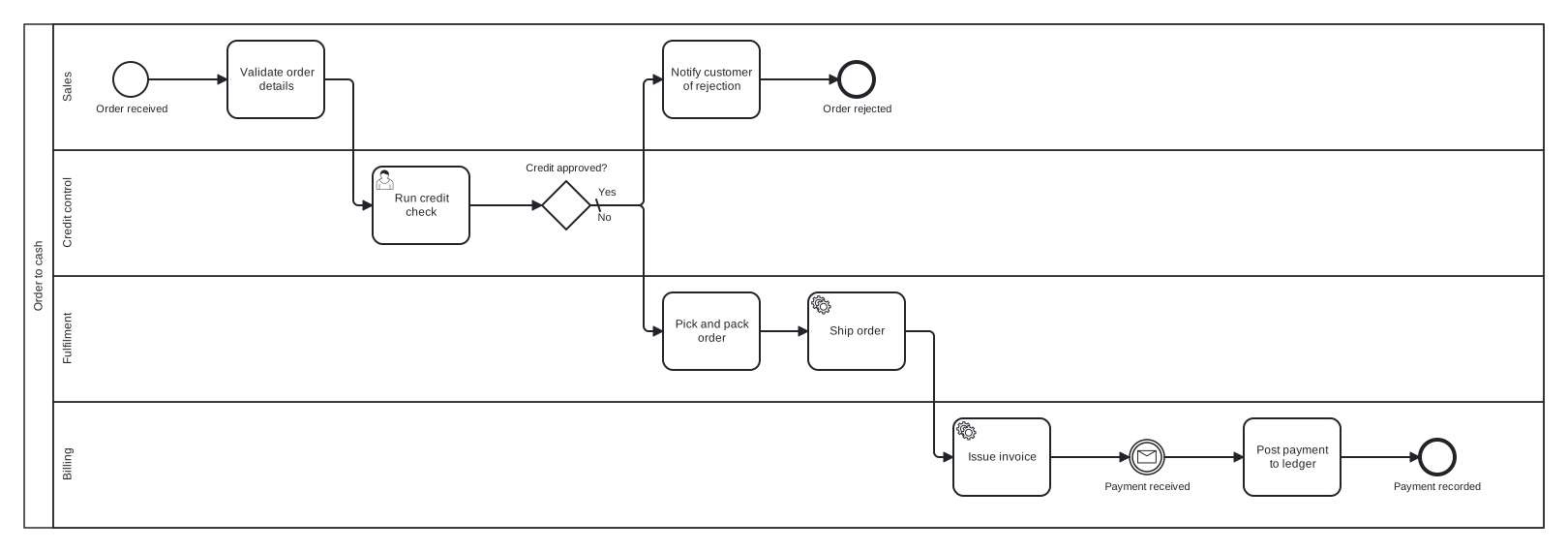
This example models a typical order to cash flow as a single pool with four lanes, one per team. A credit decision gateway splits the flow early: rejected orders exit through their own end event instead of limping along the happy path. After shipment, an intermediate message event makes the wait for customer payment explicit rather than hiding it inside a task.
Standard BPMN 2.0 interchange XML: opens in Camunda Modeler, Signavio, Bizagi, and any other compliant tool.
The process at a glance
How to read this diagram
The process starts when an order is received in the Sales lane. Sales validates the order details, then hands over to Credit control, which runs a credit check. The exclusive gateway "Credit approved?" is the only decision in the flow: the No branch (the default path) returns the order to Sales to notify the customer, ending at "Order rejected". The Yes branch drops into the Fulfilment lane, where the order is picked, packed, and shipped.
Once goods are on their way, Billing issues the invoice and the process waits at a message catch event until payment arrives. Posting the payment to the ledger closes the loop at the "Payment recorded" end event. Two end events matter here: a process reader can see at a glance that an order either completes with cash collected or is rejected at credit, and no token is ever left in limbo.
BPMN elements used
| Element | Count | In this diagram |
|---|---|---|
| Start event | 1 | Order received |
| End event | 2 | Order rejected, Payment recorded |
| Intermediate catch event | 1 | Payment received |
| Task | 4 | Validate order details, Notify customer of rejection, Pick and pack order, Post payment to ledger |
| User task | 1 | Run credit check |
| Service task | 2 | Ship order, Issue invoice |
| Exclusive gateway | 1 | Credit approved? |
View the BPMN 2.0 XML for this diagram
<?xml version="1.0" encoding="UTF-8"?>
<bpmn2:definitions xmlns:bpmn2="http://www.omg.org/spec/BPMN/20100524/MODEL" xmlns:bpmndi="http://www.omg.org/spec/BPMN/20100524/DI" xmlns:dc="http://www.omg.org/spec/DD/20100524/DC" xmlns:di="http://www.omg.org/spec/DD/20100524/DI" xmlns:xsi="http://www.w3.org/2001/XMLSchema-instance" id="Definitions_1" targetNamespace="http://bpmn.io/schema/bpmn" exporter="swimdraft" exporterVersion="1.0">
  <bpmn2:collaboration id="Collaboration_1">
    <bpmn2:participant id="pool_o2c" name="Order to cash" processRef="Process_pool_o2c" />
  </bpmn2:collaboration>
  <bpmn2:process id="Process_pool_o2c" isExecutable="false">
    <bpmn2:laneSet id="LaneSet_pool_o2c">
      <bpmn2:lane id="lane_sales" name="Sales">
        <bpmn2:flowNodeRef>start_o2c</bpmn2:flowNodeRef>
        <bpmn2:flowNodeRef>t_validate</bpmn2:flowNodeRef>
        <bpmn2:flowNodeRef>t_reject</bpmn2:flowNodeRef>
        <bpmn2:flowNodeRef>end_rejected</bpmn2:flowNodeRef>
      </bpmn2:lane>
      <bpmn2:lane id="lane_credit" name="Credit control">
        <bpmn2:flowNodeRef>t_credit</bpmn2:flowNodeRef>
        <bpmn2:flowNodeRef>g_credit</bpmn2:flowNodeRef>
      </bpmn2:lane>
      <bpmn2:lane id="lane_fulfil" name="Fulfilment">
        <bpmn2:flowNodeRef>t_pick</bpmn2:flowNodeRef>
        <bpmn2:flowNodeRef>t_ship</bpmn2:flowNodeRef>
      </bpmn2:lane>
      <bpmn2:lane id="lane_billing" name="Billing">
        <bpmn2:flowNodeRef>t_invoice</bpmn2:flowNodeRef>
        <bpmn2:flowNodeRef>ev_payment</bpmn2:flowNodeRef>
        <bpmn2:flowNodeRef>t_post</bpmn2:flowNodeRef>
        <bpmn2:flowNodeRef>end_paid</bpmn2:flowNodeRef>
      </bpmn2:lane>
    </bpmn2:laneSet>
    <bpmn2:startEvent id="start_o2c" name="Order received">
      <bpmn2:outgoing>fo2c1</bpmn2:outgoing>
    </bpmn2:startEvent>
    <bpmn2:task id="t_validate" name="Validate order details">
      <bpmn2:incoming>fo2c1</bpmn2:incoming>
      <bpmn2:outgoing>fo2c2</bpmn2:outgoing>
    </bpmn2:task>
    <bpmn2:userTask id="t_credit" name="Run credit check">
      <bpmn2:incoming>fo2c2</bpmn2:incoming>
      <bpmn2:outgoing>fo2c3</bpmn2:outgoing>
    </bpmn2:userTask>
    <bpmn2:exclusiveGateway id="g_credit" name="Credit approved?" default="fo2c5">
      <bpmn2:incoming>fo2c3</bpmn2:incoming>
      <bpmn2:outgoing>fo2c4</bpmn2:outgoing>
      <bpmn2:outgoing>fo2c5</bpmn2:outgoing>
    </bpmn2:exclusiveGateway>
    <bpmn2:task id="t_reject" name="Notify customer of rejection">
      <bpmn2:incoming>fo2c5</bpmn2:incoming>
      <bpmn2:outgoing>fo2c6</bpmn2:outgoing>
    </bpmn2:task>
    <bpmn2:endEvent id="end_rejected" name="Order rejected">
      <bpmn2:incoming>fo2c6</bpmn2:incoming>
    </bpmn2:endEvent>
    <bpmn2:task id="t_pick" name="Pick and pack order">
      <bpmn2:incoming>fo2c4</bpmn2:incoming>
      <bpmn2:outgoing>fo2c7</bpmn2:outgoing>
    </bpmn2:task>
    <bpmn2:serviceTask id="t_ship" name="Ship order">
      <bpmn2:incoming>fo2c7</bpmn2:incoming>
      <bpmn2:outgoing>fo2c8</bpmn2:outgoing>
    </bpmn2:serviceTask>
    <bpmn2:serviceTask id="t_invoice" name="Issue invoice">
      <bpmn2:incoming>fo2c8</bpmn2:incoming>
      <bpmn2:outgoing>fo2c9</bpmn2:outgoing>
    </bpmn2:serviceTask>
    <bpmn2:intermediateCatchEvent id="ev_payment" name="Payment received">
      <bpmn2:incoming>fo2c9</bpmn2:incoming>
      <bpmn2:outgoing>fo2c10</bpmn2:outgoing>
      <bpmn2:messageEventDefinition id="ev_payment_def" />
    </bpmn2:intermediateCatchEvent>
    <bpmn2:task id="t_post" name="Post payment to ledger">
      <bpmn2:incoming>fo2c10</bpmn2:incoming>
      <bpmn2:outgoing>fo2c11</bpmn2:outgoing>
    </bpmn2:task>
    <bpmn2:endEvent id="end_paid" name="Payment recorded">
      <bpmn2:incoming>fo2c11</bpmn2:incoming>
    </bpmn2:endEvent>
    <bpmn2:sequenceFlow id="fo2c1" sourceRef="start_o2c" targetRef="t_validate" />
    <bpmn2:sequenceFlow id="fo2c2" sourceRef="t_validate" targetRef="t_credit" />
    <bpmn2:sequenceFlow id="fo2c3" sourceRef="t_credit" targetRef="g_credit" />
    <bpmn2:sequenceFlow id="fo2c4" name="Yes" sourceRef="g_credit" targetRef="t_pick">
      <bpmn2:conditionExpression xsi:type="bpmn2:tFormalExpression">Yes</bpmn2:conditionExpression>
    </bpmn2:sequenceFlow>
    <bpmn2:sequenceFlow id="fo2c5" name="No" sourceRef="g_credit" targetRef="t_reject" />
    <bpmn2:sequenceFlow id="fo2c6" sourceRef="t_reject" targetRef="end_rejected" />
    <bpmn2:sequenceFlow id="fo2c7" sourceRef="t_pick" targetRef="t_ship" />
    <bpmn2:sequenceFlow id="fo2c8" sourceRef="t_ship" targetRef="t_invoice" />
    <bpmn2:sequenceFlow id="fo2c9" sourceRef="t_invoice" targetRef="ev_payment" />
    <bpmn2:sequenceFlow id="fo2c10" sourceRef="ev_payment" targetRef="t_post" />
    <bpmn2:sequenceFlow id="fo2c11" sourceRef="t_post" targetRef="end_paid" />
  </bpmn2:process>
  <bpmndi:BPMNDiagram id="BPMNDiagram_1">
    <bpmndi:BPMNPlane id="BPMNPlane_1" bpmnElement="Collaboration_1">
      <bpmndi:BPMNShape id="pool_o2c_di" bpmnElement="pool_o2c" isHorizontal="true">
        <dc:Bounds x="20" y="20" width="1570" height="520" />
      </bpmndi:BPMNShape>
      <bpmndi:BPMNShape id="lane_sales_di" bpmnElement="lane_sales" isHorizontal="true">
        <dc:Bounds x="50" y="20" width="1540" height="130" />
      </bpmndi:BPMNShape>
      <bpmndi:BPMNShape id="lane_credit_di" bpmnElement="lane_credit" isHorizontal="true">
        <dc:Bounds x="50" y="150" width="1540" height="130" />
      </bpmndi:BPMNShape>
      <bpmndi:BPMNShape id="lane_fulfil_di" bpmnElement="lane_fulfil" isHorizontal="true">
        <dc:Bounds x="50" y="280" width="1540" height="130" />
      </bpmndi:BPMNShape>
      <bpmndi:BPMNShape id="lane_billing_di" bpmnElement="lane_billing" isHorizontal="true">
        <dc:Bounds x="50" y="410" width="1540" height="130" />
      </bpmndi:BPMNShape>
      <bpmndi:BPMNShape id="start_o2c_di" bpmnElement="start_o2c">
        <dc:Bounds x="112" y="59" width="36" height="36" />
        <bpmndi:BPMNLabel><dc:Bounds x="93" y="101" width="75" height="14" /></bpmndi:BPMNLabel>
      </bpmndi:BPMNShape>
      <bpmndi:BPMNShape id="t_validate_di" bpmnElement="t_validate">
        <dc:Bounds x="230" y="37" width="100" height="80" />
      </bpmndi:BPMNShape>
      <bpmndi:BPMNShape id="t_credit_di" bpmnElement="t_credit">
        <dc:Bounds x="380" y="167" width="100" height="80" />
      </bpmndi:BPMNShape>
      <bpmndi:BPMNShape id="g_credit_di" bpmnElement="g_credit">
        <dc:Bounds x="555" y="182" width="50" height="50" />
        <bpmndi:BPMNLabel><dc:Bounds x="537" y="162" width="87" height="14" /></bpmndi:BPMNLabel>
      </bpmndi:BPMNShape>
      <bpmndi:BPMNShape id="t_reject_di" bpmnElement="t_reject">
        <dc:Bounds x="680" y="37" width="100" height="80" />
      </bpmndi:BPMNShape>
      <bpmndi:BPMNShape id="end_rejected_di" bpmnElement="end_rejected">
        <dc:Bounds x="862" y="59" width="36" height="36" />
        <bpmndi:BPMNLabel><dc:Bounds x="844" y="101" width="73" height="14" /></bpmndi:BPMNLabel>
      </bpmndi:BPMNShape>
      <bpmndi:BPMNShape id="t_pick_di" bpmnElement="t_pick">
        <dc:Bounds x="680" y="297" width="100" height="80" />
      </bpmndi:BPMNShape>
      <bpmndi:BPMNShape id="t_ship_di" bpmnElement="t_ship">
        <dc:Bounds x="830" y="297" width="100" height="80" />
      </bpmndi:BPMNShape>
      <bpmndi:BPMNShape id="t_invoice_di" bpmnElement="t_invoice">
        <dc:Bounds x="980" y="427" width="100" height="80" />
      </bpmndi:BPMNShape>
      <bpmndi:BPMNShape id="ev_payment_di" bpmnElement="ev_payment">
        <dc:Bounds x="1162" y="449" width="36" height="36" />
        <bpmndi:BPMNLabel><dc:Bounds x="1135" y="491" width="91" height="14" /></bpmndi:BPMNLabel>
      </bpmndi:BPMNShape>
      <bpmndi:BPMNShape id="t_post_di" bpmnElement="t_post">
        <dc:Bounds x="1280" y="427" width="100" height="80" />
      </bpmndi:BPMNShape>
      <bpmndi:BPMNShape id="end_paid_di" bpmnElement="end_paid">
        <dc:Bounds x="1462" y="449" width="36" height="36" />
        <bpmndi:BPMNLabel><dc:Bounds x="1434" y="491" width="92" height="14" /></bpmndi:BPMNLabel>
      </bpmndi:BPMNShape>
      <bpmndi:BPMNEdge id="fo2c1_di" bpmnElement="fo2c1">
        <di:waypoint x="148" y="77" />
        <di:waypoint x="230" y="77" />
      </bpmndi:BPMNEdge>
      <bpmndi:BPMNEdge id="fo2c2_di" bpmnElement="fo2c2">
        <di:waypoint x="330" y="77" />
        <di:waypoint x="360" y="77" />
        <di:waypoint x="360" y="207" />
        <di:waypoint x="380" y="207" />
      </bpmndi:BPMNEdge>
      <bpmndi:BPMNEdge id="fo2c3_di" bpmnElement="fo2c3">
        <di:waypoint x="480" y="207" />
        <di:waypoint x="555" y="207" />
      </bpmndi:BPMNEdge>
      <bpmndi:BPMNEdge id="fo2c4_di" bpmnElement="fo2c4">
        <di:waypoint x="605" y="207" />
        <di:waypoint x="660" y="207" />
        <di:waypoint x="660" y="337" />
        <di:waypoint x="680" y="337" />
        <bpmndi:BPMNLabel><dc:Bounds x="611" y="187" width="21" height="14" /></bpmndi:BPMNLabel>
      </bpmndi:BPMNEdge>
      <bpmndi:BPMNEdge id="fo2c5_di" bpmnElement="fo2c5">
        <di:waypoint x="605" y="207" />
        <di:waypoint x="660" y="207" />
        <di:waypoint x="660" y="77" />
        <di:waypoint x="680" y="77" />
        <bpmndi:BPMNLabel><dc:Bounds x="611" y="213" width="17" height="14" /></bpmndi:BPMNLabel>
      </bpmndi:BPMNEdge>
      <bpmndi:BPMNEdge id="fo2c6_di" bpmnElement="fo2c6">
        <di:waypoint x="780" y="77" />
        <di:waypoint x="862" y="77" />
      </bpmndi:BPMNEdge>
      <bpmndi:BPMNEdge id="fo2c7_di" bpmnElement="fo2c7">
        <di:waypoint x="780" y="337" />
        <di:waypoint x="830" y="337" />
      </bpmndi:BPMNEdge>
      <bpmndi:BPMNEdge id="fo2c8_di" bpmnElement="fo2c8">
        <di:waypoint x="930" y="337" />
        <di:waypoint x="960" y="337" />
        <di:waypoint x="960" y="467" />
        <di:waypoint x="980" y="467" />
      </bpmndi:BPMNEdge>
      <bpmndi:BPMNEdge id="fo2c9_di" bpmnElement="fo2c9">
        <di:waypoint x="1080" y="467" />
        <di:waypoint x="1162" y="467" />
      </bpmndi:BPMNEdge>
      <bpmndi:BPMNEdge id="fo2c10_di" bpmnElement="fo2c10">
        <di:waypoint x="1198" y="467" />
        <di:waypoint x="1280" y="467" />
      </bpmndi:BPMNEdge>
      <bpmndi:BPMNEdge id="fo2c11_di" bpmnElement="fo2c11">
        <di:waypoint x="1380" y="467" />
        <di:waypoint x="1462" y="467" />
      </bpmndi:BPMNEdge>
    </bpmndi:BPMNPlane>
  </bpmndi:BPMNDiagram>
</bpmn2:definitions>
Frequently asked questions
Why model order to cash as one pool instead of separate pools per team?
Sales, credit control, fulfilment, and billing all belong to the same organisation and share one process instance, so they are lanes within a single pool. Separate pools with message flows are reserved for genuinely independent participants, such as the customer or an external logistics provider.
Why is the rejection path the default sequence flow?
The BPMN 2.0 spec requires every non-default flow out of a diverging exclusive gateway to carry a condition. Making "No" the default guarantees the token always has somewhere to go even if the credit result is unexpected, which keeps the model spec compliant and the process deadlock free.
What does the envelope symbol after invoicing mean?
That is an intermediate message catch event. It models the process pausing until an external message arrives, in this case the customer payment. Modelling the wait explicitly is better practice than a vague "wait for payment" task, because events and activities have different semantics in BPMN.
Related BPMN examples
Procure to pay
The complete procure to pay cycle as a BPMN 2.0 diagram: requisition approval, purchase order, goods receipt, three way match, and payment. Free .bpmn download.
Invoice approval
Invoice approval as a BPMN 2.0 swimlane diagram: amount thresholds, manager and director approval, and posting to the ledger. View it and download the .bpmn file free.
Expense reimbursement
An expense reimbursement process in BPMN 2.0: policy checks, receipt audit, an amendment loop, and a timed payment run. View the diagram and download the .bpmn free.
Accounts payable
Accounts payable in BPMN 2.0 with a black box supplier pool: invoice matching, supplier queries by message flow, and a timed payment run. Free .bpmn download.
Generate your own version of this diagram
Describe how the process works in your organisation: plain English, meeting notes, a transcript, or a spreadsheet. Swimdraft turns it into a spec-validated BPMN 2.0 diagram you can edit in the browser and export as .bpmn, SVG, or PNG.
Start freeNo credit card required