
Invoice approval BPMN example
Invoice approval is the control step between receiving a supplier invoice and committing to pay it. Organisations map it because it is where delegated authority lives: who may approve what amount, and what happens when they refuse. Left unmapped, the process degenerates into invoices sitting in inboxes, suppliers chasing payment, and auditors asking who authorised what.
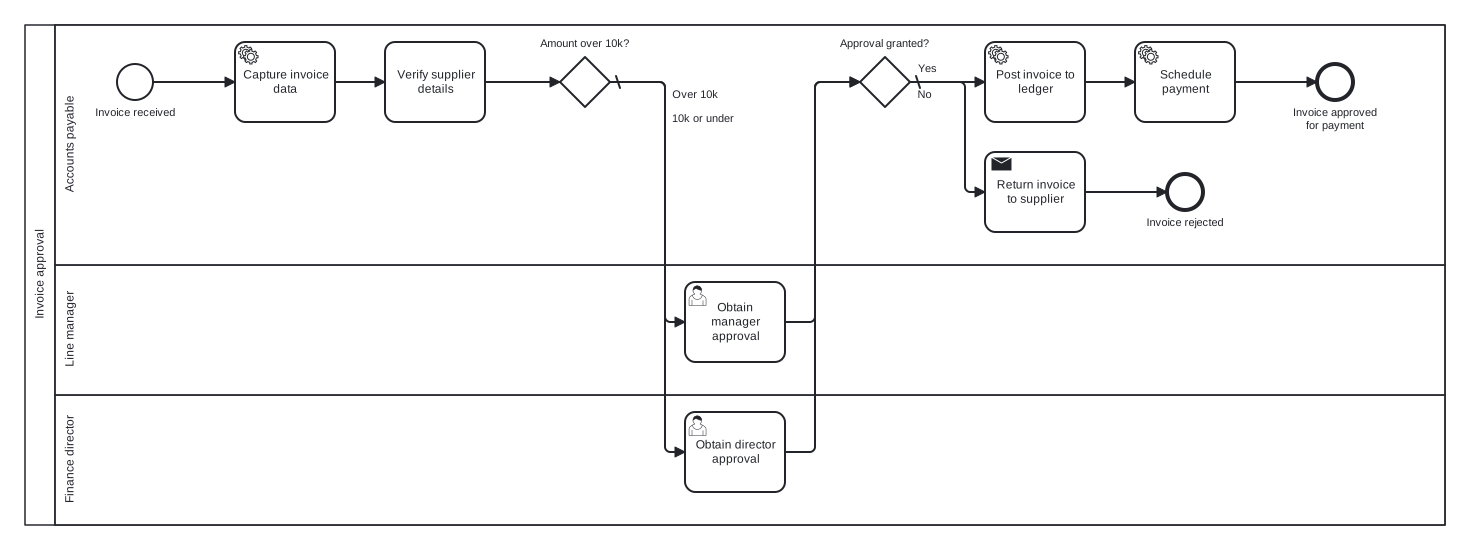
The model is a single pool with three lanes: Accounts payable, Line manager, and Finance director. Two exclusive gateways shape the flow: an amount threshold routes large invoices to the director, and an approval outcome gateway both merges the two approval paths and splits them again. That double duty gateway is the detail worth studying.
Standard BPMN 2.0 interchange XML: opens in Camunda Modeler, Signavio, Bizagi, and any other compliant tool.
The process at a glance
How to read this diagram
An invoice arriving from a supplier starts the flow in the Accounts payable lane, where the invoice data is captured and the supplier details verified. The gateway "Amount over 10k?" then routes the token: the "Over 10k" branch heads to the Finance director lane for approval, while the default "10k or under" branch goes to the line manager. Both approval tasks feed the same exclusive gateway, "Approval granted?", which merges the paths and immediately splits them again on the outcome.
Refusal takes the default No branch: the invoice is returned to the supplier through a send task and the process ends at "Invoice rejected". On the Yes branch, Accounts payable posts the invoice to the ledger and schedules the payment, closing at "Invoice approved for payment". The two end events keep the outcomes honest: every invoice is either queued for payment or formally sent back, never merely forgotten.
BPMN elements used
| Element | Count | In this diagram |
|---|---|---|
| Start event | 1 | Invoice received |
| End event | 2 | Invoice rejected, Invoice approved for payment |
| Task | 1 | Verify supplier details |
| User task | 2 | Obtain director approval, Obtain manager approval |
| Service task | 3 | Capture invoice data, Post invoice to ledger, Schedule payment |
| Send task | 1 | Return invoice to supplier |
| Exclusive gateway | 2 | Amount over 10k?, Approval granted? |
View the BPMN 2.0 XML for this diagram
<?xml version="1.0" encoding="UTF-8"?>
<bpmn2:definitions xmlns:bpmn2="http://www.omg.org/spec/BPMN/20100524/MODEL" xmlns:bpmndi="http://www.omg.org/spec/BPMN/20100524/DI" xmlns:dc="http://www.omg.org/spec/DD/20100524/DC" xmlns:di="http://www.omg.org/spec/DD/20100524/DI" xmlns:xsi="http://www.w3.org/2001/XMLSchema-instance" id="Definitions_1" targetNamespace="http://bpmn.io/schema/bpmn" exporter="swimdraft" exporterVersion="1.0">
  <bpmn2:collaboration id="Collaboration_1">
    <bpmn2:participant id="pool_inv" name="Invoice approval" processRef="Process_pool_inv" />
  </bpmn2:collaboration>
  <bpmn2:process id="Process_pool_inv" isExecutable="false">
    <bpmn2:laneSet id="LaneSet_pool_inv">
      <bpmn2:lane id="lane_inv_ap" name="Accounts payable">
        <bpmn2:flowNodeRef>start_inv</bpmn2:flowNodeRef>
        <bpmn2:flowNodeRef>t_inv_capture</bpmn2:flowNodeRef>
        <bpmn2:flowNodeRef>t_inv_verify</bpmn2:flowNodeRef>
        <bpmn2:flowNodeRef>g_inv_amount</bpmn2:flowNodeRef>
        <bpmn2:flowNodeRef>g_inv_granted</bpmn2:flowNodeRef>
        <bpmn2:flowNodeRef>t_inv_return</bpmn2:flowNodeRef>
        <bpmn2:flowNodeRef>end_inv_rejected</bpmn2:flowNodeRef>
        <bpmn2:flowNodeRef>t_inv_post</bpmn2:flowNodeRef>
        <bpmn2:flowNodeRef>t_inv_schedule</bpmn2:flowNodeRef>
        <bpmn2:flowNodeRef>end_inv_approved</bpmn2:flowNodeRef>
      </bpmn2:lane>
      <bpmn2:lane id="lane_inv_mgr" name="Line manager">
        <bpmn2:flowNodeRef>t_inv_mgr</bpmn2:flowNodeRef>
      </bpmn2:lane>
      <bpmn2:lane id="lane_inv_fd" name="Finance director">
        <bpmn2:flowNodeRef>t_inv_fd</bpmn2:flowNodeRef>
      </bpmn2:lane>
    </bpmn2:laneSet>
    <bpmn2:startEvent id="start_inv" name="Invoice received">
      <bpmn2:outgoing>finv1</bpmn2:outgoing>
    </bpmn2:startEvent>
    <bpmn2:serviceTask id="t_inv_capture" name="Capture invoice data">
      <bpmn2:incoming>finv1</bpmn2:incoming>
      <bpmn2:outgoing>finv2</bpmn2:outgoing>
    </bpmn2:serviceTask>
    <bpmn2:task id="t_inv_verify" name="Verify supplier details">
      <bpmn2:incoming>finv2</bpmn2:incoming>
      <bpmn2:outgoing>finv3</bpmn2:outgoing>
    </bpmn2:task>
    <bpmn2:exclusiveGateway id="g_inv_amount" name="Amount over 10k?" default="finv5">
      <bpmn2:incoming>finv3</bpmn2:incoming>
      <bpmn2:outgoing>finv4</bpmn2:outgoing>
      <bpmn2:outgoing>finv5</bpmn2:outgoing>
    </bpmn2:exclusiveGateway>
    <bpmn2:userTask id="t_inv_fd" name="Obtain director approval">
      <bpmn2:incoming>finv4</bpmn2:incoming>
      <bpmn2:outgoing>finv6</bpmn2:outgoing>
    </bpmn2:userTask>
    <bpmn2:userTask id="t_inv_mgr" name="Obtain manager approval">
      <bpmn2:incoming>finv5</bpmn2:incoming>
      <bpmn2:outgoing>finv7</bpmn2:outgoing>
    </bpmn2:userTask>
    <bpmn2:exclusiveGateway id="g_inv_granted" name="Approval granted?" default="finv9">
      <bpmn2:incoming>finv6</bpmn2:incoming>
      <bpmn2:incoming>finv7</bpmn2:incoming>
      <bpmn2:outgoing>finv8</bpmn2:outgoing>
      <bpmn2:outgoing>finv9</bpmn2:outgoing>
    </bpmn2:exclusiveGateway>
    <bpmn2:sendTask id="t_inv_return" name="Return invoice to supplier">
      <bpmn2:incoming>finv9</bpmn2:incoming>
      <bpmn2:outgoing>finv10</bpmn2:outgoing>
    </bpmn2:sendTask>
    <bpmn2:endEvent id="end_inv_rejected" name="Invoice rejected">
      <bpmn2:incoming>finv10</bpmn2:incoming>
    </bpmn2:endEvent>
    <bpmn2:serviceTask id="t_inv_post" name="Post invoice to ledger">
      <bpmn2:incoming>finv8</bpmn2:incoming>
      <bpmn2:outgoing>finv11</bpmn2:outgoing>
    </bpmn2:serviceTask>
    <bpmn2:serviceTask id="t_inv_schedule" name="Schedule payment">
      <bpmn2:incoming>finv11</bpmn2:incoming>
      <bpmn2:outgoing>finv12</bpmn2:outgoing>
    </bpmn2:serviceTask>
    <bpmn2:endEvent id="end_inv_approved" name="Invoice approved for payment">
      <bpmn2:incoming>finv12</bpmn2:incoming>
    </bpmn2:endEvent>
    <bpmn2:sequenceFlow id="finv1" sourceRef="start_inv" targetRef="t_inv_capture" />
    <bpmn2:sequenceFlow id="finv2" sourceRef="t_inv_capture" targetRef="t_inv_verify" />
    <bpmn2:sequenceFlow id="finv3" sourceRef="t_inv_verify" targetRef="g_inv_amount" />
    <bpmn2:sequenceFlow id="finv4" name="Over 10k" sourceRef="g_inv_amount" targetRef="t_inv_fd">
      <bpmn2:conditionExpression xsi:type="bpmn2:tFormalExpression">Over 10k</bpmn2:conditionExpression>
    </bpmn2:sequenceFlow>
    <bpmn2:sequenceFlow id="finv5" name="10k or under" sourceRef="g_inv_amount" targetRef="t_inv_mgr" />
    <bpmn2:sequenceFlow id="finv6" sourceRef="t_inv_fd" targetRef="g_inv_granted" />
    <bpmn2:sequenceFlow id="finv7" sourceRef="t_inv_mgr" targetRef="g_inv_granted" />
    <bpmn2:sequenceFlow id="finv8" name="Yes" sourceRef="g_inv_granted" targetRef="t_inv_post">
      <bpmn2:conditionExpression xsi:type="bpmn2:tFormalExpression">Yes</bpmn2:conditionExpression>
    </bpmn2:sequenceFlow>
    <bpmn2:sequenceFlow id="finv9" name="No" sourceRef="g_inv_granted" targetRef="t_inv_return" />
    <bpmn2:sequenceFlow id="finv10" sourceRef="t_inv_return" targetRef="end_inv_rejected" />
    <bpmn2:sequenceFlow id="finv11" sourceRef="t_inv_post" targetRef="t_inv_schedule" />
    <bpmn2:sequenceFlow id="finv12" sourceRef="t_inv_schedule" targetRef="end_inv_approved" />
  </bpmn2:process>
  <bpmndi:BPMNDiagram id="BPMNDiagram_1">
    <bpmndi:BPMNPlane id="BPMNPlane_1" bpmnElement="Collaboration_1">
      <bpmndi:BPMNShape id="pool_inv_di" bpmnElement="pool_inv" isHorizontal="true">
        <dc:Bounds x="20" y="20" width="1420" height="500" />
      </bpmndi:BPMNShape>
      <bpmndi:BPMNShape id="lane_inv_ap_di" bpmnElement="lane_inv_ap" isHorizontal="true">
        <dc:Bounds x="50" y="20" width="1390" height="240" />
      </bpmndi:BPMNShape>
      <bpmndi:BPMNShape id="lane_inv_mgr_di" bpmnElement="lane_inv_mgr" isHorizontal="true">
        <dc:Bounds x="50" y="260" width="1390" height="130" />
      </bpmndi:BPMNShape>
      <bpmndi:BPMNShape id="lane_inv_fd_di" bpmnElement="lane_inv_fd" isHorizontal="true">
        <dc:Bounds x="50" y="390" width="1390" height="130" />
      </bpmndi:BPMNShape>
      <bpmndi:BPMNShape id="start_inv_di" bpmnElement="start_inv">
        <dc:Bounds x="112" y="59" width="36" height="36" />
        <bpmndi:BPMNLabel><dc:Bounds x="89" y="101" width="82" height="14" /></bpmndi:BPMNLabel>
      </bpmndi:BPMNShape>
      <bpmndi:BPMNShape id="t_inv_capture_di" bpmnElement="t_inv_capture">
        <dc:Bounds x="230" y="37" width="100" height="80" />
      </bpmndi:BPMNShape>
      <bpmndi:BPMNShape id="t_inv_verify_di" bpmnElement="t_inv_verify">
        <dc:Bounds x="380" y="37" width="100" height="80" />
      </bpmndi:BPMNShape>
      <bpmndi:BPMNShape id="g_inv_amount_di" bpmnElement="g_inv_amount">
        <dc:Bounds x="555" y="52" width="50" height="50" />
        <bpmndi:BPMNLabel><dc:Bounds x="534" y="32" width="92" height="14" /></bpmndi:BPMNLabel>
      </bpmndi:BPMNShape>
      <bpmndi:BPMNShape id="t_inv_fd_di" bpmnElement="t_inv_fd">
        <dc:Bounds x="680" y="407" width="100" height="80" />
      </bpmndi:BPMNShape>
      <bpmndi:BPMNShape id="t_inv_mgr_di" bpmnElement="t_inv_mgr">
        <dc:Bounds x="680" y="277" width="100" height="80" />
      </bpmndi:BPMNShape>
      <bpmndi:BPMNShape id="g_inv_granted_di" bpmnElement="g_inv_granted">
        <dc:Bounds x="855" y="52" width="50" height="50" />
        <bpmndi:BPMNLabel><dc:Bounds x="834" y="32" width="92" height="14" /></bpmndi:BPMNLabel>
      </bpmndi:BPMNShape>
      <bpmndi:BPMNShape id="t_inv_return_di" bpmnElement="t_inv_return">
        <dc:Bounds x="980" y="147" width="100" height="80" />
      </bpmndi:BPMNShape>
      <bpmndi:BPMNShape id="end_inv_rejected_di" bpmnElement="end_inv_rejected">
        <dc:Bounds x="1162" y="169" width="36" height="36" />
        <bpmndi:BPMNLabel><dc:Bounds x="1140" y="211" width="80" height="14" /></bpmndi:BPMNLabel>
      </bpmndi:BPMNShape>
      <bpmndi:BPMNShape id="t_inv_post_di" bpmnElement="t_inv_post">
        <dc:Bounds x="980" y="37" width="100" height="80" />
      </bpmndi:BPMNShape>
      <bpmndi:BPMNShape id="t_inv_schedule_di" bpmnElement="t_inv_schedule">
        <dc:Bounds x="1130" y="37" width="100" height="80" />
      </bpmndi:BPMNShape>
      <bpmndi:BPMNShape id="end_inv_approved_di" bpmnElement="end_inv_approved">
        <dc:Bounds x="1312" y="59" width="36" height="36" />
        <bpmndi:BPMNLabel><dc:Bounds x="1279" y="101" width="102" height="28" /></bpmndi:BPMNLabel>
      </bpmndi:BPMNShape>
      <bpmndi:BPMNEdge id="finv1_di" bpmnElement="finv1">
        <di:waypoint x="148" y="77" />
        <di:waypoint x="230" y="77" />
      </bpmndi:BPMNEdge>
      <bpmndi:BPMNEdge id="finv2_di" bpmnElement="finv2">
        <di:waypoint x="330" y="77" />
        <di:waypoint x="380" y="77" />
      </bpmndi:BPMNEdge>
      <bpmndi:BPMNEdge id="finv3_di" bpmnElement="finv3">
        <di:waypoint x="480" y="77" />
        <di:waypoint x="555" y="77" />
      </bpmndi:BPMNEdge>
      <bpmndi:BPMNEdge id="finv4_di" bpmnElement="finv4">
        <di:waypoint x="605" y="77" />
        <di:waypoint x="660" y="77" />
        <di:waypoint x="660" y="447" />
        <di:waypoint x="680" y="447" />
        <bpmndi:BPMNLabel><dc:Bounds x="666" y="83" width="47" height="14" /></bpmndi:BPMNLabel>
      </bpmndi:BPMNEdge>
      <bpmndi:BPMNEdge id="finv5_di" bpmnElement="finv5">
        <di:waypoint x="605" y="77" />
        <di:waypoint x="660" y="77" />
        <di:waypoint x="660" y="317" />
        <di:waypoint x="680" y="317" />
        <bpmndi:BPMNLabel><dc:Bounds x="666" y="107" width="64" height="14" /></bpmndi:BPMNLabel>
      </bpmndi:BPMNEdge>
      <bpmndi:BPMNEdge id="finv6_di" bpmnElement="finv6">
        <di:waypoint x="780" y="447" />
        <di:waypoint x="810" y="447" />
        <di:waypoint x="810" y="77" />
        <di:waypoint x="855" y="77" />
      </bpmndi:BPMNEdge>
      <bpmndi:BPMNEdge id="finv7_di" bpmnElement="finv7">
        <di:waypoint x="780" y="317" />
        <di:waypoint x="810" y="317" />
        <di:waypoint x="810" y="77" />
        <di:waypoint x="855" y="77" />
      </bpmndi:BPMNEdge>
      <bpmndi:BPMNEdge id="finv8_di" bpmnElement="finv8">
        <di:waypoint x="905" y="77" />
        <di:waypoint x="980" y="77" />
        <bpmndi:BPMNLabel><dc:Bounds x="911" y="57" width="21" height="14" /></bpmndi:BPMNLabel>
      </bpmndi:BPMNEdge>
      <bpmndi:BPMNEdge id="finv9_di" bpmnElement="finv9">
        <di:waypoint x="905" y="77" />
        <di:waypoint x="960" y="77" />
        <di:waypoint x="960" y="187" />
        <di:waypoint x="980" y="187" />
        <bpmndi:BPMNLabel><dc:Bounds x="911" y="83" width="17" height="14" /></bpmndi:BPMNLabel>
      </bpmndi:BPMNEdge>
      <bpmndi:BPMNEdge id="finv10_di" bpmnElement="finv10">
        <di:waypoint x="1080" y="187" />
        <di:waypoint x="1162" y="187" />
      </bpmndi:BPMNEdge>
      <bpmndi:BPMNEdge id="finv11_di" bpmnElement="finv11">
        <di:waypoint x="1080" y="77" />
        <di:waypoint x="1130" y="77" />
      </bpmndi:BPMNEdge>
      <bpmndi:BPMNEdge id="finv12_di" bpmnElement="finv12">
        <di:waypoint x="1230" y="77" />
        <di:waypoint x="1312" y="77" />
      </bpmndi:BPMNEdge>
    </bpmndi:BPMNPlane>
  </bpmndi:BPMNDiagram>
</bpmn2:definitions>
Frequently asked questions
Why an exclusive gateway for the amount split rather than an inclusive one?
Exactly one of the two branches applies to any invoice: it is either over the threshold or it is not. An inclusive gateway would suggest both approvals could run for the same invoice, which is not the policy here. Reserve inclusive gateways for genuine any-combination situations, such as notifying several optional reviewers at once.
Can one gateway really merge and split at the same time?
Yes. "Approval granted?" has two incoming flows, one from each approval task, and two outgoing flows for the outcome, which the BPMN spec permits. Many modellers prefer a separate merge gateway before the decision for readability, and that variant is equally valid. This model keeps the compact form to show that it works.
How would I add an escalation for an approver who does nothing?
Attach a timer to the approval step. One spec-friendly pattern within this palette is a parallel path holding an intermediate timer catch event that fires after, say, three days and routes to a reminder task before rejoining the flow. Alternatively, a boundary timer event on the approval task can redirect the token to a nominated deputy.
Related BPMN examples
Order to cash
A complete order to cash process as a BPMN 2.0 diagram: credit check, fulfilment, invoicing, and payment. View the swimlane diagram and download the .bpmn file free.
Procure to pay
The complete procure to pay cycle as a BPMN 2.0 diagram: requisition approval, purchase order, goods receipt, three way match, and payment. Free .bpmn download.
Expense reimbursement
An expense reimbursement process in BPMN 2.0: policy checks, receipt audit, an amendment loop, and a timed payment run. View the diagram and download the .bpmn free.
Accounts payable
Accounts payable in BPMN 2.0 with a black box supplier pool: invoice matching, supplier queries by message flow, and a timed payment run. Free .bpmn download.
Generate your own version of this diagram
Describe how the process works in your organisation: plain English, meeting notes, a transcript, or a spreadsheet. Swimdraft turns it into a spec-validated BPMN 2.0 diagram you can edit in the browser and export as .bpmn, SVG, or PNG.
Start freeNo credit card required