
Maintenance request BPMN example
A maintenance request process carries a reported fault from the shop floor to a verified repair: log it, triage its severity, secure the parts, fix it, and confirm the equipment runs. Facilities and engineering teams map it because response time promises depend on the triage step, and because the parts question quietly decides how long a machine stays down. The usual weakness is that urgent and routine faults follow the same undifferentiated queue.
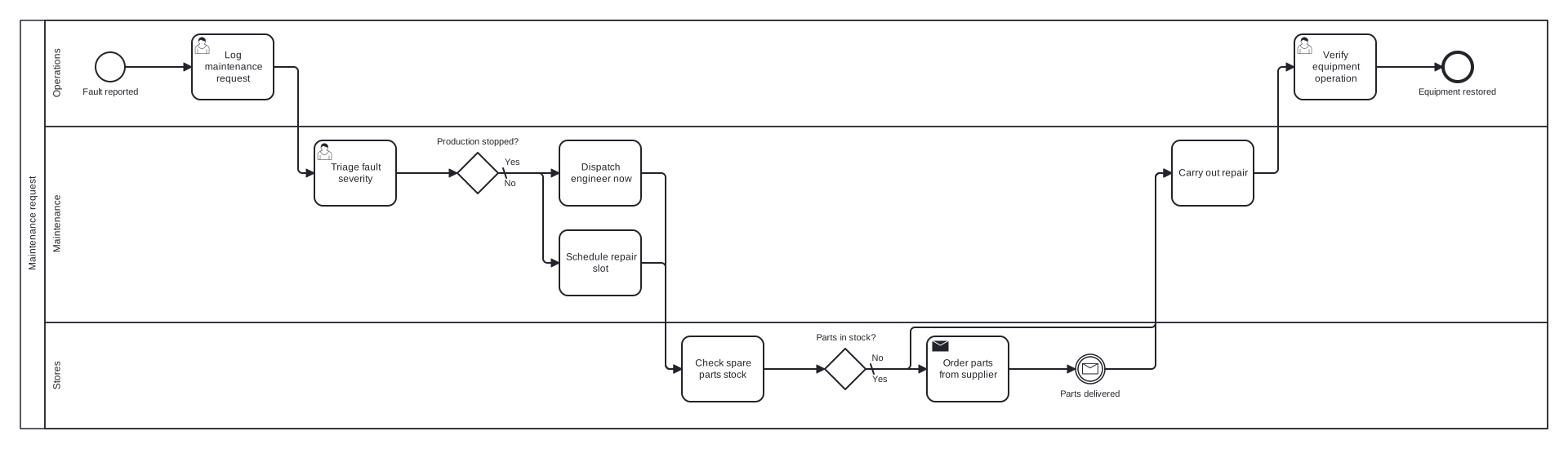
This model is a single pool with Operations, Maintenance, and Stores lanes. Two exclusive gateways drive it: the first separates production stopping faults from routine ones, the second checks spare parts availability, with a message event marking the wait for a parts delivery. Worth noticing is that verification sits with Operations, not Maintenance: the team that reported the fault confirms the fix, which keeps the sign off independent.
Standard BPMN 2.0 interchange XML: opens in Camunda Modeler, Signavio, Bizagi, and any other compliant tool.
The process at a glance
How to read this diagram
When an operator reports a fault, the Operations lane logs the maintenance request and the Maintenance lane triages its severity. The gateway "Production stopped?" splits the response: Yes dispatches an engineer immediately, while the default No branch schedules a repair slot instead. Both branches meet again at the Stores lane, where staff check the spare parts stock before any work starts.
Next the gateway "Parts in stock?" asks the availability question. On the default Yes branch the engineer proceeds directly; on the No branch Stores orders the parts from the supplier and the process waits at a message catch event until they are delivered. The paths converge on "Carry out repair" in the Maintenance lane, after which Operations verifies the equipment runs correctly and the process closes at the "Equipment restored" end event.
BPMN elements used
| Element | Count | In this diagram |
|---|---|---|
| Start event | 1 | Fault reported |
| End event | 1 | Equipment restored |
| Intermediate catch event | 1 | Parts delivered |
| Task | 4 | Dispatch engineer now, Schedule repair slot, Check spare parts stock, Carry out repair |
| User task | 3 | Log maintenance request, Triage fault severity, Verify equipment operation |
| Send task | 1 | Order parts from supplier |
| Exclusive gateway | 2 | Production stopped?, Parts in stock? |
View the BPMN 2.0 XML for this diagram
<?xml version="1.0" encoding="UTF-8"?>
<bpmn2:definitions xmlns:bpmn2="http://www.omg.org/spec/BPMN/20100524/MODEL" xmlns:bpmndi="http://www.omg.org/spec/BPMN/20100524/DI" xmlns:dc="http://www.omg.org/spec/DD/20100524/DC" xmlns:di="http://www.omg.org/spec/DD/20100524/DI" xmlns:xsi="http://www.w3.org/2001/XMLSchema-instance" id="Definitions_1" targetNamespace="http://bpmn.io/schema/bpmn" exporter="swimdraft" exporterVersion="1.0">
  <bpmn2:collaboration id="Collaboration_1">
    <bpmn2:participant id="pool_mr" name="Maintenance request" processRef="Process_pool_mr" />
  </bpmn2:collaboration>
  <bpmn2:process id="Process_pool_mr" isExecutable="false">
    <bpmn2:laneSet id="LaneSet_pool_mr">
      <bpmn2:lane id="lane_mr_ops" name="Operations">
        <bpmn2:flowNodeRef>start_mr</bpmn2:flowNodeRef>
        <bpmn2:flowNodeRef>t_mr_log</bpmn2:flowNodeRef>
        <bpmn2:flowNodeRef>t_mr_verify</bpmn2:flowNodeRef>
        <bpmn2:flowNodeRef>end_mr</bpmn2:flowNodeRef>
      </bpmn2:lane>
      <bpmn2:lane id="lane_mr_maint" name="Maintenance">
        <bpmn2:flowNodeRef>t_mr_triage</bpmn2:flowNodeRef>
        <bpmn2:flowNodeRef>g_mr_sev</bpmn2:flowNodeRef>
        <bpmn2:flowNodeRef>t_mr_dispatch</bpmn2:flowNodeRef>
        <bpmn2:flowNodeRef>t_mr_sched</bpmn2:flowNodeRef>
        <bpmn2:flowNodeRef>t_mr_repair</bpmn2:flowNodeRef>
      </bpmn2:lane>
      <bpmn2:lane id="lane_mr_stores" name="Stores">
        <bpmn2:flowNodeRef>t_mr_parts</bpmn2:flowNodeRef>
        <bpmn2:flowNodeRef>g_mr_parts</bpmn2:flowNodeRef>
        <bpmn2:flowNodeRef>t_mr_order</bpmn2:flowNodeRef>
        <bpmn2:flowNodeRef>ev_mr_deliv</bpmn2:flowNodeRef>
      </bpmn2:lane>
    </bpmn2:laneSet>
    <bpmn2:startEvent id="start_mr" name="Fault reported">
      <bpmn2:outgoing>fmr1</bpmn2:outgoing>
    </bpmn2:startEvent>
    <bpmn2:userTask id="t_mr_log" name="Log maintenance request">
      <bpmn2:incoming>fmr1</bpmn2:incoming>
      <bpmn2:outgoing>fmr2</bpmn2:outgoing>
    </bpmn2:userTask>
    <bpmn2:userTask id="t_mr_triage" name="Triage fault severity">
      <bpmn2:incoming>fmr2</bpmn2:incoming>
      <bpmn2:outgoing>fmr3</bpmn2:outgoing>
    </bpmn2:userTask>
    <bpmn2:exclusiveGateway id="g_mr_sev" name="Production stopped?" default="fmr5">
      <bpmn2:incoming>fmr3</bpmn2:incoming>
      <bpmn2:outgoing>fmr4</bpmn2:outgoing>
      <bpmn2:outgoing>fmr5</bpmn2:outgoing>
    </bpmn2:exclusiveGateway>
    <bpmn2:task id="t_mr_dispatch" name="Dispatch engineer now">
      <bpmn2:incoming>fmr4</bpmn2:incoming>
      <bpmn2:outgoing>fmr6</bpmn2:outgoing>
    </bpmn2:task>
    <bpmn2:task id="t_mr_sched" name="Schedule repair slot">
      <bpmn2:incoming>fmr5</bpmn2:incoming>
      <bpmn2:outgoing>fmr7</bpmn2:outgoing>
    </bpmn2:task>
    <bpmn2:task id="t_mr_parts" name="Check spare parts stock">
      <bpmn2:incoming>fmr6</bpmn2:incoming>
      <bpmn2:incoming>fmr7</bpmn2:incoming>
      <bpmn2:outgoing>fmr8</bpmn2:outgoing>
    </bpmn2:task>
    <bpmn2:exclusiveGateway id="g_mr_parts" name="Parts in stock?" default="fmr10">
      <bpmn2:incoming>fmr8</bpmn2:incoming>
      <bpmn2:outgoing>fmr9</bpmn2:outgoing>
      <bpmn2:outgoing>fmr10</bpmn2:outgoing>
    </bpmn2:exclusiveGateway>
    <bpmn2:sendTask id="t_mr_order" name="Order parts from supplier">
      <bpmn2:incoming>fmr9</bpmn2:incoming>
      <bpmn2:outgoing>fmr11</bpmn2:outgoing>
    </bpmn2:sendTask>
    <bpmn2:intermediateCatchEvent id="ev_mr_deliv" name="Parts delivered">
      <bpmn2:incoming>fmr11</bpmn2:incoming>
      <bpmn2:outgoing>fmr12</bpmn2:outgoing>
      <bpmn2:messageEventDefinition id="ev_mr_deliv_def" />
    </bpmn2:intermediateCatchEvent>
    <bpmn2:task id="t_mr_repair" name="Carry out repair">
      <bpmn2:incoming>fmr10</bpmn2:incoming>
      <bpmn2:incoming>fmr12</bpmn2:incoming>
      <bpmn2:outgoing>fmr13</bpmn2:outgoing>
    </bpmn2:task>
    <bpmn2:userTask id="t_mr_verify" name="Verify equipment operation">
      <bpmn2:incoming>fmr13</bpmn2:incoming>
      <bpmn2:outgoing>fmr14</bpmn2:outgoing>
    </bpmn2:userTask>
    <bpmn2:endEvent id="end_mr" name="Equipment restored">
      <bpmn2:incoming>fmr14</bpmn2:incoming>
    </bpmn2:endEvent>
    <bpmn2:sequenceFlow id="fmr1" sourceRef="start_mr" targetRef="t_mr_log" />
    <bpmn2:sequenceFlow id="fmr2" sourceRef="t_mr_log" targetRef="t_mr_triage" />
    <bpmn2:sequenceFlow id="fmr3" sourceRef="t_mr_triage" targetRef="g_mr_sev" />
    <bpmn2:sequenceFlow id="fmr4" name="Yes" sourceRef="g_mr_sev" targetRef="t_mr_dispatch">
      <bpmn2:conditionExpression xsi:type="bpmn2:tFormalExpression">Yes</bpmn2:conditionExpression>
    </bpmn2:sequenceFlow>
    <bpmn2:sequenceFlow id="fmr5" name="No" sourceRef="g_mr_sev" targetRef="t_mr_sched" />
    <bpmn2:sequenceFlow id="fmr6" sourceRef="t_mr_dispatch" targetRef="t_mr_parts" />
    <bpmn2:sequenceFlow id="fmr7" sourceRef="t_mr_sched" targetRef="t_mr_parts" />
    <bpmn2:sequenceFlow id="fmr8" sourceRef="t_mr_parts" targetRef="g_mr_parts" />
    <bpmn2:sequenceFlow id="fmr9" name="No" sourceRef="g_mr_parts" targetRef="t_mr_order">
      <bpmn2:conditionExpression xsi:type="bpmn2:tFormalExpression">No</bpmn2:conditionExpression>
    </bpmn2:sequenceFlow>
    <bpmn2:sequenceFlow id="fmr10" name="Yes" sourceRef="g_mr_parts" targetRef="t_mr_repair" />
    <bpmn2:sequenceFlow id="fmr11" sourceRef="t_mr_order" targetRef="ev_mr_deliv" />
    <bpmn2:sequenceFlow id="fmr12" sourceRef="ev_mr_deliv" targetRef="t_mr_repair" />
    <bpmn2:sequenceFlow id="fmr13" sourceRef="t_mr_repair" targetRef="t_mr_verify" />
    <bpmn2:sequenceFlow id="fmr14" sourceRef="t_mr_verify" targetRef="end_mr" />
  </bpmn2:process>
  <bpmndi:BPMNDiagram id="BPMNDiagram_1">
    <bpmndi:BPMNPlane id="BPMNPlane_1" bpmnElement="Collaboration_1">
      <bpmndi:BPMNShape id="pool_mr_di" bpmnElement="pool_mr" isHorizontal="true">
        <dc:Bounds x="20" y="20" width="1870" height="500" />
      </bpmndi:BPMNShape>
      <bpmndi:BPMNShape id="lane_mr_ops_di" bpmnElement="lane_mr_ops" isHorizontal="true">
        <dc:Bounds x="50" y="20" width="1840" height="130" />
      </bpmndi:BPMNShape>
      <bpmndi:BPMNShape id="lane_mr_maint_di" bpmnElement="lane_mr_maint" isHorizontal="true">
        <dc:Bounds x="50" y="150" width="1840" height="240" />
      </bpmndi:BPMNShape>
      <bpmndi:BPMNShape id="lane_mr_stores_di" bpmnElement="lane_mr_stores" isHorizontal="true">
        <dc:Bounds x="50" y="390" width="1840" height="130" />
      </bpmndi:BPMNShape>
      <bpmndi:BPMNShape id="start_mr_di" bpmnElement="start_mr">
        <dc:Bounds x="112" y="59" width="36" height="36" />
        <bpmndi:BPMNLabel><dc:Bounds x="95" y="101" width="71" height="14" /></bpmndi:BPMNLabel>
      </bpmndi:BPMNShape>
      <bpmndi:BPMNShape id="t_mr_log_di" bpmnElement="t_mr_log">
        <dc:Bounds x="230" y="37" width="100" height="80" />
      </bpmndi:BPMNShape>
      <bpmndi:BPMNShape id="t_mr_triage_di" bpmnElement="t_mr_triage">
        <dc:Bounds x="380" y="167" width="100" height="80" />
      </bpmndi:BPMNShape>
      <bpmndi:BPMNShape id="g_mr_sev_di" bpmnElement="g_mr_sev">
        <dc:Bounds x="555" y="182" width="50" height="50" />
        <bpmndi:BPMNLabel><dc:Bounds x="529" y="162" width="103" height="14" /></bpmndi:BPMNLabel>
      </bpmndi:BPMNShape>
      <bpmndi:BPMNShape id="t_mr_dispatch_di" bpmnElement="t_mr_dispatch">
        <dc:Bounds x="680" y="167" width="100" height="80" />
      </bpmndi:BPMNShape>
      <bpmndi:BPMNShape id="t_mr_sched_di" bpmnElement="t_mr_sched">
        <dc:Bounds x="680" y="277" width="100" height="80" />
      </bpmndi:BPMNShape>
      <bpmndi:BPMNShape id="t_mr_parts_di" bpmnElement="t_mr_parts">
        <dc:Bounds x="830" y="407" width="100" height="80" />
      </bpmndi:BPMNShape>
      <bpmndi:BPMNShape id="g_mr_parts_di" bpmnElement="g_mr_parts">
        <dc:Bounds x="1005" y="422" width="50" height="50" />
        <bpmndi:BPMNLabel><dc:Bounds x="993" y="402" width="75" height="14" /></bpmndi:BPMNLabel>
      </bpmndi:BPMNShape>
      <bpmndi:BPMNShape id="t_mr_order_di" bpmnElement="t_mr_order">
        <dc:Bounds x="1130" y="407" width="100" height="80" />
      </bpmndi:BPMNShape>
      <bpmndi:BPMNShape id="ev_mr_deliv_di" bpmnElement="ev_mr_deliv">
        <dc:Bounds x="1312" y="429" width="36" height="36" />
        <bpmndi:BPMNLabel><dc:Bounds x="1292" y="471" width="76" height="14" /></bpmndi:BPMNLabel>
      </bpmndi:BPMNShape>
      <bpmndi:BPMNShape id="t_mr_repair_di" bpmnElement="t_mr_repair">
        <dc:Bounds x="1430" y="167" width="100" height="80" />
      </bpmndi:BPMNShape>
      <bpmndi:BPMNShape id="t_mr_verify_di" bpmnElement="t_mr_verify">
        <dc:Bounds x="1580" y="37" width="100" height="80" />
      </bpmndi:BPMNShape>
      <bpmndi:BPMNShape id="end_mr_di" bpmnElement="end_mr">
        <dc:Bounds x="1762" y="59" width="36" height="36" />
        <bpmndi:BPMNLabel><dc:Bounds x="1731" y="101" width="98" height="14" /></bpmndi:BPMNLabel>
      </bpmndi:BPMNShape>
      <bpmndi:BPMNEdge id="fmr1_di" bpmnElement="fmr1">
        <di:waypoint x="148" y="77" />
        <di:waypoint x="230" y="77" />
      </bpmndi:BPMNEdge>
      <bpmndi:BPMNEdge id="fmr2_di" bpmnElement="fmr2">
        <di:waypoint x="330" y="77" />
        <di:waypoint x="360" y="77" />
        <di:waypoint x="360" y="207" />
        <di:waypoint x="380" y="207" />
      </bpmndi:BPMNEdge>
      <bpmndi:BPMNEdge id="fmr3_di" bpmnElement="fmr3">
        <di:waypoint x="480" y="207" />
        <di:waypoint x="555" y="207" />
      </bpmndi:BPMNEdge>
      <bpmndi:BPMNEdge id="fmr4_di" bpmnElement="fmr4">
        <di:waypoint x="605" y="207" />
        <di:waypoint x="680" y="207" />
        <bpmndi:BPMNLabel><dc:Bounds x="611" y="187" width="21" height="14" /></bpmndi:BPMNLabel>
      </bpmndi:BPMNEdge>
      <bpmndi:BPMNEdge id="fmr5_di" bpmnElement="fmr5">
        <di:waypoint x="605" y="207" />
        <di:waypoint x="660" y="207" />
        <di:waypoint x="660" y="317" />
        <di:waypoint x="680" y="317" />
        <bpmndi:BPMNLabel><dc:Bounds x="611" y="213" width="17" height="14" /></bpmndi:BPMNLabel>
      </bpmndi:BPMNEdge>
      <bpmndi:BPMNEdge id="fmr6_di" bpmnElement="fmr6">
        <di:waypoint x="780" y="207" />
        <di:waypoint x="810" y="207" />
        <di:waypoint x="810" y="447" />
        <di:waypoint x="830" y="447" />
      </bpmndi:BPMNEdge>
      <bpmndi:BPMNEdge id="fmr7_di" bpmnElement="fmr7">
        <di:waypoint x="780" y="317" />
        <di:waypoint x="810" y="317" />
        <di:waypoint x="810" y="447" />
        <di:waypoint x="830" y="447" />
      </bpmndi:BPMNEdge>
      <bpmndi:BPMNEdge id="fmr8_di" bpmnElement="fmr8">
        <di:waypoint x="930" y="447" />
        <di:waypoint x="1005" y="447" />
      </bpmndi:BPMNEdge>
      <bpmndi:BPMNEdge id="fmr9_di" bpmnElement="fmr9">
        <di:waypoint x="1055" y="447" />
        <di:waypoint x="1130" y="447" />
        <bpmndi:BPMNLabel><dc:Bounds x="1061" y="427" width="17" height="14" /></bpmndi:BPMNLabel>
      </bpmndi:BPMNEdge>
      <bpmndi:BPMNEdge id="fmr10_di" bpmnElement="fmr10">
        <di:waypoint x="1055" y="447" />
        <di:waypoint x="1110" y="447" />
        <di:waypoint x="1110" y="396" />
        <di:waypoint x="1410" y="396" />
        <di:waypoint x="1410" y="207" />
        <di:waypoint x="1430" y="207" />
        <bpmndi:BPMNLabel><dc:Bounds x="1061" y="453" width="21" height="14" /></bpmndi:BPMNLabel>
      </bpmndi:BPMNEdge>
      <bpmndi:BPMNEdge id="fmr11_di" bpmnElement="fmr11">
        <di:waypoint x="1230" y="447" />
        <di:waypoint x="1312" y="447" />
      </bpmndi:BPMNEdge>
      <bpmndi:BPMNEdge id="fmr12_di" bpmnElement="fmr12">
        <di:waypoint x="1348" y="447" />
        <di:waypoint x="1410" y="447" />
        <di:waypoint x="1410" y="207" />
        <di:waypoint x="1430" y="207" />
      </bpmndi:BPMNEdge>
      <bpmndi:BPMNEdge id="fmr13_di" bpmnElement="fmr13">
        <di:waypoint x="1530" y="207" />
        <di:waypoint x="1560" y="207" />
        <di:waypoint x="1560" y="77" />
        <di:waypoint x="1580" y="77" />
      </bpmndi:BPMNEdge>
      <bpmndi:BPMNEdge id="fmr14_di" bpmnElement="fmr14">
        <di:waypoint x="1680" y="77" />
        <di:waypoint x="1762" y="77" />
      </bpmndi:BPMNEdge>
    </bpmndi:BPMNPlane>
  </bpmndi:BPMNDiagram>
</bpmn2:definitions>
Frequently asked questions
Why do the urgent and routine branches merge into one task?
Because after dispatching or scheduling, the remaining work is identical: check parts, repair, verify. Pointing both flows at the parts check is an implicit exclusive merge, which BPMN permits without a gateway symbol. Only one token ever arrives, since the branches came from an exclusive split, so no synchronisation is needed.
Where would an escalation attach if the repair overruns?
In full BPMN you would attach an interrupting or non interrupting timer boundary event to "Carry out repair", routing to an escalation task after a deadline. If your tool models boundary events sparingly, an alternative is a timer catch event on a parallel monitoring path. Either way, name the deadline so the model documents the promise.
Can I export this and adapt it to my own CMMS workflow?
Yes. The diagram downloads as BPMN 2.0 interchange XML that opens in Camunda Modeler, Signavio, or Bizagi, so you can rename lanes and tasks to match your maintenance system. Swimdraft validates edits against 19 normative rules from the OMG BPMN 2.0.2 spec, and your first 5 diagrams are free.
Related BPMN examples
Order fulfilment
An order fulfilment process as a BPMN 2.0 diagram: stock check, backorder loop, picking, and dispatch confirmation. View the swimlanes and download the .bpmn file free.
Goods receipt
A goods receipt process as a BPMN 2.0 diagram: PO matching, condition inspection, discrepancy handling, and GRN posting. See the swimlanes and download the free .bpmn file.
Shipping and dispatch
A shipping and dispatch process as a BPMN 2.0 diagram: parallel packing and paperwork, customs branch, and departure. View the swimlanes and download the .bpmn free.
Inventory replenishment
An inventory replenishment process as a BPMN 2.0 diagram: reorder trigger, policy rules, approval branch, and supplier confirmation. Free .bpmn file download included.
Generate your own version of this diagram
Describe how the process works in your organisation: plain English, meeting notes, a transcript, or a spreadsheet. Swimdraft turns it into a spec-validated BPMN 2.0 diagram you can edit in the browser and export as .bpmn, SVG, or PNG.
Start freeNo credit card required