
Payroll processing BPMN example
Payroll processing is the one back office process where a mistake is visible to every employee at once. Teams map it because it is deadline work with hard external dependencies: input from HR, statutory reporting to HMRC, and a bank submission window that does not move. The recurring failure is exception handling, where late corrections crowd into the final hours before cut off.
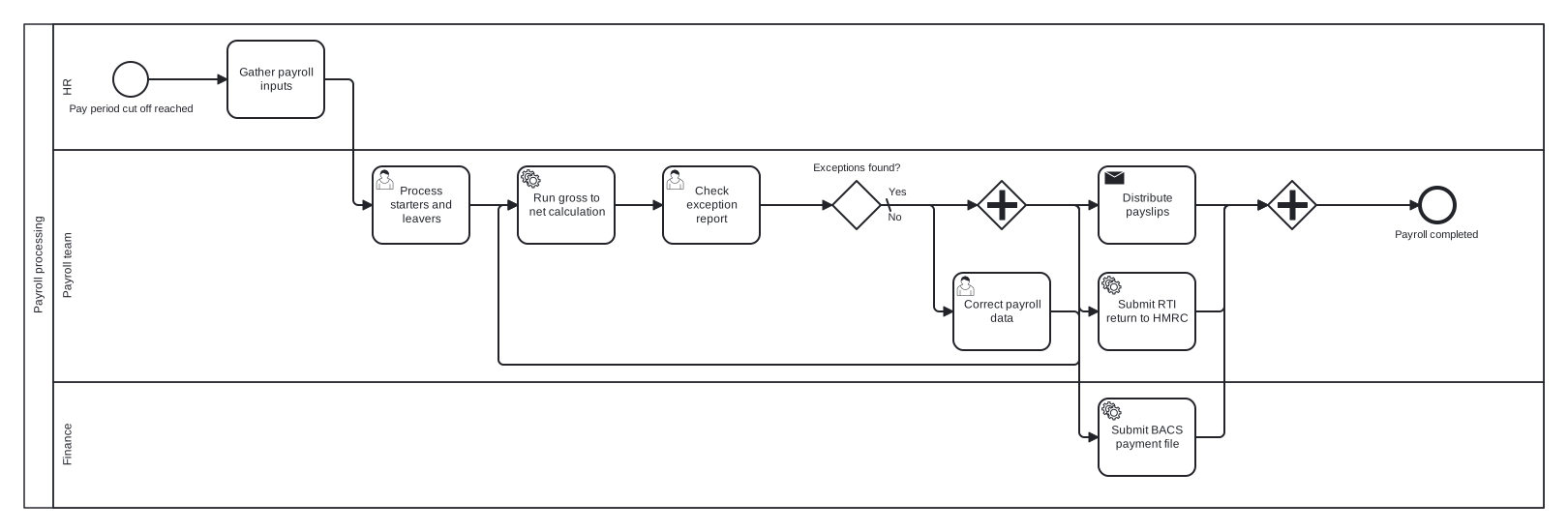
The model is a single pool with HR, Payroll team, and Finance lanes. An exclusive gateway with a correction loop guards the gross to net calculation, and a parallel gateway then fans out the three closing obligations, bank file, payslips, and RTI return, which do not depend on each other. Splitting the endgame in parallel is the choice worth noticing.
Standard BPMN 2.0 interchange XML: opens in Camunda Modeler, Signavio, Bizagi, and any other compliant tool.
The process at a glance
How to read this diagram
Reaching the pay period cut off starts the clock. HR gathers the payroll inputs, the Payroll team processes starters and leavers, and the gross to net calculation runs as a service task. Its output is checked against an exception report, and at "Exceptions found?" the Yes branch corrects the payroll data and loops back to rerun the calculation, repeating until the report is clean. The default No branch releases the results.
A parallel gateway then splits the token three ways with no conditions: Finance submits the BACS payment file, while the Payroll team distributes payslips and submits the RTI return to HMRC. The joining gateway waits for all three before the process ends at "Payroll completed", which guarantees no pay run is declared done with a statutory filing still outstanding.
BPMN elements used
| Element | Count | In this diagram |
|---|---|---|
| Start event | 1 | Pay period cut off reached |
| End event | 1 | Payroll completed |
| Task | 1 | Gather payroll inputs |
| User task | 3 | Process starters and leavers, Check exception report, Correct payroll data |
| Service task | 3 | Run gross to net calculation, Submit BACS payment file, Submit RTI return to HMRC |
| Send task | 1 | Distribute payslips |
| Exclusive gateway | 1 | Exceptions found? |
| Parallel gateway | 2 |
View the BPMN 2.0 XML for this diagram
<?xml version="1.0" encoding="UTF-8"?>
<bpmn2:definitions xmlns:bpmn2="http://www.omg.org/spec/BPMN/20100524/MODEL" xmlns:bpmndi="http://www.omg.org/spec/BPMN/20100524/DI" xmlns:dc="http://www.omg.org/spec/DD/20100524/DC" xmlns:di="http://www.omg.org/spec/DD/20100524/DI" xmlns:xsi="http://www.w3.org/2001/XMLSchema-instance" id="Definitions_1" targetNamespace="http://bpmn.io/schema/bpmn" exporter="swimdraft" exporterVersion="1.0">
  <bpmn2:collaboration id="Collaboration_1">
    <bpmn2:participant id="pool_pay" name="Payroll processing" processRef="Process_pool_pay" />
  </bpmn2:collaboration>
  <bpmn2:process id="Process_pool_pay" isExecutable="false">
    <bpmn2:laneSet id="LaneSet_pool_pay">
      <bpmn2:lane id="lane_pay_hr" name="HR">
        <bpmn2:flowNodeRef>start_pay</bpmn2:flowNodeRef>
        <bpmn2:flowNodeRef>t_pay_collect</bpmn2:flowNodeRef>
      </bpmn2:lane>
      <bpmn2:lane id="lane_pay_team" name="Payroll team">
        <bpmn2:flowNodeRef>t_pay_changes</bpmn2:flowNodeRef>
        <bpmn2:flowNodeRef>t_pay_run</bpmn2:flowNodeRef>
        <bpmn2:flowNodeRef>t_pay_check</bpmn2:flowNodeRef>
        <bpmn2:flowNodeRef>g_pay_exc</bpmn2:flowNodeRef>
        <bpmn2:flowNodeRef>t_pay_fix</bpmn2:flowNodeRef>
        <bpmn2:flowNodeRef>g_pay_split</bpmn2:flowNodeRef>
        <bpmn2:flowNodeRef>t_pay_slips</bpmn2:flowNodeRef>
        <bpmn2:flowNodeRef>t_pay_rti</bpmn2:flowNodeRef>
        <bpmn2:flowNodeRef>g_pay_join</bpmn2:flowNodeRef>
        <bpmn2:flowNodeRef>end_pay_done</bpmn2:flowNodeRef>
      </bpmn2:lane>
      <bpmn2:lane id="lane_pay_fin" name="Finance">
        <bpmn2:flowNodeRef>t_pay_bacs</bpmn2:flowNodeRef>
      </bpmn2:lane>
    </bpmn2:laneSet>
    <bpmn2:startEvent id="start_pay" name="Pay period cut off reached">
      <bpmn2:outgoing>fpay1</bpmn2:outgoing>
    </bpmn2:startEvent>
    <bpmn2:task id="t_pay_collect" name="Gather payroll inputs">
      <bpmn2:incoming>fpay1</bpmn2:incoming>
      <bpmn2:outgoing>fpay2</bpmn2:outgoing>
    </bpmn2:task>
    <bpmn2:userTask id="t_pay_changes" name="Process starters and leavers">
      <bpmn2:incoming>fpay2</bpmn2:incoming>
      <bpmn2:outgoing>fpay3</bpmn2:outgoing>
    </bpmn2:userTask>
    <bpmn2:serviceTask id="t_pay_run" name="Run gross to net calculation">
      <bpmn2:incoming>fpay3</bpmn2:incoming>
      <bpmn2:incoming>fpay7</bpmn2:incoming>
      <bpmn2:outgoing>fpay4</bpmn2:outgoing>
    </bpmn2:serviceTask>
    <bpmn2:userTask id="t_pay_check" name="Check exception report">
      <bpmn2:incoming>fpay4</bpmn2:incoming>
      <bpmn2:outgoing>fpay5</bpmn2:outgoing>
    </bpmn2:userTask>
    <bpmn2:exclusiveGateway id="g_pay_exc" name="Exceptions found?" default="fpay8">
      <bpmn2:incoming>fpay5</bpmn2:incoming>
      <bpmn2:outgoing>fpay6</bpmn2:outgoing>
      <bpmn2:outgoing>fpay8</bpmn2:outgoing>
    </bpmn2:exclusiveGateway>
    <bpmn2:userTask id="t_pay_fix" name="Correct payroll data">
      <bpmn2:incoming>fpay6</bpmn2:incoming>
      <bpmn2:outgoing>fpay7</bpmn2:outgoing>
    </bpmn2:userTask>
    <bpmn2:parallelGateway id="g_pay_split">
      <bpmn2:incoming>fpay8</bpmn2:incoming>
      <bpmn2:outgoing>fpay9</bpmn2:outgoing>
      <bpmn2:outgoing>fpay10</bpmn2:outgoing>
      <bpmn2:outgoing>fpay11</bpmn2:outgoing>
    </bpmn2:parallelGateway>
    <bpmn2:serviceTask id="t_pay_bacs" name="Submit BACS payment file">
      <bpmn2:incoming>fpay9</bpmn2:incoming>
      <bpmn2:outgoing>fpay12</bpmn2:outgoing>
    </bpmn2:serviceTask>
    <bpmn2:sendTask id="t_pay_slips" name="Distribute payslips">
      <bpmn2:incoming>fpay10</bpmn2:incoming>
      <bpmn2:outgoing>fpay13</bpmn2:outgoing>
    </bpmn2:sendTask>
    <bpmn2:serviceTask id="t_pay_rti" name="Submit RTI return to HMRC">
      <bpmn2:incoming>fpay11</bpmn2:incoming>
      <bpmn2:outgoing>fpay14</bpmn2:outgoing>
    </bpmn2:serviceTask>
    <bpmn2:parallelGateway id="g_pay_join">
      <bpmn2:incoming>fpay12</bpmn2:incoming>
      <bpmn2:incoming>fpay13</bpmn2:incoming>
      <bpmn2:incoming>fpay14</bpmn2:incoming>
      <bpmn2:outgoing>fpay15</bpmn2:outgoing>
    </bpmn2:parallelGateway>
    <bpmn2:endEvent id="end_pay_done" name="Payroll completed">
      <bpmn2:incoming>fpay15</bpmn2:incoming>
    </bpmn2:endEvent>
    <bpmn2:sequenceFlow id="fpay1" sourceRef="start_pay" targetRef="t_pay_collect" />
    <bpmn2:sequenceFlow id="fpay2" sourceRef="t_pay_collect" targetRef="t_pay_changes" />
    <bpmn2:sequenceFlow id="fpay3" sourceRef="t_pay_changes" targetRef="t_pay_run" />
    <bpmn2:sequenceFlow id="fpay4" sourceRef="t_pay_run" targetRef="t_pay_check" />
    <bpmn2:sequenceFlow id="fpay5" sourceRef="t_pay_check" targetRef="g_pay_exc" />
    <bpmn2:sequenceFlow id="fpay6" name="Yes" sourceRef="g_pay_exc" targetRef="t_pay_fix">
      <bpmn2:conditionExpression xsi:type="bpmn2:tFormalExpression">Yes</bpmn2:conditionExpression>
    </bpmn2:sequenceFlow>
    <bpmn2:sequenceFlow id="fpay7" sourceRef="t_pay_fix" targetRef="t_pay_run" />
    <bpmn2:sequenceFlow id="fpay8" name="No" sourceRef="g_pay_exc" targetRef="g_pay_split" />
    <bpmn2:sequenceFlow id="fpay9" sourceRef="g_pay_split" targetRef="t_pay_bacs" />
    <bpmn2:sequenceFlow id="fpay10" sourceRef="g_pay_split" targetRef="t_pay_slips" />
    <bpmn2:sequenceFlow id="fpay11" sourceRef="g_pay_split" targetRef="t_pay_rti" />
    <bpmn2:sequenceFlow id="fpay12" sourceRef="t_pay_bacs" targetRef="g_pay_join" />
    <bpmn2:sequenceFlow id="fpay13" sourceRef="t_pay_slips" targetRef="g_pay_join" />
    <bpmn2:sequenceFlow id="fpay14" sourceRef="t_pay_rti" targetRef="g_pay_join" />
    <bpmn2:sequenceFlow id="fpay15" sourceRef="g_pay_join" targetRef="end_pay_done" />
  </bpmn2:process>
  <bpmndi:BPMNDiagram id="BPMNDiagram_1">
    <bpmndi:BPMNPlane id="BPMNPlane_1" bpmnElement="Collaboration_1">
      <bpmndi:BPMNShape id="pool_pay_di" bpmnElement="pool_pay" isHorizontal="true">
        <dc:Bounds x="20" y="20" width="1570" height="500" />
      </bpmndi:BPMNShape>
      <bpmndi:BPMNShape id="lane_pay_hr_di" bpmnElement="lane_pay_hr" isHorizontal="true">
        <dc:Bounds x="50" y="20" width="1540" height="130" />
      </bpmndi:BPMNShape>
      <bpmndi:BPMNShape id="lane_pay_team_di" bpmnElement="lane_pay_team" isHorizontal="true">
        <dc:Bounds x="50" y="150" width="1540" height="240" />
      </bpmndi:BPMNShape>
      <bpmndi:BPMNShape id="lane_pay_fin_di" bpmnElement="lane_pay_fin" isHorizontal="true">
        <dc:Bounds x="50" y="390" width="1540" height="130" />
      </bpmndi:BPMNShape>
      <bpmndi:BPMNShape id="start_pay_di" bpmnElement="start_pay">
        <dc:Bounds x="112" y="59" width="36" height="36" />
        <bpmndi:BPMNLabel><dc:Bounds x="65" y="101" width="131" height="14" /></bpmndi:BPMNLabel>
      </bpmndi:BPMNShape>
      <bpmndi:BPMNShape id="t_pay_collect_di" bpmnElement="t_pay_collect">
        <dc:Bounds x="230" y="37" width="100" height="80" />
      </bpmndi:BPMNShape>
      <bpmndi:BPMNShape id="t_pay_changes_di" bpmnElement="t_pay_changes">
        <dc:Bounds x="380" y="167" width="100" height="80" />
      </bpmndi:BPMNShape>
      <bpmndi:BPMNShape id="t_pay_run_di" bpmnElement="t_pay_run">
        <dc:Bounds x="530" y="167" width="100" height="80" />
      </bpmndi:BPMNShape>
      <bpmndi:BPMNShape id="t_pay_check_di" bpmnElement="t_pay_check">
        <dc:Bounds x="680" y="167" width="100" height="80" />
      </bpmndi:BPMNShape>
      <bpmndi:BPMNShape id="g_pay_exc_di" bpmnElement="g_pay_exc">
        <dc:Bounds x="855" y="182" width="50" height="50" />
        <bpmndi:BPMNLabel><dc:Bounds x="834" y="162" width="93" height="14" /></bpmndi:BPMNLabel>
      </bpmndi:BPMNShape>
      <bpmndi:BPMNShape id="t_pay_fix_di" bpmnElement="t_pay_fix">
        <dc:Bounds x="980" y="277" width="100" height="80" />
      </bpmndi:BPMNShape>
      <bpmndi:BPMNShape id="g_pay_split_di" bpmnElement="g_pay_split">
        <dc:Bounds x="1005" y="182" width="50" height="50" />
      </bpmndi:BPMNShape>
      <bpmndi:BPMNShape id="t_pay_bacs_di" bpmnElement="t_pay_bacs">
        <dc:Bounds x="1130" y="407" width="100" height="80" />
      </bpmndi:BPMNShape>
      <bpmndi:BPMNShape id="t_pay_slips_di" bpmnElement="t_pay_slips">
        <dc:Bounds x="1130" y="167" width="100" height="80" />
      </bpmndi:BPMNShape>
      <bpmndi:BPMNShape id="t_pay_rti_di" bpmnElement="t_pay_rti">
        <dc:Bounds x="1130" y="277" width="100" height="80" />
      </bpmndi:BPMNShape>
      <bpmndi:BPMNShape id="g_pay_join_di" bpmnElement="g_pay_join">
        <dc:Bounds x="1305" y="182" width="50" height="50" />
      </bpmndi:BPMNShape>
      <bpmndi:BPMNShape id="end_pay_done_di" bpmnElement="end_pay_done">
        <dc:Bounds x="1462" y="189" width="36" height="36" />
        <bpmndi:BPMNLabel><dc:Bounds x="1435" y="231" width="90" height="14" /></bpmndi:BPMNLabel>
      </bpmndi:BPMNShape>
      <bpmndi:BPMNEdge id="fpay1_di" bpmnElement="fpay1">
        <di:waypoint x="148" y="77" />
        <di:waypoint x="230" y="77" />
      </bpmndi:BPMNEdge>
      <bpmndi:BPMNEdge id="fpay2_di" bpmnElement="fpay2">
        <di:waypoint x="330" y="77" />
        <di:waypoint x="360" y="77" />
        <di:waypoint x="360" y="207" />
        <di:waypoint x="380" y="207" />
      </bpmndi:BPMNEdge>
      <bpmndi:BPMNEdge id="fpay3_di" bpmnElement="fpay3">
        <di:waypoint x="480" y="207" />
        <di:waypoint x="530" y="207" />
      </bpmndi:BPMNEdge>
      <bpmndi:BPMNEdge id="fpay4_di" bpmnElement="fpay4">
        <di:waypoint x="630" y="207" />
        <di:waypoint x="680" y="207" />
      </bpmndi:BPMNEdge>
      <bpmndi:BPMNEdge id="fpay5_di" bpmnElement="fpay5">
        <di:waypoint x="780" y="207" />
        <di:waypoint x="855" y="207" />
      </bpmndi:BPMNEdge>
      <bpmndi:BPMNEdge id="fpay6_di" bpmnElement="fpay6">
        <di:waypoint x="905" y="207" />
        <di:waypoint x="960" y="207" />
        <di:waypoint x="960" y="317" />
        <di:waypoint x="980" y="317" />
        <bpmndi:BPMNLabel><dc:Bounds x="911" y="187" width="21" height="14" /></bpmndi:BPMNLabel>
      </bpmndi:BPMNEdge>
      <bpmndi:BPMNEdge id="fpay7_di" bpmnElement="fpay7">
        <di:waypoint x="1080" y="317" />
        <di:waypoint x="1110" y="317" />
        <di:waypoint x="1110" y="372" />
        <di:waypoint x="510" y="372" />
        <di:waypoint x="510" y="207" />
        <di:waypoint x="530" y="207" />
      </bpmndi:BPMNEdge>
      <bpmndi:BPMNEdge id="fpay8_di" bpmnElement="fpay8">
        <di:waypoint x="905" y="207" />
        <di:waypoint x="1005" y="207" />
        <bpmndi:BPMNLabel><dc:Bounds x="911" y="213" width="17" height="14" /></bpmndi:BPMNLabel>
      </bpmndi:BPMNEdge>
      <bpmndi:BPMNEdge id="fpay9_di" bpmnElement="fpay9">
        <di:waypoint x="1055" y="207" />
        <di:waypoint x="1110" y="207" />
        <di:waypoint x="1110" y="447" />
        <di:waypoint x="1130" y="447" />
      </bpmndi:BPMNEdge>
      <bpmndi:BPMNEdge id="fpay10_di" bpmnElement="fpay10">
        <di:waypoint x="1055" y="207" />
        <di:waypoint x="1130" y="207" />
      </bpmndi:BPMNEdge>
      <bpmndi:BPMNEdge id="fpay11_di" bpmnElement="fpay11">
        <di:waypoint x="1055" y="207" />
        <di:waypoint x="1110" y="207" />
        <di:waypoint x="1110" y="317" />
        <di:waypoint x="1130" y="317" />
      </bpmndi:BPMNEdge>
      <bpmndi:BPMNEdge id="fpay12_di" bpmnElement="fpay12">
        <di:waypoint x="1230" y="447" />
        <di:waypoint x="1260" y="447" />
        <di:waypoint x="1260" y="207" />
        <di:waypoint x="1305" y="207" />
      </bpmndi:BPMNEdge>
      <bpmndi:BPMNEdge id="fpay13_di" bpmnElement="fpay13">
        <di:waypoint x="1230" y="207" />
        <di:waypoint x="1305" y="207" />
      </bpmndi:BPMNEdge>
      <bpmndi:BPMNEdge id="fpay14_di" bpmnElement="fpay14">
        <di:waypoint x="1230" y="317" />
        <di:waypoint x="1260" y="317" />
        <di:waypoint x="1260" y="207" />
        <di:waypoint x="1305" y="207" />
      </bpmndi:BPMNEdge>
      <bpmndi:BPMNEdge id="fpay15_di" bpmnElement="fpay15">
        <di:waypoint x="1355" y="207" />
        <di:waypoint x="1462" y="207" />
      </bpmndi:BPMNEdge>
    </bpmndi:BPMNPlane>
  </bpmndi:BPMNDiagram>
</bpmn2:definitions>
Frequently asked questions
Why do the three closing tasks run in parallel?
Submitting the bank file, issuing payslips, and filing the RTI return draw on the same approved results but not on each other, so forcing them into a sequence would only add delay. The parallel join then does the real work: it holds the end event back until all three obligations are met, which is exactly the control you want.
Why does the exception loop return to the calculation rather than to HR?
The correction task fixes data inside the payroll system, so the shortest safe path is to rerun the calculation from there. Looping all the way back to gathering inputs would repeat work that is already done. If your exceptions are usually HR data problems, move the loop target back one step and the model stays valid either way.
Why mix task types across the payroll run?
The types document who or what does the work. The gross to net calculation and the BACS and RTI submissions are system executed, so they are service tasks; checking the exception report and correcting data need human judgement, so they are user tasks; payslip distribution is a send task because its essence is transmitting something to recipients.
Related BPMN examples
Order to cash
A complete order to cash process as a BPMN 2.0 diagram: credit check, fulfilment, invoicing, and payment. View the swimlane diagram and download the .bpmn file free.
Procure to pay
The complete procure to pay cycle as a BPMN 2.0 diagram: requisition approval, purchase order, goods receipt, three way match, and payment. Free .bpmn download.
Invoice approval
Invoice approval as a BPMN 2.0 swimlane diagram: amount thresholds, manager and director approval, and posting to the ledger. View it and download the .bpmn file free.
Expense reimbursement
An expense reimbursement process in BPMN 2.0: policy checks, receipt audit, an amendment loop, and a timed payment run. View the diagram and download the .bpmn free.
Generate your own version of this diagram
Describe how the process works in your organisation: plain English, meeting notes, a transcript, or a spreadsheet. Swimdraft turns it into a spec-validated BPMN 2.0 diagram you can edit in the browser and export as .bpmn, SVG, or PNG.
Start freeNo credit card required