
Production order BPMN example
A production order process takes a released manufacturing order through material checks, scheduling, the production run itself, and final inspection. Planners map it because it is the hinge between the ERP system and the shop floor, and the two rarely agree on material availability. The most common distortion in practice is starting a run on incomplete materials and discovering the shortage mid batch.
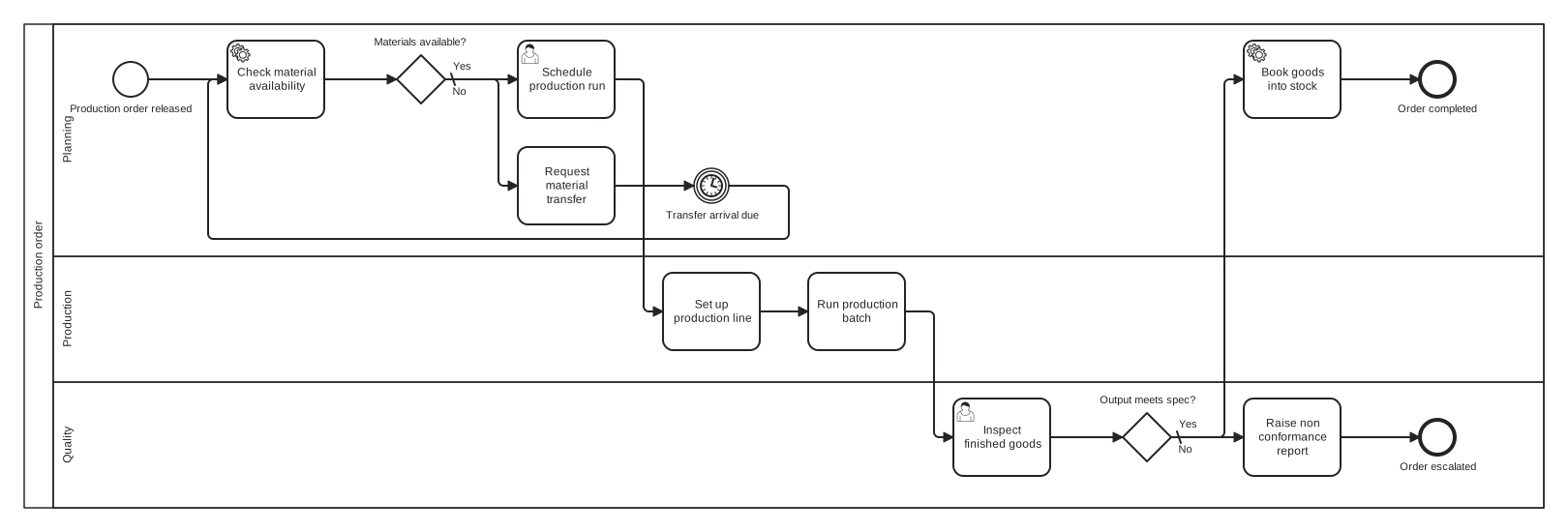
Modelled here as a single pool with Planning, Production, and Quality lanes, the flow uses two exclusive gateways. The first guards the start of the run: missing materials trigger a transfer request and a timer wait, then loop back to the availability check rather than proceeding on hope. The second gateway records the inspection verdict, splitting the order into a completed and an escalated outcome so failures are visible, not absorbed.
Standard BPMN 2.0 interchange XML: opens in Camunda Modeler, Signavio, Bizagi, and any other compliant tool.
The process at a glance
How to read this diagram
Release of the production order starts the flow in the Planning lane, where a service task checks material availability against the bill of materials. The gateway "Materials available?" holds the line: on the default No branch, Planning requests a material transfer, a timer event models the wait for its arrival, and the flow loops back to the availability check. Only a Yes result lets Planning schedule the production run.
With the run scheduled, the Production lane sets up the line and runs the batch, and the Quality lane inspects the finished goods. At "Output meets spec?", the Yes branch books the goods into stock and ends at "Order completed". The default No branch raises a non conformance report and ends at "Order escalated", handing the failed batch to the quality process rather than pretending it shipped. The loop at the front and the split at the back are what make this model audit friendly.
BPMN elements used
| Element | Count | In this diagram |
|---|---|---|
| Start event | 1 | Production order released |
| End event | 2 | Order completed, Order escalated |
| Intermediate catch event | 1 | Transfer arrival due |
| Task | 4 | Request material transfer, Set up production line, Run production batch, Raise non conformance report |
| User task | 2 | Schedule production run, Inspect finished goods |
| Service task | 2 | Check material availability, Book goods into stock |
| Exclusive gateway | 2 | Materials available?, Output meets spec? |
View the BPMN 2.0 XML for this diagram
<?xml version="1.0" encoding="UTF-8"?>
<bpmn2:definitions xmlns:bpmn2="http://www.omg.org/spec/BPMN/20100524/MODEL" xmlns:bpmndi="http://www.omg.org/spec/BPMN/20100524/DI" xmlns:dc="http://www.omg.org/spec/DD/20100524/DC" xmlns:di="http://www.omg.org/spec/DD/20100524/DI" xmlns:xsi="http://www.w3.org/2001/XMLSchema-instance" id="Definitions_1" targetNamespace="http://bpmn.io/schema/bpmn" exporter="swimdraft" exporterVersion="1.0">
  <bpmn2:collaboration id="Collaboration_1">
    <bpmn2:participant id="pool_po" name="Production order" processRef="Process_pool_po" />
  </bpmn2:collaboration>
  <bpmn2:process id="Process_pool_po" isExecutable="false">
    <bpmn2:laneSet id="LaneSet_pool_po">
      <bpmn2:lane id="lane_po_plan" name="Planning">
        <bpmn2:flowNodeRef>start_po</bpmn2:flowNodeRef>
        <bpmn2:flowNodeRef>t_po_mat</bpmn2:flowNodeRef>
        <bpmn2:flowNodeRef>g_po_mat</bpmn2:flowNodeRef>
        <bpmn2:flowNodeRef>t_po_transfer</bpmn2:flowNodeRef>
        <bpmn2:flowNodeRef>ev_po_wait</bpmn2:flowNodeRef>
        <bpmn2:flowNodeRef>t_po_sched</bpmn2:flowNodeRef>
        <bpmn2:flowNodeRef>t_po_book</bpmn2:flowNodeRef>
        <bpmn2:flowNodeRef>end_po_done</bpmn2:flowNodeRef>
      </bpmn2:lane>
      <bpmn2:lane id="lane_po_prod" name="Production">
        <bpmn2:flowNodeRef>t_po_setup</bpmn2:flowNodeRef>
        <bpmn2:flowNodeRef>t_po_run</bpmn2:flowNodeRef>
      </bpmn2:lane>
      <bpmn2:lane id="lane_po_qa" name="Quality">
        <bpmn2:flowNodeRef>t_po_inspect</bpmn2:flowNodeRef>
        <bpmn2:flowNodeRef>g_po_spec</bpmn2:flowNodeRef>
        <bpmn2:flowNodeRef>t_po_ncr</bpmn2:flowNodeRef>
        <bpmn2:flowNodeRef>end_po_esc</bpmn2:flowNodeRef>
      </bpmn2:lane>
    </bpmn2:laneSet>
    <bpmn2:startEvent id="start_po" name="Production order released">
      <bpmn2:outgoing>fpo1</bpmn2:outgoing>
    </bpmn2:startEvent>
    <bpmn2:serviceTask id="t_po_mat" name="Check material availability">
      <bpmn2:incoming>fpo1</bpmn2:incoming>
      <bpmn2:incoming>fpo6</bpmn2:incoming>
      <bpmn2:outgoing>fpo2</bpmn2:outgoing>
    </bpmn2:serviceTask>
    <bpmn2:exclusiveGateway id="g_po_mat" name="Materials available?" default="fpo4">
      <bpmn2:incoming>fpo2</bpmn2:incoming>
      <bpmn2:outgoing>fpo3</bpmn2:outgoing>
      <bpmn2:outgoing>fpo4</bpmn2:outgoing>
    </bpmn2:exclusiveGateway>
    <bpmn2:task id="t_po_transfer" name="Request material transfer">
      <bpmn2:incoming>fpo4</bpmn2:incoming>
      <bpmn2:outgoing>fpo5</bpmn2:outgoing>
    </bpmn2:task>
    <bpmn2:intermediateCatchEvent id="ev_po_wait" name="Transfer arrival due">
      <bpmn2:incoming>fpo5</bpmn2:incoming>
      <bpmn2:outgoing>fpo6</bpmn2:outgoing>
      <bpmn2:timerEventDefinition id="ev_po_wait_def" />
    </bpmn2:intermediateCatchEvent>
    <bpmn2:userTask id="t_po_sched" name="Schedule production run">
      <bpmn2:incoming>fpo3</bpmn2:incoming>
      <bpmn2:outgoing>fpo7</bpmn2:outgoing>
    </bpmn2:userTask>
    <bpmn2:task id="t_po_setup" name="Set up production line">
      <bpmn2:incoming>fpo7</bpmn2:incoming>
      <bpmn2:outgoing>fpo8</bpmn2:outgoing>
    </bpmn2:task>
    <bpmn2:task id="t_po_run" name="Run production batch">
      <bpmn2:incoming>fpo8</bpmn2:incoming>
      <bpmn2:outgoing>fpo9</bpmn2:outgoing>
    </bpmn2:task>
    <bpmn2:userTask id="t_po_inspect" name="Inspect finished goods">
      <bpmn2:incoming>fpo9</bpmn2:incoming>
      <bpmn2:outgoing>fpo10</bpmn2:outgoing>
    </bpmn2:userTask>
    <bpmn2:exclusiveGateway id="g_po_spec" name="Output meets spec?" default="fpo12">
      <bpmn2:incoming>fpo10</bpmn2:incoming>
      <bpmn2:outgoing>fpo11</bpmn2:outgoing>
      <bpmn2:outgoing>fpo12</bpmn2:outgoing>
    </bpmn2:exclusiveGateway>
    <bpmn2:serviceTask id="t_po_book" name="Book goods into stock">
      <bpmn2:incoming>fpo11</bpmn2:incoming>
      <bpmn2:outgoing>fpo13</bpmn2:outgoing>
    </bpmn2:serviceTask>
    <bpmn2:endEvent id="end_po_done" name="Order completed">
      <bpmn2:incoming>fpo13</bpmn2:incoming>
    </bpmn2:endEvent>
    <bpmn2:task id="t_po_ncr" name="Raise non conformance report">
      <bpmn2:incoming>fpo12</bpmn2:incoming>
      <bpmn2:outgoing>fpo14</bpmn2:outgoing>
    </bpmn2:task>
    <bpmn2:endEvent id="end_po_esc" name="Order escalated">
      <bpmn2:incoming>fpo14</bpmn2:incoming>
    </bpmn2:endEvent>
    <bpmn2:sequenceFlow id="fpo1" sourceRef="start_po" targetRef="t_po_mat" />
    <bpmn2:sequenceFlow id="fpo2" sourceRef="t_po_mat" targetRef="g_po_mat" />
    <bpmn2:sequenceFlow id="fpo3" name="Yes" sourceRef="g_po_mat" targetRef="t_po_sched">
      <bpmn2:conditionExpression xsi:type="bpmn2:tFormalExpression">Yes</bpmn2:conditionExpression>
    </bpmn2:sequenceFlow>
    <bpmn2:sequenceFlow id="fpo4" name="No" sourceRef="g_po_mat" targetRef="t_po_transfer" />
    <bpmn2:sequenceFlow id="fpo5" sourceRef="t_po_transfer" targetRef="ev_po_wait" />
    <bpmn2:sequenceFlow id="fpo6" sourceRef="ev_po_wait" targetRef="t_po_mat" />
    <bpmn2:sequenceFlow id="fpo7" sourceRef="t_po_sched" targetRef="t_po_setup" />
    <bpmn2:sequenceFlow id="fpo8" sourceRef="t_po_setup" targetRef="t_po_run" />
    <bpmn2:sequenceFlow id="fpo9" sourceRef="t_po_run" targetRef="t_po_inspect" />
    <bpmn2:sequenceFlow id="fpo10" sourceRef="t_po_inspect" targetRef="g_po_spec" />
    <bpmn2:sequenceFlow id="fpo11" name="Yes" sourceRef="g_po_spec" targetRef="t_po_book">
      <bpmn2:conditionExpression xsi:type="bpmn2:tFormalExpression">Yes</bpmn2:conditionExpression>
    </bpmn2:sequenceFlow>
    <bpmn2:sequenceFlow id="fpo12" name="No" sourceRef="g_po_spec" targetRef="t_po_ncr" />
    <bpmn2:sequenceFlow id="fpo13" sourceRef="t_po_book" targetRef="end_po_done" />
    <bpmn2:sequenceFlow id="fpo14" sourceRef="t_po_ncr" targetRef="end_po_esc" />
  </bpmn2:process>
  <bpmndi:BPMNDiagram id="BPMNDiagram_1">
    <bpmndi:BPMNPlane id="BPMNPlane_1" bpmnElement="Collaboration_1">
      <bpmndi:BPMNShape id="pool_po_di" bpmnElement="pool_po" isHorizontal="true">
        <dc:Bounds x="20" y="20" width="1570" height="500" />
      </bpmndi:BPMNShape>
      <bpmndi:BPMNShape id="lane_po_plan_di" bpmnElement="lane_po_plan" isHorizontal="true">
        <dc:Bounds x="50" y="20" width="1540" height="240" />
      </bpmndi:BPMNShape>
      <bpmndi:BPMNShape id="lane_po_prod_di" bpmnElement="lane_po_prod" isHorizontal="true">
        <dc:Bounds x="50" y="260" width="1540" height="130" />
      </bpmndi:BPMNShape>
      <bpmndi:BPMNShape id="lane_po_qa_di" bpmnElement="lane_po_qa" isHorizontal="true">
        <dc:Bounds x="50" y="390" width="1540" height="130" />
      </bpmndi:BPMNShape>
      <bpmndi:BPMNShape id="start_po_di" bpmnElement="start_po">
        <dc:Bounds x="112" y="59" width="36" height="36" />
        <bpmndi:BPMNLabel><dc:Bounds x="66" y="101" width="129" height="14" /></bpmndi:BPMNLabel>
      </bpmndi:BPMNShape>
      <bpmndi:BPMNShape id="t_po_mat_di" bpmnElement="t_po_mat">
        <dc:Bounds x="230" y="37" width="100" height="80" />
      </bpmndi:BPMNShape>
      <bpmndi:BPMNShape id="g_po_mat_di" bpmnElement="g_po_mat">
        <dc:Bounds x="405" y="52" width="50" height="50" />
        <bpmndi:BPMNLabel><dc:Bounds x="380" y="32" width="100" height="14" /></bpmndi:BPMNLabel>
      </bpmndi:BPMNShape>
      <bpmndi:BPMNShape id="t_po_transfer_di" bpmnElement="t_po_transfer">
        <dc:Bounds x="530" y="147" width="100" height="80" />
      </bpmndi:BPMNShape>
      <bpmndi:BPMNShape id="ev_po_wait_di" bpmnElement="ev_po_wait">
        <dc:Bounds x="712" y="169" width="36" height="36" />
        <bpmndi:BPMNLabel><dc:Bounds x="681" y="211" width="98" height="14" /></bpmndi:BPMNLabel>
      </bpmndi:BPMNShape>
      <bpmndi:BPMNShape id="t_po_sched_di" bpmnElement="t_po_sched">
        <dc:Bounds x="530" y="37" width="100" height="80" />
      </bpmndi:BPMNShape>
      <bpmndi:BPMNShape id="t_po_setup_di" bpmnElement="t_po_setup">
        <dc:Bounds x="680" y="277" width="100" height="80" />
      </bpmndi:BPMNShape>
      <bpmndi:BPMNShape id="t_po_run_di" bpmnElement="t_po_run">
        <dc:Bounds x="830" y="277" width="100" height="80" />
      </bpmndi:BPMNShape>
      <bpmndi:BPMNShape id="t_po_inspect_di" bpmnElement="t_po_inspect">
        <dc:Bounds x="980" y="407" width="100" height="80" />
      </bpmndi:BPMNShape>
      <bpmndi:BPMNShape id="g_po_spec_di" bpmnElement="g_po_spec">
        <dc:Bounds x="1155" y="422" width="50" height="50" />
        <bpmndi:BPMNLabel><dc:Bounds x="1130" y="402" width="101" height="14" /></bpmndi:BPMNLabel>
      </bpmndi:BPMNShape>
      <bpmndi:BPMNShape id="t_po_book_di" bpmnElement="t_po_book">
        <dc:Bounds x="1280" y="37" width="100" height="80" />
      </bpmndi:BPMNShape>
      <bpmndi:BPMNShape id="end_po_done_di" bpmnElement="end_po_done">
        <dc:Bounds x="1462" y="59" width="36" height="36" />
        <bpmndi:BPMNLabel><dc:Bounds x="1438" y="101" width="84" height="14" /></bpmndi:BPMNLabel>
      </bpmndi:BPMNShape>
      <bpmndi:BPMNShape id="t_po_ncr_di" bpmnElement="t_po_ncr">
        <dc:Bounds x="1280" y="407" width="100" height="80" />
      </bpmndi:BPMNShape>
      <bpmndi:BPMNShape id="end_po_esc_di" bpmnElement="end_po_esc">
        <dc:Bounds x="1462" y="429" width="36" height="36" />
        <bpmndi:BPMNLabel><dc:Bounds x="1440" y="471" width="81" height="14" /></bpmndi:BPMNLabel>
      </bpmndi:BPMNShape>
      <bpmndi:BPMNEdge id="fpo1_di" bpmnElement="fpo1">
        <di:waypoint x="148" y="77" />
        <di:waypoint x="230" y="77" />
      </bpmndi:BPMNEdge>
      <bpmndi:BPMNEdge id="fpo2_di" bpmnElement="fpo2">
        <di:waypoint x="330" y="77" />
        <di:waypoint x="405" y="77" />
      </bpmndi:BPMNEdge>
      <bpmndi:BPMNEdge id="fpo3_di" bpmnElement="fpo3">
        <di:waypoint x="455" y="77" />
        <di:waypoint x="530" y="77" />
        <bpmndi:BPMNLabel><dc:Bounds x="461" y="57" width="21" height="14" /></bpmndi:BPMNLabel>
      </bpmndi:BPMNEdge>
      <bpmndi:BPMNEdge id="fpo4_di" bpmnElement="fpo4">
        <di:waypoint x="455" y="77" />
        <di:waypoint x="510" y="77" />
        <di:waypoint x="510" y="187" />
        <di:waypoint x="530" y="187" />
        <bpmndi:BPMNLabel><dc:Bounds x="461" y="83" width="17" height="14" /></bpmndi:BPMNLabel>
      </bpmndi:BPMNEdge>
      <bpmndi:BPMNEdge id="fpo5_di" bpmnElement="fpo5">
        <di:waypoint x="630" y="187" />
        <di:waypoint x="712" y="187" />
      </bpmndi:BPMNEdge>
      <bpmndi:BPMNEdge id="fpo6_di" bpmnElement="fpo6">
        <di:waypoint x="748" y="187" />
        <di:waypoint x="810" y="187" />
        <di:waypoint x="810" y="242" />
        <di:waypoint x="210" y="242" />
        <di:waypoint x="210" y="77" />
        <di:waypoint x="230" y="77" />
      </bpmndi:BPMNEdge>
      <bpmndi:BPMNEdge id="fpo7_di" bpmnElement="fpo7">
        <di:waypoint x="630" y="77" />
        <di:waypoint x="660" y="77" />
        <di:waypoint x="660" y="317" />
        <di:waypoint x="680" y="317" />
      </bpmndi:BPMNEdge>
      <bpmndi:BPMNEdge id="fpo8_di" bpmnElement="fpo8">
        <di:waypoint x="780" y="317" />
        <di:waypoint x="830" y="317" />
      </bpmndi:BPMNEdge>
      <bpmndi:BPMNEdge id="fpo9_di" bpmnElement="fpo9">
        <di:waypoint x="930" y="317" />
        <di:waypoint x="960" y="317" />
        <di:waypoint x="960" y="447" />
        <di:waypoint x="980" y="447" />
      </bpmndi:BPMNEdge>
      <bpmndi:BPMNEdge id="fpo10_di" bpmnElement="fpo10">
        <di:waypoint x="1080" y="447" />
        <di:waypoint x="1155" y="447" />
      </bpmndi:BPMNEdge>
      <bpmndi:BPMNEdge id="fpo11_di" bpmnElement="fpo11">
        <di:waypoint x="1205" y="447" />
        <di:waypoint x="1260" y="447" />
        <di:waypoint x="1260" y="77" />
        <di:waypoint x="1280" y="77" />
        <bpmndi:BPMNLabel><dc:Bounds x="1211" y="427" width="21" height="14" /></bpmndi:BPMNLabel>
      </bpmndi:BPMNEdge>
      <bpmndi:BPMNEdge id="fpo12_di" bpmnElement="fpo12">
        <di:waypoint x="1205" y="447" />
        <di:waypoint x="1280" y="447" />
        <bpmndi:BPMNLabel><dc:Bounds x="1211" y="453" width="17" height="14" /></bpmndi:BPMNLabel>
      </bpmndi:BPMNEdge>
      <bpmndi:BPMNEdge id="fpo13_di" bpmnElement="fpo13">
        <di:waypoint x="1380" y="77" />
        <di:waypoint x="1462" y="77" />
      </bpmndi:BPMNEdge>
      <bpmndi:BPMNEdge id="fpo14_di" bpmnElement="fpo14">
        <di:waypoint x="1380" y="447" />
        <di:waypoint x="1462" y="447" />
      </bpmndi:BPMNEdge>
    </bpmndi:BPMNPlane>
  </bpmndi:BPMNDiagram>
</bpmn2:definitions>
Frequently asked questions
Why loop back to the material check instead of waiting inline?
Looping to the check re verifies availability after every wait, which matters because a transfer can arrive short or be diverted to another order. An inline continuation would assume the transfer always satisfies the shortage. The loop costs one sequence flow and buys a model that matches how planners actually behave.
Why does the failed inspection end the process instead of triggering rework?
Scope. This model covers the production order itself, and a non conformance is the entry point of a separate quality process with its own roles and timescales. Ending at "Order escalated" keeps this diagram small and honest. If you prefer one combined model, replace that end event with a rework loop into the run.
Which tasks here are good candidates for service tasks?
Steps a system performs without human judgement: the material availability check, booking goods into stock, and arguably the schedule creation if your planning tool automates it. Setup, running the batch, and inspection stay as manual or user tasks. Typing tasks accurately makes the automation boundary visible at a glance.
Related BPMN examples
Order fulfilment
An order fulfilment process as a BPMN 2.0 diagram: stock check, backorder loop, picking, and dispatch confirmation. View the swimlanes and download the .bpmn file free.
Goods receipt
A goods receipt process as a BPMN 2.0 diagram: PO matching, condition inspection, discrepancy handling, and GRN posting. See the swimlanes and download the free .bpmn file.
Shipping and dispatch
A shipping and dispatch process as a BPMN 2.0 diagram: parallel packing and paperwork, customs branch, and departure. View the swimlanes and download the .bpmn free.
Inventory replenishment
An inventory replenishment process as a BPMN 2.0 diagram: reorder trigger, policy rules, approval branch, and supplier confirmation. Free .bpmn file download included.
Generate your own version of this diagram
Describe how the process works in your organisation: plain English, meeting notes, a transcript, or a spreadsheet. Swimdraft turns it into a spec-validated BPMN 2.0 diagram you can edit in the browser and export as .bpmn, SVG, or PNG.
Start freeNo credit card required