
Purchase order approval BPMN example
Purchase order approval is where an organisation decides who signs off spend before a commitment reaches a supplier. Teams map it because approval thresholds live in policy documents that nobody reads, so in practice orders bounce between inboxes and high value spend slips through with a single signature. A diagram makes the routing rules impossible to misread.
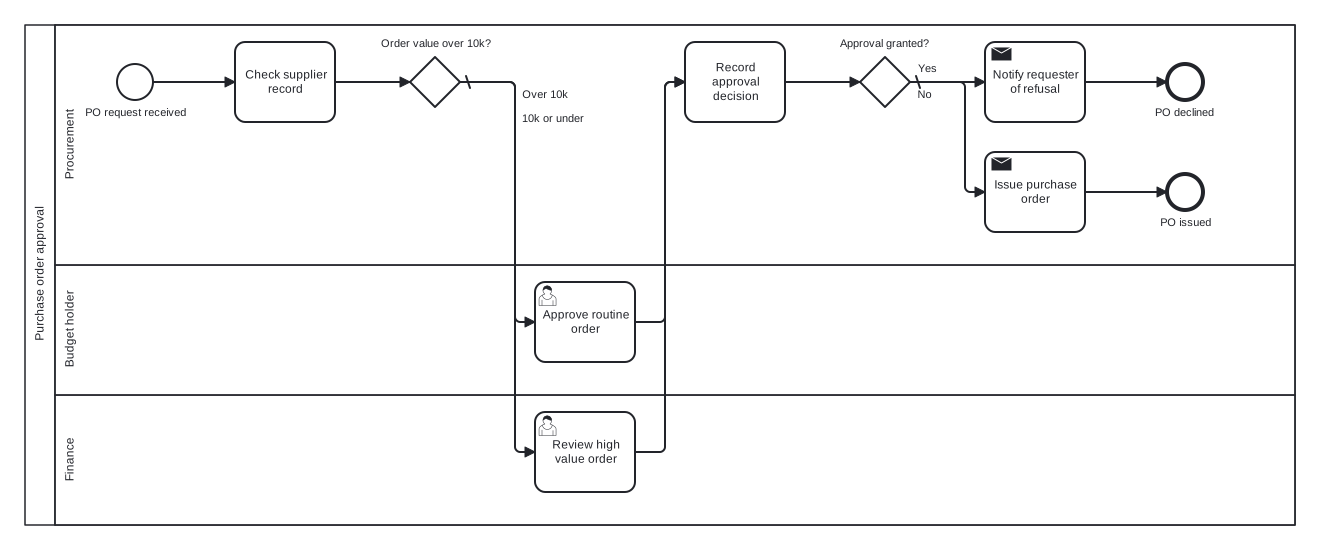
The model here is one pool with three lanes: Procurement, Budget holder, and Finance. The first gateway routes by order value, sending large orders to Finance and routine ones to the budget holder, and both paths converge on a shared decision recording task before a second gateway settles the outcome. Converging on a task rather than a merge gateway is the modelling choice to notice.
Standard BPMN 2.0 interchange XML: opens in Camunda Modeler, Signavio, Bizagi, and any other compliant tool.
The process at a glance
How to read this diagram
Work begins in the Procurement lane when a PO request is received. Procurement checks the supplier record and the flow reaches the value gateway, "Order value over 10k?". The "Over 10k" branch routes to Finance, where a reviewer examines the high value order; the "10k or under" branch, marked as the default, goes to the Budget holder lane for a routine approval.
Both approval paths point at the same task, "Record approval decision", which merges them without a gateway. The final gateway, "Approval granted?", then splits the outcome: Yes leads to Procurement issuing the purchase order and the "PO issued" end event, while the default No branch notifies the requester of the refusal and finishes at "PO declined".
BPMN elements used
| Element | Count | In this diagram |
|---|---|---|
| Start event | 1 | PO request received |
| End event | 2 | PO issued, PO declined |
| Task | 2 | Check supplier record, Record approval decision |
| User task | 2 | Approve routine order, Review high value order |
| Send task | 2 | Issue purchase order, Notify requester of refusal |
| Exclusive gateway | 2 | Order value over 10k?, Approval granted? |
View the BPMN 2.0 XML for this diagram
<?xml version="1.0" encoding="UTF-8"?>
<bpmn2:definitions xmlns:bpmn2="http://www.omg.org/spec/BPMN/20100524/MODEL" xmlns:bpmndi="http://www.omg.org/spec/BPMN/20100524/DI" xmlns:dc="http://www.omg.org/spec/DD/20100524/DC" xmlns:di="http://www.omg.org/spec/DD/20100524/DI" xmlns:xsi="http://www.w3.org/2001/XMLSchema-instance" id="Definitions_1" targetNamespace="http://bpmn.io/schema/bpmn" exporter="swimdraft" exporterVersion="1.0">
  <bpmn2:collaboration id="Collaboration_1">
    <bpmn2:participant id="pool_poa" name="Purchase order approval" processRef="Process_pool_poa" />
  </bpmn2:collaboration>
  <bpmn2:process id="Process_pool_poa" isExecutable="false">
    <bpmn2:laneSet id="LaneSet_pool_poa">
      <bpmn2:lane id="lane_poa_proc" name="Procurement">
        <bpmn2:flowNodeRef>start_poa</bpmn2:flowNodeRef>
        <bpmn2:flowNodeRef>t_poa_check</bpmn2:flowNodeRef>
        <bpmn2:flowNodeRef>g_poa_value</bpmn2:flowNodeRef>
        <bpmn2:flowNodeRef>t_poa_record</bpmn2:flowNodeRef>
        <bpmn2:flowNodeRef>g_poa_granted</bpmn2:flowNodeRef>
        <bpmn2:flowNodeRef>t_poa_issue</bpmn2:flowNodeRef>
        <bpmn2:flowNodeRef>end_poa_issued</bpmn2:flowNodeRef>
        <bpmn2:flowNodeRef>t_poa_notify</bpmn2:flowNodeRef>
        <bpmn2:flowNodeRef>end_poa_declined</bpmn2:flowNodeRef>
      </bpmn2:lane>
      <bpmn2:lane id="lane_poa_bh" name="Budget holder">
        <bpmn2:flowNodeRef>t_poa_bh</bpmn2:flowNodeRef>
      </bpmn2:lane>
      <bpmn2:lane id="lane_poa_fin" name="Finance">
        <bpmn2:flowNodeRef>t_poa_fin</bpmn2:flowNodeRef>
      </bpmn2:lane>
    </bpmn2:laneSet>
    <bpmn2:startEvent id="start_poa" name="PO request received">
      <bpmn2:outgoing>fpoa1</bpmn2:outgoing>
    </bpmn2:startEvent>
    <bpmn2:task id="t_poa_check" name="Check supplier record">
      <bpmn2:incoming>fpoa1</bpmn2:incoming>
      <bpmn2:outgoing>fpoa2</bpmn2:outgoing>
    </bpmn2:task>
    <bpmn2:exclusiveGateway id="g_poa_value" name="Order value over 10k?" default="fpoa4">
      <bpmn2:incoming>fpoa2</bpmn2:incoming>
      <bpmn2:outgoing>fpoa3</bpmn2:outgoing>
      <bpmn2:outgoing>fpoa4</bpmn2:outgoing>
    </bpmn2:exclusiveGateway>
    <bpmn2:userTask id="t_poa_bh" name="Approve routine order">
      <bpmn2:incoming>fpoa4</bpmn2:incoming>
      <bpmn2:outgoing>fpoa5</bpmn2:outgoing>
    </bpmn2:userTask>
    <bpmn2:userTask id="t_poa_fin" name="Review high value order">
      <bpmn2:incoming>fpoa3</bpmn2:incoming>
      <bpmn2:outgoing>fpoa6</bpmn2:outgoing>
    </bpmn2:userTask>
    <bpmn2:task id="t_poa_record" name="Record approval decision">
      <bpmn2:incoming>fpoa5</bpmn2:incoming>
      <bpmn2:incoming>fpoa6</bpmn2:incoming>
      <bpmn2:outgoing>fpoa7</bpmn2:outgoing>
    </bpmn2:task>
    <bpmn2:exclusiveGateway id="g_poa_granted" name="Approval granted?" default="fpoa9">
      <bpmn2:incoming>fpoa7</bpmn2:incoming>
      <bpmn2:outgoing>fpoa8</bpmn2:outgoing>
      <bpmn2:outgoing>fpoa9</bpmn2:outgoing>
    </bpmn2:exclusiveGateway>
    <bpmn2:sendTask id="t_poa_issue" name="Issue purchase order">
      <bpmn2:incoming>fpoa8</bpmn2:incoming>
      <bpmn2:outgoing>fpoa10</bpmn2:outgoing>
    </bpmn2:sendTask>
    <bpmn2:endEvent id="end_poa_issued" name="PO issued">
      <bpmn2:incoming>fpoa10</bpmn2:incoming>
    </bpmn2:endEvent>
    <bpmn2:sendTask id="t_poa_notify" name="Notify requester of refusal">
      <bpmn2:incoming>fpoa9</bpmn2:incoming>
      <bpmn2:outgoing>fpoa11</bpmn2:outgoing>
    </bpmn2:sendTask>
    <bpmn2:endEvent id="end_poa_declined" name="PO declined">
      <bpmn2:incoming>fpoa11</bpmn2:incoming>
    </bpmn2:endEvent>
    <bpmn2:sequenceFlow id="fpoa1" sourceRef="start_poa" targetRef="t_poa_check" />
    <bpmn2:sequenceFlow id="fpoa2" sourceRef="t_poa_check" targetRef="g_poa_value" />
    <bpmn2:sequenceFlow id="fpoa3" name="Over 10k" sourceRef="g_poa_value" targetRef="t_poa_fin">
      <bpmn2:conditionExpression xsi:type="bpmn2:tFormalExpression">Over 10k</bpmn2:conditionExpression>
    </bpmn2:sequenceFlow>
    <bpmn2:sequenceFlow id="fpoa4" name="10k or under" sourceRef="g_poa_value" targetRef="t_poa_bh" />
    <bpmn2:sequenceFlow id="fpoa5" sourceRef="t_poa_bh" targetRef="t_poa_record" />
    <bpmn2:sequenceFlow id="fpoa6" sourceRef="t_poa_fin" targetRef="t_poa_record" />
    <bpmn2:sequenceFlow id="fpoa7" sourceRef="t_poa_record" targetRef="g_poa_granted" />
    <bpmn2:sequenceFlow id="fpoa8" name="Yes" sourceRef="g_poa_granted" targetRef="t_poa_issue">
      <bpmn2:conditionExpression xsi:type="bpmn2:tFormalExpression">Yes</bpmn2:conditionExpression>
    </bpmn2:sequenceFlow>
    <bpmn2:sequenceFlow id="fpoa9" name="No" sourceRef="g_poa_granted" targetRef="t_poa_notify" />
    <bpmn2:sequenceFlow id="fpoa10" sourceRef="t_poa_issue" targetRef="end_poa_issued" />
    <bpmn2:sequenceFlow id="fpoa11" sourceRef="t_poa_notify" targetRef="end_poa_declined" />
  </bpmn2:process>
  <bpmndi:BPMNDiagram id="BPMNDiagram_1">
    <bpmndi:BPMNPlane id="BPMNPlane_1" bpmnElement="Collaboration_1">
      <bpmndi:BPMNShape id="pool_poa_di" bpmnElement="pool_poa" isHorizontal="true">
        <dc:Bounds x="20" y="20" width="1270" height="500" />
      </bpmndi:BPMNShape>
      <bpmndi:BPMNShape id="lane_poa_proc_di" bpmnElement="lane_poa_proc" isHorizontal="true">
        <dc:Bounds x="50" y="20" width="1240" height="240" />
      </bpmndi:BPMNShape>
      <bpmndi:BPMNShape id="lane_poa_bh_di" bpmnElement="lane_poa_bh" isHorizontal="true">
        <dc:Bounds x="50" y="260" width="1240" height="130" />
      </bpmndi:BPMNShape>
      <bpmndi:BPMNShape id="lane_poa_fin_di" bpmnElement="lane_poa_fin" isHorizontal="true">
        <dc:Bounds x="50" y="390" width="1240" height="130" />
      </bpmndi:BPMNShape>
      <bpmndi:BPMNShape id="start_poa_di" bpmnElement="start_poa">
        <dc:Bounds x="112" y="59" width="36" height="36" />
        <bpmndi:BPMNLabel><dc:Bounds x="79" y="101" width="103" height="14" /></bpmndi:BPMNLabel>
      </bpmndi:BPMNShape>
      <bpmndi:BPMNShape id="t_poa_check_di" bpmnElement="t_poa_check">
        <dc:Bounds x="230" y="37" width="100" height="80" />
      </bpmndi:BPMNShape>
      <bpmndi:BPMNShape id="g_poa_value_di" bpmnElement="g_poa_value">
        <dc:Bounds x="405" y="52" width="50" height="50" />
        <bpmndi:BPMNLabel><dc:Bounds x="375" y="32" width="111" height="14" /></bpmndi:BPMNLabel>
      </bpmndi:BPMNShape>
      <bpmndi:BPMNShape id="t_poa_bh_di" bpmnElement="t_poa_bh">
        <dc:Bounds x="530" y="277" width="100" height="80" />
      </bpmndi:BPMNShape>
      <bpmndi:BPMNShape id="t_poa_fin_di" bpmnElement="t_poa_fin">
        <dc:Bounds x="530" y="407" width="100" height="80" />
      </bpmndi:BPMNShape>
      <bpmndi:BPMNShape id="t_poa_record_di" bpmnElement="t_poa_record">
        <dc:Bounds x="680" y="37" width="100" height="80" />
      </bpmndi:BPMNShape>
      <bpmndi:BPMNShape id="g_poa_granted_di" bpmnElement="g_poa_granted">
        <dc:Bounds x="855" y="52" width="50" height="50" />
        <bpmndi:BPMNLabel><dc:Bounds x="834" y="32" width="92" height="14" /></bpmndi:BPMNLabel>
      </bpmndi:BPMNShape>
      <bpmndi:BPMNShape id="t_poa_issue_di" bpmnElement="t_poa_issue">
        <dc:Bounds x="980" y="147" width="100" height="80" />
      </bpmndi:BPMNShape>
      <bpmndi:BPMNShape id="end_poa_issued_di" bpmnElement="end_poa_issued">
        <dc:Bounds x="1162" y="169" width="36" height="36" />
        <bpmndi:BPMNLabel><dc:Bounds x="1154" y="211" width="53" height="14" /></bpmndi:BPMNLabel>
      </bpmndi:BPMNShape>
      <bpmndi:BPMNShape id="t_poa_notify_di" bpmnElement="t_poa_notify">
        <dc:Bounds x="980" y="37" width="100" height="80" />
      </bpmndi:BPMNShape>
      <bpmndi:BPMNShape id="end_poa_declined_di" bpmnElement="end_poa_declined">
        <dc:Bounds x="1162" y="59" width="36" height="36" />
        <bpmndi:BPMNLabel><dc:Bounds x="1149" y="101" width="62" height="14" /></bpmndi:BPMNLabel>
      </bpmndi:BPMNShape>
      <bpmndi:BPMNEdge id="fpoa1_di" bpmnElement="fpoa1">
        <di:waypoint x="148" y="77" />
        <di:waypoint x="230" y="77" />
      </bpmndi:BPMNEdge>
      <bpmndi:BPMNEdge id="fpoa2_di" bpmnElement="fpoa2">
        <di:waypoint x="330" y="77" />
        <di:waypoint x="405" y="77" />
      </bpmndi:BPMNEdge>
      <bpmndi:BPMNEdge id="fpoa3_di" bpmnElement="fpoa3">
        <di:waypoint x="455" y="77" />
        <di:waypoint x="510" y="77" />
        <di:waypoint x="510" y="447" />
        <di:waypoint x="530" y="447" />
        <bpmndi:BPMNLabel><dc:Bounds x="516" y="83" width="47" height="14" /></bpmndi:BPMNLabel>
      </bpmndi:BPMNEdge>
      <bpmndi:BPMNEdge id="fpoa4_di" bpmnElement="fpoa4">
        <di:waypoint x="455" y="77" />
        <di:waypoint x="510" y="77" />
        <di:waypoint x="510" y="317" />
        <di:waypoint x="530" y="317" />
        <bpmndi:BPMNLabel><dc:Bounds x="516" y="107" width="64" height="14" /></bpmndi:BPMNLabel>
      </bpmndi:BPMNEdge>
      <bpmndi:BPMNEdge id="fpoa5_di" bpmnElement="fpoa5">
        <di:waypoint x="630" y="317" />
        <di:waypoint x="660" y="317" />
        <di:waypoint x="660" y="77" />
        <di:waypoint x="680" y="77" />
      </bpmndi:BPMNEdge>
      <bpmndi:BPMNEdge id="fpoa6_di" bpmnElement="fpoa6">
        <di:waypoint x="630" y="447" />
        <di:waypoint x="660" y="447" />
        <di:waypoint x="660" y="77" />
        <di:waypoint x="680" y="77" />
      </bpmndi:BPMNEdge>
      <bpmndi:BPMNEdge id="fpoa7_di" bpmnElement="fpoa7">
        <di:waypoint x="780" y="77" />
        <di:waypoint x="855" y="77" />
      </bpmndi:BPMNEdge>
      <bpmndi:BPMNEdge id="fpoa8_di" bpmnElement="fpoa8">
        <di:waypoint x="905" y="77" />
        <di:waypoint x="960" y="77" />
        <di:waypoint x="960" y="187" />
        <di:waypoint x="980" y="187" />
        <bpmndi:BPMNLabel><dc:Bounds x="911" y="57" width="21" height="14" /></bpmndi:BPMNLabel>
      </bpmndi:BPMNEdge>
      <bpmndi:BPMNEdge id="fpoa9_di" bpmnElement="fpoa9">
        <di:waypoint x="905" y="77" />
        <di:waypoint x="980" y="77" />
        <bpmndi:BPMNLabel><dc:Bounds x="911" y="83" width="17" height="14" /></bpmndi:BPMNLabel>
      </bpmndi:BPMNEdge>
      <bpmndi:BPMNEdge id="fpoa10_di" bpmnElement="fpoa10">
        <di:waypoint x="1080" y="187" />
        <di:waypoint x="1162" y="187" />
      </bpmndi:BPMNEdge>
      <bpmndi:BPMNEdge id="fpoa11_di" bpmnElement="fpoa11">
        <di:waypoint x="1080" y="77" />
        <di:waypoint x="1162" y="77" />
      </bpmndi:BPMNEdge>
    </bpmndi:BPMNPlane>
  </bpmndi:BPMNDiagram>
</bpmn2:definitions>
Frequently asked questions
Is it valid to merge two branches into a task instead of a gateway?
Yes. BPMN allows multiple sequence flows to target the same activity, and for an exclusive merge the behaviour is identical: whichever token arrives simply continues. An explicit converging gateway earns its place when you need to make the merge visually obvious or when combining parallel paths, which requires a parallel join.
Why use an exclusive gateway for the value split rather than an inclusive one?
Because exactly one route applies to any order: it is either over the threshold or it is not. Inclusive gateways are for situations where several conditions can be true at once and multiple branches may run together. Using one here would suggest an order could need both approvals simultaneously, which the policy does not intend.
Can I open the downloaded file in my own modelling tool?
Yes. The download is standard BPMN 2.0 interchange XML, validated against 19 normative rules from the OMG 2.0.2 specification, so it opens cleanly in Camunda Modeler, Signavio, or Bizagi. You can also edit it first in the Swimdraft browser editor and export .bpmn, SVG, or PNG.
Related BPMN examples
Purchase requisition
A purchase requisition process as a BPMN 2.0 diagram: request, completeness check, manager approval, and PO creation. View the swimlanes and download the .bpmn file free.
Vendor onboarding
A vendor onboarding process as a BPMN 2.0 diagram: document collection, sanctions screening, bank verification, and activation. Download the .bpmn file free.
Supplier evaluation
A supplier evaluation process as a BPMN 2.0 diagram: parallel data gathering, scoring, and an improvement plan branch. View it and download the .bpmn file free.
Tender process
A competitive tender process as a BPMN 2.0 diagram with a supplier pool, timer deadline, bid scoring, and award. Download the .bpmn file free and edit it online.
Generate your own version of this diagram
Describe how the process works in your organisation: plain English, meeting notes, a transcript, or a spreadsheet. Swimdraft turns it into a spec-validated BPMN 2.0 diagram you can edit in the browser and export as .bpmn, SVG, or PNG.
Start freeNo credit card required