
Purchase requisition BPMN example
A purchase requisition is the internal request that starts most spending: someone needs goods or a service, and the organisation needs a record and an approval before money is committed. Teams map it because it is the front door to procurement, and a leaky front door means maverick spend, missing budget codes, and purchase orders raised after the invoice has already arrived.
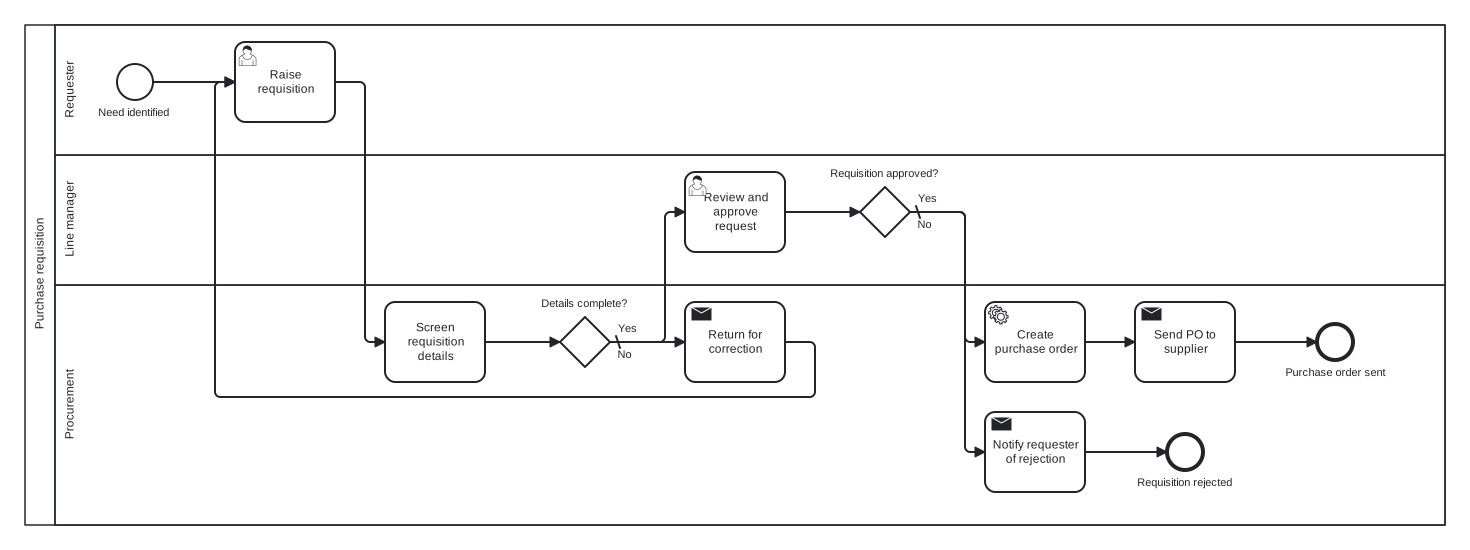
This example models the requisition as a single pool with three lanes: Requester, Line manager, and Procurement. Two exclusive gateways carry the logic: a completeness check that loops incomplete requests back to the requester, and the approval decision itself. The rework loop is the choice worth noticing, because it shows correction as a cycle rather than a dead end.
Standard BPMN 2.0 interchange XML: opens in Camunda Modeler, Signavio, Bizagi, and any other compliant tool.
The process at a glance
How to read this diagram
A need identified in the Requester lane starts the process, and the requester raises the requisition. Procurement screens the details and hits the first gateway, "Details complete?". The No branch (the default) sends the request back for correction, which loops to the requester raising it again; the Yes branch passes it to the Line manager lane for review.
At the second gateway, "Requisition approved?", the Yes branch drops into Procurement, which creates the purchase order and sends it to the supplier, ending at "Purchase order sent". The No branch, marked as the default flow, has Procurement notify the requester of the rejection and the process closes at "Requisition rejected". Every token therefore finishes at exactly one of two named end states.
BPMN elements used
| Element | Count | In this diagram |
|---|---|---|
| Start event | 1 | Need identified |
| End event | 2 | Requisition rejected, Purchase order sent |
| Task | 1 | Screen requisition details |
| User task | 2 | Raise requisition, Review and approve request |
| Service task | 1 | Create purchase order |
| Send task | 3 | Return for correction, Notify requester of rejection, Send PO to supplier |
| Exclusive gateway | 2 | Details complete?, Requisition approved? |
View the BPMN 2.0 XML for this diagram
<?xml version="1.0" encoding="UTF-8"?>
<bpmn2:definitions xmlns:bpmn2="http://www.omg.org/spec/BPMN/20100524/MODEL" xmlns:bpmndi="http://www.omg.org/spec/BPMN/20100524/DI" xmlns:dc="http://www.omg.org/spec/DD/20100524/DC" xmlns:di="http://www.omg.org/spec/DD/20100524/DI" xmlns:xsi="http://www.w3.org/2001/XMLSchema-instance" id="Definitions_1" targetNamespace="http://bpmn.io/schema/bpmn" exporter="swimdraft" exporterVersion="1.0">
  <bpmn2:collaboration id="Collaboration_1">
    <bpmn2:participant id="pool_preq" name="Purchase requisition" processRef="Process_pool_preq" />
  </bpmn2:collaboration>
  <bpmn2:process id="Process_pool_preq" isExecutable="false">
    <bpmn2:laneSet id="LaneSet_pool_preq">
      <bpmn2:lane id="lane_preq_req" name="Requester">
        <bpmn2:flowNodeRef>start_preq</bpmn2:flowNodeRef>
        <bpmn2:flowNodeRef>t_preq_raise</bpmn2:flowNodeRef>
      </bpmn2:lane>
      <bpmn2:lane id="lane_preq_mgr" name="Line manager">
        <bpmn2:flowNodeRef>t_preq_approve</bpmn2:flowNodeRef>
        <bpmn2:flowNodeRef>g_preq_approved</bpmn2:flowNodeRef>
      </bpmn2:lane>
      <bpmn2:lane id="lane_preq_proc" name="Procurement">
        <bpmn2:flowNodeRef>t_preq_screen</bpmn2:flowNodeRef>
        <bpmn2:flowNodeRef>g_preq_complete</bpmn2:flowNodeRef>
        <bpmn2:flowNodeRef>t_preq_return</bpmn2:flowNodeRef>
        <bpmn2:flowNodeRef>t_preq_notify</bpmn2:flowNodeRef>
        <bpmn2:flowNodeRef>end_preq_rejected</bpmn2:flowNodeRef>
        <bpmn2:flowNodeRef>t_preq_po</bpmn2:flowNodeRef>
        <bpmn2:flowNodeRef>t_preq_send</bpmn2:flowNodeRef>
        <bpmn2:flowNodeRef>end_preq_done</bpmn2:flowNodeRef>
      </bpmn2:lane>
    </bpmn2:laneSet>
    <bpmn2:startEvent id="start_preq" name="Need identified">
      <bpmn2:outgoing>fpreq1</bpmn2:outgoing>
    </bpmn2:startEvent>
    <bpmn2:userTask id="t_preq_raise" name="Raise requisition">
      <bpmn2:incoming>fpreq1</bpmn2:incoming>
      <bpmn2:incoming>fpreq6</bpmn2:incoming>
      <bpmn2:outgoing>fpreq2</bpmn2:outgoing>
    </bpmn2:userTask>
    <bpmn2:task id="t_preq_screen" name="Screen requisition details">
      <bpmn2:incoming>fpreq2</bpmn2:incoming>
      <bpmn2:outgoing>fpreq3</bpmn2:outgoing>
    </bpmn2:task>
    <bpmn2:exclusiveGateway id="g_preq_complete" name="Details complete?" default="fpreq5">
      <bpmn2:incoming>fpreq3</bpmn2:incoming>
      <bpmn2:outgoing>fpreq4</bpmn2:outgoing>
      <bpmn2:outgoing>fpreq5</bpmn2:outgoing>
    </bpmn2:exclusiveGateway>
    <bpmn2:sendTask id="t_preq_return" name="Return for correction">
      <bpmn2:incoming>fpreq5</bpmn2:incoming>
      <bpmn2:outgoing>fpreq6</bpmn2:outgoing>
    </bpmn2:sendTask>
    <bpmn2:userTask id="t_preq_approve" name="Review and approve request">
      <bpmn2:incoming>fpreq4</bpmn2:incoming>
      <bpmn2:outgoing>fpreq7</bpmn2:outgoing>
    </bpmn2:userTask>
    <bpmn2:exclusiveGateway id="g_preq_approved" name="Requisition approved?" default="fpreq9">
      <bpmn2:incoming>fpreq7</bpmn2:incoming>
      <bpmn2:outgoing>fpreq8</bpmn2:outgoing>
      <bpmn2:outgoing>fpreq9</bpmn2:outgoing>
    </bpmn2:exclusiveGateway>
    <bpmn2:sendTask id="t_preq_notify" name="Notify requester of rejection">
      <bpmn2:incoming>fpreq9</bpmn2:incoming>
      <bpmn2:outgoing>fpreq10</bpmn2:outgoing>
    </bpmn2:sendTask>
    <bpmn2:endEvent id="end_preq_rejected" name="Requisition rejected">
      <bpmn2:incoming>fpreq10</bpmn2:incoming>
    </bpmn2:endEvent>
    <bpmn2:serviceTask id="t_preq_po" name="Create purchase order">
      <bpmn2:incoming>fpreq8</bpmn2:incoming>
      <bpmn2:outgoing>fpreq11</bpmn2:outgoing>
    </bpmn2:serviceTask>
    <bpmn2:sendTask id="t_preq_send" name="Send PO to supplier">
      <bpmn2:incoming>fpreq11</bpmn2:incoming>
      <bpmn2:outgoing>fpreq12</bpmn2:outgoing>
    </bpmn2:sendTask>
    <bpmn2:endEvent id="end_preq_done" name="Purchase order sent">
      <bpmn2:incoming>fpreq12</bpmn2:incoming>
    </bpmn2:endEvent>
    <bpmn2:sequenceFlow id="fpreq1" sourceRef="start_preq" targetRef="t_preq_raise" />
    <bpmn2:sequenceFlow id="fpreq2" sourceRef="t_preq_raise" targetRef="t_preq_screen" />
    <bpmn2:sequenceFlow id="fpreq3" sourceRef="t_preq_screen" targetRef="g_preq_complete" />
    <bpmn2:sequenceFlow id="fpreq4" name="Yes" sourceRef="g_preq_complete" targetRef="t_preq_approve">
      <bpmn2:conditionExpression xsi:type="bpmn2:tFormalExpression">Yes</bpmn2:conditionExpression>
    </bpmn2:sequenceFlow>
    <bpmn2:sequenceFlow id="fpreq5" name="No" sourceRef="g_preq_complete" targetRef="t_preq_return" />
    <bpmn2:sequenceFlow id="fpreq6" sourceRef="t_preq_return" targetRef="t_preq_raise" />
    <bpmn2:sequenceFlow id="fpreq7" sourceRef="t_preq_approve" targetRef="g_preq_approved" />
    <bpmn2:sequenceFlow id="fpreq8" name="Yes" sourceRef="g_preq_approved" targetRef="t_preq_po">
      <bpmn2:conditionExpression xsi:type="bpmn2:tFormalExpression">Yes</bpmn2:conditionExpression>
    </bpmn2:sequenceFlow>
    <bpmn2:sequenceFlow id="fpreq9" name="No" sourceRef="g_preq_approved" targetRef="t_preq_notify" />
    <bpmn2:sequenceFlow id="fpreq10" sourceRef="t_preq_notify" targetRef="end_preq_rejected" />
    <bpmn2:sequenceFlow id="fpreq11" sourceRef="t_preq_po" targetRef="t_preq_send" />
    <bpmn2:sequenceFlow id="fpreq12" sourceRef="t_preq_send" targetRef="end_preq_done" />
  </bpmn2:process>
  <bpmndi:BPMNDiagram id="BPMNDiagram_1">
    <bpmndi:BPMNPlane id="BPMNPlane_1" bpmnElement="Collaboration_1">
      <bpmndi:BPMNShape id="pool_preq_di" bpmnElement="pool_preq" isHorizontal="true">
        <dc:Bounds x="20" y="20" width="1420" height="500" />
      </bpmndi:BPMNShape>
      <bpmndi:BPMNShape id="lane_preq_req_di" bpmnElement="lane_preq_req" isHorizontal="true">
        <dc:Bounds x="50" y="20" width="1390" height="130" />
      </bpmndi:BPMNShape>
      <bpmndi:BPMNShape id="lane_preq_mgr_di" bpmnElement="lane_preq_mgr" isHorizontal="true">
        <dc:Bounds x="50" y="150" width="1390" height="130" />
      </bpmndi:BPMNShape>
      <bpmndi:BPMNShape id="lane_preq_proc_di" bpmnElement="lane_preq_proc" isHorizontal="true">
        <dc:Bounds x="50" y="280" width="1390" height="240" />
      </bpmndi:BPMNShape>
      <bpmndi:BPMNShape id="start_preq_di" bpmnElement="start_preq">
        <dc:Bounds x="112" y="59" width="36" height="36" />
        <bpmndi:BPMNLabel><dc:Bounds x="92" y="101" width="76" height="14" /></bpmndi:BPMNLabel>
      </bpmndi:BPMNShape>
      <bpmndi:BPMNShape id="t_preq_raise_di" bpmnElement="t_preq_raise">
        <dc:Bounds x="230" y="37" width="100" height="80" />
      </bpmndi:BPMNShape>
      <bpmndi:BPMNShape id="t_preq_screen_di" bpmnElement="t_preq_screen">
        <dc:Bounds x="380" y="297" width="100" height="80" />
      </bpmndi:BPMNShape>
      <bpmndi:BPMNShape id="g_preq_complete_di" bpmnElement="g_preq_complete">
        <dc:Bounds x="555" y="312" width="50" height="50" />
        <bpmndi:BPMNLabel><dc:Bounds x="535" y="292" width="90" height="14" /></bpmndi:BPMNLabel>
      </bpmndi:BPMNShape>
      <bpmndi:BPMNShape id="t_preq_return_di" bpmnElement="t_preq_return">
        <dc:Bounds x="680" y="297" width="100" height="80" />
      </bpmndi:BPMNShape>
      <bpmndi:BPMNShape id="t_preq_approve_di" bpmnElement="t_preq_approve">
        <dc:Bounds x="680" y="167" width="100" height="80" />
      </bpmndi:BPMNShape>
      <bpmndi:BPMNShape id="g_preq_approved_di" bpmnElement="g_preq_approved">
        <dc:Bounds x="855" y="182" width="50" height="50" />
        <bpmndi:BPMNLabel><dc:Bounds x="824" y="162" width="112" height="14" /></bpmndi:BPMNLabel>
      </bpmndi:BPMNShape>
      <bpmndi:BPMNShape id="t_preq_notify_di" bpmnElement="t_preq_notify">
        <dc:Bounds x="980" y="407" width="100" height="80" />
      </bpmndi:BPMNShape>
      <bpmndi:BPMNShape id="end_preq_rejected_di" bpmnElement="end_preq_rejected">
        <dc:Bounds x="1162" y="429" width="36" height="36" />
        <bpmndi:BPMNLabel><dc:Bounds x="1131" y="471" width="99" height="14" /></bpmndi:BPMNLabel>
      </bpmndi:BPMNShape>
      <bpmndi:BPMNShape id="t_preq_po_di" bpmnElement="t_preq_po">
        <dc:Bounds x="980" y="297" width="100" height="80" />
      </bpmndi:BPMNShape>
      <bpmndi:BPMNShape id="t_preq_send_di" bpmnElement="t_preq_send">
        <dc:Bounds x="1130" y="297" width="100" height="80" />
      </bpmndi:BPMNShape>
      <bpmndi:BPMNShape id="end_preq_done_di" bpmnElement="end_preq_done">
        <dc:Bounds x="1312" y="319" width="36" height="36" />
        <bpmndi:BPMNLabel><dc:Bounds x="1279" y="361" width="102" height="14" /></bpmndi:BPMNLabel>
      </bpmndi:BPMNShape>
      <bpmndi:BPMNEdge id="fpreq1_di" bpmnElement="fpreq1">
        <di:waypoint x="148" y="77" />
        <di:waypoint x="230" y="77" />
      </bpmndi:BPMNEdge>
      <bpmndi:BPMNEdge id="fpreq2_di" bpmnElement="fpreq2">
        <di:waypoint x="330" y="77" />
        <di:waypoint x="360" y="77" />
        <di:waypoint x="360" y="337" />
        <di:waypoint x="380" y="337" />
      </bpmndi:BPMNEdge>
      <bpmndi:BPMNEdge id="fpreq3_di" bpmnElement="fpreq3">
        <di:waypoint x="480" y="337" />
        <di:waypoint x="555" y="337" />
      </bpmndi:BPMNEdge>
      <bpmndi:BPMNEdge id="fpreq4_di" bpmnElement="fpreq4">
        <di:waypoint x="605" y="337" />
        <di:waypoint x="660" y="337" />
        <di:waypoint x="660" y="207" />
        <di:waypoint x="680" y="207" />
        <bpmndi:BPMNLabel><dc:Bounds x="611" y="317" width="21" height="14" /></bpmndi:BPMNLabel>
      </bpmndi:BPMNEdge>
      <bpmndi:BPMNEdge id="fpreq5_di" bpmnElement="fpreq5">
        <di:waypoint x="605" y="337" />
        <di:waypoint x="680" y="337" />
        <bpmndi:BPMNLabel><dc:Bounds x="611" y="343" width="17" height="14" /></bpmndi:BPMNLabel>
      </bpmndi:BPMNEdge>
      <bpmndi:BPMNEdge id="fpreq6_di" bpmnElement="fpreq6">
        <di:waypoint x="780" y="337" />
        <di:waypoint x="810" y="337" />
        <di:waypoint x="810" y="392" />
        <di:waypoint x="210" y="392" />
        <di:waypoint x="210" y="77" />
        <di:waypoint x="230" y="77" />
      </bpmndi:BPMNEdge>
      <bpmndi:BPMNEdge id="fpreq7_di" bpmnElement="fpreq7">
        <di:waypoint x="780" y="207" />
        <di:waypoint x="855" y="207" />
      </bpmndi:BPMNEdge>
      <bpmndi:BPMNEdge id="fpreq8_di" bpmnElement="fpreq8">
        <di:waypoint x="905" y="207" />
        <di:waypoint x="960" y="207" />
        <di:waypoint x="960" y="337" />
        <di:waypoint x="980" y="337" />
        <bpmndi:BPMNLabel><dc:Bounds x="911" y="187" width="21" height="14" /></bpmndi:BPMNLabel>
      </bpmndi:BPMNEdge>
      <bpmndi:BPMNEdge id="fpreq9_di" bpmnElement="fpreq9">
        <di:waypoint x="905" y="207" />
        <di:waypoint x="960" y="207" />
        <di:waypoint x="960" y="447" />
        <di:waypoint x="980" y="447" />
        <bpmndi:BPMNLabel><dc:Bounds x="911" y="213" width="17" height="14" /></bpmndi:BPMNLabel>
      </bpmndi:BPMNEdge>
      <bpmndi:BPMNEdge id="fpreq10_di" bpmnElement="fpreq10">
        <di:waypoint x="1080" y="447" />
        <di:waypoint x="1162" y="447" />
      </bpmndi:BPMNEdge>
      <bpmndi:BPMNEdge id="fpreq11_di" bpmnElement="fpreq11">
        <di:waypoint x="1080" y="337" />
        <di:waypoint x="1130" y="337" />
      </bpmndi:BPMNEdge>
      <bpmndi:BPMNEdge id="fpreq12_di" bpmnElement="fpreq12">
        <di:waypoint x="1230" y="337" />
        <di:waypoint x="1312" y="337" />
      </bpmndi:BPMNEdge>
    </bpmndi:BPMNPlane>
  </bpmndi:BPMNDiagram>
</bpmn2:definitions>
Frequently asked questions
Why loop incomplete requisitions back instead of ending the process?
Because in reality an incomplete request is corrected, not abandoned. Modelling the correction as a sequence flow back to "Raise requisition" keeps one process instance alive through the fix. A separate end event would force the requester to start again from scratch, which misrepresents how the work actually happens.
Should the line manager be a lane or a separate pool?
A lane. The manager works inside the same organisation and the same process instance, so control passes with a sequence flow. Pools are for independent participants that communicate by message, such as the supplier. If you gave the manager a pool, every handoff would need message flows, adding complexity without adding meaning.
How would I extend this model with an escalation for slow approvals?
Attach a timer to the approval step: model "Review and approve request" waiting alongside an intermediate timer event, or use a boundary timer in a fuller notation. When the deadline fires, route to a task that escalates to the manager's manager, then rejoin the flow before the approval gateway.
Related BPMN examples
Purchase order approval
A purchase order approval workflow as a BPMN 2.0 diagram, with a value threshold routing orders to the budget holder or finance. Free .bpmn file download included.
Vendor onboarding
A vendor onboarding process as a BPMN 2.0 diagram: document collection, sanctions screening, bank verification, and activation. Download the .bpmn file free.
Supplier evaluation
A supplier evaluation process as a BPMN 2.0 diagram: parallel data gathering, scoring, and an improvement plan branch. View it and download the .bpmn file free.
Tender process
A competitive tender process as a BPMN 2.0 diagram with a supplier pool, timer deadline, bid scoring, and award. Download the .bpmn file free and edit it online.
Generate your own version of this diagram
Describe how the process works in your organisation: plain English, meeting notes, a transcript, or a spreadsheet. Swimdraft turns it into a spec-validated BPMN 2.0 diagram you can edit in the browser and export as .bpmn, SVG, or PNG.
Start freeNo credit card required