
Vendor onboarding BPMN example
Vendor onboarding turns a prospective supplier into one your systems will actually pay: documents gathered, compliance screening passed, and bank details verified. Organisations map it because it sits at the junction of procurement, compliance, and finance, and the common failure is a vendor set up with unverified bank details, which is precisely how invoice fraud gets in.
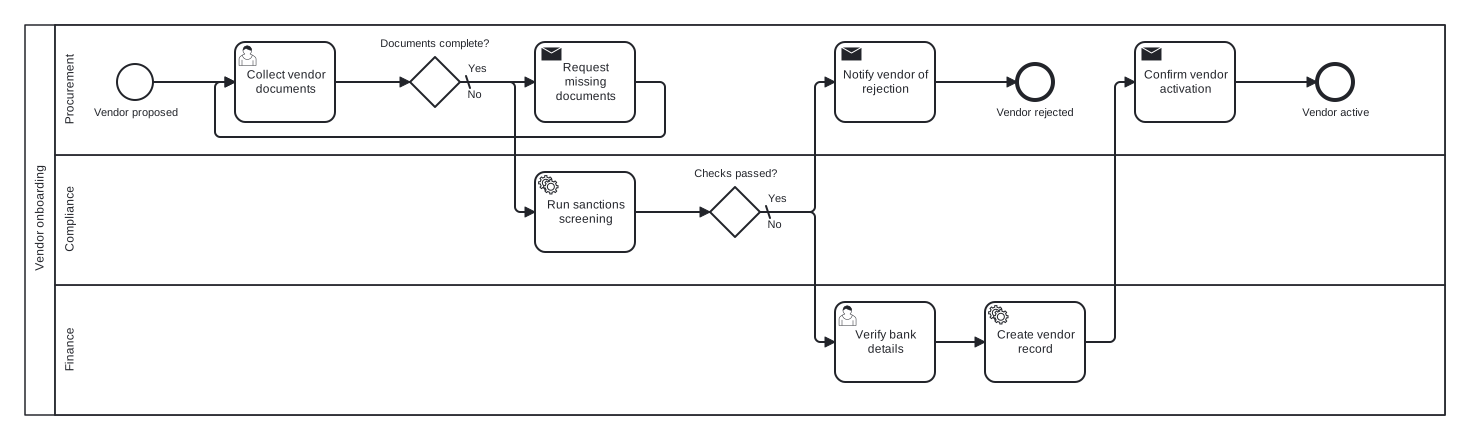
This model uses a single pool with Procurement, Compliance, and Finance lanes. Two exclusive gateways structure the flow: a document completeness check that loops back through a chasing task, and a screening decision that either rejects the vendor or releases the record for finance setup. Notice that bank verification sits after screening, so no financial data is processed for a vendor who will fail.
Standard BPMN 2.0 interchange XML: opens in Camunda Modeler, Signavio, Bizagi, and any other compliant tool.
The process at a glance
How to read this diagram
Onboarding opens in the Procurement lane when a vendor is proposed. Procurement collects the vendor documents and the gateway "Documents complete?" tests the pack: the default No branch triggers "Request missing documents" and loops back to collection, while Yes hands over to Compliance, which runs sanctions screening as an automated service task.
Screening feeds the second gateway, "Checks passed?". Its default No branch has Procurement notify the vendor and the process ends at "Vendor rejected". On the Yes branch, Finance verifies the bank details and creates the vendor record, then Procurement confirms activation with the supplier and the flow closes at "Vendor active". The two end events keep failed and successful onboardings clearly separate.
BPMN elements used
| Element | Count | In this diagram |
|---|---|---|
| Start event | 1 | Vendor proposed |
| End event | 2 | Vendor rejected, Vendor active |
| User task | 2 | Collect vendor documents, Verify bank details |
| Service task | 2 | Run sanctions screening, Create vendor record |
| Send task | 3 | Request missing documents, Notify vendor of rejection, Confirm vendor activation |
| Exclusive gateway | 2 | Documents complete?, Checks passed? |
View the BPMN 2.0 XML for this diagram
<?xml version="1.0" encoding="UTF-8"?>
<bpmn2:definitions xmlns:bpmn2="http://www.omg.org/spec/BPMN/20100524/MODEL" xmlns:bpmndi="http://www.omg.org/spec/BPMN/20100524/DI" xmlns:dc="http://www.omg.org/spec/DD/20100524/DC" xmlns:di="http://www.omg.org/spec/DD/20100524/DI" xmlns:xsi="http://www.w3.org/2001/XMLSchema-instance" id="Definitions_1" targetNamespace="http://bpmn.io/schema/bpmn" exporter="swimdraft" exporterVersion="1.0">
  <bpmn2:collaboration id="Collaboration_1">
    <bpmn2:participant id="pool_vo" name="Vendor onboarding" processRef="Process_pool_vo" />
  </bpmn2:collaboration>
  <bpmn2:process id="Process_pool_vo" isExecutable="false">
    <bpmn2:laneSet id="LaneSet_pool_vo">
      <bpmn2:lane id="lane_vo_proc" name="Procurement">
        <bpmn2:flowNodeRef>start_vo</bpmn2:flowNodeRef>
        <bpmn2:flowNodeRef>t_vo_collect</bpmn2:flowNodeRef>
        <bpmn2:flowNodeRef>g_vo_docs</bpmn2:flowNodeRef>
        <bpmn2:flowNodeRef>t_vo_request</bpmn2:flowNodeRef>
        <bpmn2:flowNodeRef>t_vo_reject</bpmn2:flowNodeRef>
        <bpmn2:flowNodeRef>end_vo_rejected</bpmn2:flowNodeRef>
        <bpmn2:flowNodeRef>t_vo_activate</bpmn2:flowNodeRef>
        <bpmn2:flowNodeRef>end_vo_active</bpmn2:flowNodeRef>
      </bpmn2:lane>
      <bpmn2:lane id="lane_vo_comp" name="Compliance">
        <bpmn2:flowNodeRef>t_vo_screen</bpmn2:flowNodeRef>
        <bpmn2:flowNodeRef>g_vo_risk</bpmn2:flowNodeRef>
      </bpmn2:lane>
      <bpmn2:lane id="lane_vo_fin" name="Finance">
        <bpmn2:flowNodeRef>t_vo_bank</bpmn2:flowNodeRef>
        <bpmn2:flowNodeRef>t_vo_create</bpmn2:flowNodeRef>
      </bpmn2:lane>
    </bpmn2:laneSet>
    <bpmn2:startEvent id="start_vo" name="Vendor proposed">
      <bpmn2:outgoing>fvo1</bpmn2:outgoing>
    </bpmn2:startEvent>
    <bpmn2:userTask id="t_vo_collect" name="Collect vendor documents">
      <bpmn2:incoming>fvo1</bpmn2:incoming>
      <bpmn2:incoming>fvo5</bpmn2:incoming>
      <bpmn2:outgoing>fvo2</bpmn2:outgoing>
    </bpmn2:userTask>
    <bpmn2:exclusiveGateway id="g_vo_docs" name="Documents complete?" default="fvo4">
      <bpmn2:incoming>fvo2</bpmn2:incoming>
      <bpmn2:outgoing>fvo3</bpmn2:outgoing>
      <bpmn2:outgoing>fvo4</bpmn2:outgoing>
    </bpmn2:exclusiveGateway>
    <bpmn2:sendTask id="t_vo_request" name="Request missing documents">
      <bpmn2:incoming>fvo4</bpmn2:incoming>
      <bpmn2:outgoing>fvo5</bpmn2:outgoing>
    </bpmn2:sendTask>
    <bpmn2:serviceTask id="t_vo_screen" name="Run sanctions screening">
      <bpmn2:incoming>fvo3</bpmn2:incoming>
      <bpmn2:outgoing>fvo6</bpmn2:outgoing>
    </bpmn2:serviceTask>
    <bpmn2:exclusiveGateway id="g_vo_risk" name="Checks passed?" default="fvo8">
      <bpmn2:incoming>fvo6</bpmn2:incoming>
      <bpmn2:outgoing>fvo7</bpmn2:outgoing>
      <bpmn2:outgoing>fvo8</bpmn2:outgoing>
    </bpmn2:exclusiveGateway>
    <bpmn2:sendTask id="t_vo_reject" name="Notify vendor of rejection">
      <bpmn2:incoming>fvo8</bpmn2:incoming>
      <bpmn2:outgoing>fvo9</bpmn2:outgoing>
    </bpmn2:sendTask>
    <bpmn2:endEvent id="end_vo_rejected" name="Vendor rejected">
      <bpmn2:incoming>fvo9</bpmn2:incoming>
    </bpmn2:endEvent>
    <bpmn2:userTask id="t_vo_bank" name="Verify bank details">
      <bpmn2:incoming>fvo7</bpmn2:incoming>
      <bpmn2:outgoing>fvo10</bpmn2:outgoing>
    </bpmn2:userTask>
    <bpmn2:serviceTask id="t_vo_create" name="Create vendor record">
      <bpmn2:incoming>fvo10</bpmn2:incoming>
      <bpmn2:outgoing>fvo11</bpmn2:outgoing>
    </bpmn2:serviceTask>
    <bpmn2:sendTask id="t_vo_activate" name="Confirm vendor activation">
      <bpmn2:incoming>fvo11</bpmn2:incoming>
      <bpmn2:outgoing>fvo12</bpmn2:outgoing>
    </bpmn2:sendTask>
    <bpmn2:endEvent id="end_vo_active" name="Vendor active">
      <bpmn2:incoming>fvo12</bpmn2:incoming>
    </bpmn2:endEvent>
    <bpmn2:sequenceFlow id="fvo1" sourceRef="start_vo" targetRef="t_vo_collect" />
    <bpmn2:sequenceFlow id="fvo2" sourceRef="t_vo_collect" targetRef="g_vo_docs" />
    <bpmn2:sequenceFlow id="fvo3" name="Yes" sourceRef="g_vo_docs" targetRef="t_vo_screen">
      <bpmn2:conditionExpression xsi:type="bpmn2:tFormalExpression">Yes</bpmn2:conditionExpression>
    </bpmn2:sequenceFlow>
    <bpmn2:sequenceFlow id="fvo4" name="No" sourceRef="g_vo_docs" targetRef="t_vo_request" />
    <bpmn2:sequenceFlow id="fvo5" sourceRef="t_vo_request" targetRef="t_vo_collect" />
    <bpmn2:sequenceFlow id="fvo6" sourceRef="t_vo_screen" targetRef="g_vo_risk" />
    <bpmn2:sequenceFlow id="fvo7" name="Yes" sourceRef="g_vo_risk" targetRef="t_vo_bank">
      <bpmn2:conditionExpression xsi:type="bpmn2:tFormalExpression">Yes</bpmn2:conditionExpression>
    </bpmn2:sequenceFlow>
    <bpmn2:sequenceFlow id="fvo8" name="No" sourceRef="g_vo_risk" targetRef="t_vo_reject" />
    <bpmn2:sequenceFlow id="fvo9" sourceRef="t_vo_reject" targetRef="end_vo_rejected" />
    <bpmn2:sequenceFlow id="fvo10" sourceRef="t_vo_bank" targetRef="t_vo_create" />
    <bpmn2:sequenceFlow id="fvo11" sourceRef="t_vo_create" targetRef="t_vo_activate" />
    <bpmn2:sequenceFlow id="fvo12" sourceRef="t_vo_activate" targetRef="end_vo_active" />
  </bpmn2:process>
  <bpmndi:BPMNDiagram id="BPMNDiagram_1">
    <bpmndi:BPMNPlane id="BPMNPlane_1" bpmnElement="Collaboration_1">
      <bpmndi:BPMNShape id="pool_vo_di" bpmnElement="pool_vo" isHorizontal="true">
        <dc:Bounds x="20" y="20" width="1420" height="390" />
      </bpmndi:BPMNShape>
      <bpmndi:BPMNShape id="lane_vo_proc_di" bpmnElement="lane_vo_proc" isHorizontal="true">
        <dc:Bounds x="50" y="20" width="1390" height="130" />
      </bpmndi:BPMNShape>
      <bpmndi:BPMNShape id="lane_vo_comp_di" bpmnElement="lane_vo_comp" isHorizontal="true">
        <dc:Bounds x="50" y="150" width="1390" height="130" />
      </bpmndi:BPMNShape>
      <bpmndi:BPMNShape id="lane_vo_fin_di" bpmnElement="lane_vo_fin" isHorizontal="true">
        <dc:Bounds x="50" y="280" width="1390" height="130" />
      </bpmndi:BPMNShape>
      <bpmndi:BPMNShape id="start_vo_di" bpmnElement="start_vo">
        <dc:Bounds x="112" y="59" width="36" height="36" />
        <bpmndi:BPMNLabel><dc:Bounds x="87" y="101" width="87" height="14" /></bpmndi:BPMNLabel>
      </bpmndi:BPMNShape>
      <bpmndi:BPMNShape id="t_vo_collect_di" bpmnElement="t_vo_collect">
        <dc:Bounds x="230" y="37" width="100" height="80" />
      </bpmndi:BPMNShape>
      <bpmndi:BPMNShape id="g_vo_docs_di" bpmnElement="g_vo_docs">
        <dc:Bounds x="405" y="52" width="50" height="50" />
        <bpmndi:BPMNLabel><dc:Bounds x="374" y="32" width="112" height="14" /></bpmndi:BPMNLabel>
      </bpmndi:BPMNShape>
      <bpmndi:BPMNShape id="t_vo_request_di" bpmnElement="t_vo_request">
        <dc:Bounds x="530" y="37" width="100" height="80" />
      </bpmndi:BPMNShape>
      <bpmndi:BPMNShape id="t_vo_screen_di" bpmnElement="t_vo_screen">
        <dc:Bounds x="530" y="167" width="100" height="80" />
      </bpmndi:BPMNShape>
      <bpmndi:BPMNShape id="g_vo_risk_di" bpmnElement="g_vo_risk">
        <dc:Bounds x="705" y="182" width="50" height="50" />
        <bpmndi:BPMNLabel><dc:Bounds x="688" y="162" width="84" height="14" /></bpmndi:BPMNLabel>
      </bpmndi:BPMNShape>
      <bpmndi:BPMNShape id="t_vo_reject_di" bpmnElement="t_vo_reject">
        <dc:Bounds x="830" y="37" width="100" height="80" />
      </bpmndi:BPMNShape>
      <bpmndi:BPMNShape id="end_vo_rejected_di" bpmnElement="end_vo_rejected">
        <dc:Bounds x="1012" y="59" width="36" height="36" />
        <bpmndi:BPMNLabel><dc:Bounds x="990" y="101" width="80" height="14" /></bpmndi:BPMNLabel>
      </bpmndi:BPMNShape>
      <bpmndi:BPMNShape id="t_vo_bank_di" bpmnElement="t_vo_bank">
        <dc:Bounds x="830" y="297" width="100" height="80" />
      </bpmndi:BPMNShape>
      <bpmndi:BPMNShape id="t_vo_create_di" bpmnElement="t_vo_create">
        <dc:Bounds x="980" y="297" width="100" height="80" />
      </bpmndi:BPMNShape>
      <bpmndi:BPMNShape id="t_vo_activate_di" bpmnElement="t_vo_activate">
        <dc:Bounds x="1130" y="37" width="100" height="80" />
      </bpmndi:BPMNShape>
      <bpmndi:BPMNShape id="end_vo_active_di" bpmnElement="end_vo_active">
        <dc:Bounds x="1312" y="59" width="36" height="36" />
        <bpmndi:BPMNLabel><dc:Bounds x="1295" y="101" width="70" height="14" /></bpmndi:BPMNLabel>
      </bpmndi:BPMNShape>
      <bpmndi:BPMNEdge id="fvo1_di" bpmnElement="fvo1">
        <di:waypoint x="148" y="77" />
        <di:waypoint x="230" y="77" />
      </bpmndi:BPMNEdge>
      <bpmndi:BPMNEdge id="fvo2_di" bpmnElement="fvo2">
        <di:waypoint x="330" y="77" />
        <di:waypoint x="405" y="77" />
      </bpmndi:BPMNEdge>
      <bpmndi:BPMNEdge id="fvo3_di" bpmnElement="fvo3">
        <di:waypoint x="455" y="77" />
        <di:waypoint x="510" y="77" />
        <di:waypoint x="510" y="207" />
        <di:waypoint x="530" y="207" />
        <bpmndi:BPMNLabel><dc:Bounds x="461" y="57" width="21" height="14" /></bpmndi:BPMNLabel>
      </bpmndi:BPMNEdge>
      <bpmndi:BPMNEdge id="fvo4_di" bpmnElement="fvo4">
        <di:waypoint x="455" y="77" />
        <di:waypoint x="530" y="77" />
        <bpmndi:BPMNLabel><dc:Bounds x="461" y="83" width="17" height="14" /></bpmndi:BPMNLabel>
      </bpmndi:BPMNEdge>
      <bpmndi:BPMNEdge id="fvo5_di" bpmnElement="fvo5">
        <di:waypoint x="630" y="77" />
        <di:waypoint x="660" y="77" />
        <di:waypoint x="660" y="132" />
        <di:waypoint x="210" y="132" />
        <di:waypoint x="210" y="77" />
        <di:waypoint x="230" y="77" />
      </bpmndi:BPMNEdge>
      <bpmndi:BPMNEdge id="fvo6_di" bpmnElement="fvo6">
        <di:waypoint x="630" y="207" />
        <di:waypoint x="705" y="207" />
      </bpmndi:BPMNEdge>
      <bpmndi:BPMNEdge id="fvo7_di" bpmnElement="fvo7">
        <di:waypoint x="755" y="207" />
        <di:waypoint x="810" y="207" />
        <di:waypoint x="810" y="337" />
        <di:waypoint x="830" y="337" />
        <bpmndi:BPMNLabel><dc:Bounds x="761" y="187" width="21" height="14" /></bpmndi:BPMNLabel>
      </bpmndi:BPMNEdge>
      <bpmndi:BPMNEdge id="fvo8_di" bpmnElement="fvo8">
        <di:waypoint x="755" y="207" />
        <di:waypoint x="810" y="207" />
        <di:waypoint x="810" y="77" />
        <di:waypoint x="830" y="77" />
        <bpmndi:BPMNLabel><dc:Bounds x="761" y="213" width="17" height="14" /></bpmndi:BPMNLabel>
      </bpmndi:BPMNEdge>
      <bpmndi:BPMNEdge id="fvo9_di" bpmnElement="fvo9">
        <di:waypoint x="930" y="77" />
        <di:waypoint x="1012" y="77" />
      </bpmndi:BPMNEdge>
      <bpmndi:BPMNEdge id="fvo10_di" bpmnElement="fvo10">
        <di:waypoint x="930" y="337" />
        <di:waypoint x="980" y="337" />
      </bpmndi:BPMNEdge>
      <bpmndi:BPMNEdge id="fvo11_di" bpmnElement="fvo11">
        <di:waypoint x="1080" y="337" />
        <di:waypoint x="1110" y="337" />
        <di:waypoint x="1110" y="77" />
        <di:waypoint x="1130" y="77" />
      </bpmndi:BPMNEdge>
      <bpmndi:BPMNEdge id="fvo12_di" bpmnElement="fvo12">
        <di:waypoint x="1230" y="77" />
        <di:waypoint x="1312" y="77" />
      </bpmndi:BPMNEdge>
    </bpmndi:BPMNPlane>
  </bpmndi:BPMNDiagram>
</bpmn2:definitions>
Frequently asked questions
Why is sanctions screening a service task rather than a user task?
Because in most organisations it is a call to a screening provider or an internal watchlist system, not a person reading lists. A service task signals automation to anyone implementing the process. If your compliance team reviews hits manually, add a user task after the service task for adjudicating matches.
Where would the vendor themselves appear in this diagram?
As a separate collapsed pool connected by message flows, since the vendor is an independent participant you cannot control. The send tasks "Request missing documents" and "Confirm vendor activation" would be natural sources for those message flows. This example keeps a single pool to focus on the internal handoffs between the three teams.
How would I add a periodic re-screening requirement to this model?
Ongoing due diligence is best modelled as a second, separate process that starts on a timer, for example every twelve months per active vendor, rather than by keeping this instance alive indefinitely. Onboarding ends at "Vendor active"; a long running loop here would blur the boundary between setup and monitoring.
Related BPMN examples
Purchase requisition
A purchase requisition process as a BPMN 2.0 diagram: request, completeness check, manager approval, and PO creation. View the swimlanes and download the .bpmn file free.
Purchase order approval
A purchase order approval workflow as a BPMN 2.0 diagram, with a value threshold routing orders to the budget holder or finance. Free .bpmn file download included.
Supplier evaluation
A supplier evaluation process as a BPMN 2.0 diagram: parallel data gathering, scoring, and an improvement plan branch. View it and download the .bpmn file free.
Tender process
A competitive tender process as a BPMN 2.0 diagram with a supplier pool, timer deadline, bid scoring, and award. Download the .bpmn file free and edit it online.
Generate your own version of this diagram
Describe how the process works in your organisation: plain English, meeting notes, a transcript, or a spreadsheet. Swimdraft turns it into a spec-validated BPMN 2.0 diagram you can edit in the browser and export as .bpmn, SVG, or PNG.
Start freeNo credit card required